Desert Online General Trading LLC
Dubai, United Arab Emirates
Desert Online General Trading LLC
Dubai, United Arab Emirates


⏰ Stay ahead of time and comfort—because your space deserves smart precision!
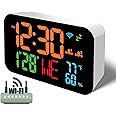
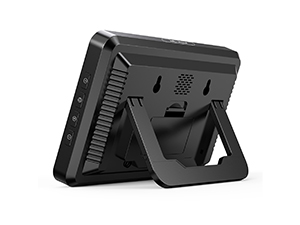
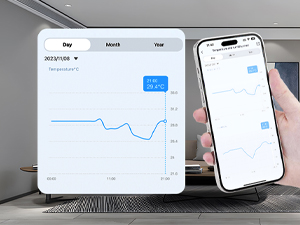
This 7.48-inch WiFi Atomic Clock automatically calibrates time via 2.4GHz WiFi, displaying accurate time, date, day, temperature, and humidity. Featuring dual alarms with snooze, 5-level adjustable brightness, and app integration through Smart Life and Tuya, it offers remote climate monitoring and alerts. Designed for versatile placement with a large LED display, it’s the perfect blend of smart home tech and everyday convenience.


B**V
Great accurate easy to read clock.
Works great. Easy to setup. Use it in my basement where I can’t get atomic clock radio signals. Nice and bright and easy to read.
S**W
Beautiful, simple, and full featured
This clock is beautiful. Adaptive brightness allows you to set the desired brightness in light and dark environments. Quickly set up using the mobile application. The temperature and humidity tracking is a nice addition, though it would be nice if the graph scaling was adjustable.I performed some very quick security tests. Even though I segment my network, I do like to keep an eye on my IoT devices. I was happy to see that there are no open ports that respond to port scans. I was a little puzzled by the fact that the app shows my public IP address for the device, rather than the private address, as is common to other devices that use the same app.I am monitoring the network activity, and will update if anything unusual is seen. So far, I am very happy with the performance and build quality.It’s not surprising that a WiFi device only works while connected to power, rather than on battery, and the cord could be a little longer for wall hanging.
Y**E
An older one is failing and a new one was dead on arrival. No quality here.
I have several older of these clocks, one of which has started on occasion to flicker. I figured that one will fail soon, because these are made of cheap components from ch-you-know-where-na.So I got this newer one.After setting a few up so your tablet has all the information in place, a new one is easy. Turn the clock on, pair it to the tablet, and the app tells the clock your wifi password. Easy peasy.Of course, as soon as I turned on the new one, it started flickering. After connecting it to my wifi, I packed it up and returned it. So these are built to fail, and you are not even guaranteed to get one that works when you buy a new one.I like just about everything about this clock and its functions. It has what I need, it takes care of itself, and it is not encrusted with "features" I don't want. The lack of quality is a real disappointment.Maybe someday someone will make one that will last, and will not arrive broken. But that day has not yet come.
P**M
Here's What You Need To Know... (Updated 03-Nov-24)
After having zero (0) luck with Atomic Clocks, I got this one to see if I would have better luck. So far I am happy with it, but as I *just* got it up and running, it's too early to tell if this is going to be a keeper.Here's the important things you want/need to know:* They give you dimensions of the unit, but what about the actual size of the numbers? Well they are bigger than, say, the Echo Spot, that's for certain. The clock numbers are 2.25 inches high and 1.25 inches wide. The numbers on the row below the time are 1 inch high and 0.5 inches wide. For my partner, knowing this information is CRITICAL, as the numbers on the Echo Spot "looked" large online, but they were not tall enough to be able to see (from someone who has poor vision).* The instructional video, and in the product description, says it does not support 5G connections and only supports 2.4G networks. Wellll...my cable provider ONLY has 5G connections on the router, and it was able to discover the unit just fine. The old router they provided had two separate networks but the newer one does not. I don't think you'll have a problem connecting.* The instructional video indicates there are multiple display colors (as in two, so, I guess that's considered multiple). However, unless there's something in the instructions that I overlooked, it only comes in one color (orange, for the clock numbers). As I said, I *just* got it up and running, haven't really delved into all the features just yet. Of course this could also mean that they sell a separate unit that has a different color for the clock numbers...(shrug)* It DOES NOT come with a charging adapter, but it does come with a tiny cord you can use to connect to a powered Hub. Seriously, even if you get a charging adapter, the cord really isn't long enough to power it from, say, a bedside table. But my partner has a charging Hub that sits on the bedside table and was able to connect to it to get power.* Batteries are not included, so if you decide to put batteries in them (2xAA), note that it they will only be used if/when the power goes out and will store the time it was when power was lost. I don't believe it will keep the clock "running" in the background, and even if it did, you won't be able to see it on the display anyway.So that's it for now, but here's a tip: Wait until your clock is connected to your Wifi before putting the batteries in. As anxious as I was to get the batteries in before connecting to Wifi, I ran into some issues trying to get the clock to connect to Wifi. Probably user error and your mileage my vary, but thought I would share that tidbit.If the cord was longer this would probably be a 5-star item. Will update this review if necessary after I've had some time to mess with it.*** UPDATE 03-Nov-24 ***Well here we are, the end of Daylight Saving Time...and the clock did not update accordingly. But I'm not going to dock another star...at least not yet.I will say that, since July, it has kept EXCELLENT time, even when we lost power during Helene and Milton.After having used this for over three months now, I can say there are probably two more things to keep in mind:1) If you see the WiFi signal flashing, it does NOT mean it is searching for a signal (as I erroneously thought it was). It means that it's been disconnected/unpaired from the device used to connect the device to the internet and it wants to reconnect. I had to do a number of things to try to get it to reconnect, which I'll explain in the next item. Anyway, you want the WiFi signal on and steady. That means you've got a solid connection.2) I thought a simple un-pair/re-pair thing with Bluetooth would work to get the connection back, but all that did was make the device "dumb" and would not connect to my phone (where the app is installed). It kept timing out when trying to connect.So I had to do this:a) Remove the batteries from the deviceb) Unplug the devicec) Uninstall and reinstall the appd) Reboot the phonee) Make sure Bluetooth pairing was onf) Log back into the appg) Make sure the app is given Location and...one other permission (can't recall off the top of my head)h) Use the app to add the deviceAssuming I remembered the correct order in which I did this, this should re-pair the device with your phone and then automatically update the time. I suppose I'll be checking again in March when we change the clocks again...I'm just hopeful that this time it will be automatic.
K**N
This is the future
I've been looking for a consumer-priced, network-based clock for years. I grabbed the smaller version of this a week ago and this bigger model works identically. The primary benefit is that it uses your 2.4Ghz WiFi network to automatically set the time so it's always set within about a second of the official time. Since it does not rely on a weak radio broadcast signal from a singular tower in Colorado, it's very reliable and can be placed almost anywhere in your home (unlike so-called "atomic" clocks). Super bright (dimmable) and colorful display looks great. Requires a UBS charger for power—I have a ton of these laying around so if you don't, keep this in mind.
T**M
Very nice and has different colors for happy feelings
Clock is useful for old people with poor vision . We bought for my husband and he is happy with big size of numbers and nice features to adjust brightness of numbers .it keeps time in case of electricity problem in house and not requre to restore timing. We are happy with all feathers and easy to operate.
J**L
Easy to read
I am unable to make the "atomic" part work. However, this is an easy-to-read clock from wherever I am in the room. I like that I can change the brightness on the screen.
F**N
Beautiful, accurate Internet clock
I like a clock to give the correct time. Silly me! it’s very hard to find one that does that though. I find that electric clocks either run ahead or lose time, and you need to reset them weekly or even daily. Who needs that? I have had no success with atomic clocks because, I suppose, there’s probably too much metal in the framing of my building, and the atomic signal does penetrate to an atomic clock, even when I keep it on the window sill itself. But the Internet clock is continually updated by Wi-Fi and is always right! No worries! Highly recommended for people who want to actually know what time it is! Highly recommended! I have bought two of them, one large and one small.
Trustpilot
3 weeks ago
3 days ago
2 weeks ago
5 days ago