Desert Online General Trading LLC
Dubai, United Arab Emirates
Desert Online General Trading LLC
Dubai, United Arab Emirates


🎮 Power, speed, and style — build your ultimate Ryzen beast now!
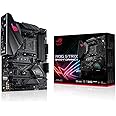
The ASUS ROG Strix B450-F Gaming II motherboard is a high-performance ATX board designed for AMD AM4 Ryzen 5000 and earlier CPUs. It features an 8+4 power stage design for stable CPU delivery, supports 4K output via HDMI 2.0b and DisplayPort 1.2, and offers dual M.2 NVMe slots alongside USB 3.2 Gen 2 Type-C for top-tier connectivity. Enhanced cooling solutions and Aura Sync RGB lighting provide both reliability and customization for serious gamers and creators.


| Processor | ryzen_5 |
| RAM | DDR4 |
| Memory Speed | 3.2E+3 MHz |
| Number of USB 2.0 Ports | 4 |
| Brand | ASUS |
| Series | ROG STRIX B450-F Gaming II |
| Item model number | ROG STRIX B450-F Gaming II |
| Item Weight | 2.65 pounds |
| Product Dimensions | 12 x 9.6 x 2 inches |
| Item Dimensions LxWxH | 12 x 9.6 x 2 inches |
| Manufacturer | ASUS |
| ASIN | B08KH1M1H4 |
| Date First Available | October 1, 2020 |
C**N
Excellent motherboard but need improvement...
I really like the Asus Rog Strix B-450-F Gaming II ATX motherboard. It has 2 RGB headers: one 5v 3pin and the other with 12v 4 pin plus 2 M.2 slots. I have not used the RGB headers yet so I’m not sure how it works. I think the previous generation (B-450-F Gaming) does not have the 5v 3pin RGB header. The I/O shield is already pre-mounted which makes it easier to put into the case. I currently use Ryzen 5 3600x, 16GB (2x8GB) DD4 3200MHz memory ram (V-Color brand). Its 3rd generation AMD Ryzen processors are already done so I don’t have to update any bios for it to work. This is my first time using Asus motherboard and so far I have only a few problems. What bothers me is their software constantly appearing on the desktop screen (see picture). Even if I move it off my desktop screen, I still accidentally click on it while playing games which takes me to the icon. Then when I switch back to my game I’m already dead; it’s very annoying, best to right click on the icon and exi. Another problem I have is on the Sonic Studio 3 app: I cannot login to my account! This link is the same Asus products register account, which I already have one. I created a different email address and password through Sonic Studio 3 and it still didn’t work! I don’t know if any of you have ever had this problem.As others mentioned and stated on Asus details, when using M.2 SSD, the board disables SATA ports 5 and 6 which leaves you with only 4 SATA ports. I saw a reviewer mention that his customer somehow lost all the SATA on the B-450-F Gaming motherboard (that the reviewer himself built) and blamed the motherboard. I found the solution to re-enable the SATA ports when I clicked “Load Optimized Defaults” (pictured) inside the bios on saving to make sure my memory ram and CPU were back to stock after playing with. The CPU and memory ram does reset back to stock, but it also DISABLES ALL the SATA ports including the M.2 slots. As a result, when the computer starts up, it looks for a hard drive or operation system (which I already installed and was working fine). I wondered why my operation system was gone. No matter how many times I restarted my computer, the screen showed “missing operation system”. After 15-20 minutes of trouble shooting I realized that I clicked on “Load Optimized Default” disabled the SATA ports and m.2 slots. To solve this, go to Advanced mode (pictured) and “Enable” the SATA port(s) and m.2 slots. Otherwise they will completely disappear and you’ll think it’s the motherboard’s fault. In my point of view, this motherboard is too advanced. The Load Optimized Default setting SHOULDN’T DISABLE the SATA ports and M.2 slots. I hope that with the new bios update, Asus will fix this problem. If not, new users might blame the motherboard as being defected or broken. I don’t know why newest motherboard (including this motherboard) still using USB 2.0. I haven’t has any problem of the device(s) even though it stated USB 2.0, I plug into USB 3.0 without any problems. Overall I recommend this motherboard to anyone.
M**A
Satisfied
Excellent piece.
J**E
Works great, looks better.
I love this board.I first installed a 2700x with 32gb 3200mhz g.skill RAM. I am also running an RTX 2070 with 1 SSD and 1 M.2 drive. I migrated this system from a different manufacturer's board because of issues with RAM stability. I could not get the XMP to run properly enough to stabilize the advertised 3200mhz on my sticks.With this board? Plug and play, baby. Everything POST'd on first press and after enabling the RAM oc in bios, no stability issues whatsoever. In fact, everything seems to run much better, even without reinstalling Windows - which I eventually did anyway for peace of mind.I threw in a 5600x and an AIO some time later. 5000 series booted out of the box without BIOS update or any issues whatsoever. ASUS has definitely won some brand loyalty from me here, doing what the other brand could not in maximizing my RAM speeds. It is also worth noting that ASUS Armory Crate and AURA Sync for LED control is a much more fluid and user friendly software package compared to plenty of other manufacturer LED software controllers. Having your lights and whatnot tied into your driver update utility is just a nice easy way to do everything in one place and then close it out and go about your business.My next mother board will absolutely be an ASUS board. A1
A**W
Great Motherboard
Great Mother Board and updated the bios with ease
T**.
oily residue leaking from the thermal pads
the price was a bit steep at the time of the purchase and there is an oily residue leaking from the thermal pads but luckily it hasn't hurt the board so i guess its fine
R**O
Una obra de arte
Estupendo me funciona al 100%actualice la Bios y puedo usar procesadores más modernos a hora mismo un rizen 7 3700x
A**P
Best Motherboards in the world hands down! Asus rocks!
I wanted to build an awesome computer and I had read Asus was making some of the best now. I was going to get an MSI and decided to give this a try, and I couldn't be happier. First off it looks the best, it's all black, their logo is killer and everything works awesome with the Razen 5 chip I purchased. i basically put my computer together for 700.00 and it's probably a 2000.00 computer. Check out the picture of this motherboard, and even if you pay higher due to the chip shortage, this is by far the best of the best for the money. Even though I am not a gamer, this is the best one out there for the money.
E**N
Great so far, but one potential issue.
I really like this board. It has everything I need. Love that it has two M.2 slots and one has a heat sink. I ended up getting it for $150. I see it's over $200 now. So watch for it to go back down. But everything works perfectly. Easy to install, no issues with anything hooked up to it. Only issue I have is that I'm trying to get Windows 11, but it says secure boot isn't enabled. Even though I went into the BIOS and enabled it. I've tried everything and can't seem to get it to work. Maybe I'm doing something wrong. Or maybe this board just isn't compatible with Windows 11. Which would suck, but if that's the case, it's my own fault for not doing the research.
Trustpilot
1 month ago
2 weeks ago
2 weeks ago
1 week ago