Some deliveries may take a little longer than usual due to regional shipping conditions.

DOWNLOAD THE APP


Customer Services
Copyright © 2025 Desertcart Holdings Limited
DOWNLOAD THE APP

❄️ Power, speed, and style — the ultimate AM5 motherboard for pros who demand more.
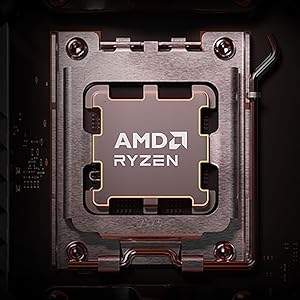
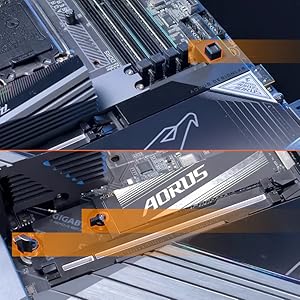
The GIGABYTE X870E AORUS PRO ICE is a premium ATX motherboard designed for AMD AM5 Ryzen 7000/8000/9000 series processors. It features a robust 16+2+2 phase 80A power design, DDR5 memory support up to 5600 MHz (and beyond with tuning), four M.2 slots with thermal guards, PCIe 5.0, dual USB4 ports, WiFi 7, and 2.5GbE LAN. Its sleek snow white design with RGB accents complements high-end builds, while EZ-Latch installation and a 5-year warranty ensure reliability and ease of use. Ideal for professionals and gamers seeking top-tier performance and future-ready connectivity.




| ASIN | B0DGVBSLLP |
| Best Sellers Rank | #16 in Computer Motherboards |
| Brand | GIGABYTE |
| Color | Snow White |
| Customer Reviews | 4.2 4.2 out of 5 stars (1,050) |
| Date First Available | September 30, 2024 |
| Item Dimensions LxWxH | 13.4 x 10.8 x 3.3 inches |
| Item Weight | 4.81 pounds |
| Item model number | X870E AORUS PRO ICE |
| Manufacturer | GIGABYTE |
| Memory Speed | 5600 MHz |
| Number of USB 2.0 Ports | 2 |
| Product Dimensions | 13.4 x 10.8 x 3.3 inches |
| RAM | DDR5 |
| Series | X870E AORUS PRO ICE |
J**Y
Best motherboard I’ve ever purchased
Aorus motherboards continue to impress me. I plan to shop Aorus motherboards exclusively for all my future PC builds. Aesthetically, I find the iced out white to be very pleasing, as it pairs very nicely with all the RGB lighting I have set up inside my case, providing a soft reflective glow instead of absorbing the light like a typical motherboard. The sleek appearance of all the VRMs and heat sinks also contributes to the visual appeal of this, and all Aorus boards in my opinion. I’m particularly partial to the lit Aorus name on the rear panel VRM. There are plenty of the right types of connections for my needs: PCIe 5.0 graphics and M.2 (there are four total M.2 slots, but two of these share bus lanes with the x16 graphics port), optical audio out, providing great sound quality, two USB-C ports directly on the back, and 10 USB-A ports, eight of which are 3.2. It also has two PCIe x4 slots but I don’t have a need for those, at least not yet. This board fits perfectly in my Corsair 4000D case, and the connection layout is the most sensible one I have encountered in a motherboard to date. Everything is also well-labeled, almost negating the need to look in the manual (which is only provided online, to save paper). I think my only gripe about it is that if I need to remove the video card, I need to remove the primary M.2 heatsink (directly north of the PCIe x16 slot, and quite a beefy heatsink, which is nice) because it’s next to impossible to hit the release latch otherwise. Just don’t forget to reinstall it when you finish. There is also a heatsink for the three M.2 slots just south of the x16 slot, which also requires the video card to be removed unless it doesn’t take up more than one slot I guess, but I don’t think there’d be much point to a video card that small. Gigabyte provides small foam blocks to “push” your SSDs into the thermal foam on the underside of the heatsink. I have found it works best with SSDs that do not have a preinstalled heatsink of their own, although the manual claims it works either way. I was relieved when I discovered this as I originally intended to buy one with a heatsink but accidentally ordered it without. All of these features come together to provide a complete package for unparalleled speed, reliability, and thermal performance in its price range. I use this board for gaming and I am thoroughly elated with it.
W**L
Powerful and Feature-Rich Motherboard for AMD AM5 Builds
The GIGABYTE X870E AORUS PRO ICE is an excellent motherboard with solid build quality and plenty of features. It supports the latest AMD Ryzen processors with AM5 socket and offers great power delivery for stable performance, even when overclocking. I love the advanced connectivity options like PCIe 5.0, USB4, and Wi-Fi 7, which make this board future-proof. The cooling solutions keep temperatures in check during heavy workloads. Plus, the clean white design with RGB lighting adds a nice touch to my setup. The only minor downside is the price—it’s on the higher end—but you definitely get what you pay for. Overall, a fantastic choice for gamers and enthusiasts building with AMD AM5.
D**S
Awesome Board!
This motherboard was easy to install and fit in my Havn 420 case perfectly. The performance has been stellar in my high end gaming machine and it takes anything I throw at it so far. I would definitely purchase from this line of motherboard again. It boots quickly, had space for a second SSD drive in a slot that wouldn't bottleneck my lanes used by the GPU. This was my first build ever and it withstood my clumsiness just fine so the durability is great. Buy this motherboard for an awesome white build or to draw some attention and enjoy the built-in lighting effects!
R**I
Aorus X870E Pro Ice – Ultimate Performance and Reliability for High-End Builds
The Aorus X870E Pro Ice motherboard is a premium platform for high-performance builds. It offers exceptional stability, extensive connectivity options, and cutting-edge features like PCIe 5.0, DDR5 support, and advanced VRM design for efficient power delivery. The sleek design, reinforced PCIe slots, and customizable RGB lighting make it both functional and visually stunning. Ideal for gamers, content creators, and enthusiasts, this motherboard provides unparalleled reliability, overclocking potential, and future-proof performance.
C**.
Not good
This motherboard is absolute trash. I constantly had an issue about not seeing the ram. I ended up testing them on a different machine, they worked fine. The worst of all is after many tries it ended up working. It was very picky which USB port was used to install Windows. It took about five tries too Get windows installed. Then the motherboard said there was an update. After that the motherboard will not turn on. It will power but it won't do anything. I'm trying to reset CMOS but it's not label so it's hard to find. I'm trying to remove the battery but you have to pretty much take apart your computer to remove the plate that covers the battery. Resetting the cmos didn't do anything still dead. This is overpriced on top of that
P**L
Happy
Very good high end board. Great for overclocking 9950 X. Memory clocks at 6000, haven’t tested a higher. On board graphics does work you need to install the AMD drivers. It was a big help having the HDMI inside the case for a front panel LCD. Word of warning it’s a low tight on the SSD’s if you have to change it out with a three layer card and pci card . Lots of USB. Love the aesthetics as a white motherboard. Manual and online manual helps you to diagnose what you did wrong. Just worry about slot placement of the memory. One side a, and the other side b. After that, it’s easy key in the processor.
B**Y
Good board, but...
The features on this motherboard are fantastic for the price and its very aesthetically pleasing. However that being said, you should REALLY Google up the 0D and 4D error codes this board will *absolutely* throw you from time to time. It may sway you away from buying it. There is plenty of info online about these errors and make sure you read it.
F**D
ممتازه جدا
E**N
Espetacular x870e pro ice
P**A
Absolutely amazing and easy to install, looks very Damn amazing too
T**R
Excellent product, aesthetically a great looking board for a white build. I upgraded with ease and everything worked out of the box including my old Windows Activation. ARGB for a white gaming build, good VRM and cooling do not need to spend the extras on the X3D version,
N**I
لوحة أم ذات جودة وشكل رائع ركبت عليها 9900X3D وشغال زي اللوز. تنبيه قبل كل شيء لازم تسوي ابديت للبيوس
Trustpilot
2 weeks ago
5 days ago