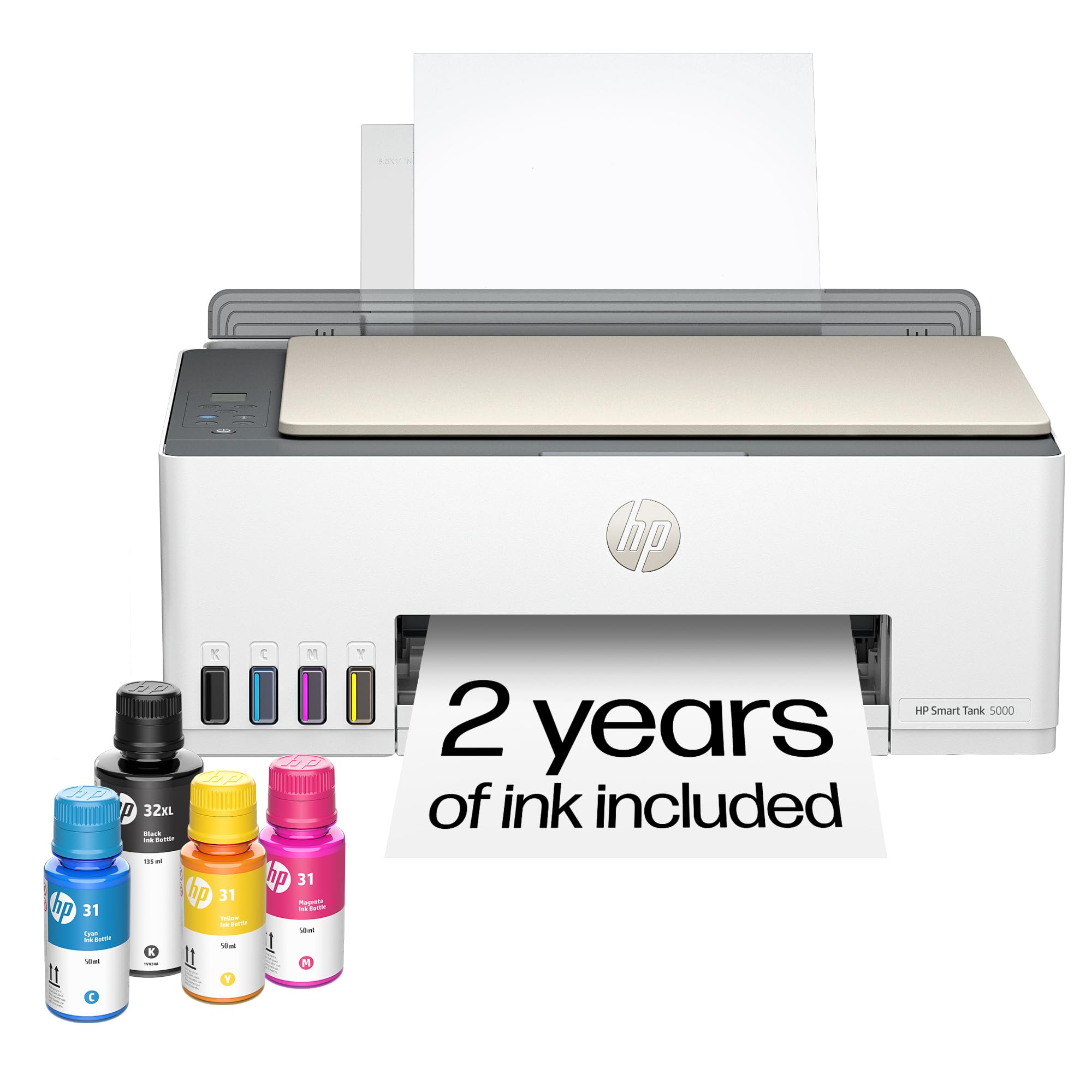
🖨️ Print smart, save big, and stay connected effortlessly!
The HP Smart Tank 5101 is a sleek, wireless all-in-one ink tank printer designed for home and small office use. It offers high-volume, low-cost printing with 2 years of included ink, fast print speeds, and professional-quality output. With easy setup, mobile app integration, mess-free refills, and advanced security features, it’s the ultimate smart printing solution for the modern professional.




| ASIN | B0BL466Y41 |
| Are Batteries Included | No |
| Best Sellers Rank | #58,933 in Computers ( See Top 100 in Computers ) #151 in Ink Tank Printers |
| Color | White |
| Colour depth | 24 bpp |
| Compatible devices | Laptops, PC, Smartphones |
| Connectivity Type | Wi-Fi |
| Controller type | Android |
| Customer Reviews | 3.9 3.9 out of 5 stars (6,942) |
| Date First Available | 15 January 2023 |
| Dual-sided printing | No |
| EU Spare Part Availability Duration | 2 Years |
| Form Factor | All-in-One |
| Included components | HP 31 Cyan Original Ink Bottle, HP 31 Magenta Original Ink Bottle, HP 31 Yellow Original Ink Bottle, HP 32XL Black Original Ink Bottle, HP Smart Tank 5101 All-in-One Printer |
| Item Weight | 5.03 Kilograms |
| Item model number | ST 5101 AIO |
| Manufacturer | HP |
| Max input sheet capacity | 100 |
| Maximum Media Size | 8.5 x 14 inch |
| Maximum black and white print resolution | 1200 x 1200 Dots Per Inch |
| Maximum color print resolution | 4800 x 1200 Dots Per Inch |
| Maximum copies per run | 99 |
| Number of USB 2.0 Ports | 1 |
| Operating System | Mac OS 10 15 Catalina, Mac OS 11 Big Sur, Mac OS 12 Monterey, Windows 11,10, 7 |
| Power Source | AC |
| Power consumption | 0.11 Watts |
| Print media | Envelopes, Glossy photo paper, Paper (plain) |
| Processor Count | 1 |
| Product dimensions | 36.1D x 43.5W x 15.7H centimeters |
| Scanner type | Flatbed |
| Sheet size | 3.5" x 5", 4" x 6", 5" x 7", 8" x 10", 8.5" x 11", 8.5" x 14", A4, A6, half letter, legal, executive) |
| Standing screen display size | 1.2 Inches |
| Voltage | 240 Volts |
Y**O
I bought this HP printer and it has been a very good experience. The print quality is clear and crisp, both in documents and images. The scanner works perfectly, it is fast and very easy to use thanks to the top glass, ideal for copying or scanning important documents. The installation was simple and in a few minutes it was already working. It has a compact and modern design that does not take up much space, perfect for the home or a small office. In addition, it is quiet and reliable. In general, it is a very good quality product, it fulfills what it promises and has an excellent price-quality ratio. I recommend it without a doubt
E**M
I recently purchased the HP Smart Tank 5101 Wireless All-in-One Ink Tank Printer, and so far I’ve been very impressed. The setup instructions were clear and easy to follow, and installing the ink was straightforward with no mess. My first print job came out crisp and high quality, which immediately gave me confidence in the printer. I’m primarily using this printer for labels and real estate documents, so I don’t anticipate heavy ink usage, but the print quality has been excellent across the board. The Wi-Fi connectivity works seamlessly, and being able to print directly from my phone has been incredibly convenient. Overall, this printer has exceeded my expectations and has been a great addition to my home office. I’m very happy with the performance and print quality so far.
G**S
this is a solid well built printer. It is a good size but not too large. It scans/copies perfectly and prints flawlessly in black & white and in color. It’s very easy to setup if you download the HP app, create an account to sign in, and then select add device (+) and then the app will literally walk you through every step of the setup process. It even comes with cartridges and ink that they say lasts up to 2 years. If it does, that would make this an incredible value for the money! Oh and it connects easily to wifi and has maintained a strong connection ever since the initial setup.
W**H
We have owned a few printers over the last 30 or so years. Most have been HP and we have always liked them and had good luck with print quality and features. The one sticking point has always been cartridge cost and reliability. And they have never worked well refilling them. Our last printer was a Canon and we will never buy one again. I had been watching the ink tank printers but price was the stumbling block. With the 5000 series the ink tank printers they are finally affordable. This printer makes very nice crisp prints in both letters and pictures. It does scan, the tray is direct feed from the rear top of the printer making it nice if you make water slide decals or anything similar. Super easy to set up and install the software, print heads fill tanks etc. Once on your network it just powers down and waits for the next time you tell it to print. The printer appears to be a winner and now we just have to test it for long term reliability of print heads etc. But as it stands we are impressed and do recommend this if you are tired of the small amounts of ink in cartridges and the high cost.
J**M
I recently started working exclusively from home, and needed my printer on a daily basis. I thought it would be alright paying $35 for an ink cartridge, as long as I just used black. Then the cartridges were lasting all of 6 days, and it was getting ridiculous. I didn't even know that these printers were an option. So in my research I wanted to stick with HP, because I already had all the software on my computer. I am also pretty frugal, so I went with the cheapest one that had good reviews, and hoped for the best. Looks like I chose wisely. After using this printer for a month, I have nothing but good things to say about it, and it has already paid for itself in ink alone. It sounds like a printer. It's not quite, but it's really not too loud. It is not a speed demon, but I don't need it to be the fastest. I am fine with how fast it will print. You can pay more for a faster printer if that is important, but I just let it do it's thing while I continue to work. The pages look great! Everything is crisp and clean. Even the ocassinal photos that I could not print before come out looking just like the picture. Set up was a breeze, especially since I already had the software installed. And setting up the wifi was as simple as connecting any other device. I have had zero issues with lost connection from the printer. On two occasions the printer showed offline, but it turned out to be the laptop that missed it when I turned the printer on after the computer, and it was fixed with a restart. If I were to remove a star it would be for the amount of paper that you can load. But it is still more than the last printer, so I will leave that star right where it is. I have been through two reams of paper so far, with no sign of low ink. This is the best printer I have ever had, and absolutely the cheapest to operate.
Trustpilot
1 month ago
3 weeks ago