We remain fully operational. Our teams are working around the clock to ensure your deliveries continue safely.

DOWNLOAD THE APP


Customer Services
Copyright © 2025 Desertcart Holdings Limited
DOWNLOAD THE APP
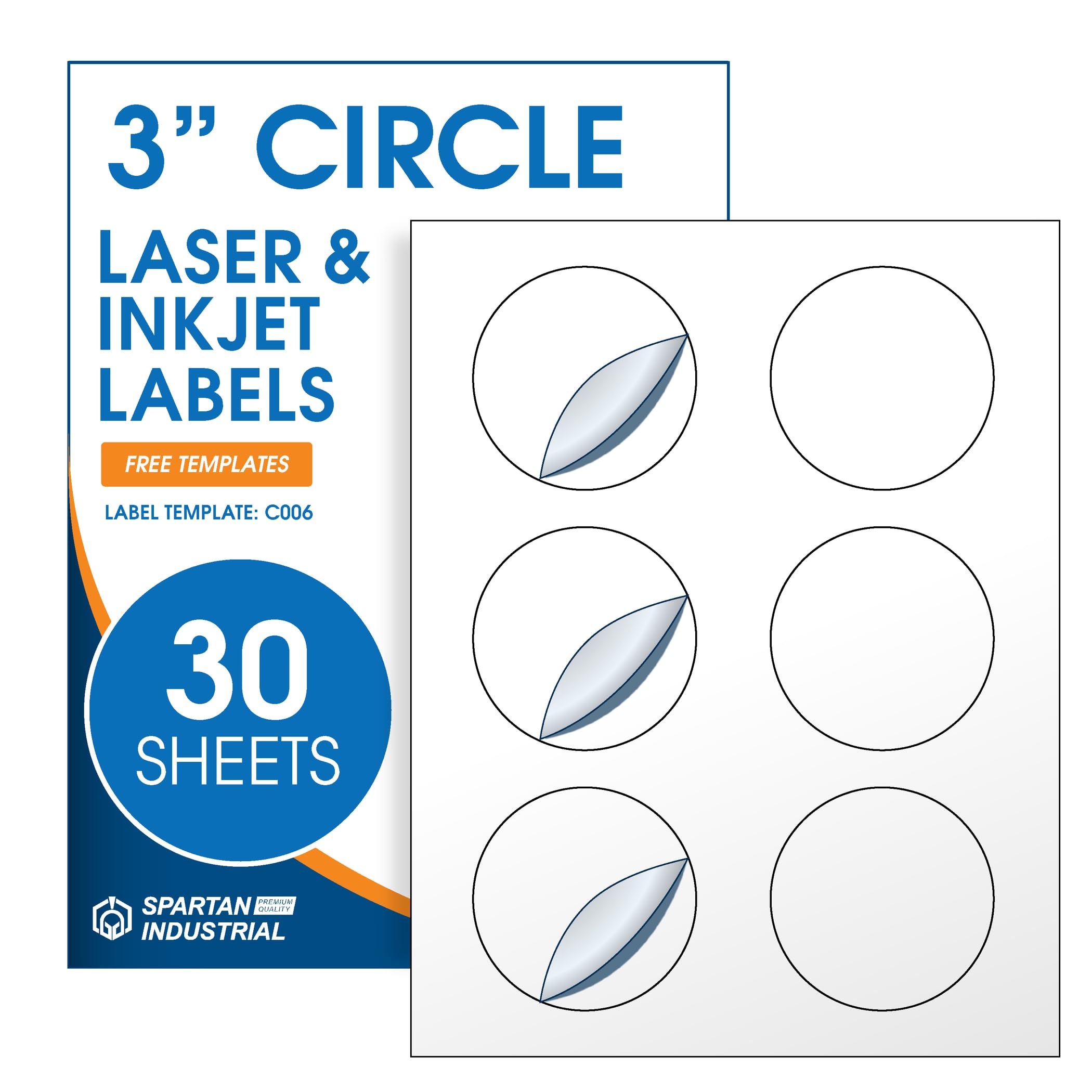


🎯 Stick with the best — label your success in style!
Spartan Industrial’s 3" Printable Round Labels offer 180 high-quality matte white stickers designed for laser and inkjet printers. Ideal for business logos, QR codes, and price tags, these labels come with a precision template for easy, professional printing. Durable and versatile, they adhere permanently to multiple surfaces without yellowing, making them a must-have for millennial professionals seeking polished branding and organization solutions.









| ASIN | B0CSPXXKWW |
| Best Sellers Rank | #2,121 in Office Products ( See Top 100 in Office Products ) #20 in Laser & Inkjet Printer Labels |
| Brand | Spartan Industrial |
| Color | White |
| Customer Reviews | 4.2 4.2 out of 5 stars (928) |
| Date First Available | January 18, 2024 |
| Item Weight | 12 ounces |
| Item model number | SI-LABEL |
| Manufacturer | SHIPPD |
| Manufacturer Part Number | SI-LABEL |
| Material Type | Paper |
| Number of Items | 30 |
| Package Dimensions | 12.52 x 9.76 x 0.43 inches |
| Shape | Round |
| Size | 3" Circle |
A**W
Nice product
Worked great for printing labels for Valentines. Easy to remove, looked nice and great price. Printed color was vibrant and stickers worked as expected.
K**R
Great quality
This is a repeat order and I have been happy with the quality of this item. I would suggest that there be some printing or something on the wrong side. It can be difficult to differentiate the printable side from back of the paper. It would be helpful to have a marking on the wrong side of the labels,
R**R
Template works good
I almost didn’t purchase these labels because of some of the reviews about the template, but I had no issues with it. Everything aligned perfectly in the Word version and this made for some cute labels for my granddaughters Valentine’s Day goodie bags. Make sure your image alignment & text wrapping is “through” after you insert it and you should be fine with the Word template.
S**Y
Hard to align & not very sticky!
I very seldom write bad reviews but these stickers are awful. I do a lot of design stuff with sublimation and cricket. I have canva so I used that for the template like they said. Clicked the link, designed my stickers, and could not get them to line up at all. Tried 3 different times. Finally just made white stickers and shrunk my design in hopes they would hit circles. Then I went to put them on the bottom of my ducks and they wouldn't stick. Fell right off. How frustrating. I tried heating them and that didnt work either. I tried sticking them to paper and other types of surfaces and they just pulled or fell right off. I had to glue them cause I had nothing else with me on the ship. Was so sad.
R**O
A lot of work to get these to print right.
I spent a lot of time (too much time) to get these to work. But, I did. So, all my hard work is here for you, so you don't have to go through hours of frustration like I did. (2" round stickers). First thing's first: The stickers are good. They are standard quality and the stickiness is adequate. Not super sticky, and I don't know how long the will last. They are matte. Not too thin to be see through, but not thick either. They are a lower-grade sticker, but for the price, that's what I was expecting. They peel off nice & smooth without any catching. They print nicely. Now, for the template debacle. I did finally get them to print after probably 2-3 hours of trial & error. One BIG con: Before I purchased, I went to their webpage to make sure they had templates. oooh, I saw Canva. Cool. I practiced with it, and downloaded the file. Does it work? Honestly I don't know because I was just testing it, and didn't have my stickers yet. So after I got my stickers, I made my labels in the Canva Label Sheets app with the Canva template I got from the company' website. SpartanIndustrial c004. But, I found out that the template is actually from a 3rd party (Hlabels), and when I went to download my file from canva after getting the actual stickers, I got a pop-up that said I needed to purchase a subscription to use it. I guess you get to try the label template in the canva app once, then you need to BUY the template, or it gives you a watermark. That had me quite angry. Next, I chose to use the PDF template from their website. I like how exact PDF files print. You can use Adobe Acrobat online (which is free) to edit the template. Time consuming to say the least. And after all that, yeah, it doesn't line up. It seems to have "wandering margins". I gave up after getting frustrated, and spending way too much time on it. Next, I have Word, and this isn't my first label printing rodeo, so I decided to use that. It's easy, but if you are used to Avery online templates, it's not as streamlined. You have to paste your stuff in each template circle, then delete the outer circle. Time consuming, but not difficult. According to their online instructions (yes, they have template instructions on their website - yay!), leave the margins alone when printing. Print. Oh, boy. The left & right sides were getting chopped off. *sigh* More work for me to figure out. Hmm... So I decided to measure the sticker sheets. The sheets have a 1/16" border. My printer (Canon Pixma) has a 1/4" white border. Ah. This is why the edges are cut off. There is nothing I can do about it. There is no 'edge printing' on that printer. I tried 'borderless printing', but that just enlarges & skews, throwing it all out of whack. Well, it's a good thing I have several printers, so I tried another. I decided to try my Epson. Tada! It prints the whole circle; No edges chopped off. But wait! We're not done. The designs were slightly off to the left. Not much, but enough that it's visibly not centered. Argh. Earlier this week I had an issue with business cards I was printing being slightly off. Seems the margins on the actual cardstock weren't exactly even. Guess what?! These sticker sheets have a slightly off margin as well. Where one side is 2/16, the other is almost 3/16. You may think that wouldn't matter, but it made a HUGE difference in how my stickers printed. If I put the LARGER margin side in the left side of my printer, they come out beautifully. Ahhh... That was a lot of work. So, if they are slightly off for you, measure your sticker paper margins. Don't have word? I found this template online with the exact same measurements as these sticker sheets: "OL5375 - 2" Circle Blank Label Template" at Online Labels. It says it's free if you have an account. I did not try it, I just thought I'd mention it because not everyone has Word or Illustrator (I did not try the AI template, so I don't know if that one works). Anyway. Yeah, if I had all that info before i started, I wouldn't have been so stressed & frustrated. But I finally got them to work. :-)
K**K
They are great and easy to work with
I love these labels
T**S
Value But Inaccurate Printing A Pain
These are a great value for the price BUT, they are a pain in the butt to get to print correctly. I was finally forced to go into the template and make adjustment to each individual label and even then you still have to make sure you put the paper in the printer the right direction. In my last print I tried to put it with the labels farthest from the edge of the paper and they printed incorrectly. I thing flipped to the other edge, label closest to the edge and they are printing correctly, not perfect, but correctly. Every time I go to print I waste a sheet figuring out whether the paper is load correctly. It should not be this difficult. At least with Avery I know things are going to print the right way every time I print. Once this pack runs out I will try Avery.
G**L
Great labels & easy to print on
Perfect for adding on the top of our honey bottles. Correct size, adheres nicely and easy to print on with our home printer.
A**L
Worked well for what we needed it for
I**Z
Muy práctico, fácil de manejar, te proporcionan una plantilla para que puedas diseñar ràçidamente tus etiquetas.
G**H
Excellent for use on spice jar lids. Avery Labels DO NOT have a template for these but custom template can be created to work
J**M
We use alot of labels for work and these labels worked perfect on our copier and the paper was a nice matte finish
S**I
Like others have said, it's impossible to line up the circles on the template. Their template is downloadable in word format, but you have to manually copy and paste into each circle and line everything up individually. I spent almost 2 hours trying to get a project set up properly, when an Avery label would have taken less than 5 minutes.
Trustpilot
1 week ago
2 weeks ago