We remain fully operational. Our teams are working around the clock to ensure your deliveries continue safely.

DOWNLOAD THE APP


Customer Services
Copyright © 2025 Desertcart Holdings Limited
DOWNLOAD THE APP

🚀 See the race before it happens — fly first, win first!
The DJI Goggles Racing Edition delivers an unparalleled first-person view drone racing experience with 1080P HD video, ultra-low 50 ms latency, and up to 7 km OcuSync transmission range. Designed for serious pilots, its dual-band video system supports multiple DJI drone models, while premium materials and ergonomic design ensure comfort during extended flights. Beyond racing, these goggles double as a high-definition media viewer compatible with Roku and Chromecast, making them a versatile tech essential for the modern drone enthusiast.
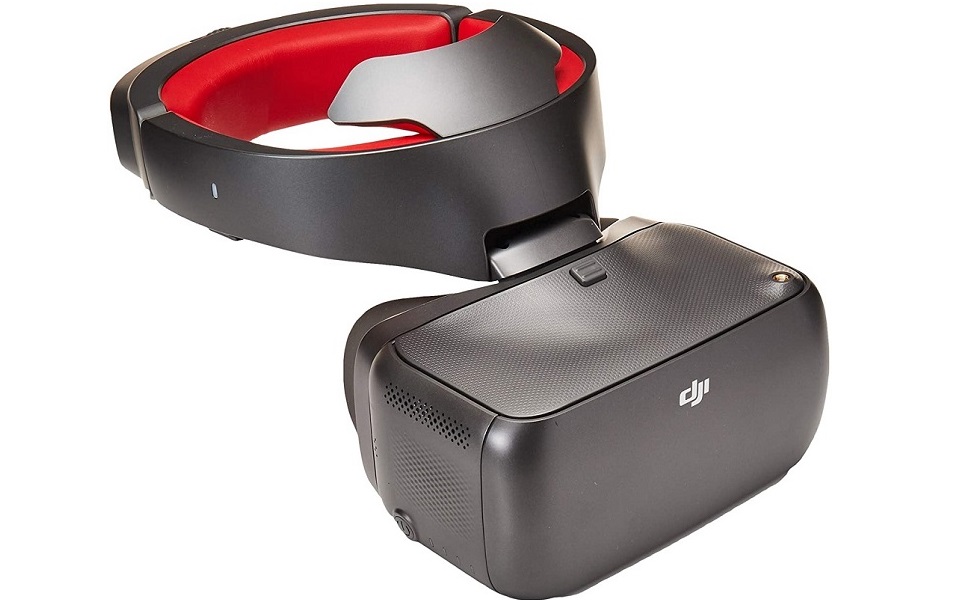

| ASIN | B077XRBQQS |
| Batteries | 1 Lithium Polymer batteries required. |
| Best Sellers Rank | #749,060 in Toys & Games ( See Top 100 in Toys & Games ) #3,630 in Hobby RC Quadcopters & Multirotors |
| Customer Reviews | 4.0 4.0 out of 5 stars (220) |
| Date First Available | December 4, 2017 |
| Is Discontinued By Manufacturer | No |
| Item Weight | 3.55 pounds |
| Item model number | DJIGOGGLESREU |
| Manufacturer | dji |
| Product Dimensions | 12.5 x 12 x 7 inches |
H**R
These are great. 1st person view and can be used with Roku and chrome cast. 1080 P quality
I took quite a bit of time before I decided to write a review on these goggles. If you go on the Internet and many of the drone sites, you will hear pluses and minuses on all of the goggles available. As in any technological device, some people will rant and rave based on their personal experience and expectations. Others will denigrate a product because they either didn't understand how to use it or didn't understand that high-end technologic devices take a little bit of time to learn how to use. 1st things 1st. This is not a 3-D goggle. This is not what some people experience when they use Google or Samsung goggles. Those devices use applications which try to give three-dimensional and totally immersive visual effects. These are called FPV for 1st person view. What that means is that it is literally like sitting inside the drone. You're not looking at a computer screen or on a small tablet. When you put these goggles on, it is as if you are actually flying inside the drone. When you move your head, the drone image moves with you. These goggles allow you to control turning your head left and right and up and down. There's also a mechanism for actually controlling the direction of the drone. They are somewhat bulky. They are somewhat heavy. They are not lightweight. And when you put them on, you will not be able to see her sense any of your surrounding environment. However, if you are willing to take the time to adjust them and appreciate the technology you're getting, all of these issues become a necessary inconvenience. What you get is the highest resolution goggles on the market. These are true 1080 P HD images. Many of the goggles out there are low resolution. And if you use your Samsung phone and a set of goggles you are essentially seeing your screen is split in half so you're getting half the resolution of normal HD. If you are using them with a DJI drone, the maverick will hook up without any wiring and it sinks easily and quickly with HD resolution transmission. You are up and flying with a minimal of problems. You do have to learn how to use the touchpad. You also have to realize how to use the head motions to control the drone. Many people complain that the image does not appear clear. And indeed, for those of us who may need reading glasses, the suggestion is to buy yourself a pair of reading glasses that are one power greater than your normal power. If you normally use a +2, get a +3. There are lenses that fit directly into the goggles that you can purchase. DJI makes some that are a perfect fit and there are some aftermarket ones. The ones from DJI are actually somewhat cheaper and are easy to insert. If you're not certain about strength, simply order a pair of large readers and wear them inside the goggles to your convinced you have the right magnification. And yes, you can wear your classes while using these goggles. You can also use them for watching movies and streaming off your Roku player. There is a mini HDMI port which can hook up to your Roku. To make that work, you simply have to get an HDMI to mini HDMI adapter. For those looking for more portability, you can even hook them up to a chrome cast, and go from the chrome cast output with an adapter to the mini HDMI on the goggles. Then you're watching 1080 P movies and TV with your goggles. They do have an audio jack output if you want to use your own headphones. Otherwise they have somewhat decent speakers right next to your ear The brightness control I said to the brightest and it seems perfect. There is no contrast control. I got the racing edition as I wanted the option of being able to use them with small drones that use the 5.8 GHz transmission system. These will work with other drones because of their flexibility Don't get these if you're thinking you're going to get 3-D. Don't get them if you think you're getting a system that allows you to use the Google 3-D apps. What you get is a terrific 1st person view. You can also watch anything you have on your Roku or chrome cast. In my opinion, it's worth the money One final note, which many people seem to post as an issue. The 1080P wireless transmission is only when using the DJI Mavic drone. The Spark does not use the same method of signal transmission. I believe it is only 720P, the same with the Phantom. ROKU and Chomecast, are hard wired, and are 1080P. So, remember, for wireless drone reception, only the Mavic uses the system that gives 1080P wireless quality.
J**N
Toy for my FUGGLY BUG!
My DJI RC Goggles links right up with my DJI MAVIC 2 zoom and everything seems perfect, now if it would stop raining long enough I might get a Chance to really see just what it will do. Does DJI make a one hand Controler? I’d so can I get some information about it. If they do, do you have one, I’ll be glad to take it off your hands. Thank you.
V**C
Good BUUUUT!
So I Originally gave these googles a 5 star review. I took 1 star off for a few reasons. 1 When I set the google mode to Analog 5.8 I get a green strip in the screen, as if the screen is split. I have updated my googles and it continues to happen. Not that big of a deal you just have to restart them. 2 I wish that DJI installed a fan in or around the frame to keep the googles from fogging up. If its hot outside and you want to use them outside they do fog up pretty quick. 3 I wish these googles did have diversity for analog so that I can run a patch antenna with the stock antenna that does very well. This is probably my biggest complaint. If it did have diversity and a fan these would be my favorite googles. I can see a lot " RACERS' have an issue with this. I also think that the SMA connection being a threaded female with male connection is a little inconvenient since 90% of antennas are made for male threads. Not that big of a deal with SMA adapters. The weight is no issue for me. I feel that as of right now these google are made specifically for Occusync and for racers to start using the occusync camera on a race quad. 5.8 Analog seems like it just a bonus feature that really wasn't thought out for the guys running 5.8 all the time. There are no pro racers that I know running this in any races and have yet to see the occusync camera on a race quad. Also found out that installing occusync is not as easy as adding a 5.8 transmitter. I use them for my Mavic PP and they work unbelievably well with that drone. I use analog mostly when Im inside my house flying whoops I probably wouldn't use these on a 5 inch quad running 5.8. Updated review So Ive utilized every feature of these google and I am impressed!!!! I absolutely love my goggles! I own a modified Mavic PP, these are a must have! I can easily focus my shots and get all my settings correct for lighting with these googles. I can not get the same result for photography or video with my large Ipad that i used to use. So if i dont have time to mess around to get a shot I use my googles. I also have race drones that help keep me improve my pilot skills. I run 5.8 for my race drones, from 80mm to 500s, from whoops to TBS discos. The analog is a little bit of a pain. What I mean by that is it for some reason split my screen in half with a large green line down the middle and give me a unusable screen to pilot. This can be fixed by turning the unit off and on once or twice, a very small issue. I also use them to play movie and to play my nintendo switch in 1080p! absolutely feels like you are in the game or in a huge theatre watching a movie. I love to be able to watch a movie next to my wife in complete darkness with theatre sound and video while not disturbing her.
B**R
Really nice and versatile googles
Set up was fairly staright forward, you will likely need to do a firmware update first..just use the dji app to version check and update as necessary,your controller,drone and googles should all be on the same version then set up is a snap. the goggles are comfortable to wear,the nicely padded headband makes for a good secure fit. i was surprised at how light they felt in my hand and after wearing them for an hour i felt no discomfort at all and i have neck/vertebrae problems, just be sure to put them on correctly..the headband should sit at an angle (lower on the back of your head) this keeps them a little tighter to your face and gives a better seal around your eyes. if you find them moving a little bit you likely have the headband to straight across the back of your head.. The software is pretty straight forward,easy to use and gives you the all important range,signal,battery etc..nice to have it right in front of you without having to look at the controller..i use them for general flying,i'm not a racer. i find the video quality to be very good, there isn't much detectable lag but i haven't range tested them beyond 1/2 mile or so as of now..still waiting on nicer weather for that.. I really like that these are not just flying googles and you can use the for VR
C**.
Amazing product. It's like your in the cockpit of the drone. An experience like no other. I would never fly with out it. Where ever u move you head up down left or right the drones camera looks in that direction. Or you can control the drones yaw (left or right) by turning your head. Depending on which mode you have it in.
A**A
La documentación menciona que tienen un rango máximo de hasta 7km, la realidad es que al momento no he pasado de 500 mts de rango sin problemas. UPDATE: Con las últimas versiones de firmware y utilizando las antenas pagoda, la conexión es muy estable con un Mavic 2 Pro
M**3
One of a kind. 10/10
H**9
Exactly what I was looking for, DJI compatibility with 5.8 rx built in as I am transitioning to freestyle fpv. I didn't have to buy 2 different goggles. 1080p is fantastic. I can wear reading glasses under them for perfect clarity. Despite the other review you can record when in analog or digital race modes. Just not in live feed mode say from your mavic. Not a big deal as you can still cache video to phone for recovery review.
H**S
excelente producto
Trustpilot
5 days ago
1 week ago