Some deliveries may take a little longer than usual due to regional shipping conditions.

DOWNLOAD THE APP


Customer Services
Copyright © 2025 Desertcart Holdings Limited
DOWNLOAD THE APP

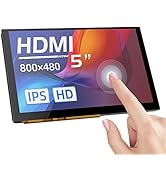
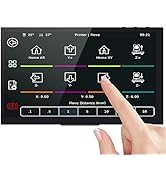
🚀 Elevate your workspace with BIGTREETECH’s sleek 7-inch touchscreen — where clarity meets control!
The BIGTREETECH 7-inch HDMI Touch Screen Display offers a sharp 1024x600 IPS panel with a 160° viewing angle, supporting 5-point capacitive touch. Compatible with Sovol-SV08, Raspberry Pi models, Banana Pi, and Windows PCs, it features HDMI connectivity, adjustable brightness and orientation, plus built-in audio output via a 3.5mm jack, making it a versatile, compact monitor for professionals and makers alike.












| ASIN | B0BC4G1L77 |
| Additional Features | Touchscreen |
| Aspect Ratio | 16:9 |
| Best Sellers Rank | #14,294 in Electronics ( See Top 100 in Electronics ) #361 in 3D Printer Accessories #731 in Computer Monitors |
| Brand | BIGTREETECH |
| Built-In Media | BIGTREETECH 7 inch HDMI Touch Screen |
| Connectivity Technology | HDMI |
| Contrast Ratio | 1000:1 |
| Customer Reviews | 4.1 out of 5 stars 327 Reviews |
| Display Resolution Maximum | 1024 x 600 |
| Display Technology | LCD |
| Display Type | LCD |
| Hardware Connectivity | HDMI |
| Has Color Screen | Yes |
| Image Contrast Ratio | 1000:1 |
| Manufacturer | BIGTREETECH |
| Model Name | HDMI7 V1.1 |
| Model Number | KINGPRINTER-1040000036 |
| Mounting Type | Wall Mount |
| Native Resolution | 1024x600 |
| Number of Component Outputs | 1 |
| Resolution | SVGA Wide |
| Response Time | 5 Milliseconds |
| Screen Finish | 160° |
| Screen Size | 7 Inches |
| Screen Surface Description | 160° |
| Total Number of HDMI Ports | 1 |
| Viewing Angle | 160 Degrees |
| Voltage | 5 Volts |
S**.
Dead out of the box, returned BUT reordered great device
1 compulsory star given because mine didn't even power on so I can't fairly give a review either way Checked multiple outlets, the power supply was in good working order. Swapped out the TF card with new formatted card and still would not power on. So I returned it and will be purchasing another hoping this doesn't occur a second time FOLLOW UP EDIT: I did end up ordering another one and the second Pad 7 works perfectly. Configured and working just fine. Very happy
P**R
Bigtreetech never disappoints!
This was an amazing upgrade for my Ender 3 Neo Max! I wanted to add Klipper and this works perfectly for my printer after I was able to build out the config. It's a perfect size and bright and easy to see screen. Overall i'd say that this is one of the best values in Klipper pads out there.
J**N
HOT GARBAGE. CONNECTIVITY ISSUES GALORE.
The WORST item I have ever used in my life. When connecting to wifi, it duplicates every network? Tried both, and it works for 3 seconds than disconnects. Disconnects from printer then re connects every 5 seconds. Even when connected, cant even control lrinter to change filament. 100% useless brick, snd even returning for a refund doesnt make up for my time wasted. AVOID.
D**H
Good Klipper Screen - after tuning it.
I have both the BTT Pad 7 and the Creality Sonic Pad, so I will be comparing them against each other. I have also set up a working Klipper instance on a Raspberry Pi. The Pad 7 is as much stock Klipper as you can get. BTT hasn't messed with anything here. The Pad itself is running stock Klipperscreen, and SSH is turned on by default. It runs Mainsail from the factory, but I installed Fluidd along side Mainsail at port 81. Setting up the firmware for your printer is pretty much like setting it up from a Raspberry Pi. I use the KIAUH script to build and install the MCU firmware. Using the screen is pretty easy, and it's pretty intuitive. I plugged in a Logitech C270 webcam for print monitoring, and after setting it up on the screen, it works as it should, although the webcam stream does not show up on the Pad 7 screen. You can only live view the webcam from a browser in Mainsail (or Fluidd). I only get about 15 FPS from the webcam on Mainsail, but I don't know it that's a camera problem, or the screen. WiFi is atrocious. I couldn't keep it connected to either 2.4 Ghz or 5 Ghz. Luckily it has a ethernet port, and following my rule that only portable devices connect to WiFi, and permanent devices are wired, this didn't impact me too much. I came with an actual Sandisk 32GB Micro SD card, which was a pleasant surprise. Pros: - Once set up, it seems to be rock solid. - Screen is clear and responsive. I notice no lag. - Just like using Klipper on a RPi, but you get a screen, too - BTT hasn't done any shenanigans with the Klipper install. It's seems to be wide open. In fact, it looks to be running Debian - There are example printer.cfg files on the SD card for a variety of printers. - Can replace the CB1 with an actual Adafriut CM4. - Includes an accelerometer for resonance tuning. Cons: - Setting up your printer is just like stock Klipper. You need to know your exact MCU processor to compile. If you - If your printer doesn't have a config file on the SD card, you need to manually confirm your printer's kinematics, thermals, and everything. - No live camera stream on the Pad 7 screen (not stock anyway, there might be a way to set this up) - Accelerometer cable is too short for big printers. - Basic features are missing from the screen's interface, like PID autotune. Compared to the Creality Sonic pad, it holds it's own. The Sonic pad is easier to set up (if you have a late model Creality printer), and the screen interface has more features. The BTT Pad 7 is more open than the Sonic Pad (Creality isn't running Klipperscreen for the Sonic Pad's UI. I have no idea how to modify it. I suspect it's running some weird firmware). Overall, If a person was looking at these, anything other than a stock late model Creality printer, I would get the BigTreeTech Pad 7. I use the Sonic Pad on my stock Ender 3 S1 Pro, and it works great. I have the BTT Pad 7 running my customized Ender 5 Plus (SKR 1.4 Turbo), and so far it working awesome.
U**S
Plug and Play!
Very nice and easy to install
R**N
Great
Very functional easy to set up very useful
T**Y
Absolutely fantastic screen for klipper
The screen it self is fantastic and works flawlessly, but I just wish they included a longer dsi cable as this is too short to do anything other then mount the PI to the back of the screen, but for a voron this is not ideal and you will require at least a 12 inch cable I opted for a 16inch so I have some cushion room for things moving. The touch feature is perfect, the switch on the bottom works to flip the screen without any software modifications and the brigtness dial does exactly that. If you are looking for a beautiful simplistic screen for KlipperScreen then this is absolutely the one for you and 5" is more then enough, things aren't so small your need a pencil to push them and with fat fingers like mine it's nice having a larger screen
M**T
Not without flaws
So, it is a pretty cool screen. But I had a heck of a time setting it up, had to replace other parts so it would work, and spent HOURS designing and tweaking a mount for it. Thank goodness I have another 3D printer to print those parts. There don't seem to be a lot of other options, though, for the Manta series. It is NOT compatible with early (v2.1) cb1 boards. I had to buy a newer one so this would work, effectively doubling my cost. Designing the mount would have been easier, but it figured out that the screen cannot touch the edge of the bezel, or it will trigger the touchscreen on its own. That could lead to some hazardous situations. It would be better if it were a capacitive touch screen, but I am sure that would cost more.
Trustpilot
2 days ago
5 days ago