
DOWNLOAD THE APP


Customer Services
Copyright © 2025 Desertcart Holdings Limited
DOWNLOAD THE APP

🔄 Simplify your dual-computer workflow with crystal-clear 4K brilliance!
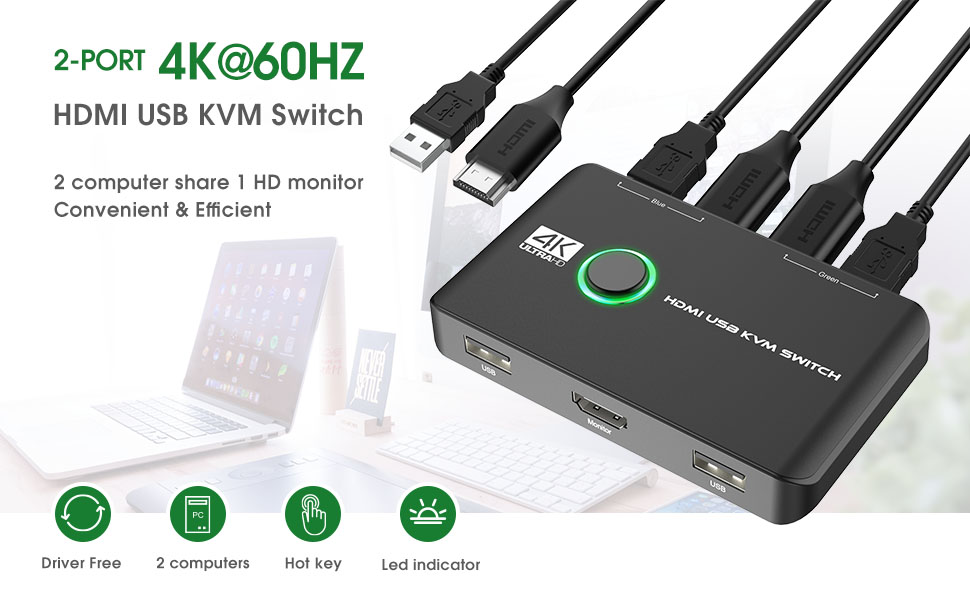
The Rybozen 4K KVM Switch HDMI 2 Port Box lets professionals effortlessly control two computers using one keyboard, mouse, and printer, supporting ultra HD 4K@60Hz resolution. With driver-free plug-and-play compatibility across major OS platforms and included HDMI and USB cables, it’s the ultimate desk decluttering solution for efficient multitasking.



| ASIN | B0BD7LX47Z |
| Batteries Required? | No |
| Batteries included? | No |
| Best Sellers Rank | 2,112 in Computers & Accessories ( See Top 100 in Computers & Accessories ) 1 in KVM Switches |
| Colour | black |
| Customer Reviews | 4.3 4.3 out of 5 stars (1,361) |
| Date First Available | 6 Sept. 2022 |
| Item Package Quantity | 1 |
| Item Weight | 300 g |
| Manufacturer | Rybozen |
| Manufacturer reference | V806-UK |
| Part number | V806-UK |
| Product Dimensions | 9.98 x 6 x 3 cm; 300 g |
| Shape | rectangle |
| Size | KVM Switch |
| Style | KVM switch HDMI for 2 computers share one HD monitor and 2 USB devices |
| Switch Type | 2-way |
M**S
Easy, functional, reliable.
Works perfectly with Dell PC and Mac Air; 1 monitor and 1 logitech unifying usb for keyboard+mouse. Plugged it in, no external power and worked immediately and exactly as intended. Also: consider that as well as the KVM box, you get 3x USB A>A cables and 2xHDMI cables. Given that I already had an existing kvm 'rig' of a usb switcher and hdmi switcher (2 separate devices) I've benefitted some extra USB and HDMI cables probably for less that I could buy them separately. I have not, and will not, be testing for: games, video conferencing through the KVM or any high-speed or high power usb devices - so if you plan on using these please consult other reviews. I have also not tested connecting a hub to the usb-switcher for multiple devices; the kvm has 2 'inputs' built in, I only use 1 for the logitect keyboard+mouse receiver. Aesthetically, it actually fits on the desk very smartly. Keyboard/mouse hotkey (to switch without touching the KVM): NONE!!! I don't care about this as I find the switch often causes usb-detection issues but if you're looking for this feature look more closely. I had another usb-switcher which supported double-click mouse wheel to switch, but it was unstable. Overall, extremely satisfied.
R**L
Very Satisfied So Far
The item is very compact and comes with all cables including one for supplementary power which I have not needed. The system was easy to set up and is working without problem so far. It would have been much neater if the cable to the monitor connected at the back or side rather than the front. I wish the USB cables had been a few inches longer but fortunately I had longer cables in stock. But these are minor quibbles and for the price this is a fine piece of kit.
B**E
It works
This does exactly what it is supposed to and works seamlessly. It switches monitor, mouse, webcam between a personal computer and a work laptop and has never failed to work. It is very simple to use with a big button to switch. The cabling situation is annoying as they connect on the front and the back of the device which leads to a mess of wires all over my desk, I would prefer if it could be more tidy. Also it seems that it doesnt support usb 3 which is not the biggest deal. Overall this is cheap and cheerful and definitely exceeded my expectations.
W**Y
Excellent price and performance
I was frankly amazed at how well this performs given the low price and small size. It was really easy to set up and worked immediately, sharing mouse keyboard and monitor to one Windows 7 PC and one Windows 11 PC, without any problems. No grainy pictures or picture interference and switches quickly and reliably. All that at a very good price considering all cables are also provided, so extremely satisfied. The only puzzle to solve was which PC it was switched intitially to so I got a "no monitor input" message when I booted the first PC, but soon fixed when I switched it. BTW if, like me, you are wondering how it shares two USB ports (in my case keyboard and mouse) to each computer when there is only one USB output to each, the receiving computers work it out without any problem.
A**Y
A great piece of kit
I bought this switch selector to use in a work environment whereby I have 2 desktop computers and laptop. The desktop computers share a wireless keyboard and mouse and I was constantly moving the USB receiver between these. It was a little inconvenient. Then to add to this, the keyboard on my laptop stopped working and although I replaced this, the fault was not cleared. I saw this switch as a potential solution to the constant moving of the USB receiver between all 3 devices. I unboxed the switch selector and thought that it both looks and feels like a quality piece of kit and it was a bonus that it came with the required USB cables to attach the other devices. When I plugged it in the devices each picked it up without issue and my problem was solved. It does the job it sets out to do without any fuss or drama. I couldn't be happier with my purchase.
S**Y
Must have for people using 2 computers simultaneously
I recently purchased the Rybozen USB 3.0 Switch for my home office, and I'm so glad I did! This switch allows me to easily share up to four USB devices between two computers, which has been a huge time-saver. The switch was incredibly easy to set up - all I had to do was plug in my USB devices and connect the switch to my two computers. The design is simple and straightforward, with a button to easily toggle between the two computers. And because it's compact, it doesn't take up much space on my desk. One of the best things about this switch is its fast USB 3.0 connectivity. I use it to share high-bandwidth devices like external hard drives, and I've had no issues with speed or performance. Overall, I'm really happy with my purchase of the Rybozen USB 3.0 Switch. It's made my work life a lot easier and more efficient, and it's definitely worth the investment. If you need to share USB devices between multiple computers, I highly recommend giving this switch a try.
A**V
Normal
Works as it should, there is automatic source detection.
Trustpilot
1 day ago
1 month ago