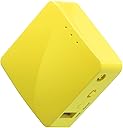
🚀 Pocket-Sized Privacy & Power — Your Travel Wi-Fi Just Got Smarter
The GL.iNet GL-MT300N-V2 (Mango) is a compact, ultra-lightweight travel router featuring dual Ethernet ports, USB 2.0, and pre-installed OpenVPN/WireGuard clients. Powered by OpenWrt with 128MB RAM and 16MB flash, it offers secure, private Wi-Fi on public or hotel networks. Its easy setup via a user-friendly admin panel and compatibility with multiple VPN providers make it a must-have for professionals seeking secure, flexible connectivity on the go.


| ASIN | B073TSK26W |
| Best Sellers Rank | #4,102 in Electronics ( See Top 100 in Electronics ) #33 in Computer Routers |
| Customer Reviews | 4.1 4.1 out of 5 stars (12,679) |
| Date First Available | July 9, 2017 |
| Is Discontinued By Manufacturer | No |
| Item Weight | 1.41 ounces |
| Item model number | GL-MT300N-V2 |
| Manufacturer | GL Technologies |
| Product Dimensions | 2.3 x 2.3 x 1 inches |
S**Y
Affordable VPN router
Small and perfect for streaming devices to get past Geo-restrictions to watch content from other countries. The downside is that it's powered through micro USB instead of USB-C. It does not come with a USB charger so you need one. Works with surf shark wire guard VPN. You can connect your cell phone as an Internet provider in a pinch if necessary. Surf Shark doesn't have a VPN client for Apple TV. This solved the problem. Additional Info. The router runs OpenWRT and supports multiple VPN profiles in memory which can come in handy to access streaming content from across the globe. It supports multiple protocols such as Open VPN, L2TP, IPsec, WireGuard, & IKE2. The company also provides cloud management apps for Android and perhaps Apple. So once you set up your various VPN profiles, switching between them can be done easily with the phone app. Several popular VPN providers are already listed but you can manually set your VPN profiles using your provider vpn.conf from their website or enter it manually with a cell or PC. Here is another plus, if you add an inexpensive ethernet switch to the LAN port, you can connect multiple streaming devices. I use an Apple 4K Gen 3 and a Nvidia Shield TV 2019. My Roku can connect to this router using the built-in 2.4Ghz wifi hotspot this router provides. This won't replace a full home main router unless your needs are very modest. But given its small size, the modest needs of streaming devices, and how small streaming devices like Amazon Sticks, Roku, and Walmart streaming devices are, it is a no-brainer for travel as you can put them inside a case and pack it with your luggage. Just a reminder, this does not come with a USB dongle/charger. But most people have many lying around in draws from old phones.
A**N
Nice travel router
2025 Update: Took the rating from 3 stars to 5. First: Mainline OpenWRT now supports the device chipset which means I can use official downloads instead of ones made by the company that did not provide source code. Second: While the Ad-hoc/IBSS mode is not supported by the chipset, 802.11s mesh point mode *is* supported. This is a better long-term solution, and works great. I wanted to do B.A.T.M.A.N with some Pi Zero units (which can only do Ad-hoc, station, and AP modes), but that project fizzled out. Combining these with my home router also setup with 802.11s gave a very reliable mesh network (these provided extended wifi out on the patio). Original review: First, let me say that I did not purchase these (I bought two) to use in their intended purpose as a travel router. I was more interested in them as a cost-efficient learning platform for building a batman-adv mesh network. Unfortunately, the chipset in this little device is a MediaTek MT7628AN v1 which doesn't seem to have mainline OpenWRT support. The manufacturer does maintain several firmware images and an opkg repository, but I do not see any source code posted for their customized OpenWRT images (GPL violation?). The good: * Small and travel friendly. * Sufficient wifi signal * Easy to set up and use its basic functionality out of the box. Easily sets up as a wifi repeater. * Has a custom web UI that simplifies the most frequent, basic configurations. For more advanced options, LuCI is also available. The bad: * The wireless chipset doesn't support ad-hoc / IBSS mode which means they're useless as-intended for my batman-adv mesh project. * Can't even query the capabilities of the wireless chipset. "iw phy" returns nothing, and all of the radio interfaces seem to be "hardwired" into pre-defined modes (ra0 = iface used for AP mode, apcli0 = iface used in STA mode, wds0-3 for WDS). * I honestly don't trust this device not to send every secret that flows through it to Beijing, and the next thing I do will be a WireShark analysis. Assuming the silicon itself isn't compromised, I was hoping to simply reflash a vanilla OpenWRT image and build on that, but the architecture is not supported in mainline, and the chipset of the device was not published in the product description. Before giving up on these, I'm going to look into setting up a build environment for the chipset and compile my own image. * The OpenVPN client is garbage. It periodically disconnects and refuses to reconnect without several reboots. Clients lose internet access completely. Internet is otherwise solid with VPN disabled. Working on setting up WireGuard to see if it is any better. This is pretty much a core advertised feature of the product, so this is pretty unforgivable. * Chipset isn't supported in mainline OpenWRT. While the manufacturer's opkg repo does provide packages for that architecture, and that repo has so-far covered my needs, it makes me solely rely on the manufacturer. I suppose I could mirror their repo locally, but community support would be much preferred. * 3rd party OpenWRT packages are pretty much off the table. As with OpenWRT itself on this device, I'm looking into compiling the packages from source myself to bypass this limitation.
D**N
Works as advertised so far.
We purchased the product so we could use it on a cruise. As people may know, cruise ships charge for each device you connect to the WiFi, so we should be able to connect a router, and then connect our phones and tablets to the router. 1. That "shared repeater" part worked. As long as we were in the room, we were able to connect two phones and an iPad to a single purchased WiFi. It takes a while to connect, and runs a little on the slow side, but it was usable, and good for the price. 2. This device does not have a built-in battery. If you want to carry it around the ship, you will need to plug it into a battery pack or some such. You will also need to keep an eye on cables, because it seems to come unplugged very easily or to at least lose the WiFi it is repeating. (The good news is that I could fit the modem and battery in a waterproof bag.) 3. The device allows use of two common VPN protocols (OpenVPN, WireGuard), but our cruise ship disconnected us when I tried to install WireGuard. I have no idea how it knew, so this may be user error. But if you are planning to use this with a VPN, then I would suggest you install and test it before you travel. 4. You have to be careful about the login and logoff, because our phones seemed to be identifying to the router using the same codes that the router was using to link to the ship's WiFi. So if the router turns off, then the ship might think that line is still connected, and not let anyone else connect on that account. This seems like pretty common behavior when a router is used as a repeater, so plan accordingly. 5. We did not use the Mango for USB modem, tethering, or ethernet. I have no reason to believe these don't work, it was just not what we were looking for. 6. This was almost a five-star review, but it was not as easy to set up as I had wanted. If you wait to get to the cruise ship before you try to set it up, you might spend a few hours of your cruise trying to figure out the instructions. This was only slightly harder than a regular modem repeater, but I had been trying to do the set-up on the flaky ship's Wifi, it would have been much harder.
L**K
I set one up as a wifi repeater to extend wifi range on a second floor of a house. Note that it is a repeater and not an extender, so it appears as a new wifi network rather than just extending the range of an existing network, but the effect is otherwise the same once you connect devices on the second storey to the new wifi network. This is actually how you might use it in a hotel or public wifi area to add an extra layer of security (connect to the wifi firewall router which is then protecting you before passing the connection through to public wifi, especially if you use the VPN feature). Interface made sense. Not 100% perfect but intuitive enough to figure out. No Ethernet connection required for setup. Very good device for the money.
B**R
Compact et pratique, le GL.iNet GL-MT300N-V2 Mango est un mini routeur de voyage très utile. Facile à configurer, il fonctionne parfaitement comme point d’accès, répéteur ou pour partager une connexion en déplacement. La compatibilité avec OpenVPN et Wireguard est un vrai plus pour sécuriser sa navigation. Petit mais puissant, il est idéal pour voyager léger tout en gardant une connexion stable et protégée
J**G
Super transportable. Excelente opción para armar una pequeña red y se puede alimentar hasta con una powerbank.
M**M
Biraz tuzlu bir fiyatı var fakat harika cihaz. Biraz daha büyük olmasını beklemiştim
M**R
router deed precies wat ik wilde.
Trustpilot
1 month ago
3 weeks ago