We remain fully operational. Our teams are working around the clock to ensure your deliveries continue safely.

DOWNLOAD THE APP


Customer Services
Copyright © 2025 Desertcart Holdings Limited
DOWNLOAD THE APP


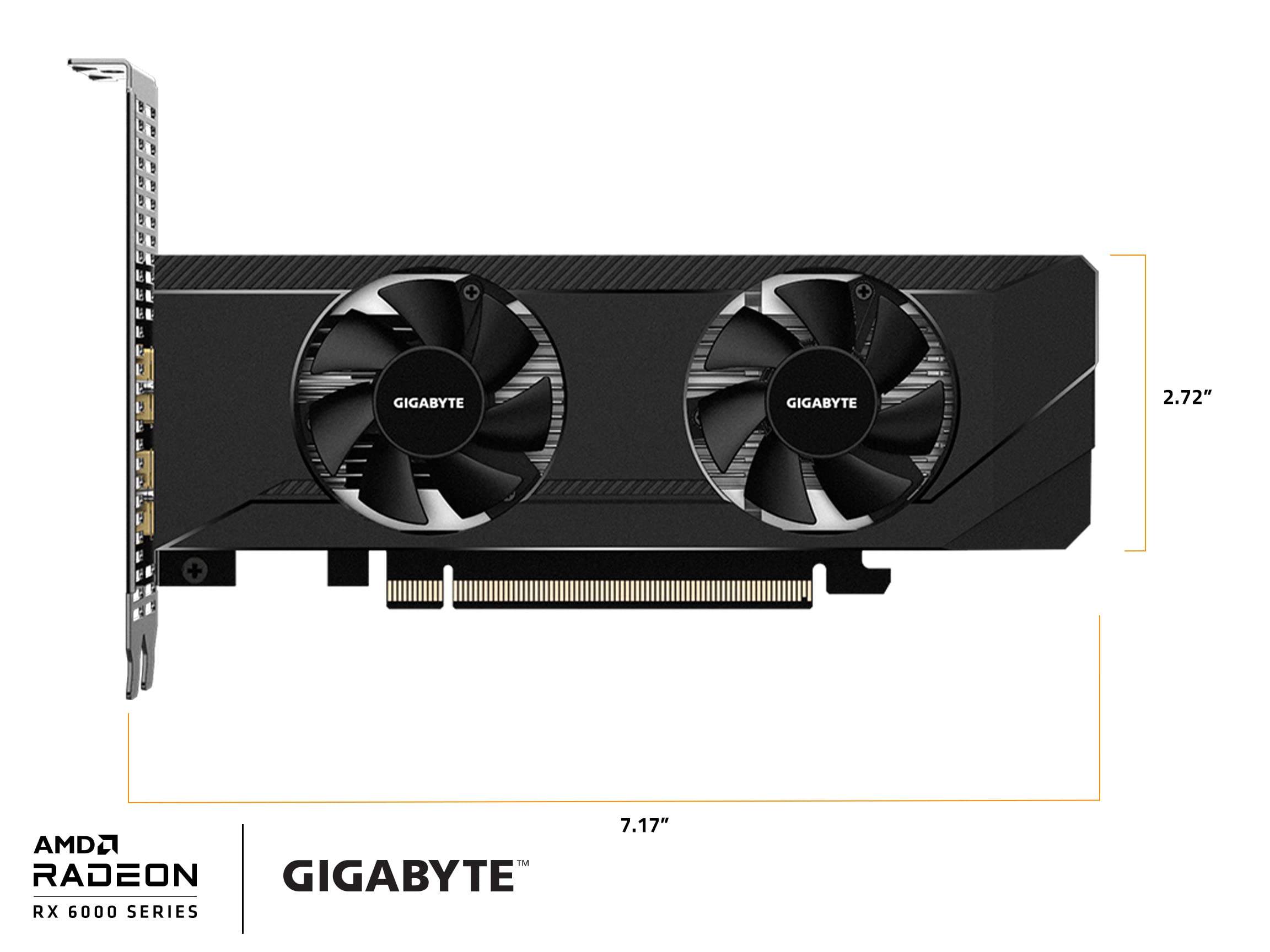
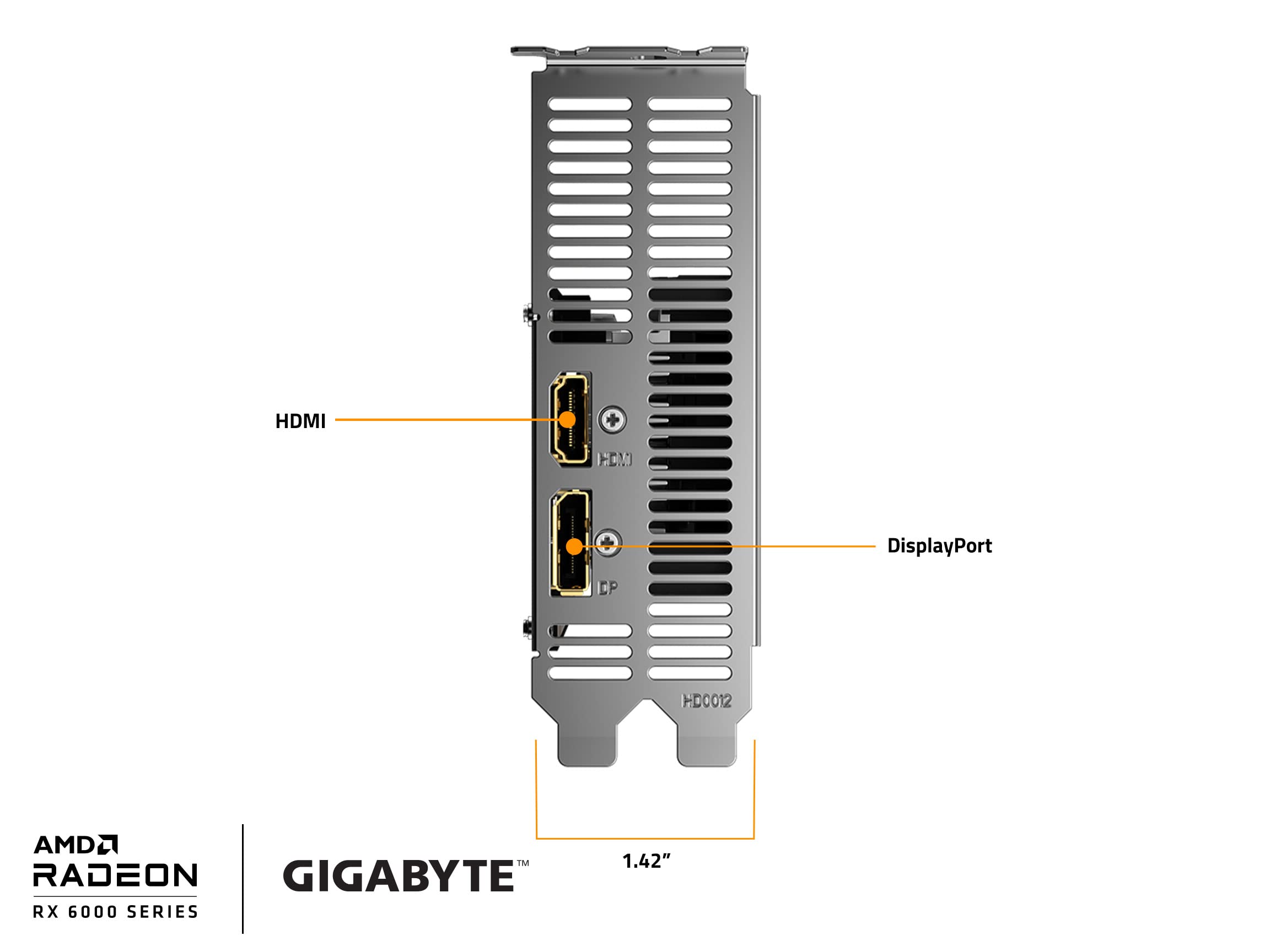
🚀 Elevate Your Gaming Experience!
The GIGABYTE Radeon RX 6400 D6 Low Profile 4G Graphics Card is a compact yet powerful solution for gamers and professionals alike. With 4GB of GDDR6 memory and a sleek low-profile design, it fits perfectly in smaller cases while delivering stunning visuals at a maximum resolution of 3840x2160. Featuring PCIe 4.0 and next-gen connectivity options, this graphics card is designed to enhance your gaming and productivity experience.

| Max Screen Resolution | 3840x2160 |
| Memory Speed | 16000 MHz |
| Graphics Coprocessor | RX 6400 |
| Chipset Brand | AMD |
| Card Description | Dedicated |
| Graphics Card Ram Size | 4 GB |
| Brand | GIGABYTE |
| Series | GV-R64D6-4GL |
| Item Weight | 1.19 pounds |
| Product Dimensions | 7.17 x 2.72 x 1.42 inches |
| Item Dimensions LxWxH | 7.17 x 2.72 x 1.42 inches |
| Color | BLACK |
| Manufacturer | GIGABYTE |
| ASIN | B09YVPZ3RY |
| Date First Available | April 29, 2022 |
G**N
Gigabyte Radeon RX 6400 D6 Low Profile 4G Graphics Card
This card is good although I don't have any newer games. My Company of heroes game doesn't stutter anymore. My Bioshock game is like 4K although it's at 1080 ultra/high everything, it's like playing a new game. I tried installing it on my Dell optiplex 7010 SFF (the short length version) and it won't fit as it's hitting the 8pin connector on motherboard. I bought another Dell Precision T3620 Mid tower refurbished with i7700 cpu and it fit on it. It only has 2 ports HDMI and display port. If you connect it to HDMI you have to go into BIOS and set this graphics card as primary display by default it's on Auto. Even then it would take a few seconds before windows sign in would show on screen and now I can't go into BIOS via HDMI. Maybe I'll use my monitor via Display port but so far everything is working good. It's probably the fault of the motherboard because it's old. But if you can find a refurbished computer with i7700 then this card is a good pairing with it. the card is sent with the high profile bracket attached, don't believe the other reviews here it being hard to remove. You only need the right tool, buy this tool on amazon ANEX Ultra Low Profile Offset Screwdriver Set 3 Piece, 90 Degree Straight Slim Plate For Tight Area. There's 2 screws in the front and 2 screws on the top and bottom on the front inside part just follow all the metal parts of the bracket and you'll see it. Only 1 screw on the top side is hard to get that's why you'll need this tool set. If you take off the shroud/heatsink etc. you'll void warranty. You'll only need the 2 front screws for the low profile bracket. As for my install I had to re-attach the high profile bracket as the Dell T3620 is mid tower. It doesn't need any extra power only draws 4 watts when playing Men of War : assault squad 2 LOL. The card has a benchmark in the software/driver and it came with free Dead Island 2 game out in April. Although I did change the PSU on the Dell T3620 which is only 290 watts with this PSU also bought on amazon, ARESGAME 550W Power Supply 80Plus Bronze PSU Non-Modular it fits perfect only need to remove 4 screws then press on tab in the case to release PSU install is reverse of removal. You need to buy this adapter to the Proprietary 8pin power connector, COMeap 24 Pin to 8 Pin ATX PSU Power Adapter Cable. You only need to remove the 8 pin and 4 pin CPU power, I left the motherboard to power the SATA , If you want you can power SATA directly from PSU just don't forget to remove SATA power connector from motherboard. I left it because it's already working. I just shoved all unused cables in empty 3.5 inch drive bay and don't forget to zip tie dangling cables. If you want a cheap starter gaming PC (with scratches and paint chips on body LOL) then this is it.
R**N
Best Graphics Card for the Price!
Yes, you read that title correctly. Even if you don’t NEED a low profile graphics card for your computer size, I would still recommend buying this. I was looking for an affordable way to upgrade my pc without having to buy a new one that would cost over $1000. I had seen videos of people testing out this graphics card and I wasn’t expecting much. This absolutely surpassed my expectations by 100x. I’m able to get a consistent 60+ fps (I can go higher, but my monitor only captures 60.) on games like Overwatch and Starwars: Battlefront 2. Battlefront especially is graphics intense, and this card doesn’t even break a sweat. Mind you, my computer motherboard only supports PCI 2.0 so the card is not even functioning at its full capacity. Honestly this was one of the best purchases I’ve ever made. Let me break down some of the pros and cons.Pros:- Consistent 60+ fps on every game I’ve tried (even graphic intense ones)- The card uses low power, so great for anyone who has a PC with a low power capacity- Works great on a PCI 2.0 slot- Extremely high value for the price- Has Dual Fans for extra airflow- Can fit into slim office pcsCons:- Setup can be troublesome at first, especially having to remove the bracket that’s already attached (which is a regular size, not low profile size)- I experienced some fps stutters when first trying out the card on a new game that I hadn’t ran before with the card. Usually it was fixed easily by letting it run for a few minutes and it wouldn’t stutter anymore- If you’re playing on a higher graphics setting and fps setting, it can get quite hot. I like to keep my settings on high with an fps cap of 70. This will keep the temperature at 70-79 degrees Celsius. However, I’ve read online that AMD cards can safely get to 110 degrees, but I wouldn’t test that out if I were you.Overall I recommend this graphics card to anyone on a tight budget, or anyone who is just starting on upgrading their pc or building one. :)
S**N
The best low profile modern GPU
First of all, you can easily install low profile bracket after undoing 4 screws on the bottom that hold radiator. Then, you can disconnect power cable and whole radiator+fans assembly will easily come off, giving you the access to the screw that you need to undo in order to install a low profile bracket. You can also put/refresh a thermal paste at that stage.As for the performance, I put this GPU in Optiplex 5050 SFF in a PCI 3.0 x4 slot, no significant performance drop observed, as some googling suggested may be an issue (since this GPU is PCI 4.0 full size, so yeah, performance will not be 100% in a PCI 3.0 x4 slot, but drop is minimal). I have solid 60 FPS in GTA V on ultra setting with ray tracing on! Never had a temperature more than 40C, and noise is minimal, all thanks to two fans and low power usage. Will see how long this GPU will last though.Also, I did not upgrade factory 180 W power supply unit, and everything works great!
M**O
Great card, but "low profile" was an afterthought
I have both this card and the Sapphire LP 6400; this Gigabyte card runs ~8C cooler and much quieter under load than the Sapphire. This was expected as it's dual slot and dual fans with a beefier heatsink. It would be a 5 star item, HOWEVER, it has the same issue as the XFX LP card where it came with the full height bracket preinstalled, and the topside bracket screw is hidden underneath the fan shroud. It's at a hard-to-reach angle and the screws that attach the shroud are ALSO at an angle so good luck trying to swap them out without nearly snapping the card in half.
Trustpilot
3 weeks ago
3 weeks ago