Some deliveries may take a little longer than usual due to regional shipping conditions.

DOWNLOAD THE APP


Customer Services
Copyright © 2025 Desertcart Holdings Limited
DOWNLOAD THE APP

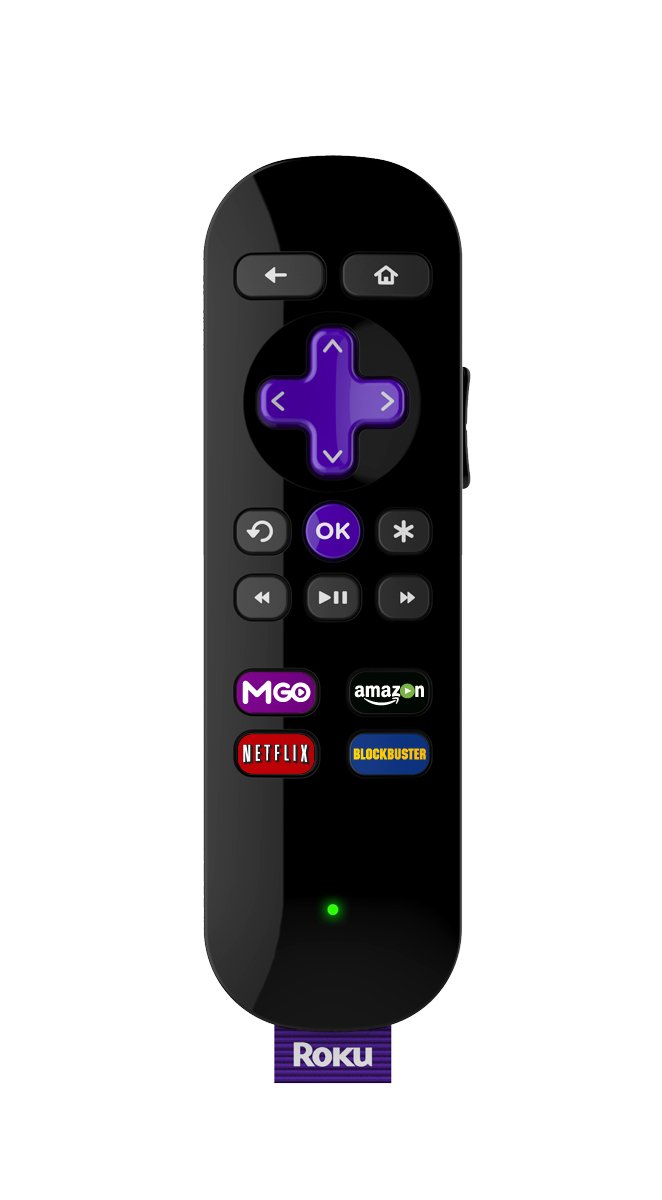

🎬 Stream smarter, listen privately, binge endlessly!
The Roku 2 Streaming Player combines lightning-fast performance with access to over 1,800 streaming channels, delivering vibrant 1080p HD video. Its enhanced remote features a built-in headphone jack for private listening, perfect for late-night viewing without disturbing others. With dual-band wireless connectivity and seamless mobile app control, Roku 2 offers a versatile, user-friendly streaming experience tailored for the modern entertainment enthusiast.
| ASIN | B00F5NB7MW |
| Batteries | 2 AA batteries required. (included) |
| Best Sellers Rank | #323,822 in Electronics ( See Top 100 in Electronics ) #1,200 in Streaming Media Players |
| Brand Name | Roku |
| Color Name | Black |
| Customer Reviews | 4.3 4.3 out of 5 stars (2,549) |
| Date First Available | September 25, 2013 |
| Is Discontinued By Manufacturer | No |
| Item Weight | 3.46 ounces |
| Item model number | 2720R |
| Product Dimensions | 3.74 x 3.74 x 1.23 inches |
| Special Features | Remote with headphone jack |
J**S
Excellent and very flexible, especially with Twonky Beam app. Can stream Jetflicks TV shows using TwonkyBeam.
This device works great to stream media directly from the Internet or from an audio/video from your tablet. It has built in support for Netflicks, Blockbuster and streaming video TV shows and Movies from Amazon Prime. You need accounts for each of those, all of which I had except Blockbuster. Hulu also has direct support as a channel. If you want to stream something that is not supported as a "channel" on Roku you can probably still stream it to your TV. For instance, I love jetflicks which has a small fee per year for hundreds of seasons of episodes of TV shows, including current ones. (jetflicks.com) They also have a High Def option which is well worth it. Jetflicks does not have direct support on Roku yet but they are currently working on it. I found success using TwonkyBeam to play jetflicks on Roku from my phone and tablet. Add Twonky as a channel on Roku. Download Twonky Beam on your phone or tablet. Start the Twonky Beam app then open jetflicks by typing in the Search URL "jetflicks.mobi" or by adding a bookmark of "jetflicks.mobi". Start a subscription or log in. Select and start playing the episode you want. It will start playing on your mobile device. Refresh the URL box under the "Play Internet media" header TWICE. This will light up the "beam it "icon" in the top gray menu. (Usually Twonky activates automatically on Roku when I tell the Twonky Beam app to "beam it". If not use the Roku remote to activate the Twonky channel.) Select device to "Beam" to as your Roku device. Click the Beam it bar and the video will start over on your television. You can pause it, but can not move along the timeline. If you stop it you will have to start over. Hope this helps. This is the best fix I know of for now with jetflicks. TwonkyBeam is excellent. It allows you to stream a movie that resides on your mobile device, or digital streams from the Internet, or media on your home network, or download media to your mobile device for later viewing. Download the Twonky app onto your mobile device and the Twonky channel on your Roku.
T**A
Twice the price as Chromecast, A BILLION TIMES BETTER
I purchased a chromecast when I got my new tv and it worked... for about two days. After that it disconnected itself randomly and I would be able to watch maybe one episode of Wilfred before I either just couldn't watch TV or would have to reset the whole system and set it up from scratch. ROKU ROCKS! Easy setup, but the Roku 2 DOES NOT COME WITH AN HDMI CABLE. It only comes with the three prong component cord, which is fine if you're not concerned about HD quality or you actually remember how to make sure those are connected right (I don't!). I got my HDMI cable for $5 at a stereo supply store, so this extra purchase didn't break the bank. Once you've got the box connected to both your TV and your wireless internet connection, and you've setup your account and chosen channels on your Roku.com account, download the Roku app for your iPhone and Android. "Why would I do that if it's got a remote?", here's why: do you want to use directional arrows to log into your Netflix, Hulu Plus, and Amazon Prime accounts? Using the phone app allows you to use the keyboard to fill in all that information so you don't have to do it letter by letter. Note: In order to use these channels, you will need an active account with each service. The remote has four dedicated buttons, including a Netflix button. This is amazing! The Roku2 doesn't have a ton of lag time when switching between channels (Channels are the different apps such as Netflix and Pandora loaded on the device), and it's almost incredible how fast it loads the episodes. You can choose which channels are loaded on your Roku by logging into your account on the Roku website, which you will create during the initial setup. The thing that sets the Roku 2 apart from its other Roku buddies is the headphone jack on the remote. If you are watching TV the regular way, and plug headphones into the headphone jack on the Roku2 Remote, it mutes the sound on the TV and makes the headphone volume controllable by the buttons on the side of the remote. This is great for a bedroom television to avoid disturbing your partner or for those late nights where you don't want to wake up the house.
Trustpilot
1 week ago
1 day ago