We remain fully operational. Our teams are working around the clock to ensure your deliveries continue safely.

DOWNLOAD THE APP


Customer Services
Copyright © 2025 Desertcart Holdings Limited
DOWNLOAD THE APP


🔥 Elevate Your Gaming Aesthetic!
The Rosewill CULLINAN MX-Red is a mid-tower gaming PC case designed for performance and style, featuring three sides of tempered glass, excellent airflow with pre-installed LED fans, and support for advanced cooling solutions.


| Number of USB 2.0 Ports | 2 |
| Number of USB 3.0 Ports | 2 |
| Brand | Rosewill |
| Series | CULLINAN MX-Red |
| Item model number | CULLINAN MX-Red |
| Item Weight | 22.9 pounds |
| Product Dimensions | 19.57 x 18.78 x 8.54 inches |
| Item Dimensions LxWxH | 19.57 x 18.78 x 8.54 inches |
| Color | CULLINAN MX RED |
| Manufacturer | Rosewill |
| ASIN | B06XY9G7ZC |
| Is Discontinued By Manufacturer | No |
| Date First Available | March 30, 2017 |
D**Q
Does everything right - detailed feature/guide here.
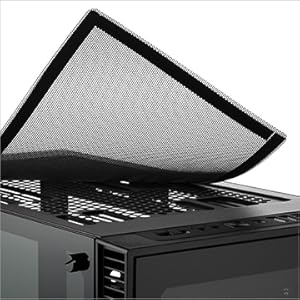
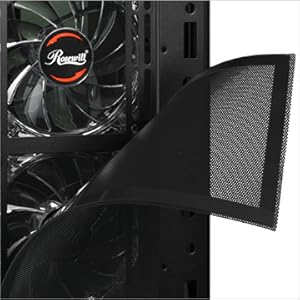
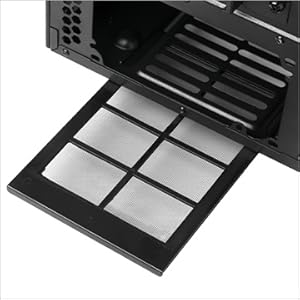
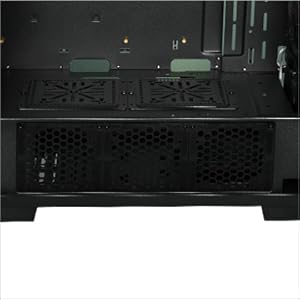
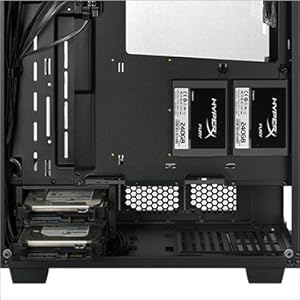
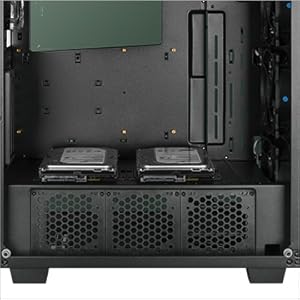
This was an absolutey phenomenal product. I was iffy on getting it, but after a quick skim of all the positive reviews with high ratings, I grabbed it. Now for the rundown, as well as a detailed look at what it features and tips on building in it.Update 2023-04-26Guess what? I'm STILL using this case. It has gone through four builds and EVERYTHING is still running with no issue. If that doesn't tell you to buy this case, I don't know what will.There is plenty of room to work where you need to.Both right and left temepered glass panels come off, and utilize large, thick screws with grips on them making it a cakewalk to do.The entire front plastic cover pops off, exposing the air filter.The air filters are 1. Metal-like material, 2. Magnetic. This means that removing them to clean them is amazingly easy.The four fans you see featured are preinstalled, and large in size (120mm). This means you don't have to buy any fans to go with it (I made that mistake, but at least I have extras now)The right side of the tower is designed incredibly well - here you will find the slot for your power supply, the 3 thin slots for your solid state drives, and the 2 pullout trays for your hard disc drives.On the bottom of the unit, there is a fan cutout for your power supply, and a rubber guard separating the PSU housing from where the motherboard will be, making wire management easy as any excess wires can simply be stored underneath in the PSU cubby.Speaking of fans, they are so silent you can't hear them. No I'm serious, the fans make zero noise. The only noise you hear is air moving, but the fans themselves just seem like they aren't there at all. It also helps that the tempered glass covers have rubber seals where you screw them in, meaning it also blocks out a lot of the internal noise.The three fans in front pull air in from the sides, and the rear fan at the top of the back blows it out - it's a very well designed air flow system. The air flows in and is guided up and to the top allowing the cooler air to remain in the tower longer to soak up the heat before being funneled to the back top, meaning the air flows where it needs to and stays long enough to actually collect heat in the first place.The top filter area of the tower is nice and long, 360mm to be exact - with the various mounting locations you can put screws in (it also comes with screws for every hole you see) it's easy to mount a water cooling loop, or more fans. The top also has premade holes, so mounting fans or a radiator + fans for your water cooling loop is incredibly easy.The kit comes with spare screws, for us less agile folk - losing a scew or two isn't nearly as bad.In the back, there's a little slide you can lift up - unscrew the screens and put in your graphics card. Then, you can slide it back down - it covers the bright metal piece that you screw in and makes it look much nicer and cleaner.That's all I can think of to cover the great functionality of the product, let's move on to notes of interest.Make sure your power supply has SATA connectors for future projects.The power, reset, and button lights respectfully are already Velcro'd and nicely together so you don't have to fool with organizing them.I don't know if you'll have this issue, but if you build everything and power the PC but your fans aren't working - don't fret! There is a switch on top with the letters L S H or something similar (can't remember ATM) , I had to switch it to the right to get the fans + their lights to work. If you switch all the way to the left the fans will run but won't be lit up.The 4 pre-installed fans aren't connected to anything - what you actually want to do is connect them to a little black board on the right side of the tower, these have 3 prongs in them to fit the fans on to, and the black board is what will connect to your motherboard - so the only motherboard fan slot you use is the CPU one, the others aren't needed - if you have a three pin connector. This is actually what makes the fans run so keep in mind the motherboard won't recognize them (with the exception of the CPU fan, if you are not water cooling.)Well, that's all I can think of to mention. Overall this is a fantastic product, and with its fantastic price tag (I got mine for just 70 - 80 USD) it really can't be bested. This case I'd absolutely recommend to anyone, and will be using it in all future builds.
O**R
Just what I was looking for
I almost got a Corsiar or Thermaltake but Rosewill have never done me wrong, I was using one of Rosewill's micro/mini towers for the compact-ness, but once I started adding cards and fans, even my modular PSU started to clog the poor small case with loomed wires killing airflow and internal space (not to mention getting caught in the fans). Now, I love the mini towers by rosewill, they are very well built, and if I needed to build another bare bones PC, I'd buy another mini Rosewill.So, THIS Rosewill Mid Tower, I have never built a bottom PSU case before (my old-ness calls it BTX), and I love the fact that you can mount the PSU facing up or down and the fact that Rosewill includes a fan filter for the price is just one more nice detail that I noticed.I also bought a Pioneer SSD at the same time (you know, I would be inserting product links to the above corsair and thermaltake, as well as the SSD, but amazon, just.... nvm), and I was exstatic to see a 2.5 to 3.5 screwless mounting adapter.There's plenty of fans already set up in the same airflow pattern that I would personally use if they weren't pre installed. Heres another plus concerning the fans: great cable management. My micro ATX board only has one case fan header, and adding another output to my modular PSU in the old case was just not physically possible, but now I can use all rails/outputs and still have tons of extra room.Also Have room to replace the poor AMD A6's OEM CPU fan with a Hyper T2.HOLY MOLY, I can even mount my optical drive, YES I still use them!USB 3.0 headers, all black interior, nice black hardware, decent but tight thumbscrews, front fan has a decent blue hue but runs slow.Only real con: the standoffs and pre drilled standoff holes are quite horrible but that's easily remedied if assembled with care.
Trustpilot
1 month ago
1 month ago