

Desert Online General Trading LLC
Dubai, United Arab Emirates
Desert Online General Trading LLC
Dubai, United Arab Emirates


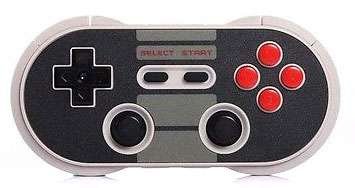
Mutiple modes supportedSupports both Bluetooth & USB connectionFirmware upgradable for function expansion in the futureCompatible with IOS(iCade only), Android,Mac OS and Windows devicesProgrammable keys to easily setup combo key and turbo key
A**Z
Works in Linux (Ubuntu 16.04), Nice Feel and Light, Great for Retro Gaming
This controller is great for retro gaming. Works in Linux Ubuntu 16.04. At first I was having range and lag issue, but I discovered that Bluetooth can get interference from the computer (from other USB devices, etc.). It is best to use on USB 2.0, but I was still having issues with lag (like 1 second delay after pressing a button). It turns out you have to get a USB 2.0 extension cable, and then place the Bluetooth adapter on the back of your desk, away from the computer. After doing this I got great performance and no more lag. For Ubuntu you want to use it in Android mode, if you use X-Input it will move the mouse around when touching the analog stick. When pairing, you have to hold down the Select button the whole time until it's connected. Also, Kega Fusion has an issue mapping controls to the D-Pad. This took me days of pulling my hair out, but I found a solution. You need to use an app called jstest, which will allow you to remap the axises so that the axis 7 and 8 are on the top, then Fusion will be able to find it. Now things are working great, love this controller.
M**Y
Awesome, great build, works almost perfectly.
Sweet game pad. I'm not a hardcore gamer, I just bought this to play some Gamecube games on Dolphin Emulator on my MacBook. Works pretty well and brings me back to when I was a kid playing my original NES. Feels really solidly built. Setting it up is only slightly finicky because the instructions included don't appear to be correct, but I've found that I just need to hold the on button for a few seconds on the controller and keep it near the computer w/ the bluetooth on and it's discoverable. All buttons / joysticks map perfectly. Only issues is sometimes the controller doesn't recognize the computer (maybe 1 in 20 times I use it). To work around this, I've found that holding the wifi/reset button on the bottom right of the controller for a few seconds makes the lights turn purple so it clears out the bluetooth connections and I just reconnect. Mapping stays memorized in the computer so it's really not much of a problem. Other problem I've had is sometimes everything looks to be mapped right but when I launch Dolphin, the game seems to think the joystick is held in the down direction. Restarting the emulator and controller once or twice has fixed this the 2 or 3 times this happened. Overall, very happy with my purchase and would highly recommend if your use is the same. Just wanted to overly clarify any issues you might run into which ultimately don't affect gameplay. Enjoy!
T**I
Best bluetooth gaming controller for the money
Love and plan to buy again. The feel was heavy but not cumbersome and the buttons were responsive and comfortable. The pairing process was as simple as can be and the charge last a pretty impressive time only requiring a charge after about two days of casual gaming use and about 6 hours of straight playing. I highly recommend for the game that wants a small travel controller that is well built. The controller was small but not too small. I was able to pair it to multiple devices successfully with no real problems up to and including, Nintendo Switch console, Raspberry Pi 3b+ (running retropie) my Smasung Galaxy Note 8 cell phone, my Amazon Fire TV Stick, and Amazon Kindle Fire 8. I could not give this anymore praise to this device and yet I forgot to mention the awesome aesthetic retro design. I loved it and plan on sticking my gaming inventory with more of these. A+ 8bitdo!
S**R
D-pad is alright for most games.
So this controller is decent. The D-pad feels great at first but if you start playing platformers that require up and down inputs this thing missfires like crazy. Left to right and you sometimes will get up/down. So in most cases its not that big of a deal. The end is nigh / Super Meat Boy / Mario Kart 8 it feels really good, but for games like Slime-San where you need to hold right then quickly dash up or down this thing will ruin a lot of runs. sometimes you will dash straight up and die when you felt like you were holding straight left.The Buttons feel great. When I initially got this controller the Y button felt a little mushy but over time it broke in and now feels like all the rest. The L and R are fine. no complaints. The R2 and L2 seem like they are in an awkward place but it actually didnt bother me. It still feels like a comfortable placement.Now lastly the joysticks. These are pretty bad. They arent terrible but they arent good. They have good resistance but they are very small sticks. They also are a bit loose so they wiggle a bit before you get a directional input.
R**T
This little thing is pretty sweet. Not perfect
This little thing is pretty sweet. Not perfect, and until I did firmware update had some trouble reconnecting after turning it off, but after update no problems whatsoever. The D-pad is a little quirky and it's somewhat easy to accidentally hit up and left/right, but you kind of figure out to push on the lower corners and it doesn't happen. I was quite surprised how accurate the thumb sticks are-- at least for how tiny this thing is. I have a SteelSeries Free (now known as the Stratus) laying in a junk drawer now, and that thing is a joke in comparison. If you have average size hands the D-pad is nigh unusable. But that's the Free/Stratus, the 8Bitdo Pro controllers are fantastic and other than R1/L1, all the keys are pretty easy to hit. My recommendation is, if you know the shoulder buttons are going to be important, put the heavier lifting on the R2/L2, it's so much easier to wrap your fingers all the way around the outside than curl up trying to get R1/L1.The picture kind of made it look bigger, but I'm not complaining about the size (get your mind out of the gutter :P). It's about the the same dimensions of your smartphone, so if you think you want to pocket it, it'll fit. And still bigger and more comfortable than the Stratus.
A**S
Works pretty well
This thing is awesome. I have so many games on my phone and this makes gaming so much easier. I have many emulators on my phone too and that's what I usually use this for.Not sure how the touch screen emulation thing works. never did get that to work.
Trustpilot
1 day ago
1 month ago