
DOWNLOAD THE APP


Customer Services
Copyright © 2025 Desertcart Holdings Limited
DOWNLOAD THE APP


🖋️ Elevate your digital writing game—because your ideas deserve the best pen.
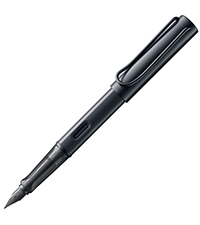
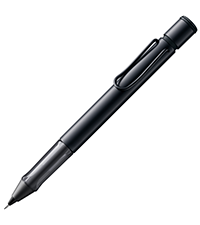
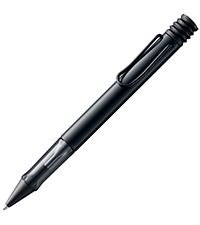
The Lamy AL-star EMR black stylus pen combines classic ergonomic design with cutting-edge Wacom EMR technology, offering over 4000 pressure sensitivity levels for precise writing and drawing on most Android devices. Battery-free operation ensures uninterrupted creativity, while included replacement tips and a functional button enhance usability. Ideal for professionals seeking a premium, paper-like digital writing experience.






| ASIN | B08K1JT1C2 |
| Age Range Description | All Ages |
| Age range (description) | All Ages |
| Best Sellers Rank | 30,628 in Computers & Accessories ( See Top 100 in Computers & Accessories ) 16 in Digital Pens |
| Body Shape | Cylindrical |
| Brand | Lamy |
| Brand Name | Lamy |
| Closure Type | Click-Off Cap |
| Colour | Black |
| Customer Reviews | 4.4 out of 5 stars 2,478 Reviews |
| Drill Point | POM tip |
| Global Trade Identification Number | 00021274062716 |
| Grip Type | ergonomic grip |
| Hardness | POM |
| Included Components | Lamy AL-star black EMR stylus pen, 2x Replacement Tips, Tweezers |
| Ink Base | Water |
| Ink Colour | Black |
| Ink colour | Black |
| Is the Product Left or Right Handed? | Ambidextrous |
| Item Dimensions | 13.9 x 1.3 x 1.3 centimetres |
| Item Type Name | Digital stylus pen |
| Item Weight | 24 Grams |
| Line Size | 0.7mm |
| Manufacturer | LAMY |
| Material | Plastic |
| Material Type | Plastic |
| Model Name | All-star EMR |
| Model Number | POM tip black |
| Pattern | Single |
| Product Warranty | no Guarantee |
| Recommended Uses For Product | Home |
| Special Features | Ergonomisch, Taschen Clip |
| Style | POM tip |
| UPC | 021274062716 |
| Unit Count | 1.0 count |
| Writing Instrument Form | Roller Ball Pen |
| Writing instrument form | Roller Ball Pen |
T**8
Works really well with the re:Markable2
This was an investment, as it's expensive for a tablet stylus. However, from experience I think it's worth every penny. Two reasons: a) It's by far the best stylus I've used with my re:Markable2 tablet. It actually feels like using a pen on paper, and you can write at normal handwriting speed with it, unlike the many cheap £10-£15 stylii out there. This alone makes it worth it, as it actually makes writing on the re:Markable a pleasure. b) It's WAY more comfortable to hold inthe hand than the thin "stick" stylii that fill the chap end of the market. Not a big deal for a few scribbles, but using those things gets tiresome if you're writing out a brain dump over many pages. Infact it's like writing with a decent rollerball pen, such as the ArtLine's, which are particularly pleasurable to write with. If I had one minor criticism, it's that the clip is a bit too big to fit on the side of the folio case I have for my re:Markable. However, that's a personal preference as I travel a lot, and if I used it only at home, or I had a case with a place to clip it to, it's not a big deal, and can be remedied by buying a case that has this (I bought my case before buying the stylus). On the bonus side, it also comes with two replacement nibs, which is even better as I chose this because I'd already read that the nibs are long lasting. Summary: Expensive, but worth it. If you have a re:Markable2, you'll enjoy using this stylus with it.
M**S
Solid Product - 10 minute reaction
This is a brilliant product. Only been using it a few minutes, so if my view changes I will update this review. It feels good in the hand. Writes well. Massive bonus is the lid aside from being metal (I think) will protect the nib and tip of the stylus from getting damaged. My RM II stylus got damaged because it didn't have a lid and the bag it was in fell off tthe the seat it was on (it was in its case as well). I had the RM II Stylus with the eraser, but I think with the RM II interface, it's actually easier to select the eraser option than it is to rotate the stylus to use the eraser end. So it's true the eraser end doesn't work on the RMII but you don't need it. Seriously, try using the stylus you have to select the eraser option. The RM II stylus should be so much cheaper, in my view, way overpriced. The only downside is the magnetic holder on the RM II doesn't work, but it's a bigger stylus and it's not practical. But the bigger size is better in the hand. Not sure if this is a negative point. Get a case with a stylus holder, and you should be good :-) It actually feels more like a normal pen and pad because of the lid , size , shape and design etc. I have yet to confirm my old remarkable nibs work in this pen. If they don't, I will update this review and let you all know. It was a deciding factor for choosing this stylus. However, others have said it does accept the RM II nibs. To use the button on the RM II joshualowcock.com then add the following guide/how-to-install-the-lamy-al-star-pen-button-eraser-hack-on-the-remarkable-2 you can then use the instructions to enable the button
L**S
Good Pen for Kindle Scribe 2024
I have been using this pen on my new Kindle Scribe 2024 for a number of hours only (received it this morning) and I do like it indeed. The unique thing about it for me is that it has a 0.35 mm tip, compared to the regular 0.70 mm. The built quality seems good so far, but it's too early to judge, isn't it? The Function Button is convenient and responsive, the grip is also good and comfortable. As far as I know, this is the only digital stylus with a classic pen design out there, which is also unique. Only issue with this pen is that its brand name will always remind me of our spineless Foreign Minister.
A**M
Works with the Onyx Nova Air
My Onyx Nova Air pen broke and I needed a replacement, I chose this because of the cap, as I’m hoping to protect the pen in the future. It’s a very well made pen, writes beautifully, but it is a lot thinner than my old Onyx Boox pen. The erase button is very useful.
J**K
Brilliant!
I absolutely love this stylus! I should add that I have been a user of Lamy fountain pens for as long as I can remember, mainly the Al-Star or Safari, and have built up a reasonable collection of them over the years. My 14 year old son also loves Lamy's fountain pens and uses them all the time at school. As such, when the time came for us to try an e-ink tablet, mainly for note-taking, my big fear was that the included Styli'i would be terrible, and so they were. I tried a Kindle Scribe and a Boox Air 2 Plus, and tried the included stylus which shipped with both. Apart from being far too thin for my chunky paws, they really didn't write that well. Given that Kindle and Boox both use Wacom EMR tech for writing which allows any compatible stylus to work on any EMR device (not iPads though which are not EMR), I tried the Boox stylus on Kindle and vice versa and in each case the result was sub-optimal. I was about to send back both tablets and consign digital notetaking to the 'it was a good idea at the time' category of dismal failures, when I happened across the Lamy Al-Star EMR on Amazon, and bought it for a really reasonable price compared to the (overly expensive) OEM options which had shipped with the tablets themselves. Inside 18 hours (a super fast delivery), I had the reassuring heft of at Lamy in my hand again, and I completely fell in love with digital writing. It is completely compatible with both devices, and as I then chose to keep the Scribe and return the Boox, I then configured the Lamy button (which is beautifully positioned for me at least) within the Kindle settings to provide me with the eraser function. Other functions seem to configure just fine too. The writing experience is excellent, far superior to Kindle's own stylus, it is brilliantly well made, and compatible with other Al-Star pens if you want to give the body and cap a colour change, however I see that a widened range of EMR's is coming soon from Lamy. It feels like my old faithful has had the digital transformation it needed to see us happily working together long into the future, and so for me the Lamy is super highly recommended. My 14 year old loves it too, which worries me as I think he now has designs on my Scribe...
R**E
Good Pen
The pen has a good thickness to it so it feels good to hold. I previously had the remarkable pen which feels very light in comparison. The pen feels solid and it works well with the remarkable nibs. I actually do like the nib it came with which has a pointy tip. I'm interested to find out how long the Lamy nibs will last in comparison to the remarkable ones. Having tested just on the remarkable tablet RM1, I can only give feedback that the pen is just as good as the original rekarkable pen. There are no delays or weird hapoenings. It works the same. The only difference is the feel of the pen and the quality of the pen. I purchased this pen because my Remarkable pen had a bit chip off by the nib which stopped itnfrom working and super glue brought it back to life for a short period but the plastic was weak. The Lamy seems a lot stronger and it is cheaper than buying a replacement Remarkable pen (marker). 1 thing that is a bit annoying (On Remarkable) there is a button where you hold the pen and sometimes, i press that button and on the Remarkable it created a straight line away from where you was writting. A bit strange but annoying at times. It depends on how you hold it but after a lot of writting insend to move my grip on the pen, i can probably adapt but i wished the button just did nothing.
G**Y
Great wee pen
This is a great wee pen I'm using it on my fabulous remarkable tablet. It works great and find it easy on my sometimes sore hands. Light weight. Fort my small hand very well. Highly recommend this product to anyone using a writing tablet. Great value for money
T**T
Used with the Boox Note Air 4c
This pen is a mixed bag. Pros: - It is comfortable to hold, thanks to the ergonomic, plastic grip, which is smooth and pleasant to the touch. - It is also very nice to have a button, which is programmed to be an erasure out of the box. Boox's standard pen doesn't have this feature, which is a real shame. Cons: - The writing feel is a disappointment. It's far more "scratchy" than the standard Boox pen, and not in a good way - The erasure button is in a bit of a silly place, so that it's uncomfortable to use with your forefinger, However, if you use your thumb, it's good enough - The lid is larger and more cumbersome than it needs to be. They could have made the design far more sleek. In short, while this pen is decent, at £40 it certainly feels overpriced. However, until a strong competitor comes along, this seems like the best replacement on the market.
Trustpilot
2 days ago
2 weeks ago