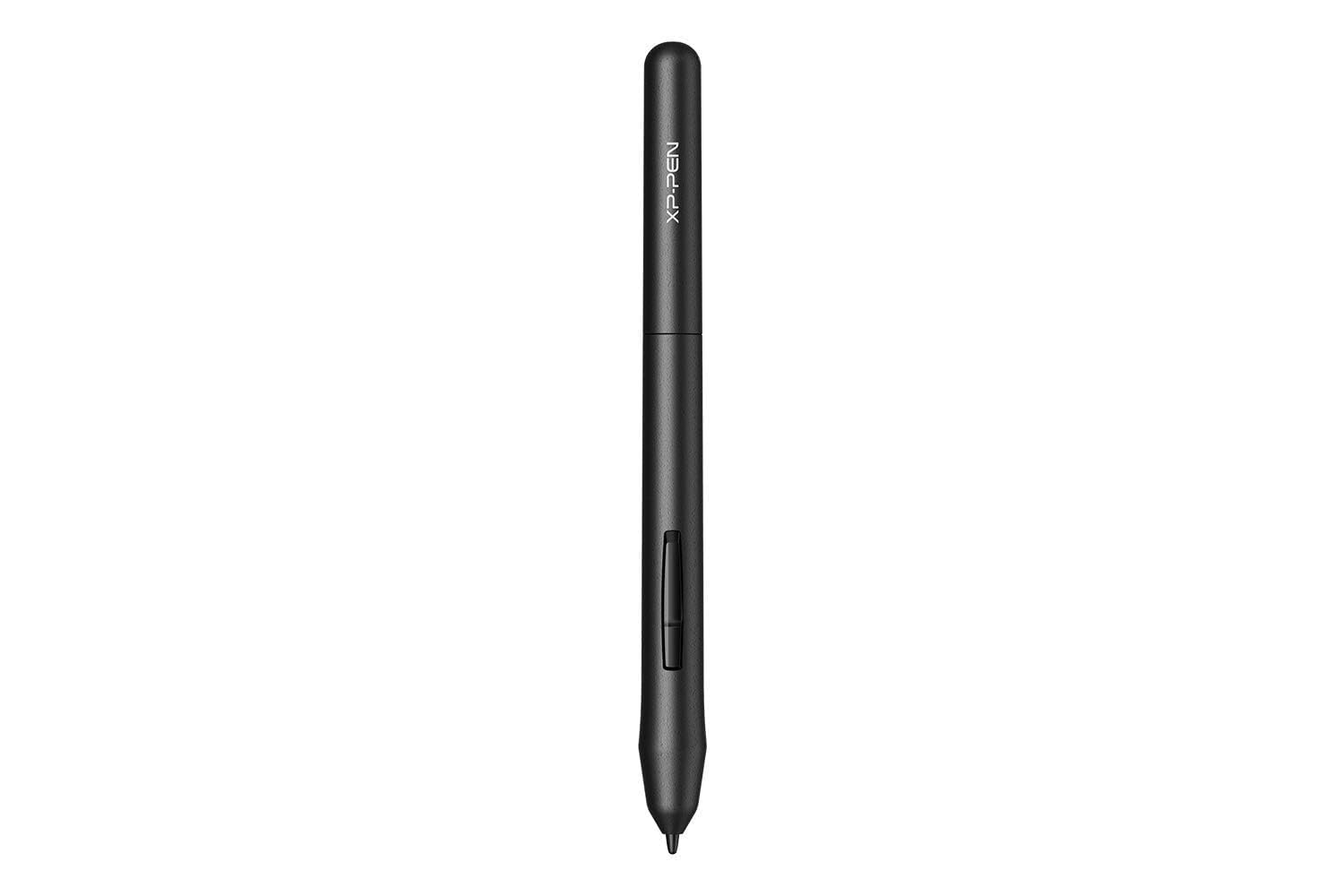
✍️ Draw Boldly, Create Freely—No Limits, No Charging!
The XPPen PN01 is a battery-free stylus engineered for XP-Pen Star G640 and Star G430 graphic tablets, featuring 8192 levels of pressure sensitivity for ultra-precise drawing. Lightweight at just 10g, it offers a natural pencil-like feel, eliminating the need for charging and ensuring uninterrupted creative flow. Designed for professionals and creatives seeking seamless, high-performance digital artistry.














| ASIN | B015FHH41K |
| Best Sellers Rank | #67 in Computer Graphics Tablets |
| Brand | XP-Pen |
| Color | black / black |
| Customer Reviews | 4.7 4.7 out of 5 stars (752) |
| Date First Available | September 16, 2015 |
| Is Discontinued By Manufacturer | No |
| Item Dimensions LxWxH | 1.57 x 4.92 x 8.86 inches |
| Item Weight | 0.353 ounces |
| Item model number | Star G430S |
| Manufacturer | XP-PEN |
| Operating System | Windows e MacOs |
| Product Dimensions | 1.57 x 4.92 x 8.86 inches |
J**E
Works right out of the box
Works great with my XP-Pen Star05! My old pen/stylus was malfunctioning, but this one worked perfectly, right out of the box.
A**M
Quality Star Series pen
XP-Pen really did a good job with this pen. The build quality is outstanding, and pretty durable too. It's thinner and lighter than most digitizing pens which for me is perfect. I have been using it with my Star03 tablet and it works great. There is some jitter to the lines, it's not very much though and using a smooth stroke feature like in Autodesk's Sketchbook program fixes that issue. My favorite thing about this pen though is the pressure curve. It is smooth and even, only jumping when really pressing down. I only own a Star03 currently so I don't know whether or not this is the case with the other tablets in the Star series, I will update this review once I get my hands on a Star01, Star02, or Star04.
L**.
look no further...this is the one
This is my 3rd time buying this. And not because it breaks. Because my darn dog hunts for them and chews them to pieces. But I continue to buy the same one because it works so well.
Z**E
didn't arrive but box did.
ok so, the pen didn't arrive but the box it was SUPPOSED TO COME IN did. and judging by how the last pen i had the build quality is VERY good, i recommend using their products but this was just surprising since i've had no bad experiences from this company. overall i enjoy xp pen but this mess up has made me a little skeptical on their other products. thank you for reading, goodbye.
N**I
I like it.
still using it so I like it.
H**N
Great competitor for Apple for the price
I got this to try it for my girlfriend before spending the money on the Apple Pencil and this one works great and surprised us with the features one thing she really wanted was that pressure sensitive and it does and works perfect
J**Y
Great!
My daughter loves it and says it’s so easy to use and works great
S**N
light and works
XPPen works and is lifht weight.
G**P
Para o preço vale a pena, porém é importante dizer que faz falta os botões laterais para atalhos.
F**M
Muito boa no PC; usei no Windows com alguns aplicativos simples como ibis/mswinwhiteboard/mspaint3d/scketchbook e flui muito bem sem atraso qualquer percebido. Comprei para ser usado prioritariamente em PC, mas seria muito melhor se funcionasse também em celulares/Android; porém, mesmo eu tendo pesquisado antes de comprar e não encontrado qualquer referência se funcionaria em celular/tablet/Android, comprei ainda assim por estar barato e insisti em testar em alguns celulares Android10, Android13 e devido suporte OTG (com adaptador OTG) mas nenhum funcionou. Não gostei do cabo de conexão USB (USB-A na ponta) que vem nele fixado, suponho que se deva tomar extremo cuidado com ele para não encurtar a vida útil pois se quebrar, já era; opino que esse cabo não deveria ser fixado e sim livre para ser usado qualquer cabo externamente mediante alguma conexão nele (que seja USB-C, USB-mini, sei lá), mas achei horrível ser fixado diretamente no dispositivo sem chance de substituição; no meu caso vou tomar bastante cuidado. Enfim, pra mim só não pegou 5 estrelas devido a esses motivos acima: a quem isso não importar, é muito bom. Se for importante funcionar no celular ou se achar a coisa do cabo USB fixo muito ruim, melhor procurar outro modelo/fabricante que esteja com valor só um pouco superior que atenda a isso.
J**S
Esperava mais do produto, apesar de ser um produto claramente de entrada. O driver pra Windows é ruim e não consegui faze-lo desconsiderar o toque da palma da mão, necessário quando o usamos para assinar um documento.
L**O
O produto é razoável, a mesa digitalizadora pode ser facilmente arranhada então procure algum tipo de plástico fino para impedir de ela se arranhar mesmo com o uso da caneta. Não veio a braçadeira para caneta a que está na imagem isso me deixou frustado, mesmo que seja algo simples. Prós: O programa de configuração é melhor que as da wacon, de preço similar muito fácil de usar e muito simples de instalar. Contra: existe a possibilidade de usar ela no Android tem um aplicativo que faz ela funcionar, então o que da a entender que ela não funciona no Android por uma trava via software por parte da empresa, fazendo só as placas mais top funcionar no sistema android. Nome do aplicativo Android Devo draw. Dica: fixe algum platico na mesa para poder usar a caneta, ela se arranha fácil.
W**M
A caneta não responde na tela do notebook
Trustpilot
3 days ago
1 month ago