We remain fully operational. Our teams are working around the clock to ensure your deliveries continue safely.

DOWNLOAD THE APP


Customer Services
Copyright © 2025 Desertcart Holdings Limited
DOWNLOAD THE APP
![ineo M.2 2280 PCIe 5 SSD Rocket Heatsink Built-in Cooling Fan [M3]](https://m.media-amazon.com/images/I/61nUPy6ztjL.jpg)
🚀 Keep your SSD cool and your workflow hotter — because throttling is so last gen!
The ineo M.2 2280 PCIe 5 SSD Rocket Heatsink with built-in 30mm RPM fan combines 4 pure copper heatpipes and smart fan speed control to drastically reduce SSD temperatures to 40-45°C during intense data transfers. Designed exclusively for desktop M.2 NVMe 2280 SSDs, it includes all necessary mounting accessories for quick installation. This cooler ensures ultra-quiet operation while preventing thermal throttling, making it an essential upgrade for professionals demanding peak PCIe 5 SSD performance and longevity.


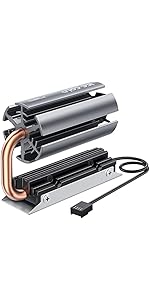


| ASIN | B08FX7JZ7H |
| Best Sellers Rank | #261 in Heatsinks |
| Brand | ineo |
| Brand Name | ineo |
| Cooler Heatsink Compatibility | M.2 NVMe 2280 SSDs |
| Cooler Heatsink Material | Copper |
| Customer Reviews | 4.3 out of 5 stars 331 Reviews |
| Item Dimensions L x W x H | 2.95"L x 2.05"W x 0.94"H |
| Item Weight | 2.93 Ounces |
| Manufacturer | ineo |
| Mounting Type | Chassis Mount |
| Product Dimensions | 2.95"L x 2.05"W x 0.94"H |
| UPC | 797716581809 |
| Unit Count | 1 Count |
D**E
Works extremely well
Completely eleminates thermal throttling and drops max temps to 40-45°C during max speed writes of the entire drive at 3GBps and I got the same results when encrypting the drives. They're 2TB Sabrent TLC drives and they ran at the previously stated temperature max during the encryption and other long lasting high speed transfers with the base temperature inside the case being in between 32 and 33°C. For anyone who is interested, Ineo's other model works almost as well. If you don't encrypt drives or do lots of large file transfers or 5-10°C on a Sabrent TLC 2TB doesn't bother you, their other model does also work quite well and you can close the performance gap by applying some Noctua thermal paste to the chamber where the heat pipe rotates when the halves are unscrewed, completely at your own risk, of course. The actual heatsink on that on is slightly bigger, but it has the advantage of being movable into a position where it doesn't interfere. This one performs a bit better due to the solid aluminum that has fan driven air flow over the fins on it and because it's two heat pipes being spread out, draws in more heat faster than the one larger heat pipe of the othet Ineo model m.2 drive heatsink. Neither of them take up as much space as they look like they do in the pictures, but they are large enough to effectively dissipate the heat they deal with. I would recommend getting better thermal pads as the ones they ship with are fine, but if you're going this far with your cooling, you are definitely going to want to get higher performance thermal pads. Make sure you know whether you have a one or a two sided drive, both will fit in both models, but you will need to know what kinds and amounts of thermal pads you will need if you are getting better ones. Also note that the bottom may require part of a thermal pad to level it if it is two sided of has a different chip on the bottom, which shouldn't happen but I've still seen it (my guess is that manufacturers and designers have to get creative to work around shortages). None of this is a problem for people who are going to use the included thermal pads as they provide plenty and the... bottom tray is actually adjustable, so make sure you are applying pressure when tightening the screws. Also, especially if you adjust the angle of the other model, make sure that you remember that heatsinks are more exposed bare metal inside your computer, so disconnect the power, discharge the capacitors however your motherboard and power supply manufacturers tell you to, usually by physically unplugging the power cord and then switching the switch on the power supply to on and hitting the start up button, waiting 5-10 seconds and then start up button, and repeat until several times after you see nothing try to activate. I also had to have the contact side of the drive sticking out a couple of millimeters so that the assembly would screw in properly. I am genuinely confused by this as it seems to indicate that the drive somehow became shorter. If Ineo could solve that little physics mystery, I'd think they'd not only get a Nobel Prize, but we would all be able to buy physically and , thus, storage sized devices that were much larger but fit into smaller areas and having a 2.5in SSD or even a full 3.5in HDD sized nvme drive arrive in the mail and then being able to put it into an m.2 slot would help with alot of problems with ssd's in general, but it would also just be really fun
J**0
Best Cooler Out There for M.2 Drives!
I wouldn't say the airflow in my MSI Sekira 500x case is amazing, but it is sufficient to keep things cool. Most of my temps are fairly low around 40c at idle(Even my Ryzen 3900x). I have a 360mm rad in the top, 2x200mm fans in the front and a 140mm in the back. I was using the stock passive heatsinks on the MSI x570 Meg Ace Mobo for my 500Gb and 1Tb Sabrent Rocket 4.0 drives. The 500Gb has been fine with the passive heatsink occasionally topping out around 49c, but it only runs my OS and that's it. The 1TB however, would get really warm during gaming up to 65c. Typically between 36-40c at Idle. With the INEO Rocket Heatsink, My idle temps stay solid at 30c and haven't hit over 47c in heavy gaming. This cooler is AMAZING! I would DEFINITELY recommend! I see a few reviews here saying they used Grizzly Thermal tape. Don't bother wasting your money. The tape that comes with the INEO is just fine, and works great. Also, I can't hear the fan over my other case fans. My fans are usually on full blast and I wear headphones, so all the fan noise doesn't bother me anyhow. I will be replacing the passive heatsink covering my 500Gb Sabrent Rocket 4.0 with the INEO Rocket as well. Thank You INEO for such a great product!
J**N
Exceeds expectations; Be mindful of where you need to install it
I had three things I was skeptical about with this product: 1) Build quality 2) Proper fitment inside of PC* 3) Major cooling improvement (for Samsung 970 EVO Plus 1 TB) It was fine on all counts, and exceeded promises on cooling performance. Build quality: the heat pipes are visible and appear to be actual heat pipes, not fake. I saw no defects in the machining or fitment of the components of the final assembled product. *Proper fitment in PC: Note that I was installing this for my M.2_2 slot, which is below PCIe slot 4. It would not have fit under my sound card had I not moved it up to PCIe slot 2. If I wanted to use this cooler on my M.2_1 slot (where my system boot SSD is installed), it would not fit underneath my GPU in PCIe slot 1. Cooling Performance: My PC case is a Fractal Design Define R6, which is well ventilated and uses 3x 140mm Noctua NF-A14 fans for intake on an aggressive fan curve. Previously my Samsung 970 EVO Plus 1 TB would be at 49C idle/70C at load. After installing this cooler it's now at 30C idle/45C load with the fan rpm at around 20-40% (motherboard would only moderate the fans off of either CPU or motherboard temp; I chose CPU). On a more aggressive fan curve (about 65% rpm) it was 27C idle/36C load. Noise: Fan noise is negligible compared to the 140mm and 120mm case fans installed, though my NAS (with all 8x HDD's spooling and 2x 120mm fans) is still louder than my PC.
N**I
Works well, but it's so damn loud.
I got this because I forgot to add a NVMe heatsink to my PC when I had it custom ordered. It works well, dropping my SSD temp by ~10 degrees Celsius, but my god is that fan loud as hell. My PC before this part was quiet, barely audible, now this one small fan makes it sound like there's a tiny lawnmower inside it. I'll keep it for the benefits, but I wish I had done more research before purchasing it.
S**R
The Best M2 Cooler! It worths the money
This cooler is really doing it's job perfectly. I used it for my Samsung 970 Pro 1TB M2 SSD. It was getting very hot especially while making plots it was reaching over 60 Celsius degrees. And minimum (when M2 is idle) was over 40 Celsius degrees. I tried the other M2 cooler things and they didn't satisfied me so much. They dropped only 3-5 Celsius degrees. After installing this cooler the maximum temperature (M2 was really under huge load - plotting operation) dropped to 47 Celsius degrees from 61 degrees and minimum temperature (M2 is idle) to 36 Celsius degrees. Also room temperature was 35 Celsius degrees in this time. I believe the temperatures will drop more when these hot summer days over. I attached the Hard Disk Sentinel temperature history screenshots (daily average, maximum and minimum values) you can see the values there. Don't forget the apply the blue thermal pads both side of your M2. They are at the bottom of the box. Installing is very simple. It is very small doesn't take up space over the mainboard and doesn't disturb anything in the case. About the fan noise i really can't hear any fan noise :) I strongly recommend this cooler for your M2. Don't forget temperature is enemy of the computer components it reduces the performance and the lifetime of them. If you want performance and long lifetime for your M2 you should definitely get this item.
S**W
Very effective M.2 heatsink
Purchased this heatsink for Samsung 980 Pro 500Gb, which in my case was getting 77 degrees Celsius under load. I have separately purchased Thermal Grizzly thermal pads (1mm height each), as usually manufacturers cut costs and put crappy cheap thermal pads that are included with heatsinks. Thermal Grizzly pads and this heatsink together resulted in 33 degrees Celsius temp drop: from 77 under load to 44 under load. Heatsink is "tall", but fortunately m.2 socket is located just above video card (on my MB at least), so there is clearance between Video card and heatsink. As for heatsink fan, it has RPM range of somewhere between 1800 - 6800, speed is controllable, but not with PWM, it uses a DC Fan control method. In my case, it has around 4200 RPM (set to constant ) speed and is not audible at all, even when I open case... However, at Max speed it is audible, similarly to my x570 Chipset fan (MSI x570 Ace), but it never gets even close to max speed. Overall I am very happy with the purchase. It is expensive, but very effective to keep high speed Gen 4 m.2 SSD cool. Definitely recommend this purchase to anyone struggling with high m.2 SSD temps. Edit: Because M.2 on my machine located right above GPU, temps are a little bit higher, when GPU is hot. But still way below a passive default heatsink.
K**R
Better then I expedted!
My M.2 NVME drive was running to hot, around 60 to 65C. After installing this unit the temps are around 35C. It comes with two thermal pads that adhere to the heat sink and to the drive. They work well and are not to thick. Once they are placed you will not be able to remove them and relocate them with out damaging them so take care and plan their placement. The fan was connected directly to power through a SATA to Fan adapter and is running at full speed all of the time. It is quite and I do not hear it at all over the reset of the system noise. I typically keep my fans running in quite mode unless gaming and even in quite mode I do not hear the coolers fan. It should fit in most any full sized M.2 location, but you will have to ensure you have clearance height for the unit. I would recommend and purchase this unit again.
Z**8
Failed my tests
While it looks like it should work well, looks are all you get. Installed on a 1TB Samsung 980 Pro using Gelid top performing thermal pads on the top and bottom, and with minimal help from case airflow (radiator fan under it unplugged and the 8 others capped at 50%, the 7,000 MB/sec 980 Pro’s sustained read/write temperature stabilized at 54C with the heat sink’s internal fan off, and 48C with the fan on at a steady 100%. Pretty much any heat sink at half the price will do better than the fan-on 100% performance. Photos attached. The reasons seem to be many. First the aluminum alloy seems very light weight and lacks luster, my guess is it’s part tin. The heat pipes look to be copper plated and cast, not extruded like the product photos. I doubt they are pure copper or hollow or filled, but regardless, they don’t work. The backplate plate is aluminum (it’s not magnetic) but very thin, so thin, it bows under light to medium thermal pad contact pressure. On the good side, the tiny little 30mm (verified) fan is a true PWM 4-pin and completely controllable via the motherboard from a dead stop to 8435 RPM. It does make an audible mosquito-like whine at full speed but becomes essentially silent by 55%. It also produces very little air flow at full speed. Overall, this one is an easy “no” from me.
Trustpilot
1 week ago
1 month ago