Desert Online General Trading LLC
Dubai, United Arab Emirates
Desert Online General Trading LLC
Dubai, United Arab Emirates


🚀 Supercharge your desktop with 8 blazing USB 3.0 ports—because speed waits for no one!
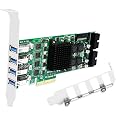
The FebSmart FS-4C-U8S-Pro is a high-performance PCIe x4 USB 3.0 expansion card featuring 8 ports across 4 dedicated 5Gbps channels, delivering a total bandwidth of 20Gbps. Designed for Windows and Linux desktops, it supports high-bandwidth devices like VR systems, SSD enclosures, and live broadcast gear. Its built-in FebSmart Self-Powered Technology supplies up to 60W power without extra cables, ensuring stable and safe connections. Compatible with standard and slim PC cases, this card is a plug-and-play powerhouse for professional-grade USB expansion.


| Brand | FebSmart |
| Series | 8-Ports Vertical 5Gbps USB-A Ports PCIE USB 3.0 Card. |
| Item model number | FS-4C-U8S-Pro |
| Operating System | Windows 11, 10, 8.x, 7, Vista, XP (32/64bit) and Windows Server 2003, 2003R2, 2008, 2008R2, 2012, 2012R2, 2016, 2019, 2022 (32/64bit). Linux Kernels. |
| Item Weight | 14.9 ounces |
| Product Dimensions | 4.72 x 6.14 x 0.71 inches |
| Item Dimensions LxWxH | 4.72 x 6.14 x 0.71 inches |
| Color | Matte Green |
| Manufacturer | FebSmart Co,.Ltd |
| ASIN | B07WCQ64RN |
| Date First Available | October 20, 2019 |
R**R
So much USB. We need more of these out there
Two fold, I got this for the four USB ports on the back and the two internal headers. This is honestly perfect for my use as my system doesn't have enough USB on it. Three of the four on the back go to three monitor USB hubs while the two headers attach to front panel ports that my older motherboard doesn't have headers for. They all work great and I couldn't be happier
D**L
Works well with Esxi and Server 12
The FS-4C-U8S-Pro is a newish (2019), Pcie Gen 3, low profile, well designed (big heatsink), four channel USB 3.0 host bus adapter. The low-profile design dictates the horizontal port placement, which some reviewers have found problematic in aligning with case slot openings. My experience, with a Lian-Li server case, is the port connector fit is snug but perfectly serviceable (try plugging in the cables before tightening the retaining screw). In addition to the 4 external ports, there are two 19 pin headers for attaching another 4 ports (though those will share bandwidth with the externals). There is also a SATA power header to provide more amperage to the ports, should you be connecting USB powered disks or other power-hungry devices. The controller chip used is the Renesas uPD720202, one per channel.My environment is an Intel 8700K CPU running VMware Esxi 6.7 U3 Free as a host OS, with a Windows Server 2012R2 VM and a couple of low use Windows 10 VMs.Performance is what I expected for rotating hdds: 200/208 Mb/s single disk, 240/258 Mb/s Raid 5 measured with ATTO, and no degradation on simultaneous usage of all 4 ports. The heatsink does a good job of keeping the chip operating temperature at 95° F in a well-ventilated case.I perform two types of daily backup to four USB 3.0 raid enclosures attached to a Server 12 Esxi VM (about 3 - 5 Tb per day). The motherboard USB controllers were unreliable in heavy usage, regularly dropping connections during backups. I tested 3 quad channel (Pcie x4) adapters in my quest to obtain reliable USB 3.0 connections for my server. This was the only card that I could get to work.It works reasonably well with individual USB devices assigned through VM settings, occasionally (randomly) dropping a device, but it works great with PCI device passthrough configured. To get passthrough configured, I had to set the ‘VMkernel.Boot.disableACSCheck’ switch to True.I have been beating the heck out of this thing 24 hours per day for a week now, and no dropped devices or failed backups.UPDATE: 1 1/2 years later and everything is still good. 100% port reliability. No issues.
C**R
Using this to power up my docking station
I bought this a over a year ago and still works. Like its 2 channel counterpart but tricky to install, my case is compatible with the device, albet barely. I am currently using 2 channels plus a third for internal flash drive from one of the usb 3.0 headers. I have no problem with the usb pcie x4 4 channel. My docking station uses 1 of the external usb 3.0 ports and has no bandwith starvation like it did when connected to central usb 3.0 ports. I have a lot of usb devices connected to my desktop, and this is the best solution I needed. I also connect usb hubs and what not, and they all work. This is a great docking PCIe x4 in my pc, which is low profile and only 1 pcie x 16 slot. At the moment the 2 channel is not being sold, but this one is. That one was good as well, but I wanted 4 channels in one pcie x 16 slot, and they made it compatable with 1 slot as well.The only real downside of this its a lot more expensive, but its worth it. It also uses 20 MSI, or 5 for each usb pcie chipset.
S**.
Works good
Works really good, has a good chipset on it. Speed is as expected all ports work. Doesnt look bad and small enough to not block airflow to gpu.Major pro. Last one i had messed with the file structure saying i had 3 of everything i plugged in. I got this one because i wanted speed and did not want a stupid file path system. This works good.Cons:Ive had only 1 or 2 bugs where my computer had to re-reconize/it would disappear for a microsecond but that issue went away after a few days of use.Price
J**6
USB port orientation
There are two options for this card, one with horizontal (to the card) USB ports, and one with ventricle. The horizontal arrangement can be installed in small cases or large cases, the vertical only in large cases. Unfortunately the one I chose had the horizontal arrangement that created issues with my case. This has been reported elsewhere.That said, the card is beautifully engineered with a heat sink and many electronic components not found on other cards to support the large power draw the card supports, and the bandwidth. It requires a driver for win 7 that was an easy install. But the USB port arrangement required that I return it before further assessment.Based on what looks like top scale enginering ONLY I would recommend the card but without performance and reliability proof to back it up.
A**L
Lite critiquing
A lot of pci cards don’t come over engineered unless you pay a heavy premium this card is in a unique place. I haven’t found another with the amount of dedicated on board controllers as this and it’s a great buy for older systems. The only cons aren’t so much of cons but if they want to kill the competition include a 20 pin to usb c header and use black pcb on the next batch when manufacturing, the green is kinda ugly and very 90s. If they made a deluxe card with a few more headers and a better cooler/card sheath even a blower style would be great I’d buy 2.
P**F
Very stable and worth investing
You can find cheaper versions of USB 3.0 extension card but those are not stable like this card. Believe me this is based on my experience. I did purchase cheaper one and were happy when I move small amount of files and those cards are versatile to support both USB2.0 and 3.0. But when you bulk copy files between or among external HDDs it crashed. This card does not support USB2.0 but moving between and among system USB 2.0 port and 3.0 port goes well and finish the job. Meaning it is stable.
K**N
Works with unraid
I just installed this in my z690 Msi pro-a build and works perfectly, shows up as 4 individual controllers(1 for each port)I haven’t tried the internal ports on the card yet but the external ones work
Trustpilot
1 month ago
2 months ago