Some deliveries may take a little longer than usual due to regional shipping conditions.

DOWNLOAD THE APP


Customer Services
Copyright © 2025 Desertcart Holdings Limited
DOWNLOAD THE APP


⌨️ Elevate your workspace — type smarter, switch faster, and stay illuminated.
The Logitech MX Keys is a premium wireless illuminated keyboard designed for professionals who demand precision, comfort, and seamless multi-device control. Featuring perfectly contoured keys, smart backlighting that responds to hand proximity, and compatibility across Windows, macOS, Linux, iOS, and Android, it supports effortless switching between three devices. Its USB-C rechargeable battery offers up to 10 days of use with backlighting, while its sturdy, weighted design ensures stability during intense workflows.
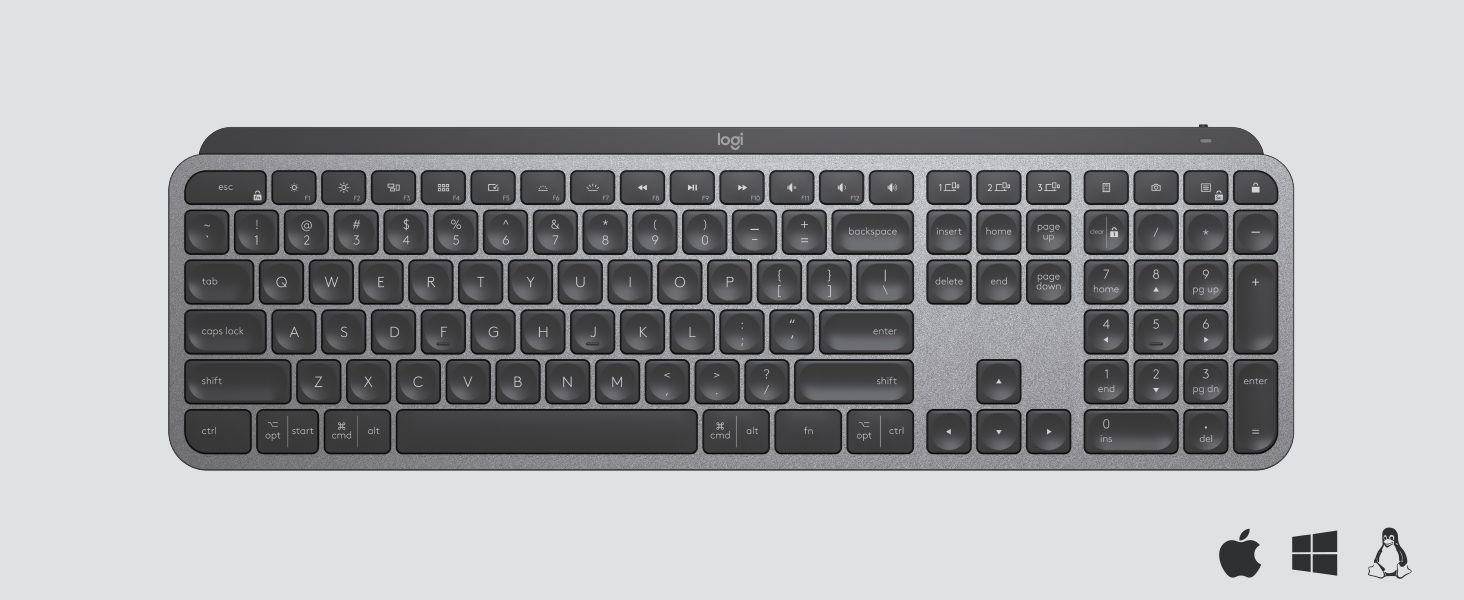
| ASIN | B07S92QBCJ |
| Batteries | 1 Lithium Polymer batteries required. (included) |
| Best Sellers Rank | #2,766 in Computer Keyboards |
| Brand | Logitech |
| Color | Graphite |
| Customer Reviews | 4.6 4.6 out of 5 stars (15,304) |
| Date First Available | September 4, 2019 |
| Hardware Platform | Laptop, Linux, PC |
| Item Dimensions LxWxH | 16.9 x 0.8 x 5.1 inches |
| Item Weight | 1.9 pounds |
| Item model number | 920-009294 |
| Manufacturer | Logitech |
| Operating System | Linux, Windows 10, Windows 11 |
| Power Source | Rechargeable Battery |
| Product Dimensions | 16.9 x 0.8 x 5.1 inches |
| Series | MX Keys |
M**E
Excellent Keyboard For Multi Device Work
I picked up the Logitech MX Keys to use across my laptop, desktop, and tablet, and it has been a big upgrade. The keys feel very smooth and precise with a low profile laptop style feel that is still satisfying to type on for long stretches. The smart backlighting is helpful in low light and adjusts well without being too bright. I really like how solid the keyboard feels on the desk. It does not flex or slide around while typing. The multi device feature is the real game changer. With the Easy Switch buttons I can jump between my main computer, a second machine, and even my tablet in a second without repairing. It connects quickly over Bluetooth or with the USB receiver and has been very stable. USB C charging is convenient and the battery life has been excellent so far. If you work across multiple devices and want a comfortable, premium feeling keyboard, this one is a very strong choice.
V**Y
Worth Every Dollar
The MX keys is the best keyboard I've ever had. The keys are soft to the touch and quiet when they are pressed. As far as the feel, this keyboard is in between a regular desktop keyboard and a laptop keyboard. The buttons are sturdy and not wobbly. The backlight is perfect. A lot of reviewers complain about the back light not staying on, but It's best that it doesn't, because it conserves the battery life during each use, you don't even have to press any keys or buttons on the keyboard, the backlight comes on when your fingers hover over the surface of the keyboard. when your done typing the backlight stays on from 5 to 7 seconds, then shuts off. All you have to do is brush your fingers across the keyboard and the backlight is back on so you don't have to worry about pressing the wrong keys in the dark. PERFECT. If the backlight stayed on then everybody would be complaining that the battery doesn't last long enough. Logitech had this in mind when building this keyboard. Everybody is also complaining about the weight of the keyboard saying its too heavy, it is in fact heavier than the standard desktop keyboard, but that's good, because if its bumped it won't move or if it is placed on a slanted surface then the weight of the keyboard and the rubber feet will prevent the keyboard from sliding off of it's surface. My keyboard was sitting half way on the edge of my bed and half way off I sat down on my bed before I realized this. I was terrified and my hart sunk to the bottom of my stomach, because I thought it was going to fall on my hard wood floor and possibly get damaged, but because of the weight of the keyboard it didn't fall and I had a chance to move it so it wouldn't fall. The weight comes from the built in battery. I rather have a little extra weight, which isn't really a lot of weight. once you have the keyboard for a week or so you don't even really notice the weight. The weight of the keyboard is actually a BIG PLUS in my option. If your looking for a good keyboard with no latency as far as the response to the keys being pressed, then this is the keyboard. My keyboard is connected via Bluetooth and I've never had any connectivity issues. No need to worry about buying batteries I can just plug my phone charger into the Type-C connection on the keyboard and it charges right up, you can also use this keyboard while it's charging. Thank you Logitech.
J**.
Takes time to get used to if used to K800. Has some advantages and some not so much.
I have been using the Logitech K800 keyboard for over 12 years and preferred it over any other I tried. When I found out the K800 was discontinued, I was really bummed out but decided to try this keyboard as a replacement. One thing that I don't like about this keyboard is that on the older K800's, the rechargeable batteries could be replaced. For the keyboard, it is not usable once the rechargeable batteries wear out. I am still getting used to the smaller chiclet keys, but there are a few things I like about this keyboard in comparison to the K800. So, what to I like about this keyboard as compared to the K800 keyboard? 1) This keyboard is much narrower as it does not include the imbedded palm rest which I don't need. So, it requires less space on my desk. 2) The illumination of this keyboard is adjustable as was the K800 but uses different keys for the adjustment. The K800 used the FN key with either the F5 or F6 keys to adjust the brightness of the keyboard. This keyboard uses an OPT key with either the F6 or F7 key for brightness adjustment. Not bad, just different. 3) The K800 has tabs to pull out to raise the back of the keyboard. This keyboard has a built in riser which I find preferable to the tabs as, on the K800, they often flattened when the keyboard was bumped. 4) This keyboard can be connected to 3 devices and the K800 could be connected to only one. 5) This keyboard easily connected to the internal Logitech Unifying software in my computer, but a USB dongle is supplied that can be used for Bluetooth connection. 6) One full charge of the battery on this keyboard last so much longer than a full charge on the K800. I have had to charge the battery on my K800 every other day, and this keyboard battery has lasted over 2 weeks without having to recharge it. In response to some comments in reviews: 1) Blinded by the light - the keyboard lighting is adjustable. 2) Lighting of the keyboard goes off when you are not using it. When your hand goes near the keyboard, the light goes on and does not go off while you are using it. The light turns off when the keyboard is not in use to conserve the battery power - so less charging is necessary. 3) The fixed keyboard angle is the same as the K800 provided with tabs, but it doesn't go down if you bump the keyboard. This is a plus for me. 4) The power switch is on the back rather than on top of the keyboard, but this is just a matter of getting used to where it is. Not a problem for me. 5) There is light leak around the keys, but this is also not a problem for me. It just provides more definition of the keys. Really, the only problem I have had with this keyboard is getting used to the smaller chiclet keys. Other than that, I think it has a lot of improvements over the K800 keyboard I am used to. UPDATE 5/29/23: I have been using this keyboard 2-3 hours every evening for over a month, and I am loving it. I fully charged it when I first got it, and have not had to charge it since. According to the Logi Options software, the battery is still full. Since I have to charge the K800 I use on my other computer every other day, I think this is very impressive. Having used this keyboard for over a month, I am now used to the chiclet keys, and actually like them. Even though the K800 on my other computer still works, I am seriously considering getting another of these keyboards to replace it. I hope this review was helpful for you.
Trustpilot
1 day ago
1 month ago