We remain fully operational. Our teams are working around the clock to ensure your deliveries continue safely.

DOWNLOAD THE APP


Customer Services
Copyright © 2025 Desertcart Holdings Limited
DOWNLOAD THE APP

🚀 Upgrade your rig, upgrade your life — don’t get left behind!
The OWC 32GB PC21300 DDR4 2666MHz SO-DIMM RAM module delivers a powerful memory boost with 32GB capacity and 2666MHz speed, compatible with Mac mini 2018, iMac 2019 and newer, plus major PC brands. It operates efficiently at 1.2 volts, meets JEDEC and ROHS standards, and comes with a lifetime warranty and advanced replacement program, making it a reliable, high-performance upgrade for professionals demanding smooth multitasking and future-proof computing.


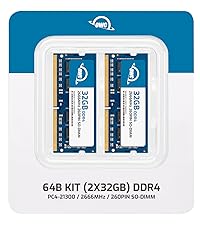


| ASIN | B07PTRBHSG |
| Best Sellers Rank | #213 in Computer Memory |
| Brand | OWC |
| Color | 1 x 32GB |
| Computer Memory Type | DDR4 SDRAM |
| Customer Reviews | 4.6 4.6 out of 5 stars (4,041) |
| Date First Available | March 21, 2019 |
| Item Dimensions LxWxH | 6.1 x 4.69 x 0.31 inches |
| Item Weight | 1.41 ounces |
| Item model number | 2666DDR4S32G |
| Manufacturer | Other World Computing |
| Memory Speed | 2666 MHz |
| Product Dimensions | 6.1 x 4.69 x 0.31 inches |
| RAM | 32 GB DDR4 |
| Series | OWC2666DDR4S32G |
| Voltage | 1.2 Volts |
N**G
What a difference! fairly easy install, cheap, a world of a difference
Imac 2019 5k here. 8 Gb out of factory from 2x4 ram sticks. I tend to have a lot of things opened at the same time, but nothing out of the ordinary, a few chrome tabs, a few safari windows , WhatsApp, mail... It was ok with 8Gb but not lighting speed. I was getting the color wheel when trying to open a new tab sometimes. I Wasn't sure how much ram to get from Amazon but the cheapest approach was to do 4x8 since I dont do video editing or anything crazy, I didn't thing anything over 32 would be useful. Install: So they tell you to lay the Mac flat, which I didn't do. I installed the new ram with the iMac vertical: I removed the old old and put the 4 new ones in place I closed the memory compartment and the Mac wouldn't boot a few times I thought I installed them correctly but YOU HAVE TO MAKE SURE EACH IS FULLY, FULLY, FULLY in. A slight off position and your computer won't boot. After trial #3, the Mac booted no problem. Back to were I left when I turned it off prior to ram upgrade. I am now using about 10gb of Ram out of the 32 available but the Mac monitor, with the same apps opened as prior. The difference is night and day when I do something, wether it is a webpage or opening iPhotos or pages, it is just instant. At $150 , it is overall a cheap upgrade given how much money we put in our machines. Super happy with the purchase given the amount of time I spend on the computer, I appreciate the smoothness.
A**A
Works great for my HP EliteBook 840 G7
Works and fits great in my HP EliteBook 840 G7. The RAM was well packaged and easy to install. I upgraded to the 64GB (2 x 32GB), and my laptop recognized the full capacity right away. The speed matches the specs exactly as listed. No issues so far.
U**K
Plug and play
My 2019 Retina 5K 27" iMac came with 16gb factory installed - two 8gb cards. I bought these two 32gb cards to upgrade memory. Nothing could be easier - open the memory compartment in the back and install the two new cards. The factory cards were in slots 1 & 3 (or 0 & 2 if you want to use the odd Apple numbering). I left them in place despite Apple spec that 64gb was max for this iMac. Put the two new 32gb cards in the open slots 2 & 4 (1 and 3 for Apple purists) - closed up and restarted the iMac. It took 30 seconds or so to orient to and recognize the new memory, then booted up fine... no problems or issues and I now have 80gb of fully recognized and usable RAM in my computer. The OWC cards are cost effective, easy to install (press them down into the open slots) and work like a charm.
R**E
Upgraded my Mac Mini to Blazing Performance
Instead of paying ludicrous prices for installed memory on my MacMini, I read a story in 9to5Mac about upgrading memory yourself. Armed with a YouTube video, a MacMini tool kit, and these memory sticks, I tore apart my 2018 MacMini and had it back together within 30 minutes. I took out the 2 x 4GB RAM sticks in it, and replaced it with these. Upon booting, no issues encountered. Follow installation steps exactly as in the video and make sure the memory sticks are firmly installed and reseated in the motherboard as shown. Also ensure you are careful unlocking and reseating all power cables, speaker cable and placing screws back in the reverse order you removed them during reassembly. It's not hard at all. Get the tool kit, which you will find online for less than 20 bucks, and save hundreds over Apple pre-installed prices. Also, you cannot upgrade some Mac Minis that have model years that have permanently installed RAM into the motherboard. The 2018 model is ok. 2012, which my wife has, cannot be upgraded. Check your model number and the OWC website if you are unsure as to what you have. No issues in operation since installed, this is a wise investment. OWC has quality products and this is a classic example.
L**A
Amazing upgrade
I was looking either a new computer or an upgrade, so I choose the latter. My iMac 27" has 8 GB original apple memory RAM, which was just enough for simple daily use. However, once I started to working again my computer had hard time to handle all those graphic softwares, top of the heavier system after the updates. After this upgrade from 8GB to 128GB, now my computer works amazingly fast. It's very easy to install, once it's placed in correctly, the computer takes care of it by itself. However, it needs some time to recognize the installation, so I had to retry few times. I think I was a bit impatient. It's compatible with my iMac27, cost effective and improvement on performance saves so much of my time. I'm very happy with this product.
J**N
Quick and easy
The two 16gb of RAM showed up yesterday, and I was very excited to install them into my computer. However when I opened the envelope they were shipped in I was a little disappointed to see that the nearly $200 worth of RAM came in a zip lock bag. They installed fine and seem to be working well, I just wish there was a little more pride in the affordable RAM in regards to how they're packaged and delivered.
M**Y
Easy to install in new 2020 Mac, saving a fortune on upgrades at time of order. Been in for a couple of months and no issues whatsoever.
L**L
Installed 2x16gb into my new iMac i7 3.8. Improved performance as expected. Easy to fit I used wrist static leads to avoid static. To maintain best performance I used slots 1 and 3 as recommended. None of the videos on installing memory that I found advised that it can take more than 30 seconds to start to boot up while the new memory is recognised. Amazons price was very competitive for OWC which is rated highly for Mac upgrades
T**S
Shipping was extremely slow but it came well packaged in the factory packaging. Genuine OWC RAM. Seller can be trusted. Have been using it for several weeks now and no issues
C**N
Memoria RAM de muy buena calidad mi iMac va de maravilla.
V**N
5 Stars for this seller. Product delivered in 3 days. Product is amazing and go for this Seller. Product prise is bit more but the service is amazing. I had ordered same product with different seller but he failed to deliver after one month also. But this seller is amazing. Purchase from this seller. Genuin product 100%. Seller PC parts and solution.
Trustpilot
2 weeks ago
2 weeks ago