
Desertcart purchases this item on your behalf and handles shipping, customs, and support to Kenya.
๐ฝ Unlock your dataโs full potentialโdock, transfer, and back up like a pro!
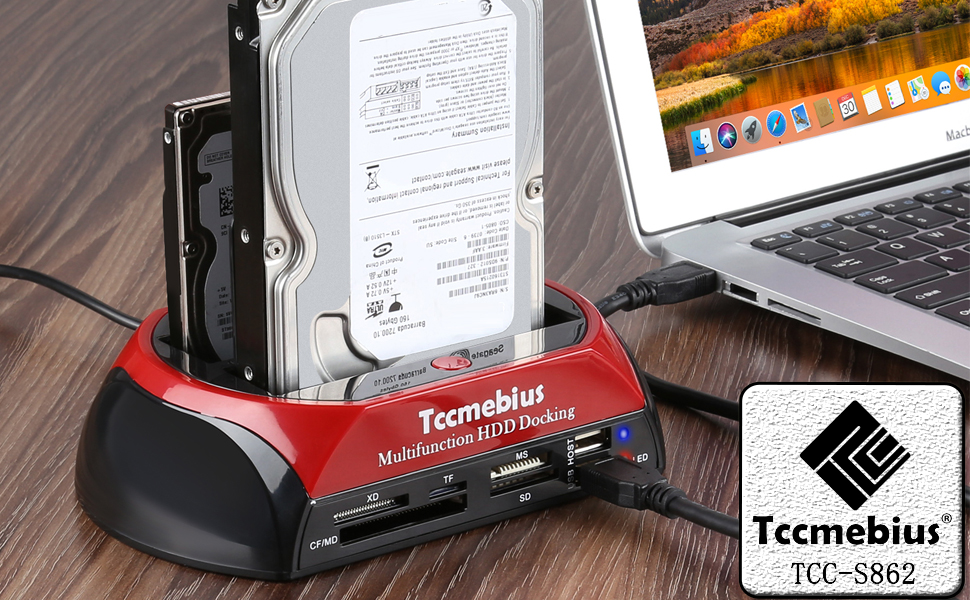
The TCC-S862-US Hard Drive Docking Station is a versatile USB 2.0 external enclosure designed for professional users needing fast, tool-free access to both IDE and SATA hard drives and SSDs. Supporting up to 20TB SATA and 1TB IDE drives, it features dual slots, an integrated all-in-one card reader, and a USB hub. With transfer speeds up to 480MB/s and one-touch backup functionality, itโs compatible with Windows and Mac OS, making it the ultimate solution for seamless data management and backup.


| Asin | B07LGCKMK7 |
| Best Sellers Rank | #19 in Hard Drive Docking Stations |
| Brand | Tccmebius |
| Built In Media | Power adapter, USB cable |
| Color | Black+Red |
| Compatible Devices | Desktop, Hard drive, Laptop, Smartphone, Tablet |
| Connectivity Technology | USB |
| Customer Reviews | 4.2 4.2 out of 5 stars (2,378) 4.2 out of 5 stars |
| Data Transfer Rate | 480 megabytes_per_second |
| Enclosure Material | Plastic |
| Hard Disk Form Factor | 3.5 inches |
| Hardware Interface | IDE, Mini USB 2.0 Type B, Serial Interface, USB 2.0, eSATA |
| Hardware Platform | Windows, Windows 10, Windows 11 |
| Item Dimensions L X W X H | 7.1"L x 4.3"W x 3.9"H |
| Item Weight | 246 g |
| Manufacturer | Tccmebius |
| Memory Storage Capacity | 20 TB |
| Mfr Part Number | 8541664212 |
| Model Number | 8541664212 |
| Number Of Items | 1 |
| Supported Devices Quantity | 5 |
| Upc | 799577101011 |
| Warranty Description | Product Warranty Rules: 1. Within 30 days after the product is purchased, you can contact Amazon Customer Service directly to return the product and return the full purchase price. 2. Within 6 months after the product was purchased, the product had quality problems. You can send pictures or videos to us by email. The pictures or videos show the normal working state of the products when they are used normally. Our technical staff will review the picture or video, determine the problem of the product and re-send the new product to the customer. The product in question does not need to be returned. 3. If the product has been problematic for more than 6 months after the product is purchased. The customer can send the product in question to our factory in China (this freight customer pays) and we will repair the product within 7 working days and then mail it to the customer (The transit time from China to the customer's destination is approximately 25 days). |
User
Gets the job done perfectly
I bought this docking station to recover files from an old 3.5" SATA hard drive that was stuck in a dead enclosure, and it ended up being exactly what I needed. Since I only use laptops now, this made it incredibly easy to connect the drive externally, plug and play with no hassle. The drive was detected almost immediately, and I was able to copy all my files over to a flash drive without a single error or disconnect. Everything worked smoothly from start to finish, and it honestly saved me a lot of stress. If you need a reliable way to access old drives, this device gets the job done perfectly.
User
Brilliant bit of kit, works as intended
It works beautifully, I was able to download from the box of old IDE hard drives I haven't accessed since 1999. All of the working drives were successful at downloading from. I was so happy to find old photographs of my wife and dog from more than a decade ago and some other data from the late 90s from a friend of mine that had lost his copies decades ago.PRO's: easy to use, just insert the drive, plug in power and connect the USB to your computer and turn it on. Windows will recognize the drive (if it's still a functioning drive, some of mine were old and I wasn't sure they were still working, and this device proves what I thought) The drives even retained the partition names which I had a good laugh at what I had called my drive partitions 20 years ago.CON's: it can be difficult to insert the IDE drives because you have to adjust the power connector as not all drives are physically the same dimensions, but that is not fully the fault of the unit, I just wish it had a clear window were I could see the connectors to make it easier to insert the drive.Overall works great, easy to use, only a tad difficult to insert without being able to see contactors while inserting the IDE drives. There is also a slot for SATA drives but I have not used that one yet. it looks much easier to insert because all drives use the same dimensions and there is no need to adjust the power pin positions.I would recommend this unit for anyone needing to pull data off of some old hard drives without the need to open and install anything.
User
Nice Hard drive docking station. Works for SATA or IDE drives as well as USB and SD cards>
The device is well made and works fine, but uses USB 2.0 to connect to the PC and is slow compared to USB 3.0. You should search the internet for proper software. I suggest DiskGenius and AOEMI Partition assistant which are free downloadable programs. But be very careful with these powerful programs, so that you do not mistakenly screw up your computers main (boot) HD. I had a boat load of obsolete, slow, small storage space hard drives removed from old out of date PCs over the years that I wanted to completely erase before disposing of. It also made it easy to clone a back up of the PC hard drive. My main complaint is not a deal breaker, but inserting an IDE drive is a bit touchy because you have to manually adjust (slide one way or the other slightly) the power connector in the dock to properly fit into the IDE HD. This is annoying, but due to variation in the IDE HD design from model to model and manufacturer to manufacture, there was probably not a better way to accommodate these design differences. It works fine with SATA drives which have standardized connectors. The dock comes with an external power supply and a USB cable to connect to the PC. They say to use one of the USB ports on the back of the PC, The included manual is written in acceptable English, and worth reading before using the dock. They offer a free download of a one button cloning program, but I did not try it. I found the AOMEI program easy to use instead. I have not used the USB, SD card reader functions, but suspect they will work as specified. For the price, the dock works fine, and I would probably buy it again or recommend it to a friend (or loan him mine). If you are more impatient, you might want to spend more for a faster device. But for the occasional user, this is fine useful device and a bargain.
User
Product update it works fine
Update2:Returning this for an exchange. The power socket is bad. This requires the power cable to be required to wiggle around till you make contact and then it will disconnect during use, I like it when it is working and will try another one. I could probably take it apprt and adjust the contacts, but why? I will update #3 when I get the replacement.Update1:This product works as advertised.The power transformer supplied was defective and the product worked fine with a different 12 volt transformer I had.This is a Swiss army knife of docking stations and does a great job!
User
Low Quality - Difficult Usage - Some Drives Don't Fit
Bought this so I could read IDE Drives with it. The unit is made of plastic and is not very robust in construction. Trying to get an IDE drive into the bay is an unreal task. The sliding Molex connector in the base of the bay does not stay where it's put. It keeps wandering so each time you try to set the heard drive in place it's almost impossible to do. Since the unit is made of plastic it isn't going to stand much forcing over and over to try to get the hard drive seated. I also noticed it was bending the pins slightly on the 40 pin connection pins on the hard drive as the drive is tilted when trying to align the Molex connector. Since the Molex connector is hidden when trying to put the drive in the bay its a task to get this in and seated well so it communicates okay. I had several Maxtor drives to pull files from and it won't work on the Maxtor drives as the 40 pin connector on the Maxtor drives is closer to center hence alignment is impossible for this unit. and the two connectors even with the adjustment of the Molex connector I work on computers every day and I deal with hard drives constantly. If a competent person on computers has difficulty with this unit the average person is going to have a real hard time with it. It may be fine if you set one drive in it and never take it out. Its still a chore to get the drive to seat in place but once in place if you never have to take it out maybe this is okay. Also the unit keeps disconnecting from the computer as well. At first I thought it might be the actual hard drive that was plugged in but I used it on 8 different drives and it did it on all 8 of them. It also doesn't seem to be able to read really older hard drives, drives from around the late 1990's which is what I bought this for initially. The front slots for USB and SD Cards seem to work fine but I noticed the transfer speed was unreal slow not at all USB 3.0 speed. It would cycle up a bit in megabytes then slow down to nothing. All in all this is something I will never use. I am going to purchase another unit that might be better quality and easier to work with. I thought having one simple unit in its own stand might be the way to go but this one is not that unit!!
User
Working, Cheap, Low Quality
I liked the device because of the amount of devices suported.I tested the following: SATA, SD card, TF card and front USB plugs. It is working.- SD slot is mounted back word, you have to insert the SD card with the pin up.- The TF slot is mounted correctly, but it is possible to insert the TF card below the slot where the TF card can fall.- The write performance of the SATA is limited to 14 Mb/s this is very slow.- An SSD disk in the SATA port takes 30 seconds to be detected.- The SD card and the TF card cannot be used at the same time.- Overall quality is poor.I would have pay $15 dollars for well design device.I returned it
User
Easy to use
Worked as it should.
User
It does the job and has plenty of usefiul inputs.
I do a lot of file transfers from older, and often ouitdated older style drives, and this piece offers all sorts of SATA, IDE, eSATA, and USB connections that allow me to do those type of file recoveries. There is a bit of a limitation on its use when connected by eSATA but the USB connection solves that problem. There is also a slider on the bottom thet adapts the connectors for the IDE drives you may be workinjg with so that it will work with the earlier style of drives as well as the later faster IDE drives.
Trustpilot
1 week ago
2 months ago