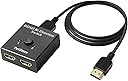
1X2/2X1
Product ID: 86357133
Details
- BrandDotStone
- Cable TypeHDMI
- Compatible DevicesPC
- Connector TypeHDMI
- Number of Ports2
desertcart.com: DotStone HDMI Switch Bi-Direction 4K HDMI Splitter 2 x 1/1 x 2 No External Power Required 2 Ports HDMI Switcher Supports Ultra HD 4K 3D 1080P Comes with 3 Feet HDMI Cable : Electronics Review: Amazing little device! - I bought this and ABSOLUTELY love it! I purchased this for both my XBOX One S and my Playstation 4 Pro (or PS4 Pro for those that are trying to find reviews through keywords). I have a Samsung 50" 4K television that only offers HDR visuals through one out of the three HDMI ports offered. Since I own two consoles that rely on HDR (not really, but still nice to have regardless), I had to have a way to be able to split one HDMI port between two consoles without using up a electrical socket. I found this. After reading the reviews that it works great on consoles, I went ahead and took a leap. And boy....am I glad that I did! Granted, I've only had this for about two or three days. I have heard that people have been experiencing problems with it within a week or two. So stay in touch with this particular review because I will be doing a review about a month from now to let you know whether or not it is still working as good as it was the day I bought it. So far, however, I love it! I get FULL 4K abilities with both my XBOX One S and my PS4 Pro, and I also get HDR on both of them. It is an HDMI Pass-Through, so anything that gets plugged into it will get split between two HDMI cords. I have a 3 foot HDMI cord going from the TV port to the splitter, and then I have just the standard 6 foot HDMI cords that came with the consoles. As far as lag is concerned, I have NONE! I know there were some questions about that. Asking if there was lag when gaming. I have played some pretty fast-paced games. I also played some of Destiny, The Division, and Friday the 13th. There wasn't any lag from any of the games. I didn't notice any, anyway. Then again, I'm not that much of a nitpicker. If it was there, it was so minuscule that you would have to be really looking for it with a fine-tooth comb in order to find it. Price is perfect for what you get! I love the fact that this is a cheap device with great performance. I am so looking forward to playing with this on a regular basis. I am thankful that this was out there. It was either buy this $15 device, or drop about $1500 to $2000 on a more high-end 4K Television that would give me the option to use more than one HDMI port for HDMI Color UHD (which is the name of the setting that you have to have turned to "on" in the picture settings for Samsung 4K TV's to get the HDR feature). But stay tuned. In a month from now, I will be reviewing this product again, or updating this particular post, to let you know exactly how well this product WORKS. Because I have heard some reviews, such as..."this splitter would make red lines/dots on the screen", or "no sound from second port", or "Ordered at the beginning of May (2017). The device stopped working a few days ago" when it was ordered a month earlier. The good reviews outweigh the bad ones though. Maybe they just got defective products. I don't know. But yes. I use the HDMI Splitter for both my XBox One S and my PS4 Pro. Both work amazing on my console. I will post pictures of the TV resolution on both of these just to show you that it does output perfectly for both consoles. As long as you are using a 4K TV that supports 4K resolution, as well as HDR. Check back in a month! So far, I love this product! Review: perfectly seamless - PC Users: switching will *not* disconnect/rearrange displays on you. Seamless transition. I was really happy to discover the above. My old switcher would have a 1-second disconnect during the switch, causing Windows to forget the display position and of course dump all windows/icons on my primary monitor. This little guy does it the right way. I have 2 monitors connected to my PC. I wanted to switch outputs from my 2nd monitor to my TV. I was previously using a true splitter, where both the Monitor and TV displayed simultaneously, but only one would be on at a time so it doesn't matter. I ran into a problem where when my TV turned on, it wouldn't pass through audio - I'd have to reconnect the HDMI at the TV. So the switcher button makes that easier. I don't have the audio problem any more. With my 1->2 scenario, the thing is powering itself (or I suppose my PC is powering it via native HDMI). I suppose it's not doing any upscaling or duplication so it doesn't really need power, just a logic switch. My previous splitter needed power injected obviously so I'm even saving a power outlet (the less cable the better). The video quality seems on-par for 1080p. I haven't tried 4k at all (the monitor is 1080 the TV is 4k, so I'm not sure how it would even behave there). I have also not tried a high-FPS game. Other than those 2 unknowns, the device is performing flawlessly and I would definitely recommend it. I will update this post if it breaks or anything changes. Pro tip: consider the length of cables you want from your [source]->[desired location of switch]->[display]. I didn't do this and ended up with a 6' cable running from PC->Switch, which is about 5' more than I need, so stuck with a coil of cable while waiting for shipment, then I have to reconnect. Plan ahead, be done sooner ;)
| ASIN | B07FM63ZHT |
| Best Sellers Rank | #2,668 in Audio & Video Selector Boxes |
| Customer Reviews | 4.4 4.4 out of 5 stars (6,357) |
| Date First Available | July 16, 2018 |
| Is Discontinued By Manufacturer | No |
| Item Weight | 4.5 ounces |
| Item model number | hdmi switch cable |
| Manufacturer | DotStone |
| Package Dimensions | 4.1 x 3.5 x 1 inches |
L**Y
Amazing little device!
I bought this and ABSOLUTELY love it! I purchased this for both my XBOX One S and my Playstation 4 Pro (or PS4 Pro for those that are trying to find reviews through keywords). I have a Samsung 50" 4K television that only offers HDR visuals through one out of the three HDMI ports offered. Since I own two consoles that rely on HDR (not really, but still nice to have regardless), I had to have a way to be able to split one HDMI port between two consoles without using up a electrical socket. I found this. After reading the reviews that it works great on consoles, I went ahead and took a leap. And boy....am I glad that I did! Granted, I've only had this for about two or three days. I have heard that people have been experiencing problems with it within a week or two. So stay in touch with this particular review because I will be doing a review about a month from now to let you know whether or not it is still working as good as it was the day I bought it. So far, however, I love it! I get FULL 4K abilities with both my XBOX One S and my PS4 Pro, and I also get HDR on both of them. It is an HDMI Pass-Through, so anything that gets plugged into it will get split between two HDMI cords. I have a 3 foot HDMI cord going from the TV port to the splitter, and then I have just the standard 6 foot HDMI cords that came with the consoles. As far as lag is concerned, I have NONE! I know there were some questions about that. Asking if there was lag when gaming. I have played some pretty fast-paced games. I also played some of Destiny, The Division, and Friday the 13th. There wasn't any lag from any of the games. I didn't notice any, anyway. Then again, I'm not that much of a nitpicker. If it was there, it was so minuscule that you would have to be really looking for it with a fine-tooth comb in order to find it. Price is perfect for what you get! I love the fact that this is a cheap device with great performance. I am so looking forward to playing with this on a regular basis. I am thankful that this was out there. It was either buy this $15 device, or drop about $1500 to $2000 on a more high-end 4K Television that would give me the option to use more than one HDMI port for HDMI Color UHD (which is the name of the setting that you have to have turned to "on" in the picture settings for Samsung 4K TV's to get the HDR feature). But stay tuned. In a month from now, I will be reviewing this product again, or updating this particular post, to let you know exactly how well this product WORKS. Because I have heard some reviews, such as..."this splitter would make red lines/dots on the screen", or "no sound from second port", or "Ordered at the beginning of May (2017). The device stopped working a few days ago" when it was ordered a month earlier. The good reviews outweigh the bad ones though. Maybe they just got defective products. I don't know. But yes. I use the HDMI Splitter for both my XBox One S and my PS4 Pro. Both work amazing on my console. I will post pictures of the TV resolution on both of these just to show you that it does output perfectly for both consoles. As long as you are using a 4K TV that supports 4K resolution, as well as HDR. Check back in a month! So far, I love this product!
S**H
perfectly seamless
PC Users: switching will *not* disconnect/rearrange displays on you. Seamless transition. I was really happy to discover the above. My old switcher would have a 1-second disconnect during the switch, causing Windows to forget the display position and of course dump all windows/icons on my primary monitor. This little guy does it the right way. I have 2 monitors connected to my PC. I wanted to switch outputs from my 2nd monitor to my TV. I was previously using a true splitter, where both the Monitor and TV displayed simultaneously, but only one would be on at a time so it doesn't matter. I ran into a problem where when my TV turned on, it wouldn't pass through audio - I'd have to reconnect the HDMI at the TV. So the switcher button makes that easier. I don't have the audio problem any more. With my 1->2 scenario, the thing is powering itself (or I suppose my PC is powering it via native HDMI). I suppose it's not doing any upscaling or duplication so it doesn't really need power, just a logic switch. My previous splitter needed power injected obviously so I'm even saving a power outlet (the less cable the better). The video quality seems on-par for 1080p. I haven't tried 4k at all (the monitor is 1080 the TV is 4k, so I'm not sure how it would even behave there). I have also not tried a high-FPS game. Other than those 2 unknowns, the device is performing flawlessly and I would definitely recommend it. I will update this post if it breaks or anything changes. Pro tip: consider the length of cables you want from your [source]->[desired location of switch]->[display]. I didn't do this and ended up with a 6' cable running from PC->Switch, which is about 5' more than I need, so stuck with a coil of cable while waiting for shipment, then I have to reconnect. Plan ahead, be done sooner ;)
R**H
Both units need to be on ....
***Update*** 1) Customer service is amazing. They read and replied to my review and tried to rectify by sending a replacement part, which arrived quickly and worked a little better than the original. 2) Upgraded my review from 2 Stars to 4 Stars 3) This is a Switcher which requires power to work. This is not a Splitter, as another reviewer kindly pointed out. This Switcher gets power from both units attached to it. The reason for it powering down is due to one of the units going on powersave, thus cutting off the power source. However, when fully powered, it is an excellent Switcher as the HD quality from both Blu Ray and gaming Console are superb. If you can, disable the Power Save functions in order to allow this unit to work uninterrupted. Otherwise, just be aware that you'll have to keep both units powered on for it to work. The video quality is worth the inconvenience for me, though I may need to get a splitter later. unfortunately, this may also mean a loss of signal quality. ****original review below***** There is a trick to using this switcher and it's something that I wish I knew beforehand: both units need to be powered on for this to work. For example, I have an X-Box 360 and a blu-ray player plugged in. To us the blu-ray player, the X-Box 360 needs to be connected and turned on. However, if the X-Box 360 powers down due to power saving features, the blu-ray player will disconnect from the TV. Similarly, if i'm playing a game on the X Box and the blu-ray player likewise shuts down due to not being used, the X-Box will disconnect from the TV. Because of this, i cannot recommend this unit unless you are able to provide constant power through the unit. However, this unit operates very well and the HD quality is superb. Unfortunately, this is not the best unit for my situation and I will need to find an alternative part.
V**R
Lo queria para el monitor de la recreativa y para la television del salon, usándolo solo uno a la vez. Sirve perfectamente, el armazón es de metal y el pulsador hasta la fecha funciona sin problemas, asi como las leds que indican el hdmi que estas usando.
D**N
Vorweg muß ich erwähnen das ich keine Fernbedienung nutzen wollte, sondern eine einfache und schnelle und unkomplizierte Möglichkeit wie ich zwischen meiner Sky TV-Box und der Amazon TV-Box umschalten kann welche an dem gleich Hdmi Kabel hängen. Dies funktioniert sehr gut und HD wird auch mit übertragen. Tolles Teil kann ich empfehlen! Update vom 12.09.2017: Es gibt zu diesem Gerät keine Fernbedienung! Ich stehe aber gerne auf und schalte direkt am Gerät um, bzw. ist mir schon vor dem einschalten des Fernsehers bewußt welches Gerät ich nutzen möchte und schalte dementsprechend um. Das Bild und der Ton werden sehr gut übertragen, ich merke keine Verschlechterung. Ja ich würde es wieder kaufen!
C**P
Purchased this to have both my PS4 and XBOX One hooked up to a single port on my PC. I have an all-in-one PC that has an HDMI input. Works great, now I have all 3 devices hooked up through my PC monitor. I had purchased 2 other switches before this one and neither worked well. They either switched automatically when they shouldn't, or would only work with 1 device powered on. Since this one is a mechanical switch, there's no automation, but the connection is much simpler, and therefore more compatible. For my purpose, it's a perfect fit.
V**O
Switch bidirezionale che fa quello che promette. Funziona in ambo le direzioni quindi è possibile usarlo per: 1. 2 input 1 output per collegare alternativamente due fonti allo stesso dispositivo (2 console collegate ad un TV) 2. 1 ingresso 2 uscite per collegarae alternativamente un dispositivo a due destinatari differenti (2 TV, 1 tv ed un proiettore, etc...) NB non è uno splitter, ma rimane uno switch collegato all'inverso, quindi il collegamento funzionerà SOLO su un dispositivo di uscita alla volta (quello selezionato dall'interruttore) Consigliato se vi serve uno switch che mantenga anche i segnali di ritorno (io lo uso regolarmente con fonti che sfruttano HDMI CEC per usare il segnale del telecomando della TV, direttamente sul dispositivo) Ed anche se vi serve uno splitter che funzioni su 1 solo delle due destinazioni alla volta... dato che non è alimentato e compatto.
D**T
Made my life much easier. Would not have been able to use Firestick and set top box together in my not so smart TV had this product not been there.
Trustpilot
2 months ago
3 weeks ago