Desertcart purchases this item on your behalf and handles shipping, customs, and support to Kenya.
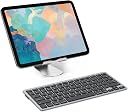
⌨️ Elevate your iPad workflow with sleek, wireless precision!
The OMOTON Wireless Bluetooth Keyboard is a compact, ultra-slim accessory designed exclusively for iPads running iOS/iPadOS 14.5 and above. It supports multiple iPad generations including Pro, Air, and Mini models, offering a stable Bluetooth connection up to 10 meters. Powered by two AAA batteries (not included), it features an energy-saving auto sleep mode that activates after 30 minutes of inactivity. Its scissor-switch keys and multimedia shortcuts deliver a comfortable and efficient typing experience, making it the perfect portable companion for professionals on the go.
| ASIN | B07S7VPQG6 |
| おすすめ度 | 5つ星のうち4.4 2,707 レビュー |
| カラー | グレー |
| キーボードの説明 | ワイヤレス |
| キーボードレイアウト | QWERTY |
| シリーズ番号 | 10 |
| スイッチのタイプ | 機械式。 |
| スタイル名 | コンテンポラリー |
| セクション数 | 2 |
| ブランド | OMOTON |
| ブランド名 | OMOTON |
| ボタン数 | 78 |
| メーカー名 | OMOTON |
| メーカー型番 | OM-Keyboard-KB066-Grey |
| ユニット数 | 1.0 個 |
| 互換デバイス | タブレット, ノートパソコン |
| 付属品総数 | 1 |
| 利き手 | 左右共用 |
| 商品の推奨用途 | 普段使い |
| 商品の追加説明1 | ポータブル, ポータブル。, ワイヤレス接続。 |
| 型番 | OM-Keyboard-KB066-Grey |
| 対応デバイス | タブレット, ノートパソコン |
| 接続技術 | Bluetooth |
| 特徴 | ポータブル, ポータブル。, ワイヤレス接続。 |
| 製品の推奨用途 | 普段使い |
| 通信・接続インターフェース | Bluetooth |
| 鍵盤数 | 78 |
D**.
Great keyboard for the price
I wanted a wireless keyboard that matched the looks of my MacBook Pro without taking up a ton of desk real estate and providing good battery life. This keyboard does all that for under $20. Not sure how long it will last, but performance-wise it is great. I’ve been using it daily since Christmas 2020 and the battery is still at 100%. Per other reviews, you need to set it up on a Mac using System Preferences > Keyboard > Set Up Bluetooth Keyboard and pair it following the instructions. I’ve had no issue with my Mac and it should also work with my iOS devices, but haven’t tried since I already have a keyboard for my IPad. The keys feel pretty good — at least comparable to a much more expensive Apple keyboard. It is just as comfortable as my Apple keyboard and just as responsive. There is no escape key, but there is a home key, so Function key+ Home key does the same thing, and a similar two key combination is necessary for forward deleting. The biggest drawback is that it loses connection with my Mac after being idle for 3-4 minutes. That said, I hit the space bar a few time and it automatically reconnects and is ready to go without any lag or problems. Overall, it is just what I wanted and a bit more than I expected given some of the other reviews. I have no idea how long this thing will last or if I will run into issues 6-12 mos. into use. But even if I do, I could buy another 5 of these keyboards for the same amount Apple wants for their equivalent offering, so for me, it is definite worth the money.
A**R
Keys not workin
Keys not working
J**N
Initial Review: Solid product
I ordered this because I’m an online student who uses an iPad to do all of my coursework. I was tired of typing essays on the touchpad and needed an actual keyboard (my otterbox case doesn’t permit the use of an attached keyboard). I’ve used this now to type 2 essays and have loved the experience. The key response is adequate, the Bluetooth connection is strong and the sleep mode isn’t a big deal at all (if it falls asleep on you while taking a break, just press any key once and it reconnects automatically). As I get more use out of it I will update this review. UPDATE! After a full semester of use I can genuinely say this product is a life saver! Typing essays has become a breeze as compared to the touchpad keyboard available on the iPad. The keys have held up well, and all positive reviews from my initial post still stand! Great option for anyone looking for a Bluetooth keyboard!
R**S
Control strip doesn't work on MacOS Mojave but iPad 7 is great
I bought the space grey looking version of this keyboard for use with my 2017 space grey Macbook Pro. It terms of looks, it matches beautifully. It is all plastic and not aluminum. But it's not unsatisfyingly plastic. It seems fine. At about one fifth the cost of an actual Apple magic keyboard, something had to give. To be fair, this keyboard isn't really advertised to fully work with MacOS. But it mostly looks like a MacOS keyboard so I figured it probably would work. As a keyboard it does work. So if all you want to do is type, you're good. But if you want to use the control keys up top to turn the volume up and down and control music playback, brightness controls, etc. nope. None of them seem to work for me. The function keys do work when holding down the Fn button, but not as control keys for media or volume or anything else. It's my fault for not digging deeper. After trying the keyboard out, I searched again and discovered this company also makes the same keyboard with MacOS specific control keys. It costs more. About 1/3 more. But still about a quarter of the price of a genuine Apple magic keyboard, like the one I'm typing on right now. So that's my error. I should have dug deeper in Amazon and found the MacOS specific version of this keyboard. I've ordered that keyboard and will update this review when I get it. All of that said. I'm still going to keep this keyboard because I also happen to own a space grey 7th gen iPad that I don't have a keyboard for already. For the under $18 that I paid for this, it's worth it to keep for that alone, and as a backup emergency keyboard for my Macs if ever needed. So ultimately this all works out for me. But if you don't own an iPad and you were going for a Mac keyboard, this isn't it. I tested it out with my iPad (7th Gen 10.2") and it works great, including all the control keys. As it should since that's what it's designed for. Like I said, I'll update this review when I get the MacOS specific version to let you know if that works as desired.
R**A
Highly recommend!
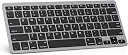
I got this keyboard and a stand for my laptop to be more elevates for better posture. I love that the keyboard is an almost perfect replica of my MacBook. The only differences I notice are 1. Probably the one that bugs me the most is it is missing the buttons at f3 and f4 that change the screen to show the desktop/app view which I use alot and now have to reach over to tap it on my laptop. And 2. The keys are more matte and aren't as soft touch as the Mac (you can hear yourself typing) this doesn't really bother me..it's a 20$ keyboard it's great for the price and i love using it. Another slightly annoying thing is that the keyboard disconnects after a few seconds of no Interaction. All you have to do is tap a button and its back on but I'm just being not picky, honestly that might be a plus that it saves battery in the long run. Overall I'm really glad that I got this keyboard and I'd buy it again. Highly recommend.
Trustpilot
1 month ago
2 weeks ago