Desertcart purchases this item on your behalf and handles shipping, customs, and support to Kenya.
🚀 Elevate Your Wi-Fi Game — Coverage, Speed & Security, All in One!
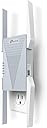
The TP-Link RE813XE AXE5400 Wi-Fi 6E Range Extender is a tri-band powerhouse designed to amplify your home network with up to 5.4 Gbps total bandwidth and coverage spanning 2800 sq. ft. Supporting up to 96 devices, it leverages the new 6 GHz band for reduced interference and faster speeds. With Beamforming antennas, OneMesh compatibility, and a 1 Gbps Ethernet port, it delivers seamless, secure connectivity ideal for streaming, gaming, and smart home setups. Easy app setup and advanced security features make it a top-tier choice for modern, connected households.


| ASIN | B0DYS1DH7T |
| Best Sellers Rank | #23,700 in Computers ( See Top 100 in Computers ) #118 in Network Repeaters |
| Brand | TP-Link |
| Built-In Media | Quick Installation Guide, Wi-Fi Range Extender RE813XE |
| Color | White |
| Colour | White |
| Compatible Devices | Router |
| Connector Type | RJ45 |
| Customer Reviews | 4.4 out of 5 stars 210 Reviews |
| Data Transfer Rate | 5400 Megabits Per Second |
| Data transfer rate | 5400 Megabits Per Second |
| Frequency | 6 GHz |
| Frequency Band Class | Tri-Band |
| Frequency Bands Supported | 2.4 GHz, 5 GHz, 6 GHz |
| Frequency band class | Tri-Band |
| Item Weight | 0.88 Pounds |
| Manufacturer | TP-Link |
| Mfr Part Number | RE813XE |
| Model Number | RE813XE |
| Number of Items | 1 |
| Number of Packs | 1 |
| Range | 258.32 meters |
| Special Features | Access Point Mode, LED Indicator, MU-MIMO, Remote Access, WiFi Mesh |
| Special features | Access Point Mode, LED Indicator, MU-MIMO , Remote Access, WiFi Mesh |
| UPC | 840460600729 |
| Wireless Compability | 802.11ab, 802.11ac, 802.11ax, 802.11g, 802.11n |
| Wireless communication standard | 802.11ab, 802.11ac, 802.11ax, 802.11g, 802.11n |
W**T
Very easy to setup and use
I have a TP-Link AXE5400 Tri-Band WiFi 6E Router (Archer AXE75) which reaches all corners of my home but the signal strength at the farthest corners are weak to moderate. I wanted to boost the signal strength in and around my garage where I have a couple of remote security cameras setup. To do this, I installed the TP-Link RE813XE AXE5400 Wi-Fi 6E Range Extender in my garage. The setup and connection process was very easy to accomplish. Just plug in the extender and press the WPS button on first the router, then the extender. It may take a few minutes so be patient and wait for the connection to be made. Once connected, you can move the extender to the area where it is required and plug it in. It will reconnect to the router and if the name of the extender is the same as the router, your devices will connect to the stronger signal automatically. It could not be any simpler. The signal strength at my cameras went from moderate to excellent and the cameras became more responsive to commands issued by the camera app. I am very pleased with the RE813XE and think it well worth the cost.
D**.
Range extension the way it should be
I've long been skeptical of Wi-Fi range extenders, but this unit made me a believer. I purchased it along with a TP-Link BE9300 (Archer BE550) router, primarily so that I could take full advantage of OneMesh/EasyMesh connectivity. Because I don't yet own any devices that support Wi-Fi 7, I don't need to extend the full Wi-Fi 7 capability of the router. However, the Wi-Fi 6E capability of the range extender means that the router and the range extender can use the 6-GHz band as a dedicated backhaul, leaving the 2.4-GHz and 5-GHz bands free to connect to my devices. Even though I'm a computer-industry veteran, I generally hate having to configure networks. Installing this pair of devices, though, was remarkably easy. After ensuring that the new router was performing properly, I followed the instructions to configure the range extender. Everything worked correctly on the first try. I now have solid coverage from one ground-floor corner of my 2000-square-foot house (the router) to the opposite second-floor corner (my work computers). Because I reused the previous SSID (and let the TP-Link devices unify the three bands), I didn't need to reconfigure any other devices—they simply resumed working as before but with far better bandwidth.
R**.
TP link
When my mesh main unit by orbi failed, this, what I travel with, worked great on getting me back up on the internet until I replace the orbi unit.. Easy to set up and great as an extender / booster
T**G
Doesn't pair well with TP- link router
Would not work with my Tp- Link router, AXE75, would not work with my security cameras either, and get real hot to the touch. Could not get it configured, I would not recommend.
A**S
Good for gaming
I really like the Wi-Fi to Ethernet capability. Using it as a wired connection is far more stable than Wi-Fi, and it works very well for gaming and other situations where a reliable connection matters. In that role, it performs great and has been very stable. The main downside is the size. It’s bulky, cannot be rotated, and ends up taking up the entire outlet space, which can be inconvenient, especially on power strips or crowded outlets. I don’t use the Wi-Fi extender feature very much—the Ethernet function is far more useful to me, and that’s where this device really shines. Overall, it’s a solid and stable product for turning Wi-Fi into a reliable Ethernet connection. The size and outlet design keep it from being perfect, but performance-wise it does what it’s supposed to do.
Trustpilot
2 months ago
2 weeks ago