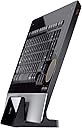
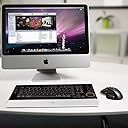
โจ๏ธ Elevate your Mac setup with wireless elegance and power-packed precision
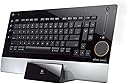
The Logitech diNovo Edge Mac Edition is a premium wireless Bluetooth keyboard tailored for Mac users, featuring a rechargeable 950mAh battery with rapid charging, a 38mm TouchDisc touchpad with accelerated scrolling, and a sleek, ambidextrous design optimized for both office and travel use.
| ASIN | B001U0WQJM |
| Additional Features | Travel |
| Antenna Location | Office |
| Best Sellers Rank | #6,754 in Computer Keyboards |
| Brand | Logitech |
| Built-In Media | USB Cable |
| Button Quantity | 78 |
| Color | Black |
| Compatible Devices | Laptop |
| Compatible Operating System Family | MacOS |
| Connectivity Technology | Bluetooth |
| Customer Reviews | 3.5 out of 5 stars 65 Reviews |
| Enclosure Material | Plastic |
| Global Trade Identification Number | 00097855056832 |
| Hand Orientation | Ambidextrous |
| Item Dimensions L x W x H | 16.14"L x 8.26"W x 0.43"H |
| Item Weight | 5 pounds |
| Keyboard Description | Wireless |
| Keyboard Layout | QWERTY |
| Manufacturer | Logitech International |
| Mfr Part Number | 920-001727 |
| Model Name | diNovo Edge Mac Edition |
| Model Number | 920-001727 |
| Number of Batteries Required | 1 |
| Number of Keys | 78 |
| Number of Packs | 1 |
| Number of Sections | 1 |
| Power Source | rechargeable battery |
| Processor Count | 1 |
| Recommended Uses For Product | Office |
| Special Feature | Travel |
| Style Name | Contemporary |
| Switch Type | Scissor-Switch |
| UPC | 097855056832 097855057907 |
| Unit Count | 1 Count |
| Water Resistance Level | Not Water Resistant |
W**T
Comfortable, pleasure to use
I've been using logitech products since their "Logitech First Mouse" which was awesome. I used that ps/2 ball mouse way into the USB/optical era because it felt so nice to use. My only concern in purchasing this keyboard was that it requires a vertical dock to charge, basically making the keyboard useless if it ran out of battery. There is no way to charge the keyboard while using it which is a design flaw IMO. however, I've been using this keyboard for over a month now on a single charge, so it will last for the long hull. I'm now at 20% and I'm expecting the a low battery indicator to kick in any day now so I'll simply drop the keyboard in the charger the night it comes on. Oh, i should mention that I'm a computer programmer and work from home, so this keyboard has been used all day every day for the entire month, and evenings too when working on night projects and gaming. I love not having the numerical keys on the keyboard! To me, the numerical keys make the keyboard too wide and it becomes hard to center keyboard on the monitor while keeping the mouse a close and comfortable distance. I know some people like having a numeric keypad because they may use it a lot, but as a programmer I never find myself missing the keypad. Maybe because I've been buying keyboards without numerical keys for many years though. The keyboard feels nice to type on as I would expect from a logitech product. Build quality is high. Adjusting volume can be slightly more difficult with the touch control rather than physical buttons, but no major issue encountered. Proper physical buttons work well for all other music control buttons. The touch mouse pad is a neat idea. Admittedly i do not use it often since I use this at my desk with a mouse, but I can see this being very useful if othis were used as a coffee table keyboard. Overall I'm very happy with this keyboard and I'd certainly recommend. I'd love to see this exact keyboard layout able to plug into a computer (no battery) with backlit keys. If logitech will make that for me I'll move this one to my coffee table :D
P**N
This really worked well - - - for a very short while
Bought this keyboard as the primary alternative to Apple's pre-packaged bluetooth keyboard and mouse. Was thrilled with it when it came, when I installed it and when I used it. I charged it for the first time and it worked flawlessly. Unfortunately, when it was time to charge it (only the second time), it would not connect to the power base. I contacted the manufacturer and they had some preliminary lame attempts to "make it work." Nothing made the contact between the keyboard and the charger work. Nicely, Logitech offered me the choice between a refund or a replacement (with a different product) and discovered that - despite the presence of the SAME keyboard on Logitech's website, they are no longer selling that product. Further, Logitech has no bluetooth keyboards for Apple. Now, I am back to the original Apple keyboard/mouse and couldn't be more unhappy about it. Logitech DiNovo Edge Rechargeable Bluetooth Keyboard for Mac
D**L
Excellent keyboard, crummy trackpad
As you'll see if you read any other reviews of Bluetooth keyboards (I did extensive research), the diNovo Edge is top of the line. It's a beautiful, quality product with strong Bluetooth connectivity and exceptional battery life. Even the charging stand is nice. I use my diNovo Edge with a Mac Mini media center, connected to my HD TV and stereo receiver. As a keyboard, it cannot be beat -- I wish I had an extra one to use at my office. The built-in volume control is really nice, as it often saves me from needing the TV or stereo receiver remote. (I passed on a multi-function remote like a high end Harmony because I wanted the keyboard, and the price point is more reasonable.) The bad news is its mouse trackpad, which is especially unfortunate given that built-in mouse control was one of my primary requirements. The trackpad is too small, meaning that you're constantly having to jump your mousing finger back to the other side of the trackpad to move the mouse. This is a huge problem when trying to drag objects across the screen (e.g. for scrolling, or drag-n-drop), which both the keys and the tap-to-click feature seem to be absolutely terrible at anyways. One of the features I immediately activate on any Mac is the two-finger scrolling -- the trackpad boasts a similar feature, where you start on the right side of the pad and move your finger in a circular motion, but in practice it works only about half the time, and hardly ever very well. The trackpad is also awkwardly positioned on the right side of the keyboard, instead of in the center like a typical laptop trackpad or trackpoint. One of the better reviews I read mentioned this, but I had no idea how annoying it was going to be to take my right hand off of home row and go fishing around for the trackpad until I'd actually tried using the keyboard for a while. Still, when sitting on the couch, it beats not having mouse control at all, and definitely beats VNC! If you're looking for a quality wireless keyboard with a built-in mouse, the diNovo Edge is a top contender. Just don't expect great usability out of the trackpad.
J**N
Expensive yes, but you get what you paid for
First of all, I have the Dinovo Edge for PC that I bought when the new aluminum iMac came out 2 years ago. I picked up the Mac edition when I got myself a second iMac. The price is a little cheaper for the Mac edition but now the functionality has been improved over the PC edition. Since this review is on the Mac edition I'll focus on that. For me, I wanted a wireless keyboard where I don't have to swap out batteries. This is basically the only keyboard that offers a rechargeable base station. I usually go about a month before I have to recharge. And I never turn off the keyboard. The base station sits in my cabinet hidden until I need to charge it. I just plug it in the wall, plop the keyboard onto the base station and let it charge up. I don't like having to take out batteries and put in the recharger and then have to put back batteries which I was doing before when I had a PC. I use an MX revolution wireless mouse from Logitech for both my iMacs and it meets the same rechargeable base station requirement. However with that mouse I need to plug in a USB receiver. Luckily for the Dinovo edge it is Bluetooth! Never had a problem with the Bluetooth dropping out or synching, works flawlessly. The only thing I would have liked is having a 10 key section. The trackpad and volume slider on the keyboard is nice, but I use a better mouse anyway. I could see it being used on a mac mini for a home theater setup though where you occasionally might need a mouse. The really nice thing is that it matches the aluminum iMac in design. You can lower the price a little by selling the keyboard that Apple gives you in the box. It will still beat any other keyboard out there. I also forgot to mention that this keyboard is SLIM!! It's seriously sexy.
V**H
Pretty, but flawed
I am big fan of trackpad gestures in the recent Macbooks, especially the double finger scroll, and I have been trying to find a wireless keyboard/trackpad combo that comes close to replicating the scroll experience. After checking out a lot of unsatisfactory options, I decided to go with the diNovo because of its gesture and Mac support. It's beautiful. There's a star trek appeal to the finish, which is enhanced by little orange leds strewn across liberally. The construction is sturdy and the board is thinner and longer than it looks in photographs. The charging cradle is handsome too, though it usually takes trial-and-error to cradle the keyboard properly so that it charges. The usability, however, is barely 2 out of 5. The keys are "heavy" -- they are a chore compared to keys on a modern notebook ie Macbook/Thinkpad. The trackpad is too small and tucked away in an uncomfortable and distant location. I find myself trying to look for keyboard shortcuts instead. The worst is the rotating finger scroll. It's a complicated gesture which is made even more frustrating by its high failure rate. Even after a few months of using it, the gesture fails 25% of the time for me. The use of trackpad as a pointing device is inconvenient due to severely constrained track area, I end up with finger fatigue after 30 minutes or so. The diNovo is sufficient for occasional use, especially with the computer that is part of the media center in your living room. However, it has ways to go before it can become a primary work device. I am hoping the next generation of wireless diNovos will be as usable as they are pretty.
A**E
Almost great....but that trackpad!
I'd agree with most.. the keyboard itself is mostly great. The layout is fine, the battery is long lasting, the look in general is very nice. The keys are fine, the bluetooth is what makes this keyboard worth anything. It pairs easily and is not line of sight...but that darn trackpad is just horrible...too small, not accurate, and creates extra work. I'd prefer a mac like track pad that is bigger...sacrifice a bigger keyboard for extra pad...or give me a track ball. This is the mac edition. Hope this helps
A**1
Great keyboard for Mac Mini used as a media center
Purchased for use with a Mac Mini that is hooked to a TV for use as a Media center. Looks great & the keyboard has a nice feel when typing. It is a great keyboard for the use in the living room as a media center. I'm not sure I would want to use it as the exclusive keyboard in other situations. Postitives - easy set up, looks great, charge lasts a long time, light weight (for use when sitting on the couch), & has decent range. Negatives - mouse works ok, but not as well as a traditional mouse. The volume control bar included on the keyboard only controls the volume on the little speaker in the computer so it doesn't control volume of stereo or tv (from what I can tell). Still not sure if I like the charging dock. It requires you to set the keyboard on it side for charging and just seems a litle odd. Luckily the charge is fast and lasts for a long time. Overall, I rate this as a very nice keyboard and would recommend it. Note- New Mac Mini that have not been set up will need a compatible mouse to use for the initial set up of this keyboard. If you don't have something you can't get past the first screen on the set up that keeps flashing a picture of mouse battery installation and a click here button. After that you will be able to use the mouse function on the keyboard without any problems.
P**R
Do not buy.
The mouse pad on this device simply is not useable. Logitech has discontinued this product. Do not buy one. Logitech should be embarrased at how badly they designed the mouse pad. This is "old technology" and should be easy to reproduce. There is a huge need for a device like this that is Apple compatible as computers merge into TV's. Apple should also be embarrased that they do not make such a device. Every notebook computer has this type of interface. Put it in a box and give it blue tooth, please. Phil
Trustpilot
4 days ago
5 days ago