Buy anything from 5,000+ international stores. One checkout price. No surprise fees. Join 2M+ shoppers on Desertcart.
Desertcart purchases this item on your behalf and handles shipping, customs, and support to Kenya.
🚀 Elevate your display game—connect smarter, play faster!
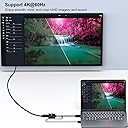
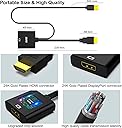
The BENFEI HDMI to DisplayPort adapter is a compact, USB-powered device that converts HDMI signals to DisplayPort with support for ultra-high resolutions up to 4K@60Hz and refresh rates up to 165Hz. Compatible with a wide range of devices including laptops, gaming consoles, and Raspberry Pi, it ensures stable, lag-free video output for professional presentations and immersive gaming experiences. Backed by an 18-month warranty, it’s the essential tool for anyone demanding premium display performance on the go.


| ASIN | B0752D33PJ |
| Best Sellers Rank | #279 in HDMI Cables |
| Brand | BENFEI |
| Color | Black |
| Compatible Devices | Laptop |
| Connector Type | HDMI |
| Current Rating | 1.2 Amps |
| Customer Reviews | 4.2 out of 5 stars 4,906 Reviews |
| External Testing Certification | Não aplicável |
| Finish | Hdmi,Projector |
| Item Dimensions | 0.79 x 1.18 x 0.79 inches |
| Item Weight | 1 Ounces |
| Item dimensions L x W x H | 0.79 x 1.18 x 0.79 inches |
| Manufacturer | BENFEI |
| Mfr Part Number | 000152black |
| Model Number | 000152black |
| Number of Items | 1 |
| Number of Ports | 1 |
| Package Quantity | 1 |
| Power Plug Type | No Plug |
| Smart Home Compatibility | Not Smart Home Compatible |
| Specific Uses For Product | Monitor,Projector,Tv |
| UPC | 606682478641 |
| Unit Count | 1 Count |
| Warranty Type | Limited |
J**B
Works well with Raspberry Pi 1, 3, or 4
First of all, let me make it clear that I am reviewing the HDMI to DisplayPort adapter. The Raspberry Pi has an HDMI display connector, and I am using the Benfei to see the Pi's video on a monitor that has a Displayport connector. To get HDMI video to appear on a DisplayPort monitor, you need more than just a connector. The Benfei actively converts the video from HDMI to DisplayPort. It has a USB power connector to power the electronics that do the conversion. My Asus monitor has HDMI and DisplayPort connections. My regular home computer uses the monitor's HDMI port, and the Benfei lets me connect the Raspberry Pi's HDMI connector to the monitor's DisplayPort. It works fine. The Raspberry Pi 4 can drive the display at its 2560x1440 max resolution. (Sorry, I don't remember whether the Pi 3 video supports that resolution.) The Benfei has a USB cable that must be connected to 5 volts. That can be done with one of the Pi's USB ports or with any regular 5 volt supply. The Benfei draws 120 milliamps from its USB connection. To use the Benfei with a Raspberry Pi 3, the connections are Raspberry Pi HDMI port Benfei device DisplayPort to DisplayPort cable Monitor DisplayPort connector The Raspberry Pi 4 has Micro HDMI, so I had to also buy a Micro HDMI to HDMI adapter cable. To use the Benfei with a Raspberry Pi 4, the connections are Raspberry Pi Micro HDMI port Micro HDMI to HDMI adapter cable Benfei device DisplayPort to DisplayPort cable Monitor DisplayPort connector UPDATE March 17, 2023 I tried the device with a Raspberry Pi 4, and it plays a 1080P youtube video smoothly without dropping frames.
J**L
It works well but I'm not stressing it much.
It works well, granted I'm not stressing it much. Using it to run a 1080p 20" secondary monitor that mainly displays static images for my gaming setup, so I have no idea how this would perform running a 4k TV running a game or something, but for my use case it works well and I have had zero issues with it! Even when I'm watching videos on that secondary monitor I've had no issues whatsoever. No hitches, hitches, visual packet loss, overheating of the device, etc. Again, I'm also not stressing this thing at all. Very low workload. Make sure you do your research however as these are unidirectional and need a separate power source via usb-a. In my case that was perfect.
E**L
Best HDMI to DP adapter I've Seen On Amazon.
Works flawlessly. Purchased a laptop with HDMI out. My external monitor supports both HDMI and DisplayPort. The HDMI only goes up to 60Hz. The DisplayPort goes all the way up to 165Hz. Instead of buying a new monitor that supports 2k 240fps and 480fps at 1080, I decided to purchase this for the time being. Works great. The male USB A connects perfectly to my turtle beach stealth hub for power. Highly recommended. Check out other adapters and you'll see that they probably don't support the same high refresh rates pertaining to the given resolutions.
A**N
Not work on xbox series x and 4k dp 1.2 monitor
Not work at all. I have an xbox series X and EIZO 4k monitor which has hdmi 1.4 and displayport 1.2. The hdmi 1.4 only supports 4k 30hz so I purchased this adapter. Totally waste of time, it can support only 1080p.. My monitor can support 4k 60hz using DP cable without a problem, it is a very high end monitor. Update 3/30/2022: I have tested it more. I can override output from automatic to HDMI in XBOX video fidelity & overscan section, and now you can choose 1440p, still no 4k support. I try to enable 4k in video modes but it says my monitor does not support 4k. I have another test, using my computer which has a GTX 1060 6G card, it is an old graphic card but still can support HDMI 2.0 output and 4k60hz. So I connect this adapter to this HDMI port, and using DP cable to my monitor, it can reach up to 4k30hz, not 4k60hz. For your information.
T**N
Good for entertainment system options!
Easy to install. Signal strength is good, no delay. If you are looking for something that can be used to hook a 120Hz gaming console (PS/Xbox series X/S) up to a high Hz PC monitor that is not built for a gaming a console, this will not work, it will be capped at 60Hz as it would be if you plugged the console into the HDMI port of some PC monitors. An HDMI gaming console will depend on the monitor build to get the full 120Hz, not the HDMI to DPI cable. We tried. All and all this cable will work great if you are trying to connect an HDMI device to a DPI only PC monitor.
A**N
Oculus Rift S Review
This is a review of the product in reference to Oculus Rift S on my Acer Nitro 5 AN-515-55. I like many others mistakingly bought an Oculus Rift S thinking it would be HDMI capable. After realizing I would either need to sell the headset or find an adapter I searched tirelessly through the internet. Most forms I came across stated an adapter for DP to HDMI would be impossible due to the amount of information that needs transferred. I took this at face value and looked for USB C or 3.0 connectors instead with no luck. Luckily I did come across this listing and I can say this works 100%. The refresh rate is definitely 80hz and the resolution is great. It feels just like an Oculus Quest. I played about 2 hours of Skyrim VR and Borderlands VR prior to this review and encountered no issues. (P.S. if you get a black desktop screen in the Oculus software make sure the app is running on your CPU instead of GPU in "Graphics Settings" on windows) All in all I couldn't be happier with the product but I will be upgrading soon since a GTX 1650TI isn't great for VR. I would highly recommend this product for Oculus Rift S users.
R**K
Intermittent problem
The adapter worked as advertised and matched the PC resolution to the capabilities of the Dell display as expected. As long as there was a signal present at the output of the computer there was no complaint. HOWEVER, as soon as the computer monitor output went to sleep the adapter stopped passing the EDID information from the display back to the Graphics card in the PC, and then the PC resolution would change to another (higher) resolution that the monitor would not accept. This causes an error message to show on the display and the display would never go to sleep. A mouse movement to wake the display would NOT bring the monitor back on. The only way to get the monitor back was to cycle the power on the monitor. I bought another brand unit for the home PC to monitor that does not have this issue; I will keep this unit in my kit bag for a rainy day.
S**N
Works for Oculus Rift S with an MSI GF65 Thin!
Bought this because it was the only product that others had found success with for their Oculus Rift S. My laptop has a 2060 that is only connected to HDMI (no DP over USB) so this was my only option. AND IT WORKED! The Oculus software detected my Displayport connect instantly and after an unplug-replug cycle it was ready to go. I experienced no issues with picture quality or framerate. Suggestions: The USB power plug isn't used for data, but instead to help power the adapter. DON'T plug it into your PC. It will take too much power from the built-in USB hub so the Rift S won't have a stable connection. This could cause audio and controller tracking dropouts. Instead, plug it into a USB wall adapter (phone charger) maybe with an extension cord if it isn't long enough (it's about 18 inches). Troubleshooting: If the headset is black or glitches out, try going into the Oculus software -> Settings -> Beta -> Restart Oculus and it should be fixed.
F**M
Asus monitorum için aldım, hdmi 120 hertz ile sınırlıydı bu adaptör sayesinde 165 hertz alabildim
Oldukça işime yaradı. Kaliteli, Teşekkürler
B**R
Kompatibel mit der PS5
Habe einen Asus VG248QE Monitor mit 144hz und wollte gerne auf der PS5 mit 120hz Spielen. Leider sind die aber nur über den DisplayPort erreichbar und nicht über HDMI. Habe sehr lange im Internet nach einer Lösung recherchiert, bis ich auf diesen Adapter gestoßen bin. Habe ihn bestellt und ausprobiert und siehe da: Es Funktioniert ! Wichtig ist das man in der PS5 die Auflösung auf 1080p stellt und den Leistungsmodus aktiviert und natürlich ein spiel startet, welches 120hz unterstützt. Seit dem neuen Update wird auch kein EDID mehr benötigt einfach den Adapter in die PS5 und zum Monitor ein DisplayPort 1.2 Kabel. Fertig!
K**様
ちゃんと映る
ビデオカードがDisplayport、モニタがHDMIは沢山あるけけど ビデオカードがHDMI、モニターがDisplayportは少ない ちゃんと映りました。値段も手ごろで買って良かったです。
I**N
OK with 2560x1440 Refresh 60Hz - on Linux Manjaro laptop.
My Dell U2722D monitor failed for the third time in 3 months. The the last two with "No HDMI signal from your device". I bought this to tide me over till I decide how to get my money back. This device plugs into the HDMI socket on laptop, power from a high output USB power source and outputs to a female Display port (DP) into which is plugged a DP lead which goes to the monitor. It works perfectly with colours as expected. However, I do not know if it would cope with a higher refresh rate than 60Hz at 2560x1440 which is the highest that this monitor which has a great display will go to. It seems fine with photos and movie DVDs at this setting. I have not tried with the USB power output from laptop which according to the website may not supply enough power. I hope this helps someone. (EDIT: It is a black one not grey, it just looked grey with its plastic cover.. There is no sign of it getting hot as some people have reported.) EDIT: I accidently ran it with the power supply turned off and it worked fine at resolution mentioned above, presumably getting power from HDMI socket. Probably better not to risk doing this in the longer run.
P**O
Funziona bene
Funziona bene, anche con un kvm/switch (attenzione che non tutti i kvm potrebbero funzionare con questi adattatori)
Trustpilot
2 weeks ago
1 week ago