Buy anything from 5,000+ international stores. One checkout price. No surprise fees. Join 2M+ shoppers on Desertcart.
Desertcart purchases this item on your behalf and handles shipping, customs, and support to Kenya.
🖤 Label Like a Pro, Organize Like a Boss
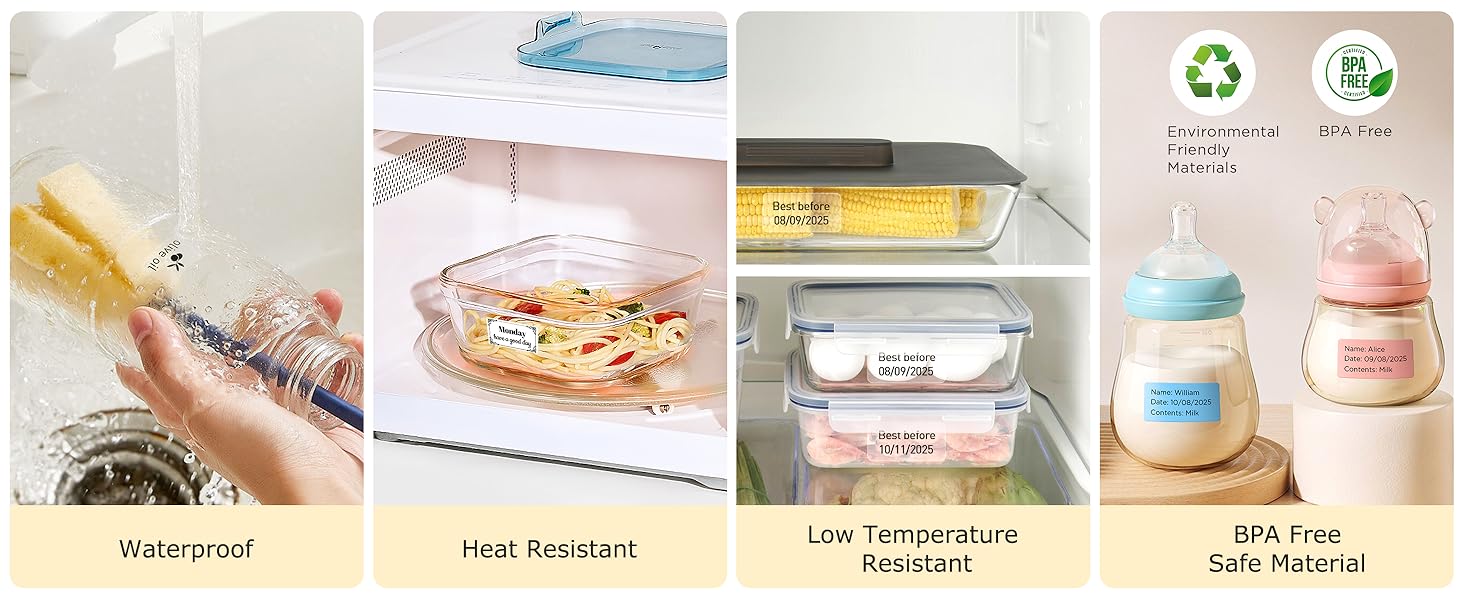
The SUPVAN T50M Pro is a cutting-edge Bluetooth thermal label maker that prints wide, waterproof, inkless labels with high-resolution clarity. Featuring a versatile app loaded with 30+ fonts and 660+ icons, it empowers professionals and organizers to create custom labels effortlessly. Compact and lightweight, it’s perfect for home, office, school, or small business use, supporting multiple label shapes and sizes for ultimate versatility.


| ASIN | B0CKYMWV5X |
| Additional Printer Functions | Print Only |
| B&W Pages per Minute | 50.0 |
| Best Sellers Rank | #391 in Office Products ( See Top 100 in Office Products ) #2 in Desktop Label Printers |
| Brand | SUPVAN |
| Built-In Media | Charging Cable, Label Tape 40 mm x 30 mm (White), Manual, T50M Pro Label Maker |
| Color | Black |
| Color Pages per Minute | 1.0 |
| Compatible Cartridge | SUPVAN Label Tape |
| Compatible Devices | Laptops, PC, Smartphones, Tablets |
| Connectivity Technology | USB |
| Control Method | App, Push Button |
| Controller Type | Android / iOS |
| Customer Reviews | 4.5 out of 5 stars 7,031 Reviews |
| Dual-sided printing | No |
| Duplex | Automatic |
| Hardware Interface | USB Type C |
| Initial Page Print Time | 1 Seconds |
| Ink Color | black |
| Is Electric | Yes |
| Item Dimensions D x W x H | 5.9"D x 2.6"W x 4.3"H |
| Item Type Name | Thermal Printer |
| Item Weight | 433 Grams |
| Manufacturer | SUPVAN |
| Maximum Copy Resolution Black and White | 203 dots_per_inch |
| Maximum Copy Resolution Color | 203 dots_per_inch |
| Maximum Copy Speed Black and White | 60 ppm |
| Maximum Media Size | 1-5/8'' x 1-3/16'' |
| Maximum Print Resolution Black and White | 203 Dots Per Inch |
| Maximum Sheet Capacity | 1 |
| Maximum print Resolution Color | 203 Dots Per Inch |
| Model Name | T50M Pro |
| Model Number | T50M Pro |
| Model Series | T50 |
| Number of Trays | 1 |
| Other Special Features of the Product | Enhanced Image Quality, High Clarity, Inkless, Lightweight, Waterproof |
| Output sheet capacity | 1.0 |
| Paper Size | 1-5/8'' x 1-3/16'' Inches |
| Power Consumption | 10 Watts |
| Print media | Labels |
| Printer Connectivity Type | USB |
| Printer Output Type | Monochrome |
| Printer Type | Thermal |
| Printing Technology | Thermal |
| Processor Count | 1 |
| Resolution | 203 |
| Scanner Type | Sheetfed |
| Series Number | 50 |
| Special Feature | Enhanced Image Quality, High Clarity, Inkless, Lightweight, Waterproof |
| Specific Uses For Product | Home, Office, School |
| Total Usb Ports | 1 |
| UPC | 739750152812 |
| Unit Count | 1.0 Count |
| Warranty Description | 1 Year Warranty |
| Warranty Type | Limited |
| Wattage | 10 watts |
E**.
Worth the spend.
Highly recommend for anyone whom is technically able to operate. Very simple usage. Great quality. Can do many different labels and even create your own bar codes. Size is perfect for travel and not much desk space. Very light weight. Great for anyone and ice coming with three different rolls of labels as well.
R**N
Best Label Maker I've Owned
I was super excited to get my new SUPVANT50M label maker! I downloaded the app and made my 1st label. It was pretty easy to figure out, I wish there was more preset choices, but with time I will figure out more. I love that it has Bluetooth, and connected easily to my phone and works super fast. I am just using the rolls that came with it for now, but I love that I can order different sizes when I need them. Its pretty easy to set up of course following the directions makes it even easier. It printed my label quickly and didn't smudge, which ive had other label makes that the ink has to dry a bit before you can remove it, but it this one, at least not for me. But for the price, I am amazed at the quite of each label, I printed 3 at a time just to put it through its paces, and each label was as perfect as the first. So unless anything happens in the new month or so, im happy! I absolutely think others will love it to!
C**E
Great purchase!
Oh my gosh I love this!! I bought it to use for labeling things for my farm stand and it’s perfect. It’s really easy to set up and use. The app is pretty cool as well because it allows you to do a lot of customizing. It’s small so it’s very portable and it’s quiet as well. I am so glad I bought this. I will update this if anything changes.
H**7
Great Label Maker
Unit was easy to use, prints amazingly quickly and was very easy to set up and start printing. I like to use it on my PC as opposed to my phone or tablet, it took a little effort to make that happen but once I figured it out I'm more than a little happy with it. Originally I downloaded an android emulator it worked but seemed bulky and not to user friendly, then I found Supvan has a program written for the PC and it works well. I like the fact there's no ink, and the labels needed for it are cost effective. I would recommend this to anyone that needs a small, versatile, inexpensive label maker.
L**C
Great printer, easy to use
I've only had this a few days, but it's come out of the gate strong. It has a good feel to it, good weight, and the parts feel and sound solid. The button presses are easy and obvious (no fumbling or "misclicks"), and the retraction of the first label you leave sticking out when inserting a roll is solid. The prints are good, and the adhesive sticks very well. I've removed a few labels, almost perfectly, but I have noticed a 1mm or 2mm spot of adhesive left behind on occasion. I think the branded labels have a good balance with adhesion. So far I'm feeling good quality all around. It keeps a record of your print jobs, even after powering off, so you can go back and edit and/or reprint them. Since there's no user guide for the app, I'm left wondering how many jobs it will store, but I like this a lot and have used it more than once. I got frustrated with placing objects on the field, then found that there are arrows to help you align the object by nudging it. Immense help! Aligning text within its box is also easily done, just choose the left/center/right alignment buttons. The app is also available for download from Supvan for PC and Mac, so if you're having trouble understanding the phone app, maybe try it on the computer and see if it makes more sense there. Some points as to other comments: 1. Yes, the app unfortunately leaves you on your own to figure it out, but after 5-10 minutes of experimenting I found it to be easier to use than I imagined. I can, however, picture this being more difficult to use for people who are not technically-oriented. 2. You absolutely can use other brands of labels. There is a DIY label option for you to enter the label details to let the printer know what you're using. Again, without instructions this may be frustrating for some, but I was able to use another brand's round labels (see purple round label photo) with no issue by telling it I had a 50mm round label with a 3mm gap between them. Some manufacturers will tell you what printers are compatible, but as long as you have the info from the manufacturer, you can check it against brand labels, or the app's settings to see if you can set it up with those specs. I do wish there were more icons available, even though I'm not seeing I'd be using them all that much at this point. You can upload your own font, so once I look into how to do that, I'm all over it. As with many things with seemingly many choices, not all are appropriate for the task at hand, and I get bored easily. I may experiment with taking screenshots of emojis and using those photos, since you can add photos to labels. I'll probably switch to using it on a tablet rather than a phone; I find using a stylus on the phone easier than using my fingers. Overall, I'm having a good experience so far and am hoping this printer will be with me a long time.
A**M
Amazing quality text-based labels, hilariously good at printing memes.
Amazing quality, honestly. Very happily surprised. I've had it for a few weeks and it's great, had no problems. Easy to use the app, I've not had any technical or connectivity issues. I do wish it could connect to more than one phone at a time (my partner and I share the device) but I can understand why that's a bit difficult. The app is a bit jank in terms of readability (you can tell it's translated from Chinese most likely) but it works and is mostly intuitive anyway. You can change a lot of settings in the app which is nice but the default works perfectly fine! You can also save your past designs as templates which is great if you want to repeat similar formatting! It also keeps your printing history so if you forget to save it you can always go back :) The sticker roll that comes with it is great! And I like that it's easy to explore other options in the future as well; clear sticker rolls, colored rolls, etc. Haven't tried others out yet but I definitely will. It's got a good adhesive and remains sticky. I even had to remove a sticker to replace it on a different object and it still stuck just fine, no problem. Really good value overall. No battery issues, I've had it on for several hours at a time and still haven't needed to charge it once yet. Typical USB-C cable so if you lose it it's also not a big deal, which is nice. It's also very fast! Unless you're printing a crazy complex picture, it's basically instant. Prints basic text-based labels the best, along with diagrams and shapes, but it's good at pictures. I'll be honest— I've mostly printed memes when I say “pictures” and it's hilariously good at it. It can only print in black and white obviously but it's kind of hilarious to see the pixelized, almost half-tone patterned versions of memes. So I have no issue with that. If anything I think it makes it better.
R**N
Must have for save the dates or wedding invites!
I ordered this to try making mailing address labels for my save the dates. It’s so easy to step up and use. Just load the roll of labels and hit the printer button to align the roll and then connect the printer with your phone via the app. I haven’t had any connectivity issues. When you’re ready to use you just hit the power button and make sure your phone is in the app. The battery on the machine seems to last a long time. I’ve charged it once a couple of weeks ago and printed 50+ labels and it’s still turning on. It charges via a usb-c cord. Very portable and would be easy to take places. I was able to use a cute template for my address labels and the lettering was easy to read. I got compliments on my save the dates and I definitely think these labels added to the appearance! It’s also fun to play around with and I made a couple of stickers. Will be using again when it’s time to send the actual invites!
R**A
Great little printer!
Update: It did hold charge; I just wore the poor little thing out on the first day. 5 Stars all the way! I am not good with trying new electronic things. I was really intimidated by this little guy, but after reading all the reviews, I knew it was exactly what I needed. I'm in the middle of remodeling my kitchen and just bought around 100+ containers with lids to put everything in. I mean EVERYTHING! We live in an old farmhouse surrounded by fields. I am sick to death of dealing with mice and ants. So, if it doesn't come in a tin can, it goes in an airtight container. I even bought all new dish cloths, hand towels, and potholders, even those are now in containers. Anyway, I ordered the T50M Pro with 2 rolls of regular labels and 1 roll of the long labels. I plugged it into my laptop and the red light came on indicating it needed to charge. That took about an hour. I didn't touch my laptop until the light turned green and then followed the instructions, held down the power button 2 seconds, the label button. It adjusted the labels perfectly and then I just started playing around with the different icons until I started figuring it out. The print quality really surprised me for such small labels. They turned out great. It's really an easy machine to figure out. I was able to figure out all kinds of different designs, lay outs, mirror affects, etc. I love its functionality! I printed out about 25 labels yesterday; it didn't seem to make much of a dent in the paper. I would say the paper capacity is pretty awesome. I'm not so sure about the battery life. I thought of a few more labels I needed to make this morning, and the printer was completely dead. I had to plug it back in and it took an hour and 20 minutes to get a green light. I printed 15 more labels and left it plugged in for about another half hour after I completed printed. If its dead in the morning, then it's definitely not holding a charge, and I'll just have to plug it in an hour+ every time I want to use it. Which would be a real bummer. I took a star off due to the charging issue. If it holds a charge tonight, I'll adjust the star back in and edit this review.
M**S
Klein, maar reuze handig.
Opladen, en direct aan de slag. Het apparaat werkt goed. Zou alleen een tweede led moeten hebben als je hem aan hebt staan en aan de lader. Dan zie je alleen het rode lampje. Verder print hij gewoon goed. De letters zijn, wat uitvergroot, pixelachtig. Maar gewoon gord leesbaar. De etiketten glanzen mooi en zijn van goede kwaliteit. Plakken goed.
F**A
Magnifique produit
J adore cette petite imprimante. Mon souci était la configuration étant donné que j sw francophone dc c était dur pour moi
D**K
Recenzja
Jest ok
X**7
piccola e facile da utilizzare
funziona, si connette facilmente ed è di rapido utilizzo. Anche la App è abbastanza intuitiva. La consiglio.
J**N
Sorprendente
Excelente impresora de etiquetas, muy fácil de usar, con muchas posibilidades de personalización. Increíble lo que hace por el precio que tiene. Muy contento con la compra.
Trustpilot
3 weeks ago
1 month ago