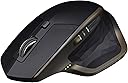
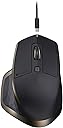
🚀 Elevate your productivity with the MX Master — the ultimate power mouse for pros who refuse to settle.
The Logitech MX Master Wireless Mouse is a premium, ergonomically designed device optimized for Mac and Windows users. It features seamless control across three computers via Bluetooth or USB receiver, a rechargeable battery lasting up to 40 days, and hyper-fast scrolling with dual modes. Customizable buttons and a sculpted shape make it ideal for professionals seeking comfort and efficiency in demanding workflows.


| ASIN | B076VKQVK3 |
| Average Battery Life (in hours) | 8 months |
| Batteries | 1 A batteries required. (included) |
| Best Sellers Rank | #3,857 in Computer Mice |
| Brand | Logitech |
| Color | Meteorite |
| Customer Reviews | 4.6 4.6 out of 5 stars (605) |
| Date First Available | October 26, 2017 |
| Hardware Platform | Laptop, PC |
| Is Discontinued By Manufacturer | No |
| Item Dimensions LxWxH | 4.96 x 3.37 x 1.9 inches |
| Item Weight | 5 ounces |
| Item model number | 910-005228 |
| Manufacturer | Logitech |
| Operating System | Mac OS X 10.7 Lion, Windows 10 |
| Power Source | Battery Powered |
| Product Dimensions | 4.96 x 3.37 x 1.9 inches |
| Series | Mx Master 3S For Business |
S**S
Great Mouse, many of the bad reviews didn't download the driver/software
laugh out loud at some of these reviews. If you plug and play this device, correct - the functionality, features, and capabilities of this mouse are not able to be fully utilized; unless you download the logitech options software. They fixed it in the latest update. You can customize the heck out of this thing. I am coming off of my G602, which I miss dearly. What an amazing mouse. Used it three years every day as a traveling consulting/occasional gamer/everything else and it took the beatings. But I was ready for a more normal looking mouse so I went with the MX master based on reviews. Glad I did. Feels great in the hand. Mine was Navy blue, and it looks very nice. Download the logi options software and look at how customizeable this mouse is. Map macros for a couple buttons, thumb wheel is nice for horiz scrolling while zoomed in, etc. Personally i mapped the two side thumb buttons to copy/paste because I do a lot of copying and pasting between documents, references, etc when putting together presentations. After a couple of days I can now copy/paste with my thumb very quickly while barely moving it. Much more efficient than reaching for the keyboard and hitting ctrl+c and then ctrl+v. Wow... #firstworldproblems Anyways. Great mouse you can map them to whatever you want. The mode-shift button on top is nice too. Press it and it applies pressure to the scroll wheel and engages "rachet" mode. You feel each click scroll. Hit mod shift again and its in freespin. I can freepin in large documents through sections quickly while seeing what I am scrolling past. Overall great mouse you won't be dissapointed. The thumb texture does take some getting used to. Occasionally after extended usage of the mouse (12+ hour work day) it can feel odd on the thumb like its tickling me. I know... strange.. the little rubber textures start to feel more protruding from the mouse I guess is how I would desribe it. But no biggie. A+++ Recommended from a mouse aficionado who used to use $800 triple optic mice when implementing radiology software
J**I
Best wireless mouse I've ever used
This is far and away the most comfortable wireless mouse I've ever used. It's also super reliable, fast, and really easy to connect to your computer. You can pair it up to three computers via bluetooth, unless you use the included USB dongle, which count's as a 'paired' connection...leaving two remaining connections you could establish. I've never had any issues you pairing it to a computer, and as soon as I turn on it will connect to the paired device. The main (vertical) scroll wheel on top has to 'modes': smooth natural scrolling, and more of a 'notched' step-styled scroll that was more prevalent on older scroll wheels. I prefer the smooth scrolling, but found that I had to tweek the sensitivity via the downloadable software utility (available on Mac/Win). Lastly, the battery life is absolutely fantastic! It lasts for ages without charging. I can't give actual battery life times because I usually just end up plugging it in before it dies, but you can keep using it as a normal wired mouse while it's charging via the included USB cable anyways. Overall, great mouse! I'd recommend it over any of the wireless Microsoft mice any day!
J**M
It's good and it's worth it
It's a Logitech MX series mouse. It's good and it's worth it. I'm glad to see the return of a full-sized model, since my MX Revolution from long ago is no longer viable. There is something viscerally satisfying about the way the mouse wheel goes from ratcheting to free spinning. The thumb context button is useful and registers fairly accurately (options range from just pressing the button to pressing and gesturing either up, down, left, or right), but you'll get the most mileage out of actually customizing the gestures in the downloaded software. I almost never use the horizontal thumb scroll, and the positioning and size of the forward/back buttons also mean those see little use. All the buttons can be remapped, but there's not much I would assign to those ones to try and get more out of them. Battery life is excellent. It probably only needs to be charged once a week, even when paired over Bluetooth. Pairing is another strong point. Up to three devices can paired, either Bluetooth or a Unifying receiver. A button on the bottom switches which one is currently in use, and picking up the mouse lights up the LED to indicate which one is currently active. Overall, a very solid mouse that screams Logitech.
K**R
Best wireless mouse I've purchased
This is far and away the most comfortable wireless mouse I've ever used, I’m now on my second one and I’m just as happy It's also super reliable, fast, and really easy to connect to your computer. You can pair it up to three computers via bluetooth, (I’ve got 2 laptops and my desktop) 2 bluetooth and 1 wireless. I've never had any issues you pairing it to a computer, and as soon as I turn on it will connect to the paired device. The main (vertical) scroll wheel on top has to 'modes': smooth natural scrolling, and more of a 'notched' step-styled scroll that was more prevalent on older scroll wheels. I will often switch between these modes depending on what I’m doing and how much of a document I need to get through. A massive thing for me is the battery life! And it’s absolutely fantastic! It lasts for weeks or months without charging
I**E
Me lo compré para usarlo en el trabajo (soy ingeniera informática), y al tener la rueda infinita y tantos botones y configurables según la aplicación, resulta realmemte cómoso.
K**R
I originally bought this mouse for its ergonomic design. I was a bit concerned that not all of its features would be available on my Linux machine, but with a little tweaking I was able to configure it to work properly on Ubuntu. After nearly a month of using this mouse for an average 12 hours a day, I find the comfort, build quality and performance very impressive. The built-in rechargeable battery seems to last forever. Simply the best mouse I have ever had!
T**S
So, I was having ... issues with my Apple Mouse. Just was not really that great, despite all the reviews. And So I went and bought this MX Master. In most reviews I read this was the one to get if I didn't have an Apple Mouse. I would say the old adage is true from Magnum PI. A client went out and asked several Private Investigator agencies on Hawaii, who was the best PI. They all said themselves first and Magnum was second. Which led me here. Great mouse. Speaking as a designer and artist who works mainly in Adobe and currently on an 27 inch iMac. <3
L**S
Good ergonomics, works really well.
D**E
Excellent mouse mostly for gaming buti use it For editing in Final cut. Does the job right and a little heavy. I like quality snd this one delivers. You canot go wrong.
Trustpilot
2 weeks ago
1 month ago