


Desertcart purchases this item on your behalf and handles shipping, customs, and support to Kenya.
🚀 Upgrade your network to warp speed — don’t get left buffering!
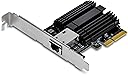
The TRENDnet TEG-10GECTX is a high-performance 10 Gigabit PCIe network adapter featuring a 10Gbps RJ-45 Ethernet port, PCIe Gen 3 x4 interface, and full NDAA/TAA compliance. Designed for professional environments, it supports advanced networking features like jumbo frames and VLAN tagging, compatible with Windows and Windows Server OS. Backed by a 3-year manufacturer warranty and versatile bracket options, it’s the ultimate upgrade for millennial managers demanding speed, security, and reliability.


| ASIN | B01N5AOWW6 |
| Best Sellers Rank | #31 in Internal Computer Networking Cards |
| Brand | TRENDnet |
| Built-In Media | Quick Installation Guide, TEG-10GECTX |
| Color | Silver |
| Compatible Devices | Desktop |
| Compatible Operating System Family | Windows |
| Customer Reviews | 4.1 out of 5 stars 296 Reviews |
| Data Link Protocol | Ethernet |
| Data Transfer Rate | 10000 megabits_per_second |
| External Testing Certification | FCC, CE |
| Global Trade Identification Number | 00710931140323 |
| Hardware Interface | Ethernet |
| Item Dimensions L x W x H | 4.7"L x 2.5"W x 0.7"H |
| Item Highlight | Convert a PCI Express Slot Into a 10 Gigabit Ethernet Port, 802.1Q VLAN Tagging, Windows and Windows Server Support |
| Item Type Name | TRENDnet 10 Gigabit Pcie Network Adapter, Supports 802.1Q Vlan, Standard and Low-Profile Brackets, Windows, Server, Linux, Nbase-T, TEG-10GECTX |
| Item Weight | 62 g |
| Manufacturer | TRENDnet |
| Mfr Part Number | TEG-10GECTX |
| Minimum Required Operating System Version | Windows 10, Windows 11 |
| Model Number | TEG-10GECTX |
| Number of Items | 1 |
| Number of Packs | 1 |
| Product Dimensions | 4.7"L x 2.5"W x 0.7"H |
| UPC | 710931140323 |
| Unit Count | 1 Count |
| Warranty Description | 3 Year Limited |
J**L
Essential to future proofing your system
I recently upgraded the network at my home. I ended up wiring all rooms to Cat8, and installed a Wifi 7 Mesh based on 2 Eero 7 Max routers. I know what people say: it's too fast, I'll never need it, etc. However, if I'm spending days in the attic pulling and fishing network cables all over the house, I'm going to install the latest standard wiring. This way, I don't have to worry about it again, probably for decades. This card was the second to last item that needed upgrading my entire network: my PC connection. The existing port maxed at 1GB. This card was the 4th card I purchased from Amazon, by the way. And it was the best outcome. 1st try was a much cheaper alternative. It supported 10/2.5/1gb speeds on paper. However, it started having temperature issues. The card would get so hot, it would start dropping the connection. I was worried about fire hazards as well. 2nd try was a more expensive alternative (the entire card was covered with a nice shiny red heatsink!). However, it only supported 10/1gb. Max 7 has 2.5gb ports as well. Why settle for slower? 3rd try was a generic card running on Intel chipset. It was advertised as 10/2.5/1, however, in reality, it was only 1000/100mb. The speed tests were obvious. My suggestion: go with this card. Excellent component overall. Here's a little review: 1. Good temperature distribution, heatsink is pretty large, and effective. 2. The drivers are available on the manufacturer's website. You don't need to keep searching into the depths of internet, like some intel models. 3. This card utilizes PCI Express 3.0. If you look at the market, overwhelming majority of cards are designed for 2.0 architecture. Being able to utilize 3.0 is an advantage. 4. Jumbo frames: I'm not big on this topic. If you are using NAS or Outbound VPN, I can see the advantage. My current router does not support it anyhow, but I checked the options, you can change the driver settings and utilize 16kb frames if that's what you'd like. 5. Price range.. Excellent hardware for this price point. 6. High and low profile brackets for different cases (not very useful, but thoughtful) Overall... The card works. I can get 1gb/2.5gb/10gb. The speed test result is attached for 2.5gb. I'll update the post once I receive the 10gb switch. PS: Little known issue with 10gb ports on routers and switches... Most hardware today, come with 2 ports that can support 10gb. Sounds great, right? However, the practice is a little bit different. Port 1, is used for input (from your modem) (in my case, my ISP, who can provide 8gb fiber input, so it's a must). Port 2, is used to connect your 2nd router for mesh purposes (this way, you have a 10gb backhaul, assuming you have the necessary wiring). Guess what? No port left for the PC or any other hardware. Therefore, until I buy a 10gb switch, and route the mesh through the switch, I won't be able to test 10gb on the PC. Seeing how this card handled 2.5gb, I have no reservations, I'm sure the card will outperform as I came to expect.
P**A
Solid inexpensive 10Gb solution
Overall, this card is exactly what I needed. It's a relatively inexpensive way to add 10Gb network connectivity to a desktop system without having to replace the motherboard or invest in enterprise-grade networking hardware. Installation was straightforward. After installing the card in an available PCIe slot, setup was quick and painless. The system recognized the adapter without issue, and I was able to get it connected and operational with minimal effort. I purchased this specifically for use with high-speed network storage and large file transfers where traditional Gigabit networking can become a bottleneck. Moving to a 10Gb connection provides substantially more bandwidth for tasks such as NAS access, media server operation, backups, and transferring large files across the network. The card has been stable in operation so far, maintaining a solid connection without any unexpected disconnects or performance issues. Once configured, it has simply worked in the background without requiring any ongoing attention, which is exactly what I want from a network adapter. The included mounting bracket and overall build quality appear solid, and the card does not feel cheaply made despite its relatively affordable price. Overall, if you're looking for an economical way to add 10Gb networking to a system, this adapter provides an easy upgrade path and has performed exactly as expected in my testing.
M**T
Works Great! Very fast! Easy install!
So far this card has been working great! I have a 10G card on my NAS, 10G switch, and the computer that has this 10G card. Speeds are very fast and only limits are the physical hard drive speeds. Install was easy and driver setup was a breeze. So far haven't had any issues. I read from early reviews that drivers had issues in the beginning but seems like they either worked out all the kinks (most likely) or I'm just lucky!
M**.
Stopped working after 4 Months of use.
I rarely leave reviews, but I need to share my experience with the TRENDnet 10 Gigabit PCIe Network Adapter. I bought TWO of these in the same month, and they both stopped working in the same week after just three months of use! At first, I was pleased with the performance, but that quickly turned into frustration. When the first adapter failed, I thought it might be a one-off issue. But when the second one went down just days later, I realized I’d made a huge mistake. I spent countless hours troubleshooting both adapters: reinstalling drivers, switching PCIe slots, and testing on different systems—all to no avail. It’s unbelievable that a product designed for reliability could fail so spectacularly. To make matters worse, customer support was a complete letdown. I faced long hold times and received little help in resolving the issue. I ended up having to return both adapters, which was an unnecessary hassle. I can’t recommend this product to anyone. If you want a dependable network adapter, steer clear of TRENDnet. Save your time, money, and sanity—go with a brand that stands behind its products!
T**E
A big step up over 1Gb
I got a number of the 10Gb RJ-45 cards a couple years ago, and finally am getting around to writing a review as I'm about to order another. I believe the ones I got back then were revision 2 cards, currently this is probably a revision 3 (don't quote me on that, though). The revision 2 cards were not automatically installed by Windows 10--I needed to download a driver from Trendnet. I don't know if the v3 cards will be automatically installed. I am using them in my home network, hooked up to a 10Gb switch, in order to keep "My Documents" and other folders of my home network in a central location. It works well for this. I don't remember any exact numbers, but I am thinking my tests for the cards came out to about 6x faster than 1Gb (Intel PCIe nics). Given the limited choices for 10Gb (commercial networks seemed to have mostly skipped 10Gb in favor of 40Gb), I'm satisfied with the performance of these cards for now. One caveat emptor is the poor performance of the Trendnet's offloading features. You should immediately turn them off because they kill the performance of the card. This has reportedly long been the case of chipsets besides Intel, so I'm not really surprised. All in all, they are a really good upgrade over 10Gbe that don't cost a ton of money.
D**E
My not be the cheapest 10gbe NIC but it works!
So at the time of my purchase, this card was a little over a bill. There were other options from Asus, ALFA, TP-Link & Rosewill just to name a few, all cheaper than the TrendNet card (Rosewill being the cheapest) and some of these may even be using the same Marvell AQTion controller, but for me, I just trust TREDNet a little better and this is the 3rd revision of the NIC so I'm hoping these guys worked out some bugs. Won't really try to go into too much technical details here, I just needed a nic that would get me a 10gbe. Cabling: I am using my existing Cat6. The runs are much shorter than the 50meter limitation of cat6's 10gbe spec. (Cat6a or higher can get you runs of 100Meters, though when using the SFP+ port, the run is limited to only 30Meters regardless of cable used). Switch: Zyxel XGS1250-12, Firmware v1.00. (B08TC3VJ61) This is a new switch that was released, I am still working on my review, in short, it rocks! I have tested using this NIC into one of the existing copper ports on the switch as well as using a Copper SFP+ transceiver (B075WMGBHX). I have had no issues establishing and maintaining a 10gbe connection. Installation: This is my only concerning point of this review, when I installed the NIC, I downloaded the "Latest" drivers from Trendnet's website, which is listed as version v1.00 with a date of 8/31/2020. However shortly after installing said driver and running Windows 10 updates (oh yeah, I'm running Windows 10 20H2), the driver was updated to version 2.2.2.0 with a date of 04/30/2020... If you go to Marvell's website, you can download their "latest" driver, version 2.1.21 with a date of 04/26/21 (The day I am writing this review is 04/25/21) I am unable to tell at this time if there is a higher version than 2.2.2.0. Regardless, its working Final Thoughts: So I have 2 machines, both running Windows 10 x64, where I installed these cards. (GA-z87x-ud7 TH & x99 Taichi). I had plenty of room in each system and I made sure there was good air flow. I see lots of concerns regarding anything 10gbe with how hot things can get. I'm attaching a screenshot from a simulated test I did between both machines. I found out shortly after upgrading my nics, my new bottle neck is the hdd array in my data server. I went from maxing out at 112MB/s (1gbe) to around 377MB/s (10gbe), though triple what I was getting, it wasn't quite 10x faster ;) So I enabled a RAM disk on both devices thus eliminating the drives array specs (ram disk gets around 23,552MB/s) and I would start seeing me hit the 10gbe max (around 900MB/s). My main work flow is photography, I'm now able to start moving my data to my storage server (which has multiple forms of data protection) but work on these files as if they were stored on one of my local drives on my main editing rig. Just verify that your system meets the min specs for this card, I am sure you will be satisfied.
A**R
It works but may cause short circuit when plugged into the PCIe slot.
Installing this card in my X570 motherboard 2nd slot (PCIe lanes to the CPU) causes short circuit protection to kick in and turns off the PC. However it works off of the PCIe slot from the chipset. This card uses the old AQC100 chip not the newer AQC113 or AQC113CS so that sucks. This card get's very hot I would recommend good airflow for it. Note that Norton Antivirus will totally limit the network speed of this and other 10Gbps network cards (at the time of this review). If you use Norton A/V and are only getting 1.5Gbps to 2.5Gbps in Microsoft Windows after installing this card that is why. Be sure to download and use the drivers from Marvell version 3.1.10 or newer. Do not try to flash the Marvell firmware to this card because it will render the card unable to operate correctly.
M**S
please understand hardware and networking before posting a review
What can I say, it works as intended. I've got 2 of these: one is in an Ubuntu 22.04 server (an old 4770 i7 machine) and the second and Arch Desktop (a ryzen 3900x). Both recognized the cards immediately and set their speeds appropriately with auto-negotiate enabled. Both machines are connected through a 10g copper port switch connected to an OPNsense router (1520 XeonD) with a 10g port. People trying to speed test these with file transfers are going about it the wrong way ad will never see the total throughput because of drive read/write speeds and protocol limitations of the chosen share method (i.e. SMB). The easiest and truest method to test is to run iperf3 as a server on a machine with a 10g interface, on the second machine run an iperf3 test as a client to your machine. BUT that will not really give you the actual result you want, as standard iperf3 tests are run as a single process and will probably cap out around 2-4 gigs. You need to run the client with the -P option to enable more processes, I typically use 10. Example: on the server end: iperf3 -s on the client end: iperf3 -c (ip of the server) -P 10 iperf3 -c (ip of the server) -P 10 -R That gives me the output that I would expect to see, typically in the 8.4 - 9.4 gig range. Also be sure to run it in reverse as well with the -R option the second time. The cards work exactly as intended for 10g, though admittedly I have not tried 2.5g or just standard 1g because I haven't the need to. And 5 gig is incredibly uncommon to find so I won't bother with it. I've attached 3 screenshots to show you the results of the 3 iperf3 tests I mentioned. The first pic is if you run iperf3 -c (ip of server) and caps out at 3.73g second is iperf3 -c (ip of server) -P 10 and caps at 9.34g third is iperf3 -c (ip of server) -P 10 -R and caps at 9.37g BTW I should note that I'm not actually using Cat6a for any of these machines. I'm actually using standard cat5e, but the lengths are less than 10 feet. If I had to go longer or started to notice issues, I'd up it to cat6a but it's not always necessary. Just an FYI
T**S
Small and fast, no issues
Arrived with full hight bracket mounted and half hight in the box. Easy swap. Works well in booth 2.5 Gbps and 10 Gbps mode. Pushes speed jus fine with iperf. Works well with 9k jumbo frames (could not test 16k since i have nothing at the other end that support it..)
V**9
Excelente
Agregué conectividad a mi QNAP en minutos, por ser PCIe Gen 2 es apta para equipos legacy.
M**G
Trustworthy brand, good price point
With cybersecurity a concern for network devices, I always look for and buy a US or Canadian brand at work. This fit that requirement. Also, I wanted an affordable 10gig Ethernet card for a workstation. This fit that requirement too. Works great, no complaints or concerns.
D**H
Failed after 2 months
Worked fine when I first installed it. After 2 months I started getting intermittent dropouts last hours. Went to manufacture website and found out that Amazon was selling a discontinued product.
S**Z
Se avete una rete a 10 gigabit da acquistare con fiducia
Ho la fibra 10 gigabit, ma la mia scheda madre e' solo a 2,5 gigabit. Installando questo adattatore PCI Express all'interno del pc posso gustarmi tutti i 10 gigabit (ovviamente meno l'overhead) a disposizione. Chipset collaudato, lavora da un anno e mezzo senza perdere colpi. Come spesso mi capita ho comprato su warehouse e mi chiedo perche' il precedente proprietario se ne sia sbarazzato. Per me una affidabile soluzione per reti a 10 gigabit. La ricomprerei.
Trustpilot
1 month ago
1 month ago