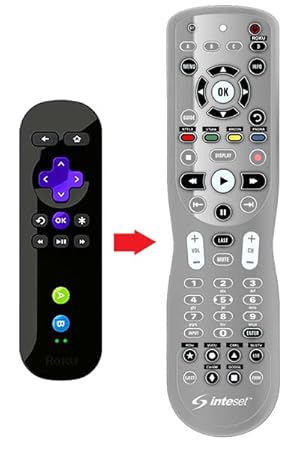
🎯 Master your media kingdom with one remote to rule them all!
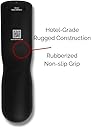
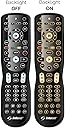
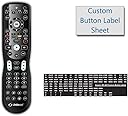
The Inteset 4-in-1 Universal Backlit IR Learning Remote is a rugged, commercial-grade controller designed for seamless operation of up to four A/V devices including Apple TV, Xbox, Roku, and Kodi. Featuring full LED backlighting, macro programming for up to 32 commands, and an extensive worldwide device code database, it offers professional-grade customization with self-adhesive button labels and learning capabilities. Powered by 2 AA batteries and backed by a one-year warranty, it’s the ultimate all-in-one remote for streamers and media managers seeking convenience and control.


| ASIN | B00M4I1BAY |
| Additional Features | Backlit, Macros, Learning |
| Battery Type | battery_type_aa |
| Best Sellers Rank | #89,880 in Electronics ( See Top 100 in Electronics ) #5,652 in Remote Controls (Electronics) |
| Brand | Inteset |
| Button Quantity | 36 |
| Color | Black |
| Compatible Devices | TV, Set Top Box, Cable Box, A/V Devices |
| Connectivity Technology | Infrared |
| Controller Type | Button Control |
| Customer Reviews | 4.1 out of 5 stars 4,588 Reviews |
| Global Trade Identification Number | 00685256233510 |
| Item Dimensions L x W x H | 8"L x 2"W x 1.5"H |
| Item Type Name | Universal Remote |
| Item Weight | 6 ounces |
| Manufacturer | Inteset Technologies |
| Max Number of Supported Devices | 4 |
| Maximum Number of Supported Devices | 4 |
| Maximum Range | 30 feet |
| Mfr Part Number | INT-422 |
| Model Name | INT422-4 |
| Model Number | INT-422 |
| Number of Batteries | 2 AA batteries required. |
| Number of Items | 1 |
| Special Feature | Backlit, Macros, Learning |
| UPC | 685256233510 685256233503 |
| Unit Count | 1 Count |
| Warranty Description | One Year with Receipt |
I**R
Excellent, powerful remote for a reasonable price!
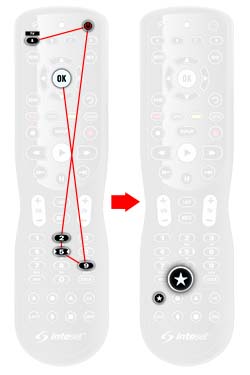
I purchased the INT-422-3 remote a couple of years ago primarily so I could control DVD/Bluray movies on my XBox One without having to use the incredibly awkward game controllers and to find a reliable remote to control our Tivo Roamio OTA. I wanted something fairly inexpensive but with a lot of features. This remote had excellent reviews so I jumped on it. It has turned out to be an excellent universal remote for all of my devices and we absolutely love it. This remote provides a set of buttons at the bottom for miscellaneous functions on various devices which came in very handy for programming the "Thumb Up" and "Thumb Down" functions on my Tivo remote. Some features of Tivo require using those buttons so they are important to have in a universal remote. The price is perfect compared to so many other brands that cost a lot more and provide generally the same features. This remote has turned out to be extremely reliable and has never failed in any regard. It is also simple to program. The batteries last a very long time and the back light is a great feature. The key to the power of this remote is how easily it can learn buttons from other remotes! It solid and feels great in the hand and allows me to control up to four devices at once. I have a Roku TV (Element brand from Wal-Mart), a Tivo Roamio OTA and an XBox One. This remote easily and simply controls all of them. XBox One features: The INT-422-3 comes pre-programmed to control XBox One consoles on the "B" button. This worked perfectly out of the box for our needs and I did not need to do any additional programming for XBox as we only use the remote when watching DVD/Bluray movies. For all other XBox functions we use the game controllers. Tivo Roamio OTA: We cut the cord a few years ago and cancelled our Cable/Satellite subscriptions and decided to use free over-the-air network channels along with streaming services. While we absolutely love the Tivo product, the Tivo "peanut" remotes have caused me nothing but headaches. My Tivo remote will occasionally just go to sleep and not do anything at all even after replacing the batteries. I even bought another "peanut" remote thinking I had a bad one but it does the same thing. This was another reason I purchased the INT-422-3. It was easy to find a working remote code on universalremotes.net (hint, it's under "Cable Set Top Boxes"->Tivo. The code is 03560). However, I ended up having to teach the INT-422-3 several buttons from the Tivo remote. The colored A, B, C and D buttons are sequentially the same but the colors are out of order on my Inteset remote so I used the "Learning a button" feature to reprogram all of them to the correct order by color. Please note that the Tivo "peanut" normally operates in RF mode so I had to force it into IR mode by holding the "Tivo" button and red "D" buttons at the same time. I then used the "Learning a button" feature to map the "thumb up"/"thumb down" buttons to two buttons at the very bottom of the Inteset remote. The label sheet provided with the INT-422-3 doesn't have anything that equates to "thumb up" or "thumb down" so I cut out a "D" and "U" from some unused labels and used those. I am also planning to use the Macro functions of the Inteset to create "jump" buttons for the apps I use on Tivo frequently but I haven't done this yet so I can't comment on how well it works. I purchased a Roku TV from Wal-Mart last fall made by Element. The Inteset comes from the factory with Roku functionality pre-programmed on the "D" button but this did not work for my TV at all. So I went to universalremotes.net to find a working code for my new TV. I had a little trouble finding a remote code for my specific TV but was able to get most functions working using the "Roku TV-TCL*" code (14398) I found in the "TV" category. My Roku remote is an Infrared (IR) remote which is important for configuring the Inteset to control my TV because there is NO WAY to replicate an RF only remote. I was able to program specific Roku buttons using the simple "Learn a button" feature to program certain buttons directly from my Roku remote. The buttons I ended up having to "learn" was the "*", "Back 10 seconds" and the streaming provider "jump" buttons (Netflix, Hulu, Vudu, etc). I also used the "Programming Button-mover" feature to copy the "Play/Pause" button in Roku mode to the "||" (pause) button. There are labels on the provided label sheet for the streaming services. Unfortunately, I have not figured out how to program a "jump" button that will pull up Amazon's Video streaming service through the Roku. So I will attempt to use the Macro function to do it through the Tivo. All in all, this has been an excellent remote that is reliable and easy to program. My only gripe is that the label sheet provided with the remote doesn't have ANY labels for Tivo, like "Tivo" or "Thumb Up" or "Thumb Down" or even simple arrow labels. I ended up using a "TV" label in place of a proper "Tivo" label. Hopefully Inteset will add Tivo-specific labels to their label sheet some day.
R**3
Excellent universal remote
I was a little skeptical at first because I had never heard of Inteset before, but I was very pleasantly surprised. The remote works great with my Vizio TV, TiVo, and Roku. Best of all, it feels great in the hand. The weight is perfect, it includes many buttons that cannot be found on other universal remotes, and it is capable of learning additional functions when necessary. It's rare to find such a great remote for such a great price. Thank you Inteset! I would definitely buy again.
J**E
Nice design. Works well with Xbox One X and Marantz AVR; only partially works with Samsung Smart TV
I was hoping to get this to replace the remote on my Samsung TV, Marantz SR7011, and Xbox One X. Although setup was pretty easy, and the design is pretty nice and ergonomic, it doesn't completely work with my Samsung Smart TV. Specifically, the back button (reverse arrow) acts like an "Exit" button instead of "Back". This means that if I'm browsing for a movie on Amazon Video, and I decide to go back one level, pushing the back button will exit from the Samsung Smart Hub entirely. There actually isn't a back button, and while this is a known issue (addressed on the forums), Inteset has yet to come up with a workaround. Because of this, I can't completely put away my Samsung Smart Remote; for this reason, I'm giving this 4/5 stars. If Inteset fixes this, i'd give it 5 stars, especially since the Inteset has a couple of buttons (like the color ones) that the Samsung lacks. Now, as for the Xbox One X: The remote comes preprogrammed for the Xbox, and it seems to work almost flawlessly. This is a lifesaver, as my wife often wants to kill me for accidentally pushing controller buttons while watching movies and screwing it up. The Xbox Controller is simply a horrible remote for DVD/Blu-ray; the inteset turns the Xbox into a real player. Excellent. For the Marantz SR7011 (AVR): Programming wasn't too bad, and it seems that all of the important functions work (volume, on/off, menu, etc). It doesn't work super well with the setup menu; however, i don't see myself digging into the setup menu too often. I love the backlight; it does a great job of clearly lighting up all of the buttons. My Samsung remote is not lit at all, and the Marantz remote lighting is ineffective because you can't really read the buttons. I'd definitely buy again for the price, but I'd probably be willing to spend another 10 - 20 dollars for a remote that works better with my samsung smart TV
B**W
Slicker than snot on a doorknob (as an old friend used to say)!
History and preamble - you may skip to the review: I bought this remote to replace my old Denon AVR-789 unit because the ON and OFF buttons had ceased working. I considered an "OEM" replacement because of the complex setup buttons that the original RC-1099 had inside a "trap door" on the back. My AVR-789 is still functional but so old that the remote control is no longer available from Denon and what was available, was obviously a look-alike universal control that had programming for my particular AVR and several others. It appears that the RC-1099 was a popular control configuration that Denon shipped with many of their AVR's and that it was programmed for whichever AVR it accompanied. Thus, I was faced with many "identical" choices but only one that was specified for my AVR-789 and a few other Denon units with dissimilar model #'s. None of these had reviews, they were marketed by various vendors and they all seemed to ship directly from somewhere on the Pacific Rim. Needless to say, this situation did not inspire confidence and I seriously considered replacing the entire A/V Receiver with a new one, just to have the assurance that the remote control and the AVR would function as a unit. Actual experience: Yes, I read reviews - exhaustively. I was struck by the number of positive reviews for the Inteset INT-422-1 and the apparent ineptitude of the few negative reviewers, one of whom was politely answered by the supplier who showed unusual pride in this product. The price was good, on a par with the fake RC-1099's, and much better that any of the Logitech units which I also considered. So, I bought it and 2 days later, it was in my hot little hands and ready to be programmed. Now, right off the bat, the packaging is not impressive. The instructions, while adequate, are quite cryptic, and visiting the web site to obtain "codes" falls short of confidence inspiring. Never-the-less, I pressed on and copied out a list of 5 AVR codes and 2 AMP codes for A/V Denon, and then, 16 possible codes for my 65" Panasonic Plasma TV (which BTW, will ONLY be replaced by a BIGGER 4K OLED when they become economical) because, why not? Anyway, I read through the entire instruction sheet again, twice, and then, taking the simplest approach, started with the Denon. The technique of entering the codes, for a neophyte like myself, is to not look for too much handholding in the instructions. What they do NOT say and what I am telling you, is to enter the entire 5 digits all at once, and then, look for the affirmation blink from the red LED. If you get it, test the programming with the ON/OFF button and like the instruction sheet says, if your "device" turns off, the code is working. Well, with the Denon, the first code was the charm. The AVR-789 turned off. So, I pushed the button again and voila! it came back on. Sucess! I searched for the mute button and it worked too. Then the volume buttons and they worked. OK, great, that was all I usually used the old, taped-together RC-1099 for anyway and if I needed to change inputs, well I could figure that out later. Now, on to the Plasma TV. The Denon was now button "A" so the Panasonic would be button "B." This setup was not so easy. The first and second 5 digit codes got no response from the INT-422-1. The third did. OK, I was getting pretty good at punching these in and had 13 more to go so, mash the power button and Hey, the TV switched off. Neat, mash again and it turned on. No need to try the volume buttons, that was handled by the Denon so on to the UP/DOWN channel buttons and THEY worked! I tried out the channel numbers and THEY worked. This was looking good. Let's see what else this puppy will do. The "Menu" button brought up, of all things, the MENU. Wow! Now, what is this button down at the bottom, Input? Mash that and there's the Input screen. So I scroll down to my DVD setting, press OK and there I am. This baby is emulating my Panasonic remote perfectly. Better in fact, because I can just tap in the number of the input I desire and it dumps the selection screen switches directly to the input. Oh yeh, and I can see it in the dark. Well, I'm delighted. The backlight is beautifully done, I have confidence in the remote and its coding, it feels good in my hand and I can hardly wait to explore those "macro" features. Best of all, If I foul things up, I can reset the whole thing or any part of it. This is a really neat toy and it is as useful as can be. Conclusion: Not only is the INT-422-1 a replacement remote control, it is an improvement!
K**N
Good, But...
First & foremost, the customer service for this product is some of the best I have ever seen with ANY product! I always got my questions answered within a day (at most), and the person was always very helpful. The bad part is that this remote did not work well for us with our DirecTV and Roku 3. We have a couple of other devices we wanted to use with this remote, but we couldn't get past the problems with the DirecTV and Roku. First, even though it states in the directions that the Roku is already preprogrammed, we could not get it to work. I did everything the customer service representative suggested, but still no dice. The DirecTV part went better than I thought it would, but the big problem here for us is that we had to change the RF/IF setting. That shouldn't be a big deal, unless your devices are stored behind glass doors. We have a really nice entertainment center with three shelves on each side of the TV, but there are glass doors that cover these shelves. And one of the choices of RF/IF (sorry, I can't remember which one right now b/c my brain got fried trying to set-up all of this (-; ) does not work well w/the DirecTV if it's behind glass. It works, but it's sticky, which then causes the person using it to start yelling and...you get the picture. And, of course, the setting that it works poorly with is the setting you have to use with the Roku. So I recommend this remote IF your devices aren't obscured by anything. This weekend, my husband is going to try to see if he can move the DirecTV to a different place so we can use this great remote. We still have to work on the Roku thing, but at least one of the problems will be solved if he can get it moved. The customer service rep said to return the remote if we can't get the Roku to work with it, so maybe we should try THAT problem first (-; .
N**K
Awesome remote
A year or so ago we got rid of cable and instead switched to using Youtube TV via an Xbox One. We never have to switch inputs on the TV, but I was still unable to get the Xbox media remote to work properly (notably to control volume). This left us stuck with two remotes in the living room: one for the TV power and volume control, another for Xbox power and navigation. When the buttons on the Xbox remote buttons started wearing out, I began looking at other options and found this remote (Inteset INT-422-3). Simply put, this remote is awesome. Right out of the box, this remote worked to control the Xbox navigation and power. This remote has four pre-programmed "device" buttons at the top (A, B, C, D) which are respectively pre-programmed for Apple TV, Xbox One, Windows Media Center, and Roku. I was quickly able to program my Samsung TV code into the remote and get that working by programming over the Apple TV button (since I don't have that). Volume control now worked when I pressed the "A" device button for all the TV controls, but when I pressed "B" for the Xbox controls, volume no longer worked. Thankfully, the user guide provides clear instructions on how to program "Global Volume Lock" and "Global Channel Lock," which turned out to be exactly what I needed. Programming Global Volume Lock basically unassociates the volume button from the device buttons, making it so volume goes up on all devices controlled by the remote. This worked so TV volume was now controlled on the same device button as the Xbox navigation, removing the need to switch back and forth between devices at the top of the remote. This remote also has a really neat button mapping and learning feature. Basically, you put your old remote and this remote "head to head" and, following the simple programming instructions, you can assign any button on the new remote to learn any button from the old remote. Unless I missed it somewhere, I had to map out the B, A, Y, and X buttons from the Xbox remote (the Menu, View, and Xbox Guide buttons were already pre-assigned and programmed) to the corresponding colors on the remote, but it was very easy. I was also to get this remote to learn the Xbox OneGuide button. After assigning settings through the Xbox itself, I can now directly pull up Youtube TV (without navigating any Xbox menus or apps) by pressing a single button on this remote. Very convenient. Though I did not try these two features, the user guide also says the remote has the ability to program macros (turning multiple button press sequences into one button press) and to remove individual devices from global volume/channel control (so if you wanted to control volume on all devices at once except a surround sound system, for example, you could set it so the surround sound volume is controlled separately). I only have two (minor) complaints about this remote. One, it doesn't seem to like multiple button presses in rapid succession. For example, when pressing the volume up button multiple times, sometimes it will only register one press until I let the remote sit for about 5 seconds. Sometimes it works fine though, so I'm not sure what the deal is there. More of a minor annoyance than anything. The other complaint is the included pre-printed sticker sheet that's included. The very small stickers are scored vertically, but for some reason not horizontally, meaning I had to carefully cut these 0.25" wide stickers in only one direction in order to label my remote buttons. I can't think of any explanation for this. Surely it would be just as easy for the stickers to be scored horizontally as well so they can just be peeled off the sheet in nice rectangles. Again, just a one-time minor annoyance. Overall, I would highly recommend this remote to anyone looking to consolidate multiple remotes (especially Xbox remotes).
S**3
DON'T BE FOOLED
USELESS, here's why. We bought a soundbar model Sharp HTSB35D to go with our Sharp TV but the cable remote couldn't be programmed to work the volume which was now controlled by the soundbar remote. This coupled with a Blu-Ray player we own gave us multiple device remotes that became unruly to deal with so I did my research and decided on this remote which had the best rating and Amazon. It also touts being able to be programmed directly (learn) a remote that isn't in it's database of "over 100,000" devices. Well, guess what, the soundbar (which is currently sold by Amazon here: http://www.amazon.com/Sharp-HTSB35D-Channel-Wireless-Subwoofer/dp/B00V4CKZ4E) isn't one of the "over 100,000" devices in the Inteset database. Wow, seriously?! Nope, and as a matter of fact, it provided 1 code to try for Sharp audio accessory and IT DIDN'T WORK. Great database, so a commonly sold modern day piece of audio equipment by a popular manufacturer isn't in your database. Nice. Sure, they have tons of codes for a bunch of defunct Eastern European Czechoslovakian and Russian TV manufacturers, but a Sharp soundbar sold on Amazon? Nope. So I figured, OK, well I'll just need to learn this remotes buttons one by one. So about 45 minutes later I did that. Now, on to my cable STB remote. I have Time Warner Cable, not some backwoods country cable company that serves only 10,000 people. Repeat, I have TIME WARNER CABLE. And my STB is an Arris. I found Arris in Inteset's database and guess what? The two codes for Arris DID NOT WORK. OMG! Are you kidding me?!!!! So now I'm figuring greaaaaaat, I have to program my cable box remote into the Inteset remote one by one! So I begin doing that, only to find out about an hour later that I run out of programmable codes!!!!!! The instructions say that learning capacity is between 42 to 75 buttons depending upon the IR code length of the training remote. Yeah, thanks Inteset, I ran out at 32!!! Just 32? What kind of limit is that? How much more does it cost to add another 100 memory slots? Really? Don't be fooled. I mean, if I had some weird or rare equipment, I be up front about it. But I just have typical stuff and a cable company that serves about 10 million people here in Southern California, and their remote database codes don't work for my stuff. I'm uploading pictures of the two remotes I own for which this remote's database doesn't have working codes.
B**X
Buttons quit working and many other issues.
Update - I take away a star because the customer support is terrible. They act like childish trolls. I described my issue with buttons failing, they basically called me a liar, and said they never had anyone say they had that problem, and they would not send me another remote. They are also childish and hurl insults like a pathetic internet troll. What a bunch of jerks. Pros: -It's a remote Cons: -The layout of buttons is poor and frustrating when operating a cable box, even when setting up custom buttons. The volume buttons and "OK" button and surrounding directional navigation buttons are way too far apart. It seems like there are a lot of buttons but in reality I need a few more up near the "OK" button. Also you cannot program the record button for some reason which is dumb. -The back light shuts off way too soon, 5 seconds? Why? Ridiculous. Also back light shuts off when you press any buttons so if you look down in the dark while pressing a button such as volume, the remote is black and invisible. Quick, you have 4 more seconds to let your eyes focus in the dark to look for the poorly placed button you want to find! :-/ -The buttons require way too much effort to push and are not positive, very mushy and nasty and cheap feeling buttons. -No separate indicator for which mode it is in when using remote, only one LED showing you are pressing a button itself. It could just light up the individual device button to let you know what mode you are in but it does not do that either. This is annoying and requires you to constantly push the device button again to make sure you are in the correct mode since there is no way of knowing otherwise. -On each device I had to basically set up just about every single button as a learned custom button because the included codes did not work for much more than turning device on and maybe a few simple functions. I have no problem doing this but it is a pain and this remote doesn't learn very easily. The learning process seems buggy and inconsistent even in a dark room with no florescent lights on and the TV turned off to avoid interference with the process. More often than not it will not learn the button. -Now the biggest problem: The buttons are the type that have what seems like a built in defect where they stop working after a few months. Frequently used buttons stop working after only a few months. Sometimes you can take these remotes apart and clean the silicone that seeps out of the reverse side of the button where it makes contact with the PCB. I am convinced the manufacturers make these things malfunction on purpose to give them a very short life cycle. All the clear silicone (or whatever it is) that seeps out of the back of the contact pads makes the contacts not conductive anymore, and they quit working. You need to open the remote and clean the buttons and contacts with alcohol or acetone and they usually will work again for a few more months until more of that clear goo leaks out. Most people will just throw it away and buy another remote. I would not recommend this remote for that reason alone even if the rest of it was perfect. The learning remote that I am comparing this against is the excellent Universal URC WR7 which was great. If these companies would just copy that size, button layout, and feature set, they would have a great remote but it seems no one has figured that out. There is a reason that remote was so popular, but too bad the Universal URC WR7 is no longer produced because it was great, especially for the price when you could get them new for 20 bucks. The only problem they had was the dreaded button failing problem but at least they lasted a few years, not a few months like this Inteset INT-422. I will keep looking for a simple, inexpensive, high quality, and well designed learning remote because this INT-422 is not it. Of course Inteset will just keep selling this seriously flawed remote without making any improvements. Lazy!
M**D
سهل البرمجه
جهاز التحكم هذا او الريموت رائع جدا جدا وسهل البرمجه والاستخدام وتعلم الازرار من ريموت آخر فقط كنت اتمنى انه بلوتوث ليمنحني مساحة اكبر وابعد
N**N
Great universal remote!
Works with nearly all devices, really easy to program, and for documentation online. It's a bit pricey but works as expected.
T**T
Awesome remote
Easy to program it using the first code in the list for my old 55-inch LG 3D TV. I then programmed the 3D button to the 'A' key using the learning feature which was super easy. I then programmed the buttons 'B' and 'C' buttons as macros using the newly programmed 3D button followed by arrow keys and the OK button to automate side-by-side 3D and Over-Under 3D with single clicks. I then programmed the 'D' button as a macro which was just the 3D button followed by OK to turn off 3D mode. This was so easy to set up and makes using the 3D feature in my TV a dream come true compared to my original LG remote, and super easy for my 6-year-old son as well. Could be happier. Great remote and great price. Oh and ALL the keys are backlit too. I love this remote!
J**I
Bien, pero no perfecto
Es buen mando. Muy practico que se ilumina cuando lo coges, en una sala oscura, viendo una película se agradece. La disposición de los botones no me parece muy buena, supongo que es cuestión de acostumbrarse. El alcance muy bueno, mejor que la mayoría de mandos originales. La programación de una TV Panasonic sin problemas mediante codigo. El deco Movistar, también lo asimila fácilmente. El mediacenter con Kodi no acaba de cogerlo, hay que programar de forma manual, pero resulta que duplica o triplica las pulsaciones, así le das una pulsación, y el equipo recibe 2 ó 3, lo que lo hace ingobernable.
W**D
Surprisingly good value for the money! Great for Xbox Series X.
I bought this remote as a replacement for Kinect, which is not supported on Xbox Series X - my multimedia setup does not fully support HDMI-CEC and even the devices, which do, don’t really work reliably. So I got this remote and was not disappointed. It controls up to 4 devices at the same time, has macro and channel/volume lock functionality - exactly what I wanted. The setup is not more complicated than - say - One For All, the remote is reliable, buttons are responsive, feels good in hand… satisfied overall. Especially for the money it’s almost a steal.
Trustpilot
1 month ago
2 months ago