Desertcart purchases this item on your behalf and handles shipping, customs, and support to Kenya.
๐ See what others canโt โ inspect like a pro, anytime, anywhere!
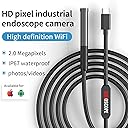
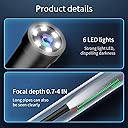
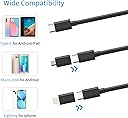
The SIBOST Endoscope Camera delivers professional-grade 1080P HD imaging with a 9.8-foot semi-rigid, IP67 waterproof cable. Equipped with 6 adjustable LED lights and universal compatibility for Android and iOS devices, itโs engineered for precise inspections in automotive, plumbing, and industrial environments. Compact, durable, and easy to use, itโs the ultimate tool for uncovering hidden details with confidence.


| ASIN | B0CG6953FL |
| Aspect Ratio | 16:9 |
| Audio Recording | No |
| Autofocus | Yes |
| Brand | SIBOST |
| Color | Black |
| Colour | Black |
| Connectivity Technology | USB |
| Connectivity technology | USB |
| Customer Reviews | 4.3 out of 5 stars 778 Reviews |
| Effective Still Resolution | 2 MP |
| Exposure Control Type | Automatic |
| Exposure control type | Automatic |
| Flash Type | Internal |
| Manufacturer | SIBOST |
| Media Type | Micro SD Card |
| Media type | Micro SD Card |
| Mfr Part Number | W300-Black |
| Model Number | W300-01 |
| Photo Sensor Resolution | 2 MP |
| Screen Size | 0.3 Inches |
| Shooting Modes | Underwater |
| Shooting modes | Underwater |
| UPC | 698746890285 |
| Water Resistance Level | Waterproof |
| Water resistance level | Waterproof |
C**R
Great camera for the price
Got this to look inside the possibly blocked water tank inlet in my RV, inside HVAC vents, etc. For the price, this tool is a good bet. The image quality is fine, although the range of focus is quite narrow. Also, if you're going through a small tunnel, the fixed end of the probe is quite long, which limits the angle at which you can view things within the tunnel itself. The cord could be a bit firmer; if you're going up, say through an HVAC vent going up into the ceiling, you can only go a couple of feet until the camera droops. Setup was quite easy; it was only made complicated by the documentation which makes a big deal of enabling "OTG" on your Android phone. I searched in vain for a half hour, unable to find any such thing anywhere on my phone, then figured out that it's irrelevant; the camera works just fine on my Android (Pixel 6a); there's nothing needed to enable anywhere. Overall, I'd recommend this product for general use.
M**C
Good value
Works great, perfect for what I wanted
S**N
Cost-effective endoscope.
Was really surprised by this. It performed better than expected and have used multiple times in wet conditions with no failures.
A**R
Saved The Day!
I had some work done on an older heating system where the contractor replaced 3 flange gaskets on the water return. The rubber material used for the gaskets was NOT pre-cut. The installers cut gasket holes for the bolts but not the piping, prohibiting water flow through the system. Although the contractor tried to convince me that the gasket material was pre-cut - he instructed me to run the boiler. I did not! I turned the boiler off, hopped on Amazon, and found this inexpensive endoscope that arrived in two days. The endoscope easily connected to my iPhone with the provided adapter and app, which I downloaded. Within minutes, I was able to "snake" the water pipes and take photos as well as video, showing that the gasket flange material was not cut properly, as I suspected. The next day the contractor came out to fix their mistake. This endoscope camera will be an invaluable tool moving forward with a variety of house projects as well as tinkering around on the cars. It allows for magnification x 3 and adjustable light brightness to 0. Highly recommended!
I**B
Instructions to setup could be made simpler
The setup instructions were a bit difficult for me to follow, but after trial and error works well. I have a Vivo Y32 with Android 14. Your phone must support OTG (USB On-The-Go), My instructions are - Download the App and install it. Plug in the endoscope, run the app, go to Settings, Bluetooth and devices (or however your phone displays those settings) then turn on OTG. The endoscope will start flashing. Go to Network & Internet (or again however your phone displays those settings) turn on WiFi and click on ANESOK-cd1e, the endoscope will stop flashing, then click on the camera button on the App. Your away, good luck.
Trustpilot
2 months ago
3 weeks ago