Desertcart purchases this item on your behalf and handles shipping, customs, and support to Kenya.
🖥️ Shield your MacBook Air in style—because your screen deserves the best!
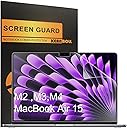
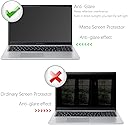
This 3-pack anti-glare screen protector is engineered specifically for the 15.3-inch MacBook Air models from 2023 to 2026 (A2941, A3114, A3241, A3448) with M2 to M5 chips. Featuring a matte finish that dramatically reduces glare and reflections, it enhances screen clarity while protecting against fingerprints and scratches with a durable 5H hardness PET material. Designed for easy, bubble-free installation and residue-free removal, it keeps your laptop screen pristine and professional-looking.


| ASIN | B0C7PX44L9 |
| Best Sellers Rank | #521 in Computers & Accessories ( See Top 100 in Computers & Accessories ) #11 in Laptop Screen Protectors |
| Brand | KEANBOLL |
| Brand Name | KEANBOLL |
| Clarity | 0.99 |
| Color | Anti Glare |
| Compatible Devices | Laptop |
| Compatible Phone Models | Macbook Air 15 |
| Customer Package Type | FFP |
| Customer Reviews | 4.3 out of 5 stars 805 Reviews |
| Item Dimensions L x W | 13.2"L x 8.67"W |
| Item Hardness | 5H |
| Manufacturer | KEANBOLL |
| Material | Polyethylene Terephthalate |
| Model Name | MacBook Air 15 inch M5 M4 M3 M2 |
| Model Number | MacBook Air 15 inch |
| Number of Items | 3 |
| Part Number | Macbook Air 15 |
| Product Dimensions | 13.2"L x 8.67"W |
| Screen Size | 15.3 inches |
| Screen Surface Description | Matte |
| Special Features | Anti Glare, Anti-Fingerprint, Scratch Resistant |
| Unit Count | 3 Count |
| Water Resistance Level | Water Resistant |
L**N
Macbook Screen Protector!
Absolutely love mine!! fit perfect!
T**B
Actually pretty awesome
Not gonna lie, I was expecting to be disappointed. But I wanted something that would give my monitor more of a matte feel so it would be easier on my eyes. Protecting from fingerprints and scratches seemed like a nice bonus. So I gave this screen protector a shot. Wow! It really does eliminate glare significantly. The screen appears very matte, almost having a sort of e-paper effect (not a substitute for e-paper but you might see what I mean when you use it). Even though there's a very slight diffusion of the pixels when you look closely, which should be expected with the matte effect, everything remains crisp at a normal viewing distance. I'm very impressed with this and am wondering where this has been all my life! Installation can be tricky but totally doable even for those who aren't particularly handy. Definitely read the instructions first! I didn't, and so I ended up with some big bubbles in the middle of the screen. At first I thought that peeling off the second outer layer of the protector had ruined my screen! Fortunately it was just bubbles because I installed the protector wrong. It's a real challenge to pull off the protector once it's installed but you can do it safely and it won't leave any sticky residue. I applied another protector, this time trying to go from the top down and smoothing out bubbles as I went down. It worked perfectly and now my Macbook Air screen looks amazing. One slight downside is I do think it makes the screen ever so slightly more dim. Macbook Air screens are not very bright to begin with, so I'm unsure if maybe the lack of glare just gives me the illusion that the screen is not as bright. This protector along with a Ghost Cover for my keyboard should keep my Macbook Air in great condition for a long time to come.
S**.
Very good product!
I found it very easy to install and it is great to see my screen without a glare
T**L
Good quality but hard to apply
Once it’s on, it’s great and good quality but it was hard to put it in the screen easily. Its edge to edge so you need to apply it very precisely or it won’t fit which is hard. I wasted one trying to put it on but the second try was successful.
F**4
Take your time and clean your work surface
Having a can of air is important to spray off dust before removing the backing to reveal the adhesive. The most important thing is to use tape to align the protector with the top of the monitor before peeling the backing. You also want to peel back just 1/3 of the way and then adhere the top slowly making sure alignment hasn't changed and there's no air bubbles. Then slowly peel back 2/3, repeat, and then the whole thing and finish the job. Dust is likely to stick to the bottom of the screen so use your air can before removing the backing on the last 1/3. The screen protector is fairly thin and this is actually a good thing. A thicker protector might be easier to install but will probably create issues with image quality. Image quality is excellent after a clean installation. It feels pretty much like the matte option. I only needed to use 1 of the included 3 protectors. It think it's good value for the money. It's not often that you will be replacing the screen protector on this thing once it's on. Adhesive is great if you don't screw up. Try not to touch the edges with your finger when peeling. Use an exacto knife or a very thin flat edge to peel the adhesive backing.
S**N
Bubbles, Scratches, and Sticky Residue
Followed the included video instructions exactly, yet this protector left large bubbles that wouldn’t go away. When I tried to remove the bubbles, it ended up scratching my brand new MacBook screen and left sticky residue from the alignment sticker. Very disappointing and not recommended.
A**E
N/A
It does the job .
M**S
These do the job but bubbles-galore
Alright, so I opened up the pack and you get the smallest wet wipe and cloth to clean your screen - 10 out of 10 wouldn't even bother with. Was a complete waste of time. Once you actually clean your screen and get absolutely every spec of dust off you peel off the side labelled 1 and lay it down - you need to really pay attention because if you have to peel 1 side up and lay it back down, you've wasted a sheet because a million bubbles will form and no amount of pressing the air bubbles with the little cardboard tool they give you will help - I know this because this is exactly what I did. I tried to lay it down but didn't have it aligned properly and lifted up one side and got it straight, let it all adhere to the screen and the corner I'd readjusted had sooooo many air bubbles and I spent ages trying to push them to the edge to flatten the protector but alas it wasn't working so ripped off the first attempt, re-cleaned the screen and went again. Second time, I was able to get almost the entire thing lined up first try. After about 20 minutes of pressing and scraping all the air bubbles out, I have almost all of them gone. There is one in the corner on the black part of the screen (you can't see it when the laptop is on) that refuses to disappear but other than that, it's great. Things you need to know - 1. when popping the air bubbles, don't peel off the 2nd side until you've completed that task. The smooth surface is what you want. I imagine it'd be a pain to try and pop those bubbles using the matte surface. 2. Take your time. You mess up, you may as well as start again. Looks great when its on and I don't see any difference that just the shinny screen. Happy with the result but what a pain getting there. Would recommend just do it when you have a peaceful minute and can take your time.
B**A
Buena visión
Me encantan, trabajo todo el día en la computadora y la disminución de destellos es genial. En general me gusta mucho poder tener una opción mate para mis dispositivos y esta ha sido una opción genial. Además no afecta la visibilidad de la pantalla de ninguna forma.
D**D
Do not buy this
So much trouble for just one item
E**A
goes in a garbage bin
Very poorly made. If you like having a bubbly screen, go ahead and get it. Mine ends up in the garbage bin.
B**S
Produto violado e amassado
O produto veio aberto e com defeito (arranhado e com bolhas)
N**N
Decent for the price
I used it for a couple of months. While the anti-glare feature was amazing, I did notice that smudges were very visible on this and did have a hard time installing the protector
Trustpilot
1 week ago
3 weeks ago