Desertcart purchases this item on your behalf and handles shipping, customs, and support to Kenya.
⚡ Power Your Productivity with Plugable’s Ultimate 16-in-1 Thunderbolt Dock!
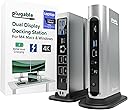
The Plugable 16-in-1 Thunderbolt 4 Dock is a premium docking station designed for M4/M5 MacBook Air/Pro and Windows Thunderbolt 4/USB4 laptops. It supports dual 4K 60Hz monitors via HDMI and DisplayPort, delivers 100W power for fast charging, and offers extensive connectivity with 7 USB ports, MicroSD/SD card readers, and 2.5Gbps Ethernet. Its sleek vertical design saves desk space while providing universal compatibility and reliable, driver-free plug-and-play performance.


| ASIN | B0BQJWKBMF |
| Best Sellers Rank | #611 in Computers & Accessories ( See Top 100 in Computers & Accessories ) #63 in Laptop Docking Stations |
| Brand | Plugable |
| Color | Silver |
| Compatible Devices | Windows 11 Thunderbolt 4 hosts and Thunderbolt 4 Macs with macOS 11+ including, M5 / M4 MacBook Pro and MacBook Air, M1 Pro/Max, M2 Pro/Max, M3 Pro/Max, or base M3 (with clamshell mode required for dual displays), HP Omnibook / EliteBook / DragonFly / ProBook / Spectre x360 series, Dell Pro Max / Plus / XPS / Latitude / Inspiron, Lenovo ThinkPad / IdeaPad / Yoga , Framework (Intel Processors), Microsoft Surface Pro 11 & 10 for Business, Surface Pro 9,8 / Surface Laptop Studio / Surface Laptop 6 / 5, Acer Swift, Predator, Aspire Vero, ASUS ZenBook, ExpertBook, ROG Zephyrus, ProArt Compatible Devices Windows 11 Thunderbolt 4 hosts and Thunderbolt 4 Macs with macOS 11+ including, M5 / M4 MacBook Pro and MacBook Air, M1 Pro/Max, M2 Pro/Max, M3 Pro/Max, or base M3 (with clamshell mode required for dual displays), HP Omnibook / EliteBook / DragonFly / ProBook / Spectre x360 series, Dell Pro Max / Plus / XPS / Latitude / Inspiron, Lenovo ThinkPad / IdeaPad / Yoga , Framework (Intel Processors), Microsoft Surface Pro 11 & 10 for Business, Surface Pro 9,8 / Surface Laptop Studio / Surface Laptop 6 / 5, Acer Swift, Predator, Aspire Vero, ASUS ZenBook, ExpertBook, ROG Zephyrus, ProArt See more |
| Customer Reviews | 4.0 out of 5 stars 526 Reviews |
| Hardware Interface | Thunderbolt |
| Input Voltage | 20 volts |
| Item Dimensions L x W x H | 4.1"L x 1.4"W x 7.7"H |
| Item Type Name | laptop docking station |
| Item Weight | 646 g |
| Manufacturer | Plugable |
| Mfr Part Number | TBT4-UDZ |
| Minimum Required Operating System Version | Mac OS 11 Big Sur, Windows 11 |
| Model Number | TBT4-UDZ |
| Number of Items | 1 |
| Number of Ports | 16 |
| Product Dimensions | 4.1"L x 1.4"W x 7.7"H |
| Total Number of HDMI Ports | 2 |
| Total USB Ports | 7 |
| Total Usb Ports | 7 |
| UPC | 819927012733 |
| Unit Count | 1 Count |
| Warranty Description | 2 Year Limited Parts and Labor |
| Wattage | 100 |
C**S
Very solid construction, top notch support
I bought this to dock a new gaming notebook to the two monitors, keyboard, mouse, speakers, mic, webcam, and other assorted odds and ends at my working desk. All of that is shared with a work notebook which has its own company-supplied "meh" quality off-brand Thunderbolt 3 dock, with both docks switching through a modern KVM so that I can jump back and forth as desired. As the new computer has a Thunderbolt 4 port, I wanted to go with a TB4 dock to allow for the possibility of higher resolution & higher refresh monitors and maybe even more of them at some point. This Plugable dock looked to be the best balance between price and features -- for the features, there just aren't that many docks at this price. A lot of the docks around this range don't even have DisplayPort, just capability for USB monitors. A lot of the ones at this price also tend to supply less power, which aren't enough for this computer. This one also seemed to make the top X on quite a few of the "best Thunderbolt 4 docks" lists. So nothing much to report in the functionality -- plug stuff in, stuff works. I had no issue with the computer locking onto the dock or the dock addressing any of the peripherals. Everything happens pretty much instantaneously. You get a nice green solid light to show successful TB connection with the computer, or white if no connection. The dock supplies 98W of power, which is enough to actively charge my power-hungry Lenovo Legion 5 Pro notebook which needs something close to that to charge while using. It's almost the 100W max for this computer for USB charging. Anyway, that certainly works. I had one hiccup -- toward the end of the first full day of use, it just stopped working at all, unable to ever establish a connection to any computer plugged into it. Swapped cable, same deal. I contacted tech support (after hours) via email and immediately got a human response acknowledging the problem, letting me know the real techs were going to be back in office first thing in the morning and would get with me, and as promised, they did, the very next day. Josh from Plugable, probably one of the most polite and pleasant people I've ever dealt with from a tech support team, was quick to ask for a bit more info, followed by acknowledgement that it appears that the dock is bad, and an offer to send out another immediately in exchange for promise of return from me using the shipping label that was to be included. Each interaction was very quick -- no long waits between emails. The package did arrive in just a couple of days and the replacement so far is working great. He mentioned really being eager to get that other one back with all of the original stuff (i.e., "please use only the new stuff [power supply, cable, etc] because we don't know which part of the old unit is the point of failure") so that they can diagnose the cause of the problem, presumably to know whether there are manufacturing or design issues to address. It's what I like to hear. Anyway, highly recommend this product. If you need it, the tech support is unbeatable. Hopefully you won't need it, and you'll have a really solid and frankly very attractive dock that looks good sitting on my desktop where my old mid-tower system used to be, along with easy access to USB ports and SD-card slots and a headphone jack.
M**.
Excellent docking station
This is the second one of these Plugable docking stations I have owned. The first one had its video outputs fried by a major electrical storm, so no fault of the device. It contains all of the HDMI, DisplayPort, USB, microphone, and headphone jacks necessary to handle the needs of most notebook computers. Its vertical tower-style format saves a tremendous amount of desk space compared to most stations, which tend to lie flat on the desk with cords plugged into its sides and ends. Importantly, it comes with a solid power adapter so it also supplies power to the notebook battery. It is also fast, well constructed, and silent.
A**R
I wish it worked as advertised.
I was disappointed. I really wanted this to work. I did my homework, read the reviews, even checked with Chat. The product looks great from the outside. Has a ton of ports. I have a very nice laptop which I wanted to plug into my three home office monitors. I plugged in everything; monitors, keyboard, mouse, Space Mouse, audio, and aux base cooler. It all work great for about the first 10 minutes. The keyboard and mouse were the first to drop off. Then, the USB devices, then one of the monitors. I unplugged everything but the two side monitors. (Connected all else directly to the laptop). That worked...okay...for a week. Then both monitors started blacking out. Right up until I FINALLY got my tower back from being serviced, the monitors - so using only TWO of the multiple ports - were blacking out for 3-5 seconds every 5 minutes! It was painful. ;-) Anyway, I really do wish it would have worked as advertised. I missed the return window. Hoping this review will help both vendor and purchaser.
J**N
Solid dock for swapping between my gaming and work laptops.
I bought this after landing a new job that has blocked remote desktop connections to my work laptop. I already had a gaming laptop, which was better than my aging gaming desktop, but I rarely used it due to wiring limitations. I've since swapped out my desktop for this dock, and have a row of laptops ready to swap as needed, allowing me to use a dual monitor setup on my gaming laptop, work laptop, and consulting laptop. The only snag I ran into that took me a bit to troubleshoot is that my desktop used a display port to HDMI cable for my second monitor. This dock is not compatible with that cable, and I'm not sure exactly what converters or converter cables do work, so if you're getting this, just plan on display port -> display port or HDMI -> HDMI. Thankfully after reading a bit I realized the problem and swapped out the cable for a pure HDMI, and everything has worked since. Everything was easy to set up. It took quite a bit more time removing my desktop than it did plugging all of this in. I've noticed no heat issues, and it is generally cool to the touch even when gaming.
A**X
Great Dock for Displays & Power, but Ethernet Performance is Inconsistent
Excellent dock overall, but Ethernet performance is inconsistent I’ve been using the Plugable 16-in-1 Thunderbolt 4 Dock for a while now, and overall, it’s a very capable and well-designed dock. What works great: • Dual monitor support is rock solid (no flickering or disconnects) • 100W power delivery keeps my MacBook charged without issues • Plenty of ports; everything connects cleanly with a single cable • Build quality feels solid and reliable This dock really delivers on its promise of being a full desktop replacement with tons of connectivity, including 2.5Gb Ethernet and multiple display outputs. The downside (and the reason for 4 stars): The built-in 2.5Gb Ethernet port is inconsistent under heavier use. For normal browsing and everyday tasks, it works fine. However, during large file transfers or sustained network activity: • Speeds can be uneven depending on direction • Throughput sometimes drops below the expected 2.5Gb performance • Occasionally requires unplugging/replugging or power cycling the dock to recover I’ve tested my network separately, and the issue only occurs when using the dock’s Ethernet. ⸻ Bottom line: If you need a dock for displays, charging, and general connectivity, this is excellent, and I would recommend it. If reliable high-speed wired networking is important to you, you may want to use a dedicated Ethernet adapter instead of relying on the dock’s built-in port.
A**R
Excellent port options and build quality. Wish it had rubber feet and a rear host port.
I’m using this docking station primarily with a Dell Latitude 5420 laptop and it works great with it. The port options are great for me as I have a DisplayPort/HDMI monitor (i.e. a Samsung Odyssey OLED monitor which is a fairly high-end monitor), rather than a thunderbolt monitor, and several USB-A devices (e.g. wireless keyboard and mouse dongles, webcam, etc.). The build quality is excellent. It’s made with metal which gives it a nice weight so that it doesn’t move around easily if I’m moving the cables such as when I’m dusting. The main cons for me are the price, the lack of rubber feet on the “bottom” when laying it on its side for a horizontal orientation, and the front-facing USB host port. I had rubber adhesive feet on hand so I was able to stick those to the bottom so that’s not an issue for me anymore. I’d prefer to give this 4.5 stars. Overall, I’m pretty happy with it so I’ll choose 5 stars rather than 4 stars.
T**R
True dual display dock that just works for Mac! (2025 MacBook Air M4)
Dual display dock that just works for Mac's! I have a newer MacBook Air M4 and struggled to find a good dock for dual separate monitors. I wanted 1 cord to do everything, power/charge my device, dual displays (not 2 mirrored same images), and add ports. I tried Anker A83B6 14 in 1, loved the look and all the extra ports but that did not support true dual displays, just mirrored. Then I tried the TobenONE UDS033, the look and finish were ok, had lots of ports, it DID support dual individual displays but required DisplayLink software to run... this caused TERRIBLE lag issues with my mouse and was useless... Finally I did more reddit dives and YouTube searches and came across this Plugable Dock, hooked it up, and it just works right out of the box! No issues, no plugin/software, no lag... it's exactly what you're looking for. My ONLY issues with this dock is I would have liked more USBC ports, and that the connection port to my computer was on the back for a cleaner look/cable management. But, it's a great dock for the price and just works for my Mac!
J**Z
Very sensitive to temperature. Not very clear instructions.
This unit is very sensitive to temperature. To be more clear, I am using a 2020 Intel Mac, And I am using 3 monitors with it. The set up is a bit tricky. I haven't been able to set up the 3 monitors at 3 different resolutions with it. I can only work 2 at a time including one 4K monitor. If I try to add a thermometer what it does is to mirror the last monitor I connected. I have been forced to connect last monitor by using one of the Mac ports. I am an electronics engineer, and write software professionally, so I am somewhat familiar with hardware and software setup. I know for sure is not a cable issue, this setup was working before by using one Hyper port extender by Sanho. Still better than previous setup, but the instructions could be clearer. I also tried different permutations of ports and cables, same result. I usually keep my house at 70゚F the whole year round. If I raise the temperature to somewhere around 74 Fahrenheit, The unit becomes really really blink and disconnect absolutely everything until I restart it. I am not sure whether this is a defective unit or all them work the same way. It is somewhat expensive for what it does at $300. I would not expect to have any issues of that price range since there is plenty of competition. I will probably return it before the return window expires.
T**I
4.5 stars for the hardware, 5 stars for the humans behind it!
The Plugable TBT4-UDZ has done what it promises in over a year of my usage. However, recently I ran into some frustrating display glitches, the kind that made me worried about the money I had spent on it for my home workstation. After purchasing the product in January 2025, the issues kept coming and going now and then. Finally, last month, the Ethernet port stopped detecting my internet connection. Obviously, since the return window had closed on Amazon, I reached out through their product page for help. And this is where I was genuinely surprised and relieved to own this product. Josh at Plugable reached out (after I ignored their AI chatbot and thought this was done!) and asked me to send a device report using their debugging software. I wasn’t still sure how this was going to pan out, but I did it. Once he had the report, he assured me that the stated problem was present and that he was going to send me a pre-tested and firmware-updated dock for free, according to their 2-year warranty! Moreover, he stayed engaged across multiple exchanges (read probable dumb doubts and queries I had) and followed up proactively. That level of support is increasingly rare, and it deserves to be called out. The product itself gets 4.5 stars. There are still some minor issues, like one monitor not coming active on a screen wakeup, but nothing that an on/off from the dock power button can’t resolve. And it currently supports my 2-monitor + 1-laptop setup, all with 2560 x 1440 resolutions and refresh rates of 120Hz on the monitors and 240Hz on the laptop. With 16 ports suitable for most kinds of setups involving display, audio, internet, and accessories, this dock is definitely solid, barring the few unavoidable glitches that might pop up. So, would I buy Plugable again? Without hesitation — not just for the hardware, but because I know if something goes sideways, there's a real person on the other end who gives a damn. And that is something, IMO, we need to support in an increasingly AI-baked techscape in the name of efficiency.
A**R
Funciona impecable con Linux
Pese a que las especificaciones mencionan que no es compatible con Linux (me di cuenta después de hacer la compra...), me funcionó perfecto sin tener que instalar o configurar absolutamente nada (en Ubuntu 24.04). Lo uso con 3 pantallas FHD externas más la pantalla FHD interna de mi notebook, las 4 pantallas mostrando contenido distinto. No he probado el puerto de red, pero el sistema sí detecta la interfaz, así que debería funcionar sin problema también.
C**R
Very good product, even better Support
Very good product! Well worth the price tag. Features as advertised are all there. And most of all: VERY GOOD PRODUCT SUPPORT team! Very responsive, very helpful. No frills, no fuss, just a really professional approach. More than makes up for any perceived shortcomings.
T**A
Very durable and Easy to setup
I ordered this for my husband. I am not a fan of gadgets, but he loved this dock once he opened it. The quality was extremely durable, and the setup was easy. He simply plugged his 2 screens and laptop. The dock has many options for connecting devices, which ultimately saves you from having to use different devices to connect to the system, like a Bluetooth adapter for a keyboard and mouse, your 2 HDMI ports, a webcam, and more. What else does a person need? Extremely helpful and problem-solving device. My husband highly recommends this.
N**L
Great functionality.
Great item with a good number of functional ports. All appears to work well and powers my Dell with 2 monitors.
Trustpilot
3 days ago
4 days ago