Buy anything from 5,000+ international stores. One checkout price. No surprise fees. Join 2M+ shoppers on Desertcart.
Desertcart purchases this item on your behalf and handles shipping, customs, and support to Kenya.
⌨️ Elevate your control game — compact, wireless, and ready to rule your media kingdom!
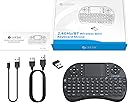
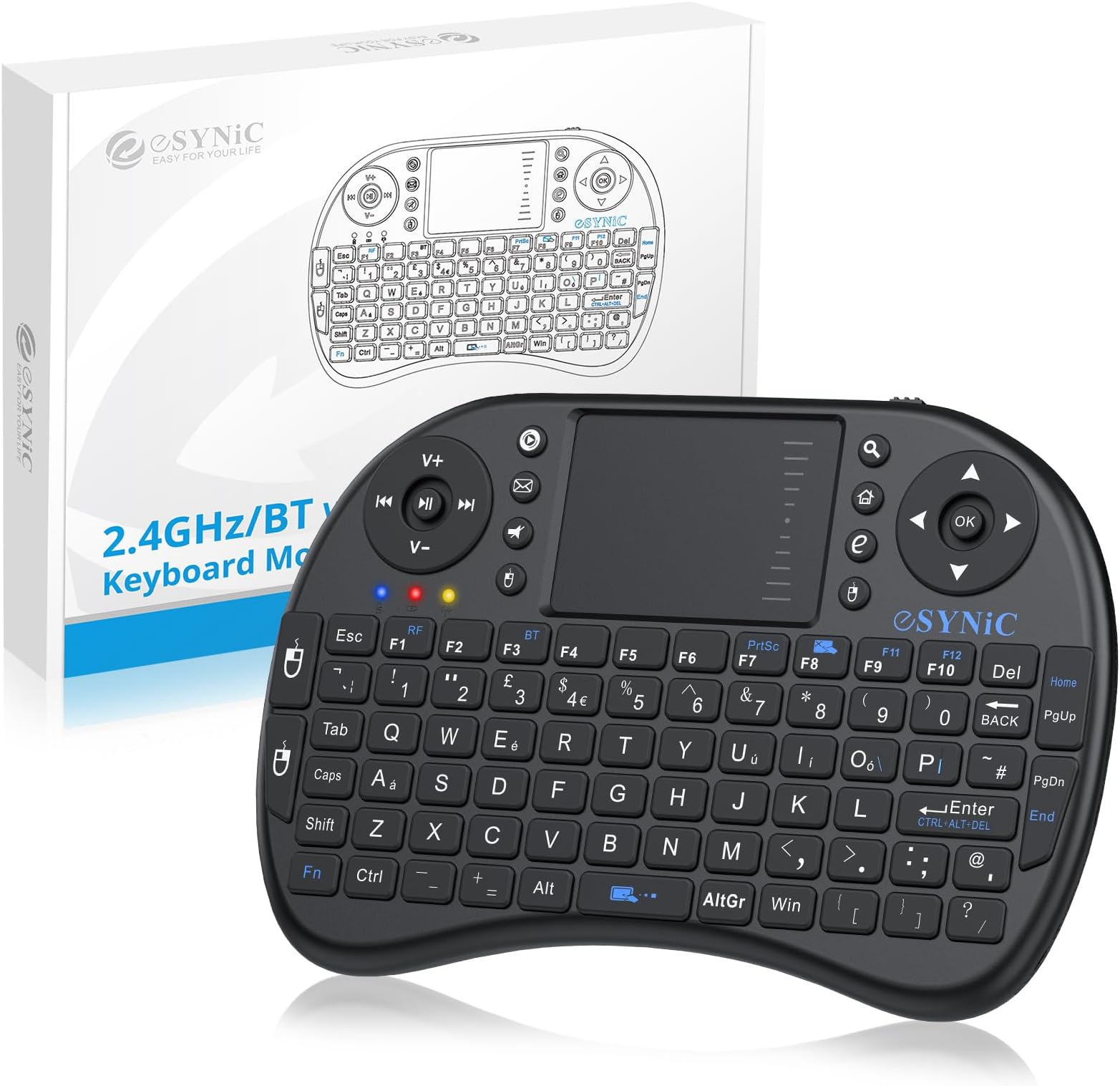
The eSynic Upgraded Bluetooth Mini Wireless Keyboard is a versatile 92-key QWERTY device featuring dual wireless modes (Bluetooth & 2.4GHz), an integrated touchpad, and multimedia controls. Designed for professionals and media enthusiasts alike, it offers broad compatibility with devices from PCs to gaming consoles, a rechargeable Li-ion battery with intelligent power management, and an ergonomic, portable design perfect for on-the-go productivity and entertainment.


| ASIN | B00DUUF250 |
| Antenna Location | Multimedia |
| Best Sellers Rank | 10,061 in Computers & Accessories ( See Top 100 in Computers & Accessories ) 462 in Keyboards (Computers & Accessories) |
| Box Contents | 1 x Mini 2.4GHz keyboard, 1 x Wireless receiver, 1 x Male to Female Cable, 1 x USB Cable, 1 x Manual |
| Brand | eSynic |
| Brand Name | eSynic |
| Button Quantity | 92 |
| Colour | Black |
| Compatible Devices | PC / Laptop / TV / Pad / Phone |
| Compatible Operating System Family | Windows |
| Compatible devices | PC / Laptop / TV / Pad / Phone |
| Connectivity Technology | Bluetooth, USB-A |
| Connectivity technology | Bluetooth, USB-A |
| Country of Origin | China |
| Customer Reviews | 4.2 out of 5 stars 7,278 Reviews |
| Enclosure Material | Plastic |
| Hand Orientation | Ambidextrous |
| Item Dimensions L x W x H | 17.8L x 10.2W x 2.5H centimetres |
| Item Weight | 110 Grams |
| Keyboard Description | Multimedia |
| Keyboard Layout | QWERTY |
| Keyboard description | Multimedia |
| Manufacturer | eSynic |
| Manufacturer Part Number | FMKRFL1-IV17 |
| Model Number | FMKRFL1-IV17 |
| Number of Keys | 92 |
| Power Source | Battery Powered |
| Product Features | Ergonomic, Lightweight, Portable, Rechargeable, Trackpad |
| Product Warranty | 12 Months |
| Recommended uses for product | Multimedia |
| Special feature | Ergonomic, Lightweight, Portable, Rechargeable, Trackpad |
| Style Name | Non-Backlit |
| UPC | 757901753558 |
F**P
Does what I wanted it to do extremely well.
Pros -------- Shipping from this company was very, very fast! Very pleased! Great little device with good quality "clicky" rubber buttons and a solid feel. Very little latency from mouse pointer. Can scroll on the trackpad with 1 finger. A good size for my hands (which are maybe a little on the smaller side for a man) White backlight works well in a dark setting. Rechargeable li-ion battery. Simple plug and play design. I plugged this into a Windows 10 laptop and an Android box and both worked instantly without trouble. Compact form factor that's comfortable to use in hands without resting on anything. Cons -------- Middle Click: There's no middle click feature. The manual gives instructions for one but they don't appear to work for this specific device. (e.g. it says you middle click by tapping on the trackpad with 2 fingers, and right click by tapping with 3, but you actually right click with 2 fingers and 3 finger tapping does nothing, at least not in Windows 10.) There's no version number of the device so it's possible I have the wrong user-manual? Other Considerations ------------------------------- Back-light: There's only the one brightness level as far as I can tell -- it's either on or off -- so the back-light might be a little unimpressive for some people's tastes. I find it's perfect for me as I don't like super bright LEDs blinding me. Redundant Buttons: There are other versions of this type of device out there that either have "www." and ".com" buttons in place of the extra left-click and right-click buttons on the left side, or removed the buttons altogether and made the rest of the buttons larger. I think those versions have no back-lighting however which makes this device the better option, but I find the extra mouse buttons a bit redundant and the space could be better utilized. It's only a minor thing though and it's probably a good thing to have extra backups of the most used buttons of the device. Netflix App: It works for navigating Netflix on an Android device, but only "sorta kinda". A lot of this probably the fault of the Netflix app itself but the spacebar and pause buttons don't seem to pause videos as you'd expect, sometimes you can navigate using the buttons whereas other times you need to use the mouse, the scroll function doesn't work, stuff like that, so if that's what you're getting the device for, might be better to just get a wireless keyboard and mouse. Overall ------------- If you're looking for a remote device for your Windows laptop, that has a rechargeable battery and back-light at a reasonable price, you really can't do better than this at this time. There are other similar devices out there that perhaps make better use of the space, but with the back-light and ability to scroll on the track-pad with one finger, as well as the other pros mentioned, it's a great device with little competition.
A**Z
A great add-on for media boxes
This is a great little device which brings my Ilinkbrand MX3 (MXIII S) - Android Smart TV Box Media Player to life. I needed a device with good range and battery life, a built-in mouse/scroller and full keyboard to perform the functions which were missing on the MX3's remote. This has proved to be an excellent buy at a very reasonable price. I can also confirm that the range is absolutely perfect for our needs (we have a sizeable lounge with the TV and sofas at opposite ends of each other). It sets up easily and, overall, is very responsive. The size ensures it fits snugly in the hands without becoming tiring, and it's a fairly robust design. I do have some concerns about the on/off switch as it feels a little weak, but time will tell. All in all, if you're looking to bring your media boxes to life without cumbersome and space-taking keyboards and/or mice, this is a great addition that tucks neatly away below the TV. It's really great to waltz through menus and browsers so quickly now. Highly recommended.
M**R
Cheap & cheerful - does the job.
Bought this to control one of those Android TV boxes, & on the whole it works very well. I wanted to give this a good run for it's money before reviewing as I was a bit dubious after reading some of the negative reviews. I've been using it extensively now for over a week and I have no major complaints so far.The trackpad is a little slow on it's default setting for my liking, but you can toggle between two speeds by holding down the Fn key and hitting the space bar. Some reviewers said the back light on their units did not work, at first I thought I had the same problem as toggling the backlight (Fn + F6) didn't seem to do anything, but this turned out to be that the backlight doesn't show up at all in daylight / a well lit room. In darkness / semi darkness it shows up very well allowing you to clearly see all the key chars (though not the extended 'blue' functions). The rubber keys have a good travel to them, but the unit itself feels a little light weight and flimsy. I wonder how well the keyboard membranes and the on/off switch will stand the test of time, but for 14 quid I wouldn't be too bothered if I only got 6 months out of it, as it's going to cost next to nothing to replace. Battery life has been great - since it's day one charge up it's had extensive use very night for over a week and is still going strong (keeping the backlight off unless needed). Wireless range is good enough for me to be able to sit back on the couch - opposite end of the living room to the TV. Note - the 'manual' this comes worth has marginally less info on it than the average Chinese fortune cookie, so you might have to play around to work out what some of the keys actually do - but at this price point thats a minor quibble. This little thing has exceeded my expectations.
A**R
Wow, and so cheap too
I bought it to use with a Mobie I bought at the same time. Without it, the Mobie would be very hard to use. With the keyboard, I can move a cursor using the finger-pad, just like on a laptop. There is one button to click on the mouse cursor, and another to click on List entries that can (as an alternative to the mouse) be selected using the arrow buttons at top right. The Mobie remote allows you to go into "mouse mode" but only offers arrow buttons to move its cursor, which is very slow. I have the following Apps installed, and the keyboard makes usage very easy: YouTube, WebBrowser with Favourites, and Google Sign On, for which I could install a password on my Windows desktop and then use it on the Movie. The WebBrowser shows the Google Search page as its Home, so it is easy to add Favourites which you search for, having checked on the desktop that the query works. The keyboard contains a lithium battery that can be charged with a supplied cable, from a USB socket, and there is one still free on the Mobie. As with a radio mouse, you just plug a little receiver into a USB socket on the Mobie. I guess you could also use the keyboard with a laptop or tower, on the far side of the room, say connected to your TV, but I have not tried this.
C**S
Nice but could do with some changes.
Nice little keyboard. Quite unresponsive. Can not keep up with the speed I normally type at all, Slowing my typing speed down a lot allows most button presses to register but still misses some. Mouse buttons would be better moved to "triggers" so can be pressed at the same time as using the arrow keys and mouse (for use as a gaming keyboard) but only if the response for the key presses was more accurate. "End" and "Home" buttons are doubled with "Page Down" and "Page Up" respectively, To press either "Home" or "End" you have to press the "Fn" (function) key, this is not a problem until you are trying to select a line of text, When pressing the combination or "Fn" + "Shift" + "Home" / "End" it ignores the "fn" key and does the functionality for either "Page Up" or "Page Down" depending on which one you pressed. The mouse works well, small area so will need settings fine tuned as any small touch pad would need to get the sensitivity you require. But the scroll bar on the side of the mouse pad is very unresponsive, as such I find myself moving the mouse more than scrolling the page when ever I try to scroll.
M**2
Perfect for web Surfing on your Smart TV
Perfect for web Surfing on your Smart TV With all the smart TVs now available and tis allowing you to Facebook, surf the web etc, you'll not be frustrated any longer using your TV remote to enter text on search engines or post to your facebook page or indeed write emails via your TV set PRO's VALUE FOR MONEY Yep it is for £12 delivered this is a cracking piece of kit and will speed up your time on your TV there are a few short cuts you will have to find maybe via the internet as the instructions are woefull IE for Right Click hold down the Mouse key bottom left hand side of the scroll/touch pad for a second and this enables the drop down menu BATTERY CHARGE, it lasts forever, well a long time anyway, the battery is removable USB storage. the USB stores in the battery compartment, so if you take it with you anywhere, the USB is safe and sound in the back of the keyboard EASE OF USE, pop in the small USB wireless adapter, switch on the keyboard and it connects instantly, if it does just retry and it will find the keyboard SMALL SIZE, It is small but easily useable, larger than a Mobile keypad so that shouldn't be an issue for anyone WIDE RANGE, The USB picks up the keyboard signals from a wide area no need to point the keyboard directly at the piece of equiptment you have the receiver plugged into, i can bounce the keyboard signal of the living room walls and it pick it up easily USB Dual use cable, cable has 2 termination end options, so you have the choice of mini usb ( to charge the keyboard ) or you can use the same charge cable as a mini extension for your usb port as it also terminated in a female USB socket CON's Totally useless info booklet, the writing is so small its unreadable, hence you'll need to google to find out a few keyboard short cuts such as Right Click as mentioned above The usb receiver is small make sure you put it in a port thats easily accessed for removal
L**L
Mixed opinion.
Ok so on one hand this mini keyboard is a nice bit of kit but on the other it's extremely cheaply made. The charging cable is very cheap quality and I guess will not last long. The actual keyboard does seem to do an okay job but as with the cable it's made from very cheap materials and will not take much to damage it. So as per my heading I'm of mixed opinion about this, would I recommend it ? No I wouldn't I would recommend paying a higher premium and getting a better quality keyboard. I will update my review in a few days after using it. UPDATE 18/07/16 ::: I have used this keyboard for a couple of days now and to honest I am having real issues with it. So it would appear that most of the left side is pretty unresponsive to the touch and you really do need to use great force to use some of the keys. I am sure I must just be unlucky because most reviews are quite favourable,,, unfortunately I lost interest in it ... it is worth mentioning that the seller emailed me today offering me a new keypad or refund , I opted for a new keypad but for some reason they have chosen to give me a refund instead. STRANGE !! Oh and they also asked me to remove my review,,, maybe that is why so many reviews are favourable??? I think if they had replaced my faulty keypad for one which wasn't faulty I may have changed my review for one more favourable, as it is i am left with the faulty one , but admittedly I got my money back.
J**S
Extremely functional
I turned an old laptop into a Chromebook to act as a small media centre and wanted a small remote keyboard to use with it. This fitted the bill perfectly. It just plugs and plays, works perfectly from the start, and a nice size - not too big to be cumbersome but not too small to be hard to use. I would not want to do much typing on it, but being able to use laptop remotely to start apps and services is great. Also features sound and media controls, which have proven to be very handy.
R**I
Tastiera di base
Prezzo ottimo. Prodotto usato. Non funziona bene il tasto @ ma molto facile l'utilizzo se non si hanno altre aspettative. Acquistato per smart box android collegata ad una TV LG del 2007.
M**N
هو انسب حاجه بالسعر ده
خامته مش اد كده بس،بالنسبة للسعر تمام بس الزراير صغيره شويه أو شويتين
Q**O
más que adecuado
no hemos dejado de utilizarlo desde el primer día, la carga de la batería es más que apropiada y permite no tener que interrumpir su uso muy a menudo; práctico, sencillo y muy intuitivo...
F**A
Otro modelo, misma función.
Ordené el control remoto marca Esynic 2.4G, y me enviaron uno muy similar de la marca Rii, físicamente son muy parecidos si no que iguales, aparentemente tienen las mismas funciones, pero el otro modelo es un poco más económico y reportan fallos de perder la señal con distancias cortas en algunos equipos, lo cual espero no sea mi caso y además quiero aclarar con Amazon para ver un reembolso de la diferencia (actualizaré al tener una respuesta). Por el momento dejo 3 estrellas porque aparentemente son casi lo mismo los controles así que está bien, espero no arrepentirme y tener que bajar la calificación.
Trustpilot
2 weeks ago
3 weeks ago