Desertcart purchases this item on your behalf and handles shipping, customs, and support to Kenya.
🎶 Command your beats, anywhere, anytime — the ultimate pocket-sized studio companion!
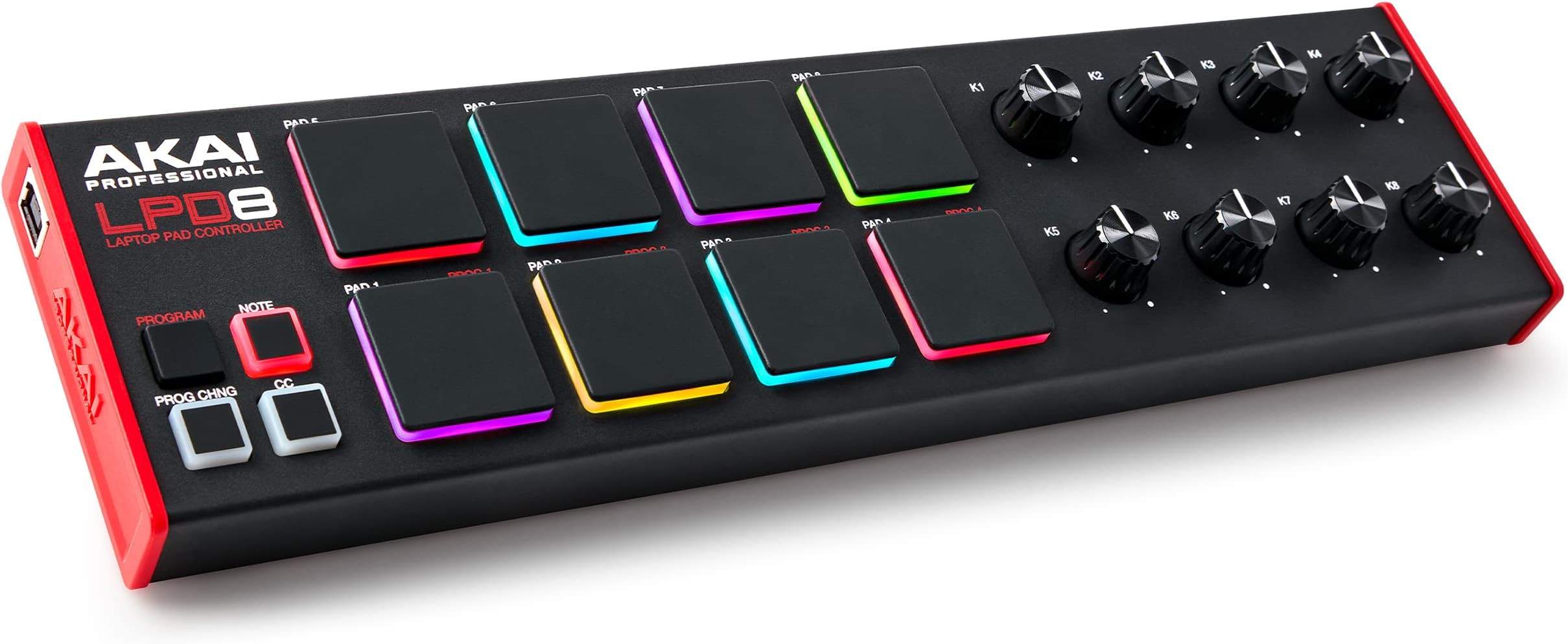
The Akai Professional LPD8 MK2 is a compact USB MIDI pad controller featuring 8 velocity-sensitive RGB MPC drum pads and 8 assignable knobs, designed for seamless integration with all major DAWs. Its rugged yet portable design, combined with programmable presets and plug-and-play USB connectivity, makes it an essential tool for music producers and beat makers seeking tactile control and creative flexibility on the go.


| Additional Features | Backlit Drum Pad, Compact, Portable, Programmable, Touch Sensitive Pad |
| Asin | B0BF9MN8R2 |
| Best Sellers Rank | #1,588 in Musical Instruments (See Top 100 in Musical Instruments) #5 in Computer Recording MIDI Controllers |
| Brand Name | Akai Professional |
| Color | Black |
| Compatible Devices | Laptop |
| Connectivity Technology | USB |
| Connector Type | USB |
| Control Method | Touch |
| Control Type | Drum Pad Controller |
| Customer Reviews | 4.4 4.4 out of 5 stars (715) 4.4 out of 5 stars |
| Global Trade Identification Number | 00694318025567 |
| Hardware Interface | USB |
| Hardware Platform | PC/Mac |
| Human Interface Input | Buttons, Dial |
| Included Components | LPD8 MK2, Quickstart Guide, USB Cable, Safety and Warranty Manual, Software download card |
| Instrument | Drum |
| Instrument Key | Any |
| Item Dimensions D X W X H | 3.24"D x 12.12"W x 1.32"H |
| Item Type Name | USB MIDI Controller with 8 Responsive MPC Drum Pads for Mac and PC, 8 Assignable Knobs and Music Production Software |
| Item Weight | 0.4 kg |
| Manufacturer | inMusic Brands Inc. |
| Manufacturer Part Number | LPD8MK2 |
| Material Type | Metal, Plastic |
| Model Name | LPD8MK2 |
| Model Number | LPD8 MK2 |
| Model Year | 2022 |
| Noise Control | None |
| Number Of Items | 1 |
| Number Of Keys | 8 |
| Platform | Mac, Windows |
| Product Style | LPD8 |
| Size | Compact |
| Supported Software | Ableton Live |
| Unit Count | 1 Count |
| Upc | 694318025567 |
| Warranty Description | 1 year manufacturer. |
User
Great Akai product
It’s a typical Akai product. Durable, responsive, compatible, and comes with loads of bonus software. The pads are a little stiff. I gotta smack em purdy hard but they just need to be broken in. It’s compact and looks dope. Doesn’t feel too light and cheap or too heavy and out dated. Very durable. Connects via usb. Plug and play all day. If you travel bring it with you on the plane and plug it up to your laptop and you’re back at it. If you’re looking to run it as your main drum pad tho in a home studio setup drop the additional $100 and buy the studio MPD. This is definitely for travel purposes
User
Solid, responsive, easy to use
I've had issues with inexpensive Akai gear in the past, so I bought this LPD8 with a bit of trepidation. But after several months of use, I am super pleased with its performance. Though the software available to program it is quite basic and not well documented, it isn't really hard to figure out. The controls are consistent and operate smoothly. Construction quality is very good overall. The small size fits very nicely above the keys on a StudioLogic SL73 and allows me to toggle patches and channels on and off and adjust synth params while I perform with Mainstage. The only missing feature that would make this unit perfect is Bluetooth MIDI and a rechargable battery inside, so that it could be operated without a cable.
User
Very good, with reservations
This is a pretty nice drum machine. It wasn't immediately apparent how to effectively play it. I suggest 2 fingers per pad. It takes a solid hit to activate the pads. Single finger drumming with light taps is impossible. They misfire quite a lot. But if you use two fingers per pad and hit directly downwards with intent, you will not misfire that often. It's quite responsive if you have the right power. Not recommended for kids unless they understand this well. Otherwise, the build quality is great and everything feels professional. It just requires more thoughtful force than you would think. Hope that makes sense. I suggest the MPD218 if you have a little extra money, but this one could be nice for travel. Or an additional set of simple controls. It's actually really nice for just queuing up patches.
User
Photo Editing on Darktable with Knobs!
I got this for editing photos in Darktable on Windows. It works well straight out of the box with no external setup required.I plugged it in and was able to assign each control to a shortcut either by clicking the shortcut button, hovering over the function, and then operating the pad/knob or by opening darktable settings, double clicking the function, and pressing the pad.As other reviewers note the pads require some force to activate. More than I would expect if they were actual buttons, but less than I expected having read the other comments. They feel more like the amount of force you would expect to use when pressing a rubberized power button than a keyboard key. But knowing that I'm not using it for the expected purpose going in, I'm content with them. I have the buttons set to rate at 1, 3, or 5 stars, to go to the next or previous photo (you have to set this separately both light table and dark room tabs), switch between light table and dark room, and monochrome.The knobs were the real draw for me and they work great. I have them set for exposure, contrast (filmic rgb), saturation, local contrast, shadows, highlights, and white balance. For white balance, I changed the speed to 100 in the shortcut settings.I'll probably adjust settings and maybe change the shortcuts as I use it more, but with just the initial set up it's already working well.I'm sure it will be a fun finger drum too, but I haven't tried it for that yet.
User
High Quality -- Engineered Solid -- Works With Everything
Amazing PriceExtreme High Quality--this has a full back and side cap piece, there are no seams or gaps. The materials are amazing quality built to extreme detail.Works plug n play with everything I've hooked up to it. Linux, Android, Roland S1 Synth, Korg Volca Beats Synth.HARD TO BEAT.
User
Just what I needed
The pads are a little hard, but the whole thing feels solid and works perfectly.
User
READ FOR INSTRUCTIONS TO SETUP IN MPC BEATS!
As a beginner, it was a nightmare getting this thing setup. The auto setup in MPC Beats is for the WIRELESS version, so it tries to use it, but its all wonky. To set your pads colors how you want, you need to use the lpd8 mk2 program editor it comes with. That's easy to use and setup. Close it when you're done, it won't be able to run at same time the lpd8 is in actual use. Make sure your lpd8 is plugged/powered up. Open MPC Beats and open one of the demos for this, since that will have sounds already assigned to the pads, you can quickly confirm this method works for you. Next, click up on the top left corner icon to get to the edit menu. Go to Preferences. Under MIDI/Sync, confirm LPD8 MK2 is present in the Input Ports at top of the page. THIS IS IMPORTANT : MAKE SURE THAT CONTROL AND TRACK ARE SELECTED under Input Ports for the LPD8 MK2. Exit Preferences, go back to the main screen where you can see the 16 pads and knobs. Go to the bottom of the screen towards the left, the icon to the right of the smiley face should be the MIDI Learn icon. Click the MIDI Learn icon. A box on the right side of the screen will show Global and Project tabs at the top. If it's not already selected, select the Global tab. There will be a drop down box on the right in the top of the Global tab. This is where MPC Beats wants to assign this wired LPD8, which there is no preset for, to the wireless one, which causes problems. In this drop down menu, select New MIDI Mapping. Then select the ENABLE AND LEARN buttons to the left of the drop down box. This will light up all the assignable parameters you see on screen in yellow. Click on the pad you want to trigger on MPC Beats FIRST. It will highlight a brighter color yellow to indicate it is ready for you to hit what pad you want triggered on your LPD8. Now hit the pad you want triggered with your LPD8. You can also select the knobs in MPC Beats and assign the knobs on the LPD8 by turning the knob when you are in LEARN/ENABLE mode. Feel free to assign the pads how you see fit. You can only use 8 at a time of course, but you are free to orient them as you see fit. You should now have fully customized colored pads and customizable pads. Figuring out MPC Beats is another adventure.I got so frustrated, I almost returned this and I am a persistent person. I found ONE video on YouTube that even came close to explaining this. There was zero ability to figure out Akai's unaccessible forums. Seriously, wtf. You log in to some other website and company for Akai stuff. It's weird and unintuitive. I got the free plug-ins and software with my LPD8, but getting the licenses registered for the Hybrid 3 and pianos is just icing on the frustration cake. Could you guys make it more complicated? All in all, I got it now and the satisfaction of barely figuring out how to use this thing is worth the price of admission.
User
Great Item
The pads feel great and work flawlessly. Product is solid with good weight. Doesnt move around when used. Great for use with Logic software.
User
Adelante con la compra
Increíble, los materiales son de buena calidad, muy portátil y plug & play
User
Akai Professional LPD8
Super schnelle Lieferung, super Qüalität, funktioniert super.
User
Qualidade
Ótima qualidade!
User
noce
noce
User
Great software, pads can be made sensitive with a hack…but.
I’m giving it 5 stars because the Akai software bundle it comes with is next level awesome for the price. However the unit itself does not have sensitive pads - 3 stars. The average is 4 stars. I have added electrical tape by opening it up from the YouTube hack, and it is now sensitive, but the pads can still get stuck occasionally. The knobs are excellent, and midi learn in MPC, Cubase, Reaper and others worked seamlessly. The unit is native in Cubase. Definitely a great cheap midi pad for people on a budget, and the software bundle is good enough to justify buying the unit. MPC Beats is awesome the VST packs are awesome all well worth $80.
Trustpilot
5 days ago
1 week ago