Desertcart purchases this item on your behalf and handles shipping, customs, and support to Kenya.
📸 Digitize your past, own your memories—before they fade away!
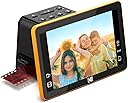
The KODAK Slide N Scan Max is a versatile 22MP digital film scanner designed for professionals and enthusiasts to effortlessly convert 35mm, 110, and 126mm negatives and 50mm slides into high-quality JPEGs. Featuring a large 7" tiltable LCD with gallery mode, a continuous quick-feed system, and built-in editing tools, it streamlines the digitization process without the need for a computer. Compatible with SD cards (not included) and USB-C enabled devices, this all-in-one scanner is perfect for preserving and sharing vintage memories with ease.


| ASIN | B0B3F6KJJ2 |
| Best Sellers Rank | #41,356 in Office Products ( See Top 100 in Office Products ) #14 in Slide & Negative Scanners |
| Brand | KODAK |
| Color Depth | 24 bits |
| Connection Type | USB |
| Connectivity Technology | USB |
| Customer Reviews | 4.1 out of 5 stars 1,837 Reviews |
| Item Dimensions D x W x H | 6.69"D x 5.35"W x 4.45"H |
| Item Weight | 16 ounces |
| Light Source Type | LED |
| Manufacturer | KODAK |
| Media Type | Negatives, Photo, Slide |
| Minimum System Requirements | Windows 7 |
| Model Name | KODAK SLIDE N SCAN Digital Film Scanner 7" Max |
| Optical Sensor Technology | CMOS |
| Product Dimensions | 6.69"D x 5.35"W x 4.45"H |
| Resolution | 3200 |
| Scanner Type | Film |
| Standard Sheet Capacity | 100 |
| UPC | 843812167529 |
| Unit Count | 1 Count |
| Warranty Description | 1 Year Limited |
| Wattage | 50 watts |
T**D
Perfect For What It Claims
Perfect, it does what it claims well and fast. I have an Epson Perfection V 600, maybe close to the gold standard for negative and slide scanners, but it's slow, very slow. First try I used the Slide N Scan on a mix of 1,260 mostly 35 mm black and white and color negatives, all over 50 years old. I captured images for 394 of them, 1.57 GB. It took 2-1/2 hours. Some, not all, of the color images had a greenish hue I could not see on the Slide N Scan, it has some ability to color correct, but those color imbalances can be automatically corrected with photo editing software more easily anyway. The B&Ws were all good. The image quality is good enough for casual use. Of the 394 images worth capturing, I set aside 46 that had enough importance to run through the Epson scanner, the others were good enough for "sharing" without additional editing. I suppose we are to the point where AI can fix anything in an image. The Slide N Scan is not intuitive, however it makes sense once you wade through the instructions or a YouTube video and it isn't necessary to resort back to the manual. The ONLY downside is if your negatives have a curl, an arch to them, the scans will be marginally "soft focused." Most of my negatives were stored in holders designed for them, so they're flat, a few were loose in drawers, a few had curls that were bad enough there were problems feeding them through the Slide N Scan. There are procedures for flattening negatives, but none of the curled ones justified the effort. Great buy.
R**H
Quick and Easy Amateur Slide & Negative Viewer/Scanner
Though maybe not the highest quality or fullest-featured transparency scanner, this product is GREAT for quickly and easily reviewing and scanning old family slides and negatives. The native 13MP image sensor is fine for the amateur family slides and snapshots from old cameras, in my opinion. 35mm negatives and slides produce 4320 x 2880 pixel image files, which seem to be about as clear as I would expect the old film to produce, if the original photo was sharp and clear (largely a function of the camera quality). Reviewing and scanning color negatives is especially nice, as it is very difficult to post-process color negatives in software - you can't just "invert" a color negative accurately with most photo editing software. With this viewer, you can just select "Color Negative" and view (and scan) your negative strips as if they were positive slides! Very handy and useful, something you can't do with just a light box and a magnifying glass. I also really appreciate the auto-exposure feature. It automatically compensates for over- and under-exposure in the slide or negative, making it quick and easy to correct and scan amateur shots. It seems to do quite well with compensating for a wide range of over- and under-exposed shots. The color correction feature, if needed, also seems to do a decent job with some fiddling - sometimes saving the extra step of post-processing some color corrections in photo editing software. I do wish they had a mode for over-scanning some slides and negatives, to reduce the auto-cropping of slides and negative frames. As other reviews have described, the scanner crops the images a little from what is usually available on the film. This is handy for most images, since it cleans up the edges by cropping off the "fuzzy" edges and rounded corners on slides and some negatives - but sometimes you need to capture the very edges of amateur shots for some critical details. With this scanner, you sometimes need to make small sacrifices over what might have been possible if you could scan more of each film frame, and do your own edge clean-up when needed. The only other issue I had was with some old non-35mm square negatives (127 format film, 40mm x 40mm image sizes). I WAS able to scan most of these negatives in a 35mm form by NOT using a film adapter (just the slide carrier), and selectively cropping a fair amount from the top and bottom, and a little from the sides. But it would be nice to be able to better handle more of the 40mm square negatives that seemed to be popular in the 50s and 60s or later. And REALLY, Kodak - not allowing the date to be set earlier than 1980?? Come on! Those old negatives and slides from our parents and grand-parents are still relevant today! My photo editing software allows the date and time "Taken" on digital images to be changed (EXIF "DateTimeOriginal"), but apparently the scanned date (EXIF "DateTimeDigitized") from the Kodak scanner is still retained in the image meta data. This causes issues with some handling in my photo organization software (Photoshop Elements Organizer). Overall, I am very satisfied with this scanner for my main purpose of easily viewing and digitizing old slides and negatives!
A**R
YOU NEED an SD card/does not directly feed to computer
PROS: -You can scan a bunch of slides pretty quickly once you get the hang of it -Automatically adjusts the focus and lighting on each photo with option to manually fix -Adjustable monitor screen so you can see it no matter how you're sitting -Fairly intuitive CONS: -Date and time that you can set to change the metadata only goes back to 1980 (but inexplicably and optimistically goes up to 2043) -YES it connects to your laptop with a USB-C but it does not directly save onto it; you do need the extra step of saving onto an SD card and then transferring it all over. But in retrospect this 'con" is an amazing resource for decluttering not only your old boxes of slides and film negatives, you will embark on a massive Thanksgiving day hunt through the house for one of the 5984030 or so SD cards you have sitting in a drawer somewhere that you saved for just this occasion. You'll revisit every old device and tangle of charger cords, the (many!) junk drawers full of odd-sized batteries, paper clips and matchbooks that you swore you had a spot for old SD cards. If you want to fully rid your home of old electronics and doo dads, this is the holiday weekend project for you! Or, you can be smart, read this review and order an SD card right now so when the urge to scan your stack of slides that goes to the ceiling hits you, you can do it. I have to say this is a good little machine, the feed thingy is manual (shove each slide through until the one in front of it is centered, then have at it) .. it's not as fast as you'd hope (I wish there was one you could just load your carousels onto and flip through with the remote, but alas) but it's better than all the stupid brackets you were supposed to use with a SLR camera to photograph and re-save slides back in the day. The Max is a must since it has a tilty screen that you can adjust. With the SD card inserted (yay) all you have to do is hit 'okay,' wait for a little egg-timer icon to appear and disappear, and it saves it to your gallery. Stick the usb-c into its slot and then to your laptop, hit the OK button on the transfer images icon on the screen, and they'll show up in your library. Since most of my slides are from 1960-77, I am batch-editing the time and date in Photos once it's in my laptop. In retrospect, setting the time and date on the slide n scan is a clunky process anyway so - it's fine. Weird they would put that in as an option and only go back to 1980 when so much photo media is from way back when.
L**R
A great scanner, especially at the price!
I used this scanner to scan about 1500 slides over about four months. I found it to be fast, reliable, accurate and easy to use. I was eventually able to scan 150 to 175 slides an hour. I would start with three slides loaded into the scanning carrier, push the scan button and wait for the scan to finish. I would advance the slides manually and once the new slide was positioned add a new slide to the right side of the carrier, pushing a finished slide out the left slide. I barely glanced at the scanned slide, instead I concentrated on keeping the workflow going. One warning I would give is that this is strictly a WYSIWYG operation. The slides I was scanning were 50+ year old and had degenerated from age and bad storage conditions. The scanner did nothing to improve the quality, but it did give me a decent image to start with when I got to Photoshop Elements. The scanner is OUTSTANDING. Scanner was priced right, shipped quickly and arrived in perfect shape. The scanner is OUTSTANDING. Easy to set up, easy to use. produces great scans. It took me a few minutes to get in to a work flow rhythm but I was doing about 2 scans a minute once I got rolling. I suspect this will get up to at least 3 scans a minute.
K**N
Stay away, not a “Kodak quality” product AT ALL.
Be wary of a FEW items that just could not be overlooked. Out of the box, the accessories are all cheap 3D printed and easily break so you MUST be careful with the tray. Second, the power cord is a USB adapter and not a “power” cord so it requires you sit VERY close to an outlet. It recommends NOT to use any extension cords as it could affect the power within the unit. Third, the quality of the image is POOR… there are two resolution settings and you can’t tell a difference between the two. All images were FUZZY and not even close to crisp. Lastly, I was only able to scan 10 images, 4 of which were “black” and didn’t scan. When I attempted to continue scans after the first ten “tests”, the scanner blinked and then after pressing “scan” button, it would immediately reset to the power up screen. It isn’t worth the $200+ dollars at all… not a “Kodak quality” product that you should expect. It was immediately returned as the link to the Kodak assistance page was not valid and the “chat” with someone to assist in setup didn’t go anywhere. Amazon is quickly losing points for all the “tech” they seem to putting into the website that doesn’t even work. If you do feel you want to risk it, just know the instructions are not actual instructions, they don’t tell you very much and what it does provide quickly demonstrates that this is a cheap piece of junk.
M**S
Impressive quality and easy to use
I spent my entire career working in a camera store and always had access to the latest equipment. That also meant I took a lot of photographs. In the late 70s and early early 80s I was mostly using slides. Throughout the years I back burned them as digital came along. This Christmas I decided to scan the slides so I can hand them over to my daughters. 10 years ago a slide scanner was absolutely out of reach for average consumers when it came to the cost. They were bulky, very finicky, and the took forever to scan each slide. This scanner takes less than five seconds to scan each one. It also does negative films if you no loner thave the origianl photo. Scanning to a jpeg file makes it very easy to file permanently in a cloud, and also to upload to a photo printing service. I'm extremely impressed with the ability of the unit to do auto color and light corrections. If it doesn't do as well, as you hoped, you can manually go in also and adjust brightness, color and contrast. The images is shown in my review are from 1978. The originals didn't look nearly as vibrant as the ones that came out in the scanner. The only thing I don't like is, although the slides load easily, and are for the most part automatic, (although manual), I do not like the way the loader is in the back. The screen is large, which is wonderful, but you have to look around the back to get each slide in. When scanning thousands of slides, that can really take a toll on your back as you reach around to get into the backside of the loader. I suppose, if I would've turned it sideways that would help. But I wanted to see the images front to check or adjust any color or light issues. Also to be sure that they were fully in the scanner area. For the cost, I don't think you can do better. It's just too simple to use and very versatile. I would recommend as a great gift for your family photographer to get the old slides and negatives into the cloud onr on a SD card. Or if you're the photographer, you will be pleasntly surprised at the quality and want to put thi on you wish list.
C**R
Easy to use, fair quality "scans".
It is what it is. It does about what you'd expect..digitizes but not great. But it's a camera not a scanner. Works okay in sense that it is quick and pretty easy to use. Quality is adequate for old family slides as long as the slide exposure is fairly balanced. But if, for example, the image is dark, the Kodak will blast the light areas and though there's an adjustable exposure it does do much. A source of frustration: my family had mounted 110 slides. This Kodak device has an adapter for 110 film strip but not your Kodak 110 mounted slides. But if you are doing 35 mm and don't need archival quality, this probably works as well as most inexpensive "scanners" (camera digitizers). The 7" screen is nice. Ultimately I'll probably use a slide projector and my mobile camera.
T**B
Will not turn on. Very disappointed.
Update-I received a replacement scanner, and it works perfectly. I haven’t tried it with negatives yet, but for the slides my dad took in my childhood, the viewer is very clear and sharp. The item did not work. It will not turn on, even after customer service had me try a couple of different things to get it to work. The seller, GadgetBasket, promised to send a replacement without making me drive 40 minutes to the nearest return site to send this one back. They even asked me to confirm my shipping address in a separate message. However, I have not heard from them since June 3, and have not received a replacement.
C**G
Ideal pour revoir et sauvegarder les vieilles diapos oubliées
Un scanner simple, efficace et rapide, largement suffisant pour redonner vie aux souvenirs de vacances. Certes ce n'est pas un équipement professionnel mais la définition est suffisante pour des diapos d'amateur pas toujours parfaites et les fichiers générés sont de taille raisonnable (3 à 4 Mo). Le paramétrage à 22 Mp n'apporte rien de plus (interpolation). L'image est légèrement recadrée latéralement mais ce n'est pas gênant car les bords de diapo sont souvent pas très nets et on peut choisir le coté qui est supprimé en déplaçant légèrement la diapo sur le support. La mise en place des diapos est plutôt aisée (chaque nouvelle diapo pousse l'ancienne) et le scan est quasiment instantané (1 à 2 secondes). Possibilité de réglage manuel de la luminosité et des couleurs (RGB) pour corriger les diapos mal exposées mais le réglage automatique est généralement correct. Pas de réglage de la mise au point. L'écran de 7" est suffisant pour ajuster le cadrage, apprécier le résultat et effectuer les éventuels réglages. Il est possible de raccorder un écran plus grand en HDMI mais ce n'est pas indispensable. Le transfert des fichiers se fait par le câble USB fourni mais il est indispensable d'insérer une carte SD (max 32 Go) dans le scanner. En conclusion : cet appareil permet de scanner rapidement une grande quantité de diapos pour un prix raisonnable et ensuite de sélectionner les meilleures pour les faire scanner par un professionnel.
J**A
Prosty szybki w obsłudze
Prosty i szybki w obsłudze. Zdjęcie po obróbce dobra jakość cyfrowa . Polecam
R**N
Does the job
Just right for making those old slides accessible. The process is easy enough and speedy once you get a rhythm going. Annoying that it can't handle portrait orientation but I just rotated in photo editing. I had 1500 1960's slides to preserve and it took me 4 sessions to do them all, onto a 32gb SD card. Then put the card in a card reader, connected to my phone and uploaded to Google photos, in batches of 100, at 5 minutes per batch. Then a quick bit of rotating/cropping/filter editing and I shared the album with my family. They were delighted with the quality and memories. Quality wise, they were fine for viewing on phones/monitors but to be honest, we were more interested in the memory than in the sharpness. Overall, an excellent purchase and would definitely recommend for use as a way of preserving what might be lost - I doubt it would meet the needs of a serious photographer, but I don't think that's it's market.
Y**A
a marca já é consagrada.
excelente
P**.
Great product, fast feed and fast scan - just get a mini HDMI converter.
Delivers perfectly - fast and easy. Only issue is it does not come with a mini HDMI adapter - lucky I had one to push up to my TV for shared viewing. Great display and auto-corrects brightness so is generally pretty close to perfect on slides and film. Really impressed and super happy with the speed of feeding slides and film - way quicker than scanning!
Trustpilot
1 week ago
1 week ago