Desertcart purchases this item on your behalf and handles shipping, customs, and support to Kenya.
🎯 Dial into your creative flow—where precision meets freedom!
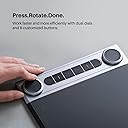
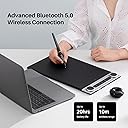
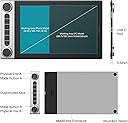
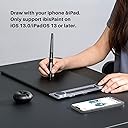
The HUION Inspiroy Dial 2 is a professional-grade wireless graphics tablet featuring 8192 levels of pen pressure sensitivity, dual programmable dials, and 6 shortcut keys for enhanced workflow. Its Bluetooth 5.0 connectivity offers up to 18 hours of battery life, while the large 10.5" x 6.5" active area and ambidextrous ultra-thin design provide comfort and versatility. Compatible across Mac, Windows, Linux, and Android platforms, it supports major creative software, making it the ultimate upgrade for serious artists and designers seeking precision and efficiency.


| ASIN | B0B1V1JBNX |
| Active Surface Area | 68.94 square inches |
| Additional Features | 60° Tilt Support, Programmable Press Key |
| Best Sellers Rank | #38,306 in Computers ( See Top 100 in Computers ) #115 in Graphic Tablets |
| Brand | HUION |
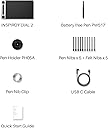
| Built-In Media | Pen Tablet, Battery-free Pen, USB-C Cable, Pen Holder, PH05F, Standard Nib x 5, Felt Nib x 5, Nib Clip, Quick Start Guide |
| Color | Black+Silver |
| Compatible Devices | Desktop, Laptop, Smartphone, Tablet |
| Connectivity Technology | Bluetooth, USB |
| Connectivity technology | Bluetooth, USB |
| Country of Origin | China |
| Customer Reviews | 4.3 out of 5 stars 109 Reviews |
| External Testing Certification | Não aplicável |
| Item Dimensions L x W | 16.5L x 26.7W centimeters |
| Item Weight | 680 g |
| Manufacturer | HUION |
| Mfr Part Number | Q630M |
| Model Name | Inspiroy Dial 2 |
| Model Number | Q630M |
| Model name | Inspiroy Dial 2 |
| Native Resolution | 5080 LPI |
| Number of Items | 1 |
| Operating System | Android 6.0 and above, Linux (Ubuntu), Mac OS 10.12 and above, Windows 7 and above |
| Operating system | Android 6.0 and above, Linux (Ubuntu), Mac OS 10.12 and above, Windows 7 and above |
| Pressure Sensitivity | 8192 Levels |
| Pressure sensitivity | 8192 Levels |
| Screen Size | 11 |
| Software Update Supported to Date | unknown |
| Special features | 60° Tilt Support, Programmable Press Key |
| Specific Uses For Product | Animation, Designing, Drawing |
| Target Audience | Artist, Designer, Student, Teacher |
| Unit Count | 1 Count |
| Warranty Description | 1 year |
S**A
Love Love Love
Amazing product, works beautifully. The Bluetooth connection is great when you're working. I used to use the on screen pen, but it wasn't working well with me. This is so much better.
P**D
I love this tablet PLUS UPDATE!
I purchased this item to replace my old Intuos 4 and I gotta say this is the first non-Wacom pen tablet that I've used that matches it in terms of build quality and drawing experience. This tablet is so nice to use, the line quality is great, the surface is a perfect middle ground of having a good amount of texture to draw on without wearing through the nib too fast, and the dials are an amazing addition to my work process. I was worried they might have been a bit gimmicky at first, but they really do improve overall workflow and user experience. I feel like I'm zipping and zooming around the canvas at the speed of light, saving time and making the overall drawing process so enjoyable (the dials also make a pleasing sound when your turn them so bonus points for that haha). The build quality is nice and solid, it's slim and doesn't take up too much space while also having a decent weight to it. I'm not worried that it's gonna snap in half or a dial is gonna pop off. The bottom of the device is made out of metal, which really adds to the higher quality feel. The fact that this device is about half the price of the Intuos Pro M is such a good deal. Wouldn't recommend to an absolute beginner due to the price point, but if you are in the market to upgrade from your starter tablet, don't overlook this bad boy. The only issue I had was that the Bluetooth was a little wonky out of the box, but Huion has a firmware update you can download that fixes the issue immediately so I can't complain. Really solid device. UPDATE 12/30/2023 Ok, so I've had this device for a little over a year now and I wanted to make an update for anyone wondering how this device holds up over time. I am happy to announce that, after a full year of pretty regular use, it still works just as well as the day I got it! For clarity, I keep it at my desk permanently, I don't travel with it so I can't speak to how well it does while being banged around in a bag all the time, but yeah I've had zero issues. Works great, battery for the bluetooth function is still good and I haven't had any connection issues, the surface has held up and doesn't have a ton of scratches or dents (I have a light drawing hand though), and I haven't had any issues with the dials, shortkeys, or pen. The biggest downside to this tablet is the fact that it's basically ruined every other drawing tablet I have tried since lol. I've tested cheaper graphics tablets and even some displays, but using all of them just made me want to go back to the Dial 2. You can REALLY feel the difference in quality between this device and some of Huion's more affordable options. I would still definitely recommend this device to anyone looking to upgrade graphics tablets.
A**R
Must read if on Windows 11
Great build, feels solid. Nice clicky dials. No perceivable latency when using bluetooth. On windows 11: initially it would not detect the tablet when trying to pair with bluetooth. In W11, Fix: Under Device settings, select Bluetooth devices discovery. > Choose Advanced from the drop-down list to show all types of Bluetooth devices.
T**A
produto excelente!
a mesa atende às expectativas, a precisão é excelente.
S**.
Value for money product..
I had 2 Wacom’s but the driver on Mac for Wacom is bad… this one works way better…. Quality compared to price is great. Use of ease and it value for money…
Z**K
From a Photoshop editing perspective
I bought this back in May and wanted to try it with an inexpensive tablet to see if it would improve my workflow and lessen fatigue. I knew initially that there would be a learning curve. I don't use it every day, but once the rotary dial is set and the buttons are configured, there is some improvement in getting accurate brush strokes. Tablet Surface: The tablet surface has plenty of space even for my XL hands. You do have to wear the sleeve as it's sensitive enough it'll move the mouse cursor but most sleeves sold on the market for $10 seems to work fine for my large hand. I use the left hand to control the dials and the buttons. The rotary dial has an audible but light-click noise. If I move fast during any workflow, sometimes it will not register, forcing me to slow down. Each dial has three settings that can be customized from basic Photoshop and Lightroom actions, keyboard shortcuts, mouse, and other application-specific shortcuts. And unfortunately, there's no unlimited shortcuts for Photoshop either but for my usage, it's perfectly okay. Pen: Speaking of shortcuts, there are two buttons that you can customize with different shortcuts as well. On the bottom button, I have it to have the brush properties popup. While the top for undo. The pen needs to be closer to the tablet for it to register the buttons so it cannot be left in the air to use it. I've yet to replace the nib yet. When I want a more pencil-like drag feel, I'll use the felt nibs. It doesn't glide as easily (but won't scratch the tablet surface) but unless I'm simply line drawing with the pen tool or browsing then 90% of the time, I have the felt nib on. Overall Impression: I would give yourself a few weeks to get used to it. It's not a magical tool if you've never used a tablet like me, and it would be less frustrating. At first, you'll feel like the tablet is slowing you down, but until you get used to how the sensitivity (adjustable) is for drawing and using it for various applications, you'll hit the wrong buttons and feel like you're using a new mouse all over again. Accuracy wise, I feel it's excellent. No major issues yet and Huion seems to keep this software up to date.
Trustpilot
2 weeks ago
1 week ago