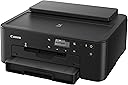
🖨️ Print smart, print sharp, print like a pro.
The Canon PIXMA TS702a is a compact, wireless single-function inkjet printer designed for home and small office use. Featuring a 350-sheet paper capacity, automatic duplex printing, and seamless mobile connectivity via AirPrint, Mopria, and Canon’s PRINT app, it delivers vibrant, high-resolution prints (up to 4800 x 1200 dpi) with a hybrid ink system for sharp text and rich colors. Energy Star certified and backed by a 1-year warranty, it balances performance, eco-consciousness, and convenience for the modern professional.


| ASIN | B09TG8F4YS |
| Additional Printer functions | Scan |
| Best Sellers Rank | #21,572 in Office Products ( See Top 100 in Office Products ) #36 in Ink Tank Printers |
| Color Depth | 16, 8 Bits |
| Compatible Devices | Smartphones |
| Control Method | App |
| Controller Type | iOS |
| Customer Reviews | 4.2 4.2 out of 5 stars (1,150) |
| Date First Available | February 25, 2022 |
| Dual-sided printing | Yes |
| Duplex | Automatic |
| Global Trade Identification Number | 00013803348118 |
| Hardware Interface | Ethernet |
| Included Components | PIXMA TS702,4” x 6” Photo Paper Sample Pack, Multi-Purpose Tray, Setup CD, Set of Standard Ink Tanks, Power Cord |
| Ink Color | Black |
| Item Weight | 14.4 pounds |
| Item model number | 3109C022 |
| Manufacturer | Canon |
| Max Input Sheet Capacity | 350 |
| Max copy resolution black-white | 4800 x 1200 dpi |
| Max copy resolution color | 4800 x 1200 dpi |
| Maximum Black and White Print Resolution | 4800 x 1200 |
| Maximum Color Print Resolution | 4800 x 1200 dpi |
| Maximum Media Size | 8.5 x 14 inch |
| Memory Storage Capacity | 64 MB |
| Model Series | PIXMA |
| Number of Trays | 1 |
| Print media | Paper (plain) |
| Printer Ink Type | Pigment Black |
| Product Dimensions | 14.4"D x 14.7"W x 6.3"H |
| Scanner Type | Flatbed |
| Sheet Size | 7 x 10, 8x 10 |
| Specific Uses For Product | Office |
| Supported Media Sizes | Legal (8.5 x 14 inches) |
| Total USB Ports | 1 |
| UPC | 013803348118 |
| Warranty Type | limited warranty |
S**A
Canon PIXMA TS702a: Reliable Wireless Printer with Great Color Output
The Canon PIXMA TS702a is a solid wireless inkjet printer that’s especially strong on color and photo printing for everyday home or small office use. It produces vibrant, detailed prints thanks to its high maximum resolution (up to 4800 × 1200 dpi), and photos look particularly nice compared to other budget printers in its class. Good print quality: Color documents and casual photo prints come out sharp and vibrant, with respectable color accuracy. Wireless & mobile printing: Works with Wi-Fi, Apple AirPrint, Mopria, and Canon’s PRINT app, so you can print straight from your phone or tablet. Automatic duplex (2-sided) printing: Saves paper and looks professional. Individual ink tanks: Replace only the color that runs out, helping lower ongoing costs. Reasonably priced and quiet: Many users find it great value and not overly noisy during operation.
A**Z
Does the job just fine.
Prints just fine., b&w and color. Seems good value for the price. Bit of a puzzle to connect, but otherwise great.
J**.
I Made the Right Choice
This was a well considered choice, and ultimately the best choice. I read the PC Magazine printer reviews, and this printer was graded "excellent." The Amazon reviews here are all over the place, and the summary was particularly disparaging. Bottom line: PC Mag rated this printer very high, and a significant 71% of Amazon reviews were 5 star, with only 10% being 1 star reviews. This was a very good buy for me. The setup was straightforward, but as I have never installed any sort of computer component before, it wasn't intuitive to me. Still, it isn't a complicated machine, and it is not completely dissimilar to the HP I had been using. It took me a while to understand which part was which, but the instructions (online, the videos, plus the paper instructions) were sufficient. Connecting the printer to my Wi-Fi was a breeze, as was connecting my phone and tablet to the printer. It makes various little whirring and clicking sounds when it receives a prompt, but it's not loud. It's roughly the same size as my old HP but weighs a little less. The profile of the printer is sleek and inconspicuous. Print speed is good. Clarity of the print is also quite good. I read a couple of reviews that begrudged having to use their app, but the app is pretty small and is sparing in storage use. No complaints here. I expect this printer to be with me for a long time. It's fairly priced and more than worth the cost.
B**N
Nightmare.
Addendum to initial review: Words fail to communicate how much I hate this printer. It’s a struggle to make it print every single time. It doesn’t connect when you want it to, it connects via wifi instead of your router when you don’t want it to, it doesn’t recognize that it has paper, it doesn’t recognize that the output tray is all the way out, it needs to have the “OK” button pushed for no apparent reason, it burns through ink really fast, the screen is tiny, dim, and impossible to read without a flashlight, you have to downgrade your network security settings with you internet provider to get it to connect at all (takes hours), or a combination of any or all of these things. Even with a lot a patience, it only succeeds in printing about 60% of the time. I sometimes need to print on glossy label stock. It globs the ink on so thick that it never dries. I had the previous generation of this model before getting this one, and it printed stickers just fine. Dunno why they made that not work on this model. Don’t buy this printer. It will only lead to madness. Apparently there is a way to connect this thing to your WiFi router, but that requires downgrading your WiFi security protocol (?) to an older one. I couldn’t make that work, despite a long customer service call. Failing that, you have to disconnect from your WiFi router and connect directly to the printer instead. That doesn’t really sound like a big deal, but if you frequently print from Google docs or other cloud-based programs it means you have to export a pdf and print that because you can’t be online and connected to the printer at the same time. Initial Review: I bought this printer to replace an older pixma that I used to print metallic labels. The old one worked great, this one gobs on the ink so heavily in “highest quality” (same program, same settings as the old one) that it never dries. On “medium quality” it doesn’t cover solidly. I hate it more every time I use it
Trustpilot
3 days ago
2 weeks ago