🚀 Elevate Your Live Stream Game with Pro-Grade Precision
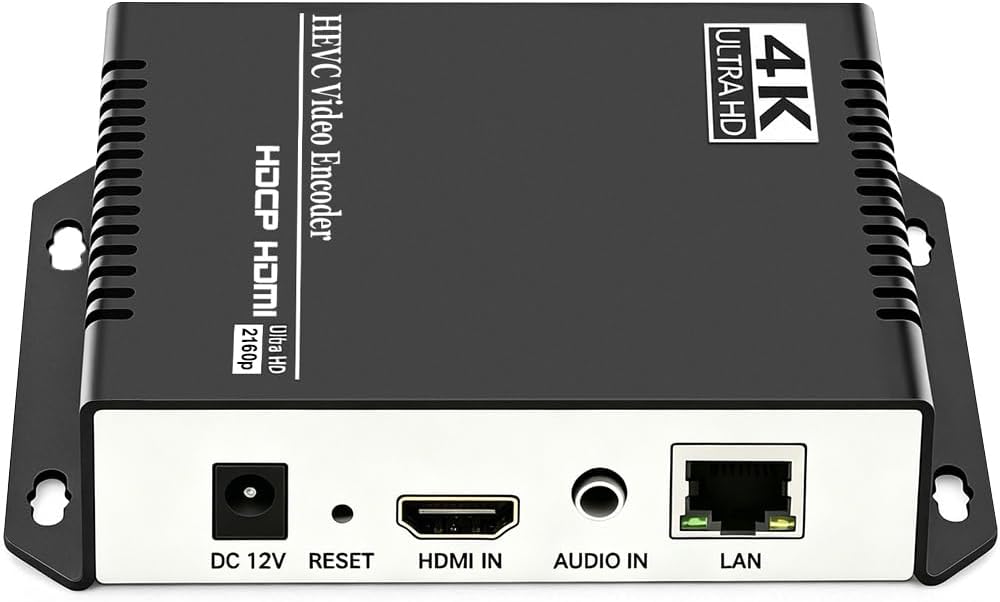
The URayCoder HEVC H.265/H.264 HDMI Video Encoder delivers professional-grade 1080p60 HD video encoding with multi-protocol support for seamless live streaming across major platforms. Featuring advanced customization options, stable low-latency transmission, and lifetime technical support, it empowers content creators and enterprises to broadcast high-quality video effortlessly and reliably.


| ASIN | B07P5WT3F1 |
| Best Sellers Rank | #85,322 in Electronics ( See Top 100 in Electronics ) #459 in Streaming Media Players |
| Item model number | UHE265-1S-4K |
| Manufacturer | URayCoder |
| Product Dimensions | 11.99 x 10.01 x 3 cm; 498.95 g |
E**Y
Fantastic product, works perfectly for streaming. Because I’m rather technologically inept, I initially struggled with formatting the encoder to work with my streaming set up. However, Linda and the team at URay were extremely helpful. I had a call with one of the engineers and used team viewer for them to assist me. After this call everything was working perfectly as intended.
H**E
The Uray HDMI encoder is an exceptional device, works as advertised and surpasses not only my expectations, but also surpasses a much more expensive encoder which I also own. My primary purpose is to view my home television programming at any location in my home on any device or away from home via the Internet. I’ve used several types of Slingboxes over the past 15 years providing acceptable PQ and connectivity depending upon network and Internet bandwidth. This device performs a similar function, but by using VLC Media Player – Network Stream as a receiver / decoder, video can be displayed on any device. For the past 9 months, I have tested this device at 2200 kbps – H.265 video and 64 kbps – 44100 audio sampling rate – AAC. Even though 1080p offers more pixels and a more resolute image that 720p, I have decided to use 720p to reduce bandwidth still providing a very good image even on larger screens such as a 55”. This device does not provide remote control capabilities for selecting source feeds, but devices are available such as the Harmony Hub or Keene Anywhere IR. Many other means exist to provide distant “remote control” as well. It could also be used to distribute any other HDMI material such as output from a laptop or output from a security camera system. I am using a U9 HDMI Splitter to send the source signal to my TV and to the encoder. If you decide to use WAN capabilities, like other devices, it will require port forwarding through your router. I recommend choosing a port other than the default for better security. Also, change the password and either reserve an IP on your router or use a static IP on the device. I recently needed a firmware upgrade, contacted the manufacturer’s representative and received the file within 2 days. I have been so impressed that I bought another.
N**E
I have an interesting IRL/Fitness streaming setup at home. My home gym is in a detached garage which is about 100ft from my router. The only way to get Internet out there was to use the spotty wifi or power line Ethernet adapters. With the Ethernet adapters, I set up one of these encoders to get my video to my streaming PC via RTMP. If you're a little tech savvy, they're fairly easy to setup and they give you a TON of parameters to modify to make sure your video quality is adequate. It just works. Additionally, the tech support is phenomenal. It's a relatively small company and it feels like a very personal focus with helping you get what you need to make sure the product works (I only needed to get firmware updates but they're quick to get me everything)
A**G
Why did you pick this product vs others?: Works as advertised. Easy to set up. Picture quality is great.
M**.
Why did you pick this product vs others?: Bought this unit (replaced an aging Teradek) to stream meetings to YouTube. Streaming capability: It works great! Setup is simple, but many options are available to customize your streams.
Trustpilot
1 day ago
2 days ago