Desertcart purchases this item on your behalf and handles shipping, customs, and support to Kenya.
🚀 Double your screens, double your impact.
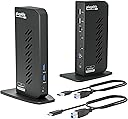
The Plugable USB 3.0 and USB-C Universal Laptop Docking Station is a versatile productivity powerhouse designed for Windows laptops. Featuring dual HDMI ports supporting up to 1920x1200 resolution, 6 USB ports, Gigabit Ethernet, and audio connectivity, it effortlessly expands your workspace. Lightweight and easy to set up, it delivers professional-grade performance without requiring a power C slot, making it the perfect all-in-one docking solution for multitasking millennials.


| ASIN | B08B6FMPTP |
| Brand | Plugable |
| Compatible Devices | Laptops |
| Compatible devices | Laptops |
| Customer Reviews | 4.5 out of 5 stars 1,923 Reviews |
| Hardware Interface | USB 3.1 Type A, USB 3.1 Type C, USB Docking Station, USB Type C |
| Hardware interface | USB 3.1 Type A, USB 3.1 Type C, USB Docking Station , USB Type C |
| Item Weight | 333 Grams |
| Item weight | 333 Grams |
| Manufacturer | Plugable |
| Mfr Part Number | UD-3900Z |
| Model Number | UD-3900Z |
| Number of Ports | 12 |
| Number of ports | 12 |
| Total Number of HDMI Ports | 2 |
| Total USB ports | 6 |
| Total Usb Ports | 6 |
| UPC | 819927012030 |
| Unit Count | 1.0 Count |
| Wattage | 24 |
A**T
Easy to set up and works well (Mac M2) but streaming might be tricky!
(NOTE: I've only had this product for a few days, so not comment on the longevity) For my work, I need to have multiple windows open, and my MacBook Air (M2) wasn't cutting it. I bought a 27-inch BenQ monitor, but it wasn't enough, so I got this to add another monitor (a 21-inch Asus) that was just sitting around. Set up 1: You go to their website and download and execute the driver. Very easy. Set up 2: You connect the dock to your laptop (USB C for me), then to the monitors (HDMI-HDMI for me). HDMI cables were NOT provided. Set up 3: Go to your Mac preferences and arrange the screens the way you like them. That's it. Just make sure that you have the screen recording permitted, otherwise it doesn't work. Con 1: It DOES NOT charge your laptop or monitors, so you'll need to power two monitors and the laptop all separately (i.e., you need a big power bar). A LOT of cables everywhere, and it's a bit inconvenient. Con 2: For Mac OS users, HDCP won't work. So technically, no streaming services (just audio and no visual). However, I contacted them and they showed me a way around it. Overall, I'm very happy with everything. Price: Reasonable Ease: Very easy to set up and use Performance: Good Longevity: Don't know yet. Customer service: Great Recommend: Highly
G**O
Excelente producto
Excelente! Su función permite sincronizar los dos monitores sin mayor problema.
M**E
Plug & Play, Works out of the Box
Wish I would have found this dock earlier. Worked like a charm, literally Plug & Play. No hassle.
J**K
Works well with Mac
Turned my M2 mac pro into a 3 display unit. Compatible with a wide array of monitors. I'm using a a Dell 24" and a acer gaming monitor. works totally fine..
B**R
Excellent dock with great compatibility
This was exactly the docking station I needed to complete my home office setup. It allows me to switch between my newer work laptop and my old home-use-only laptop that essentially functions as a desktop because the battery died long ago. This docking station is compatible with a wide assortment of computers, which made it perfect for my use-case. Another benefit to this docking station is that the cable that connects to the computer is not attached to the dock and can be switched out. This allowed me to get a longer cable so I could put the docking station in a side cabinet on my desk and keep the laptops in the front "keyboard tray" drawer, which was too far for the original cable to reach. The only potential drawback to this dock is that it's not going to charge your laptop when plugged in like the USBC / thunderbolt docks. However, that was never in the cards for me anyway because my old laptop doesn't charge by USBC. I've also come to view this as a positive thing for my newer laptop because it allows me to unplug it from power while using the dock in order to better preserve battery longevity. My thunderbolt dock at work is always charging my work laptop while in use and I worry that this degrades the battery faster. Lastly, this docking station just works. It was dead simple to power it on and plug in. Every day when I want to use one or the other of my computers, it's as simple as plugging in the USB and powering on the laptop. This is a great product and comes highly recommended for anyone with a use-case similar to mine.
Trustpilot
3 weeks ago
2 weeks ago