


Desertcart purchases this item on your behalf and handles shipping, customs, and support to Kenya.
🚀 Upgrade your home network to pro-level speed & control — because buffering is so last decade!
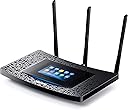
The TP-Link AC1900 Touch Screen Wi-Fi Gigabit Router delivers cutting-edge 802.11ac dual-band wireless speeds up to 1900 Mbps, enhanced by beamforming technology and a powerful 1GHz dual-core processor. Its sleek touchscreen interface revolutionizes setup and network management, while four gigabit Ethernet ports provide ultra-fast wired connections. Designed for homes up to 10,000 sq ft, it’s perfect for seamless 4K streaming, online gaming, and smart device connectivity.




| ASIN | B014PY9K5M |
| Antenna Location | Gaming |
| Best Sellers Rank | #43,113 in Computers & Accessories ( See Top 100 in Computers & Accessories ) #1,072 in Computer Routers |
| Brand | TP-Link |
| Built-In Media | AC 1900 Touch Screen Wi-Fi Gigabit Router Touch P5, 3 Detachable Antennas, Power Supply Unit, Ethernet Cable, Quick Installation Guide |
| Color | Router 2 |
| Compatible Devices | Personal Computer, Smartphone, Tablet |
| Connectivity Protocol | ethernet, wi-fi |
| Connectivity Range | 10000 square_feet |
| Connectivity Technology | wireless |
| Control Method | App |
| Controller Type | vera |
| Coverage | up to 10,000 square feet |
| Customer Reviews | 4.4 out of 5 stars 516 Reviews |
| Data Transfer Rate | 1900 megabits_per_second |
| Frequency | 5 GHz |
| Frequency Band Class | Dual-Band |
| Global Trade Identification Number | 00845973092290 |
| Item Weight | 2.9 pounds |
| LAN Port Bandwidth | 5 ghz |
| Manufacturer | TP-LINK USA |
| Maximum Upstream Data Transfer Rate | 1900 megabits_per_second |
| Mfr Part Number | Touch P5 |
| Model Name | Router 2 |
| Model Number | Router 2 |
| Number of Ports | 2 |
| Operating System | Microsoft Windows 98SE, NT, 2000, XP, Vista or Windows 7, 8, 8.1,10, Mac OS, NetWare, UNIX or Linux |
| Other Special Features of the Product | WPS |
| Router Network Type | hybrid |
| Security Protocol | WEP, WPA, WPA-PSK, WPA2-PSK |
| Special Feature | WPS |
| UPC | 845973092290 |
| Unit Count | 1 Count |
| Wireless Communication Standard | 5.8 GHz Radio Frequency , 802.11a/b/g/n, 802.11ac |
| Wireless Compability | 5.8 GHz Radio Frequency, 802.11a/b/g/n, 802.11ac |
C**.
Hassle free router that delivers a great connection
I recently bought a home which is much larger than the previous 2 BR 2 BA dwellings I had lived in previously. Because of this, my old wireless router just wasn't cutting it anymore. Besides, it was 4 years old and I was due for an upgrade. I was a little apprehensive about buying this product because it's a brand I'm not familiar with and I wasn't sure if it was one of those brands that worked great for a month and then developed a small annoying problem you learn to live with because it was working great all the time and now it's just working great most of the time. Fast forward a year and you're back to using up your cell phone data because your home internet cuts in and out more than an aggressive driver during L.A. rush hour. It has now been six months since I first booted this thing up and it's still working just as great as it did on day one. Pros: It looks fantastic. Usually, I try hiding my router, modem and cables. Now, I just have to hide my modem and cables. I actually want to mount this to the wall in the hallway because it looks that good. I was a little leery of the touch screen as I know sometimes they can be awkward/frustrating to use. This is neither. It actually has a nice, simple, easy to use GUI. And it's intuitive to boot! Things actually are where you think they should be, there's no hunting around to find a particular setting or googling "how to's". It just is, and it's great! Being able to have a dedicated guest access point is one word: "genius." Whenever someone comes over, they inevitably ask "what's your WiFi password?" and you there sit and think through all the passwords you were using around the time you set up your router and maybe you get it right on the first try, maybe the fifth. Either way, you're broadcasting your own personal passwords to everyone else also in the room. With this router, you just direct them over to the router and touch the screen and boom! A randomly generated guest password is there waiting on the locked screen. And this password can be regenerated at a set interval as well. Of course, the signal strength has to be on point as well if you're reviewing a WiFi router and simply put: it is. There are 2 different bands this operates on. For simplicity, one fast band (operating on 5GHz) and two slow(er) bands (operating on 2.4 GHz). The fast one is great for gaming, streaming Planet Earth in HD and downloading games and movies in seconds (well it could be seconds if your home bandwidth and the servers bandwidth could support it). The slow bands are good for everything else: internet browsing, streaming TV in which you're fine watching in standard def, updating the multitude of devices and apps that not only drain your devices battery but also your bandwidth. I gave a couple devices access to my "fast band" like my smart TV and console and everything else (including the guest password) has access to the slower band and I've never had any issue or complaint for that matter. Cons: I can't think of any. If I were pressed for one shortfall it would be that some comparable models have dual fast bands leaving this slightly under-powered. It's not really an issue for me and my uses but if you lived in say a house with where everyone is streaming their own TV or a house with a few teenager boys who simultaneously play COD online on their own consoles, dual 5GHz bands might be what you want to look in to.
S**Y
I love this router
I purchased this router because my old one was just terrible (it was a MediaLink that the company took down the support page for because it's so bad and outdated). To go from one that sucked to one that is totally awesome is miraculous. I used to work in I.T. So I do have more knowledge than the average person when it comes to networking. That being said, emphasis on "I USED to work in I.T.". I don't anymore. And I don't want to. So the touch screen on this is not only cool looking, it makes setting it up so quick and easy it's a cakewalk. Navigating the features and configuration is quite simple. It does have a web interface, so you don't have to actually use the touch screen; but I like it and it's easy so I do. Literally everything about my home network (mostly hard wired) is running far better and more efficiently, especially online gaming. My old sucky router rebelled when I played XBox online. The AC1900 simply says "bring it on". This is a wonderful home router that will be easier for a novice user to set up than some of the other ones, especially with the touch screen. The quick setup is intuitive and easy. Buy without hesitation.
B**R
Decent Router with Some Notable Quirks
A majority of the positive reviews for this router are aimed primarily at its touch-screen interface, which stops working after the unit has been operating for an extended period of time, and which displays the guest network password for anyone to see. Personally, I don’t care much about that feature; you can do basic setup there, but more advanced configuration requires the web interface. What I do care about is range and reliability. My Touch P5 is located in the basement, and its signal reaches to the second story of our house, where it is still reasonably strong. In contrast to the old Netgear router that it replaced, the Touch P5 is very fast; a computer connected via wi-fi on the main floor of our house shows the same results on speed tests as the basement computer that’s hard-wired to the router. UPDATE 7/9/2017: The default settings for IPv6 do not work with Comcast. Here are the settings that do work for me. IPv6 ON; Internet Connection Type: Dynamic IP (SLAAC/DHCPv6); Advanced/Get IPv6 Address: DHCPv6; Advanced/Prefix Delegation: Enable; Advanced/DNS Address: Get Dynamically from ISP; LAN/Assigned Type: SLAAC+RDNSS. Once you apply these settings, you may need to reboot the router in order to get IPv6. Update 6/21/2019: This router's IPV6 settings do not last with Comcast. They will stick for a week or so, but after that time, a reboot is necessary to restore IPV6. Same goes for activating or deactivating the guest network via the router's touch screen. You can go through the steps, but they end in failure. Reboot the router, and the process works again, but only for a few days. As for the quirks: (1) The router’s touch screen reveals the guest network’s name and password, even if the guest network is not activated. And it doesn’t require any administrative password to show that information; it’s in plain sight for anyone to see. This doesn't strike me as a very good idea. (2) Daylight Savings Time is turned off by default. In the Daylight Savings Time setting, you can choose a start date and an end date for a given year, but the only dates offered in the drop-down menu are “First”, 2, 3, 4, and “Last”. As you might have guessed, those don’t refer to calendar dates, but rather to the “First”, 2nd, 3rd, etc. Sunday (or other day) of the month; the touch-screen actually makes this clear, but the web interface does not. (3) The router cannot check for firmware updates; you have to do this manually by going to the TP-Link website. That’s not exactly convenient. I posed a couple of questions to TP-Link support via the contact form on their website, and I received replies by e-mail within 24 hours. They were not uniformly helpful, and they didn't provide anything that would solve the IPv6 problem.
H**H
Fabulous
Wow. I've installed many a wireless router in my day, but this is by far the easiest. The touchscreen makes all the difference, as sometimes you just can't connect to a wireless router when you're trying to set it up encounter problems. While it's easy to set up, there are enough options for configuring your unit for the best possible performance. For example, I set up the 5-GHz band for "mixed n/ac only", and the 2.4-GHz band for "wireless-n only." (No devices in my home use anything lower than 802.11-n, and most can use 802.11-ac.) I was then able to use the same SSID for both 2.4 GHz and 5 GHz. The guest network offers fewer options but seems to piggyback its main setting off of those set for the primary SSID. As with the primary network, I used the same SSID for both the 2.4 GHz and 5 GHz bands. Unfortunately, until the Ethernet connection on the second-floor den is repaired, I need to keep the AC1900 in the basement utility room next to the furnace, dehumidifier, and water heater. Still, on the second-floor den on the other side of a 3400-sq.-ft. home, my download speeds typically top 200 Mbps. Not too shabby. I'm going to order another one of these just to keep around for a spare.
K**D
Just what the house ordered! Highly reccomend!!!
This TP-Link is exactly what I was hoping for and Much more! I love the touch screen interface. The ability to create multiple networks is great for guests and home users. We have multiple Alexa Dots, TP-Libi smart Switches, smart lights, all that require a 2.4GHz connection only. So I was able to create a Smart Home network so I can easily connect all of our smart home devices while our phones and computers can still be on the faster 5GHz connection. The range of this router extended my connection over 10x the distance and there is no dead spots in our house. As a test I walked outside and walked down the street with my cellular network off so in could see how far it went. I was able to go 10 houses down and still connect to Netflix. This router is affordable, easy to use, and the quality is amazing. The multi directional antennas ensure you have a connection anywhere you are. Look no further and purchase this one!
R**I
I found this router very easy to setup and use
I just received this router today and got it setup. Now, granted, I'm an IT person, so setting up a router as an access point coming through an ethernet connection from my ISP is not difficult for me. That being said, I found this router very easy to setup and use. I love the touch screen and the fact that I didn't have to put in a 30 character password written on the router itself, but instead, could just put in my own from the start was a breath of fresh air. The menu through the web page is very simplified and certainly not overly complicated. The touch screen is responsive and the GUI feels very similar to a smartphone. I actually wish all of the network and switching devices at work were so easy. Once I got this set up it doubled my internet speed. I was using an old 10/100 router from Cisco, which I probably should have upgraded years ago. Great device, very happy so far. I'll keep this review updated with my progress.
R**K
It works! It works!!
I gotta say I was nervous buying this. I recently upgraded to gigabit internet service for my home, but was only getting 10 to 30 meg to my devices due to using an old wireless router I paid $25 for at least 5 years ago. So I bought a new router from WalMart that had great specs, but I could only get it to connect for at most 15 minutes at a time at which point it disconnected, I had to power it off and on, and then it worked for another 15 minutes or so. So I went back to the old router which was at least reliable, but NetFlix and Hulu would buffer from time to time, very annoying. So I got this guy on Prime Day, and wow! what a difference! No more buffering, setup was super simple, I couldn't be happier. I really like the touch screen interface, I didn't even have to connect to the router to get it 100% set up. Easy Peasy. I would recommend this router to anyone.
R**L
Stopped Working After 14 Months
I thought I had made the right decision on this product. It setup easily, did everything that was stated in the description, and worked flawlessly for 14 months. My problem came in month 15 when the wired connectivity to my smart TV started buffering all the time and 2.4 GHz stopped communicating with some of my devices (Harmony Home Hub, Kuna Light, Honeywell Thermostat...). All of the 5GHz devices still seem to work, but I'm not sure how long that will last. This router looks good and is super easy, but if you actually want your investment to survive more than the warranty, I don't recommend this one. TP-Link AC1900 Wireless Wi-Fi Gigabit Router with Touch Screen Setup (Touch P5)
D**N
Funcional
Excelente dispositivo
P**E
So far its been fantastic
I've had this router for about a week now the modem that Bell supplied kept dropping the internet connection so I needed to something to try and see if it would stop the issue, set up was a breeze, it had to be connected to my old modem since there is not ethernet connection at the wall, but so far it seems to have fixed the issue, there has been steady internet and it's made my life a lot easier without having to reset the old modem 5 times a day and having slow internet connection, this router unlike the modem can handle keeping the internet connected to all devices and it is also has better distance than the crappy modem bell supplied
J**N
Excellent Product with great styling!
I bought this router to replace my current dying and out of warranty by a week router.... lol My decision to purchase this particular router was based on 4 things: 1- Type - had to be AC1900 - This fit the bill 2- Price - This had a great price for the features it includes 3- Touchscreen - Yes 4- had to be pleasing to look at - yes, this fits the bill. The first thing I noticed was the packaging, it was appealing. After I took the product out I was very pleased by the was it looked. The design was going to fit right in with the room. The basic set up of wiring is the same as any other routers so I won't comment there but what I will comment on is the ease of setup. The setup wizard that comes up on the touch screen is so easy to follow. I literally had the router configured in 5 min and ready to connect my devices. The range I'm finding better than my last router by about an extra 10' outside the house. Overall this router is a steal for the price. It's visually stunning has great features and sets up unbelievably fast! Highly recommended!
C**N
José Martinez
En el tiempo en que lo he utilizado, a resultado un excelente equipo, ya que la cobertura de wifi es de lo mejor en toda la casa, no importando los muros, lo recomiendo ampliamente.
E**K
Nice
Excelente producto justo lo que esperaba lo recomiendo bastante ya sea como router o como alcanzador fácil instalación y manejo
Trustpilot
3 weeks ago
3 days ago