


Desertcart purchases this item on your behalf and handles shipping, customs, and support to Kenya.
🖱️ Elevate your workflow with precision and comfort — the trackball mouse that means business!
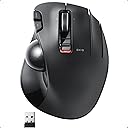
The ELECOM EX-G Trackball Mouse combines high-performance optical tracking with an ergonomic thumb-operated design, featuring 6 programmable buttons and wireless 2.4GHz connectivity. Its adjustable DPI (750/1500) ensures precise cursor control, while durable artificial ruby ball bearings offer smooth, low-maintenance operation. Compatible with Windows and macOS, it’s engineered for professionals seeking comfort, efficiency, and a sleek, clutter-free workspace.


| ASIN | B016QCPNUW |
| Additional Features | 6 Functional Buttons, Ergonomic Design, Optical Gaming Sensor, Thumb-Operation, Wireless |
| Antenna Location | personal, gaming, business |
| Best Sellers Rank | #30 in Computer Trackballs |
| Brand | エレコム(ELECOM) |
| Button Quantity | 6 |
| Color | Right Handed |
| Compatible Devices | Personal Computer |
| Connectivity Technology | USB, Wired |
| Customer Reviews | 4.1 out of 5 stars 9,637 Reviews |
| Enclosure Material | Plastic |
| Finish | Matte |
| Global Trade Identification Number | 04953103473683 |
| Hand Orientation | Right |
| Hardware Platform | Laptop, PC |
| Included Components | English manual, Japanese manual, Receiver, Trackball mouse |
| Item Dimensions L x W | 4.9"L x 3.7"W |
| Item Type Name | ELECOM 2.4GHz Wireless Thumb-operated Trackball Mouse, 6-Button Function with Smooth Tracking, Precision Optical Gaming Sensor (M-XT3DRBK) |
| Item Weight | 7.04 ounces |
| Manufacturer | ELECOM |
| Mfr Part Number | M-XT3DRBK |
| Minimum Required Operating System Version | Windows 10 |
| Model Name | M-XT3DRBK |
| Model Number | M-XT3DRBK |
| Mouse Maximum Sensitivity | 1500 dots_per_inch |
| Movement Detection | Optical |
| Movement Detection Technology | Optical |
| Number of Batteries | 1 AAA batteries required. |
| Number of Buttons | 6 |
| Operating System | Windows 10, Windows 7, Windows 8.1, Windows Vista |
| Power Source | Battery Powered |
| Range | 10.0 meters |
| Special Feature | 6 Functional Buttons, Ergonomic Design, Optical Gaming Sensor, Thumb-Operation, Wireless |
| Style Name | Wireless_BlackBall |
| Theme | Versatile |
| Warranty Description | 1 year manufacturer |
K**N
Excellent trackball for not much money.
Bought this as the switches in my 1st generation Elecom wireless trackball (M-XT1DRBK) started playing up. It was far easier to buy a new mouse, and I'm damn glad I did. The external design hasn't changed from Gen1 - they physically look identical - save for the forward and back buttons, which are now of a lower profile. This is a good thing - it was a fantastic thing to hold in the first place. Popping the trackball out reveals the artificial ruby bearings, which are much larger than the ceramic ones previously used. Having only used it for a day I can say that the movement is more positive, albeit a bit scratchier. A bit of PTFE on the bearings might fix that. No comment on maintenance intervals yet as I haven't had it for long enough - Gen1 lasted about a week or so before needing cleaning so I expect this to last longer. The two biggest changes in terms of feel are the switches for left/right click, and the scroll wheel - these are the reasons I'm glad I upgraded. The switches weight are perfect, being a little on the heavy side, with a loud and tactile engagement. Blows Gen1 out of the water in this aspect, even when they did work properly. The second change - the scroll wheel - is minor but makes a huge difference. Since the first day I got the Gen1 trackball the scroll wheel always drove me up the wall, as the scroll wheel had a lot of play; it would move up and down whilst scrolling, and when clicking it would move forwards, and therefore never delivered consistent performance or positive feedback. The new scroll wheel is much better though, despite the wheel itself not changing. Overall this is a great option for a thumb trackball, and is very reasonably priced for what you get. Better than previous generations AND the M570. The Logitech MX Ergo would have to deliver unbelievable performance to top this.
B**P
Great replacement for M570
I've used three Logitech trackballs over the years: - M570 - Original Marble - MX Ergo The M570 just quit working one day. Something I've noticed about Logitech mice and the Logitech keyboard and trackpad combo; The connection to the USB dongle is spotty at best, even when it's 1 foot from each other and new batteries. The Marble was a hand me down. There was a spot (chip) that would constantly snag. Just last week I used a piece of sandpaper to smooth it out, but in doing so, made the surface rough and the trackball wouldn't glide as efficient, but was slightly better than when it had a divot. The MX Ergo is sitting on my desk at work, unused, as I've been WFH since March due to Covid-19. So instead of going down there to retrieve it, I ordered this trackball mouse and I'm very happy with it. Ironically enough, it's a Japanese designed mouse, not Chinese. It flows very smooth and its quite responsive. I actually have it set to the lowest mouse scroll setting and it's still quite fast. It's still fast when you flip the switch to precision. Unchecking the Enhance Pointer Precision box in the Mouse Properties speeds up the mouse very fast. Wish there was an actual driver to dial in the settings vs using the WIndows mouse properties. Other than that, I'm happy with this purchase and highly recommend. I haven't had an issue with wireless connectivity, either.
N**N
Decent for the price, maybe would have rather bought a wired unit
Good device with many configuration options. I'm using it with macOS, and am impressed with the bundled software as it comes with many excellent features, which is great. Especially nice is support for the various buttons, which I missed with the last mouse I purchased. I use it for software development with 4-screen configuration. Mousing becomes a pain with this kind of setup, and the trackball is a lot more convenient, even though I'm not a huge trackball fan. I've had occasional stuttering with the cursor movement, but assume that's due to the challenging radio environment with my setup. I moved the included receiver to a port closer to where the device sits, and that seems to have helped. My problem may have been more to do with the USB hub I'm using which has 10 ports on it, but i'm not sure. Moving it to a different hub eliminated that issue. The resolution switch on the unit is a nice option, though I wish it were a pushbutton toggle that could be easily accessed during use. I'd like to be able to switch to hi-res mode without involving my other hand or removing my hand from the device during use. Not a dealbreaker. Cleaning the trackball is easy, with simple access for removing the ball from the bottom. I don't game so I can't speak to latency, etc., but overall it seems responsive. Overall, it's a well thought out design with good hardware and software options. I would probably buy it again, but might opt for a wired model which is actually more convenient for me.
J**H
Better Than Some Reviews - Second One - Give It Some Time
This is my second Elecom EX-G Trackball Mouse, the first one is wired but otherwise exactly the same as this one. When I first came to buy this one the reviews surprised me, mostly the ones saying the ball was not all that smooth. My first one is so good I decided to give it a go anyway. I admit, at first there did seem to be a little bumpiness or stickiness to it but it's been almost a month and it now feels great and I expect it will continue to get better with more and more use. I like the size, I've got short thick fingers and I like how my hand fits the mouse. I like that the speed can be adjusted with a switch, don't use it often but it's a nice feature. So far I would definitely recommend this mouse.
N**.
Simultaneous inputs causes issues with whether those buttons are pressed or not
This was my first attempt at using a trackball mouse, keep this in mind. I'm not comparing to other devices, I'm just stating my experience with the mouse. Also, the last point is the one that warranted the lowest review score. Connectivity wise, it's plug and play, it just works. the only issue is that by default, mouse 6 (the furthest most right click) is disabled by default and you need the companion app to make it do anything. 4/5 runs as expected, but the companion app is way too minimal for customization and settings. Structurally, it seems decent overall but subjectively, the design doesn't fit the natural curvature of my hand. However, the mouse 4 and 5 are definitely significantly out of reach. I have to readjust my grip to reach them, nearly placing my middle finger on the scroll wheel. These buttons were designed for "you'll press them once in a while, but not frequent enough to rest your finger near". If you use these buttons in video games, not great. Additionally, the mouse 6 button quality is severely lacking. it flexes so much that you can press the tip of it all the way down without tripping the microswitch, and it has so much left/right flex that it can rub up against the right click. 3/5 it does what it should but doesn't do it well. The mouse ball is held in place with 4 nubs that are part of the plastic mold. It feels like there is a significant amount of static friction even compared to trying to move a standard mouse. This makes fine-tuned movement less... fine. I've read reviews that say "give it time, it will get better" but, my next point makes this mouse. 3/5 average score mostly because I have no baseline to compare against and wont be seeing if it improves The real issue with this mouse is at the firmware/driver level. When I press two buttons on the mouse at the same time, the mouse can almost reliably not send the "mouse unpress" information for either key. For instance, if you play a shooting game, generally right click is aim, left is shoot. Press both at the same time (not holding either of them down) and both are registered as being held down until I press those buttons again and let go. This is an unacceptable oversight in an input device with 10 buttons not being able to reliably input even 2 of them simultaneously. I would give leeway for this if there was any support, but the only support available is with the companion software, and all that does is configure the buttons. There is no software support, there is no fix for this, therefore I deem this mouse defective by design. 1/5 I cannot warrant anything other than minimal score for a device I deem defective, but without that specific issue, I would say this warrants a total 3/5. I'm told by someone that has used many trackballs that better options are available.
D**A
Not a match for a large trackball
I just recently started using trackballs, where previously I used gaming mice such as the Razer Naga with all the buttons binded to all functions I could think of on After Effects, C4D, Unreal and multiple suites of graphics programs. My workflow was carefully set for that hardware, and I couldn't think I could improve it. Then I tried the Kensington Expert Trackball and after a couple of weeks of readjustment I was never going back. The increase in precision and control is extreme. I was amazed when I abandoned all of my key bindings for a trackball that had only four buttons and could not ever get close in customization and functions, but still left me much more satisfied. So I decided to try the elecom for my secondary computer. I wanted a smaller trackball that had a bit more portability, and I was particularilly wondering if the set of extra buttons and customization could get me near where I was before workflow-wise. I was thinking I would get the best of both worlds. First, precision is not great. A thumb trackball is quite a different beast from a large, index finger trackball, and I didn't get the improvement the Kensingston gave me. Where with the Expert I didn't want to work with a mouse again, with the Elecom I found that many times a mouse would give me a finer control and the experience for this model was actually exasperating. A lot of this has to do with size and fingers used, but I also got to try a Logitech M570 and I found it a much smoother and precise experience. I would buy that one instead, knowing what I know now. As many users, I also found the ball was not of the best quality and would skip a lot on fine movements, as if there was some resistance inside the mouse. It was very noticeable and actually quite maddening. Smooth control was impossible and I didn't have an easy way to change the included ball, as many users had sugested. Luckily, I can report that after several weeks of using the Elecom the ball seems to have improved as if some rough edges inside had been smoothed by use. Now it is giving me a finer control, almost on par of the Logitech. But it did take a long time and I wish that "break in" hadn't been necessary. It is quite usable now. As for the customization, I don't find the position of the buttons natural, and I much prefer the software on the kensingston or even the Razer, as bad as and slow to detect applications as that is. The Elecom one is not terrible, it is stable and it does what it says, but I don't find it attractive, and I find it somewhat limited (for example, you cannot set arbitrary macros, there is a limit on the number of keys). The idea of the gesture system was interesting (you can use a key to enable a "gesture writing" mode, that in turn can activate multiple functions, theoretically giving you as many extra functions as you want). But in practice, I find it strange to use and slower than key combinations. Maybe with more practice it could become more usable, but it hasn't become part of my workflow and I don't see it happening soon. So, in a nutshell: Large index operated trackballs are the real deal for me. For thumb trackballs, the quality of the Elecom is not the best and I would go with the Logitech M570 for much better precision out of the box. The elecom is not terrible per se and improves with time, but I do not see a real practical advantage over the cheaper Logitech all things cosidered. The extra buttons and customizability I am not using as much because it is not as natural as I expected. I would actually consider the Elecom HUGE, and might try it on my next purchase. Maybe that one gets me on that ideal sweet spot of both precision and extreme customization. But I am not buying this model again. Based on what you have tried before, your expectations and what you are used to, your milleage might vary.
A**S
The longest lasting trackball I have ever purchased.
I purchased this trackball in June of 2020 and 6 years later it is still working great.
M**S
Great and Configurable!
This is comfortable, wireless, and configurable! I actually wore out the Right and Left click buttons on my old one... but just reconfigured the Forward and Back buttons (to the left of the left button) to be Right and Left Click, and limped along for another year or two.
A**B
منتج جيد جدا وسعر ممتاز ومناسب استخدامه 90٪ رائع حتى الان
كل شي جميل وبتصميم انيق واستخدمه سلس ، حيث استخدمت جميع اجهاز لوجتك M النوعين وهم ممتازين جدا
A**ー
【親指操作の快適なのせ心地】手首の疲労が激減!Excelに便利な左右チルト&ルビー支持球を搭載した高機能トラックボール
オフィスでの長時間のデスクワーク時の手首の腱鞘炎対策(負担軽減)を目的に、右手用Lサイズのワイヤレスモデルを注文し、メインのPC環境にマイクロレシーバを常時接続して毎日愛用しています。 最大のメリットは、手の骨格・筋肉の窪みに着目したという「握りの極み」エルゴノミックデザインが生み出す抜群ののせ心地です。本体を動かさずに親指だけで直径約34mmの黒玉を転がすため、狭いデスクでも省スペースで正確なポインタ追従性を発揮してくれます。左右ボタンと薬指用の減速ボタンには1000万回高耐久のOMRON社製スイッチが使われており、カチカチと心地よいクリック感があります。さらに、ホイールを傾けるだけで左右スクロールができる「チルトホイール(横スクロール機能)」を搭載しているため、Excelの横に長いスプレッドシートやWebページの閲覧効率が劇的に向上しました。裏面の穴からボールを簡単に取り外せる設計で、直径2.5mmの大型人工ルビー支持球に溜まる手あか等のゴミ掃除(メンテナンス)がしやすい点も非常に実用的です。 2段階の速度変更スイッチや、無料の専用ソフトによるボタンカスタマイズ、長持ちするバッテリー性能も魅力です。慣れには数日かかりますが、手首の疲れが軽減されるおすすめの製品です。
P**N
Muy parecido al Logitech M570, con mas botones, pero con algo menos de precision
Viniendo de dos Logitech M570 seguidos, con sus habituales fallos en los botones, el cambio ha sido muy facil, Es ligerisimamente mas corto que el M570 pero muy comodo y manejable. Practicamente no hay diferencia en la postura de la mano respecto al Logitech. Muy utiles los botones adicionales. La precision es mejorable. En ese sentido daria un 10 al M570 y un 8 al Elecom P.d.: añado que le he puesto la bola del Logitech y la precision es ahora absoluta. Parece que el dibujo de la trama de la bola Logitech funciona mejor
J**U
Worthy Alternative to Logitech Trackball, Lovely Feature Set
Finally, a trackball mouse that lets me use Autodesk's Fusion and my PC's functions the way I want it, without using layers or macro controls/apps. All of my multi-button mice have been set up in a way that uses the side buttons for volume up and down, and the middle button for Back function. This is what I prefer for normal browsing and file folder navigation purposes. But in Fusion, the orbit and pan view functions cannot be programmed to any button or key that you like, there are only a few settings to choose from. This mouse has a 6th button on the right, which I can set to middle button click, so Fusion recognizes it as Pan view. So I can now have this function without reassigning my middle mouse button, or create a different profile/layer in software that more often than not, gets ignored by Fusion, making me have to restart the program constantly. I love having this convenience! The mouse is packaged very well. I love the simple cardbox box that is devoid of garish graphics or text that proclaims this and that. Only thing I wish is that the inner packaging securing the mouse can be changed to cardboard instead of plastic. The mouse itself is built well, about the same as my Logitech Ergo M575S trackball, but this Elecom costs about half the price of that. The trackball is glossy and smooth, and very responsive. I have no trouble with my thumb moving it around, no slipping. I will buy another one just to have a backup, no regrets with this mouse, especially at this price point.
P**S
Love it!
I've been using this trackball for a while now. I absolutely love it. It's nice: heavy and sturdy. Beautiful really! Just what I expected from Japanese technology.
Trustpilot
3 weeks ago
1 month ago