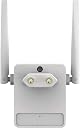
🚀 Elevate your Wi-Fi game—never miss a beat or a meeting!
The Netgear EX6120 WiFi Range Extender delivers robust dual-band AC1200 speeds, extending wireless coverage up to 1200 sq ft and supporting up to 20 devices. Its compact wall-plug design includes a wired Ethernet port for high-speed connections, universal compatibility with all routers, and easy setup via WPS and a dedicated app, making it the perfect upgrade for seamless, secure connectivity in any professional or home environment.


| Asin | B013SCBJ10 |
| Best Sellers Rank | #19,598 in Computers & Accessories (See Top 100 in Computers & Accessories) #70 in Repeaters & Extenders |
| Box Contents | • AC1200 WiFi Range Extender (EX6120) • Quick start guide |
| Brand Name | Netgear |
| Compatible Devices | Router |
| Connector Type | RJ45 |
| Customer Reviews | 3.6 3.6 out of 5 stars (8,530) 3.6 out of 5 stars |
| Data Transfer Rate | 1200 Megabits Per Second |
| Frequency | 5 GHz |
| Frequency Band Class | Dual-Band |
| Frequency Bands Supported | 2.4 GHz, 5 GHz |
| Global Trade Identification Number | 00606449109986 |
| Importer Contact Information | Kaira Distribution Pvt Ltd. Unit No.305, 3rd floor, Luciya City Centre, No 6/2, OTC Road, Bangalore – 560002 |
| Item Dimensions D X W X H | 15D x 22W x 27H Millimeters |
| Item Part Number | EX6120100PES |
| Item Type Name | Extender |
| Item Weight Unit Of Measure | 10.34 Ounces |
| Manufacturer | Netgear Technologies India PVT LTD. 21 Paharpur Business Centre, Nehru Place, New Delhi - 110019, Netgear Technologies India PVT LTD. 21 Paharpur Business Centre, Nehru Place, New Delhi - 110019 |
| Manufacturer Contact Information | Netgear Technologies India PVT LTD. 21 Paharpur Business Centre, Nehru Place, New Delhi - 110019 |
| Manufacturer Part Number | EX6120-100PES |
| Model Number | EX6120-100PES |
| Number Of Items | 1 |
| Packer Contact Information | Netgear Technologies India PVT LTD. 21 Paharpur Business Centre, Nehru Place, New Delhi - 110019 |
| Special Features | Dual Band, LED Indicator |
| Unit Count | 1 Count |
| Upc | 606449109986 |
| Warranty Description | 2-year Limited Hardware Warranty |
| Wireless Compability | 802.11a, 802.11b, 802.11g, 802.11n |
User
strong performance, ease of setup.
The Netgear AC1200 WiFi extender (models lEX6120) is great because of its performance and ease of use. Here are some key points which I believe is very helpful: Performance is great and using AC1200 provides dual-band WiFi support with speeds up to 1200Mbps. This extend the coverage to other room and have proper connection. Setup is very easy and if anyone have any issue you can look for installation manual which is also very handy, I configure it in 2-5 minutes and after that it’s ready to server the purpose. Design perspective it is very compact and easy to hang on the wall-plug design. It comes with internal antennas, which are very nicely designed to reduce the space where we need to hang. Overall, I would recommend Netgear AC1200 WiFi extender for its strong performance, ease of setup.
User
Horrible product, utter waste of money
Sold in India, however the plug point is not compatible. See image.So you need to buy an additional travel adapter to use it.It has some serious connectivity issues. After you install it, it works well but it would suddenly disconnect or restart. The problem shows up on continuous usage throughout the day and not easy to spot. But don't use it for working from home and taking meetings, you'd be embarrassed. Amazon doesn't provide a way to return it, only to replace it for which you need to take care of the box, the original manual etc etc.I don't trust this product and will need to buy another one wasting about 2k (not insignificant).
User
Highly stable connectivity
Netgear products are so stable especially with BSNL FIBRE and Genexis router.I have got no luck with TP link products. I have tried TP link RE505X, RE605X and their router C6, AX53 and Deco M4.. all those products have various kind of issue with my network and RE505X got frequent disconnection with every network.If any one like me, go and try netgear.I wanted to buy premium netgear products as they are worth it but unfortunately netgear at the moment not giving many options. Ping and latency is very high and stable but range is average only. If you want range, you need to get premium netgear extenders.It gives same range as similar priced tp link range extenders but i found RE 505 X had better range but what is the use range without stability. Go for this if your requirement is just 100 Mbps. Product is made in Vietnam. Good quality. Thank you Netgear USA. TP link has tendancy to make everything big and give many antenna but trust those are just for show. This looks small but got beast performance for its price.Update – After 7 days, the extender started disconnecting automatically and refused to reconnect immediately. This happens about every hour. I think it’s due to overheating and the limited RAM and processor in the extender. So, I advise you to buy a different product. I am planning to get the D-Link M30.
User
Good product and value for money
I liked this product very much because I'm getting a equal internet speed from the main router ,as the download speed and upload speed is same and good .I'm using a jiofiber wifi , but it is located in ground floor and I wasn't getting the actual speed to the first floor ,so by looking every wifi extender I reached out to this product and I'm happy with it , because now I'm using the 30mbps network plan and I'm getting an equal speed of the wifi , and good area coverage the product has ,but the 5G can only be got in limited area , but 2.4G has a wide area coverage which covers our first floor completely and reaches every 3 room ,and also the extender is also getting from the ground floor also .The installation process is very easy and only takes few minutes to get ready to use . But I have only used this product for only few days only , I need to use it for a few months and then only I can say complete review.
User
Low signal reciving
Good but old design low range easy instal build quality above avrage, avrage speed, low reciving signal
User
Quick setup & get it up and running in no time
Well already a netgear user and needed a range extender, post research & reviews found what i was looking for.The setup was fairly simple and quick to get it up and running which is the best thing one can ask for. Have been using this for sometime now and no complaints at all. It provides the 2 separate channels and option to combine both into a fastlane channel. The range output is good enough for what I was looking for with the primary rotuer being quite a bit away.Have been using the extender to connect the TV, laptops, multiple tabs and couple of phones all simultaneously and find that it can deliver as promised.This is a must have solution to extend the range of your wifi without a drop in the speed
User
I am cheated
The product does not match specifications given in Amazon and is 2021. It does not even sense signal even 2 to 3ft distance from modem/ router with WPS on. Does not give dual band signal even if it sense modem signal when very near. Useless extender in India now. Don't make mistake of buying it. I want to return and buy TPLINK which I have one and 500%better than this but Amazon has replacement policy so I wasted money.
User
बढ़िया है
अच्छा काम कर रहा है
User
Eccellente
Buongiorno a tutti,Prometto che con questo commento di essere utile a chi sta cercando un AMPLIFICATORE segna WiFi e era come indeciso quale acquistare considerando che in rete c’è una quantità infinita.Allora…..questo è già il secondo AMPLIFICATORE che acquisto. Sia per il primo ma anche per il secondo amplificatore ho scelto la casa NETGEAR …direi un marchio ben conosciuto.Il primo amplificatore che ho acquistato era “NETGEAR WN3000RP Range Extender Universale Wi-Fi N300 Mbps “ acquistato sempre su AMAZON. Sono rimasto molto soddisfatto dell’acquisto perché svolgeva anzi svolge tuttora egregiamente il suo lavoro. Però adesso testando il modello superiore NETGEAR EX6120-100PSE posso confermare che il modello WN3000RP forse più adatto per un ambiente di grandezza media su unico piano. Poi bisogna sempre valutare la struttura della casa…faccio riferimento alla mia casa che disposta su due livelli è di 150 mq in totale , dove visto che è una nuova costruzione e dove non abbiamo badato alle spese per la struttura portante , abbiamo messo il ferro da per tutto anche il tetto è in cemento armato. Quindi tornando al modello WN3000RP…mi serviva per ampliare il segnale al piano superiore (promettendo che il mio router WiFi ALICE si trova sul piano sottostante) Segnale su era molto debole e di conseguenza anche WN3000RP mi segnalava segnale debole (LED ROSSO SEMPRE ACCESO) , però nonostante ciò riusciva ugualmente amplificare il segnale sul piano superiore , non al massimo ma sempre meglio che niente.Visto che anche mia suocera ne aveva bisogno di un amplificatore ho deciso di farle un regalo…..le ho regalato il mio WN3000RP , tanto lei usa il PC solo nel pian terreno o nel porticato, mettendo questo amplificatore ora segnale al massimo su tutto il piano + porticato + una parte del giardino.Invece mentre cercavo un altro amplificatore mi sono accorto che NETGEAR EX6120-100PES è sceso di prezzo da Euro 69.99 al 38.99 e ho approfittato di questa offerta.Prima di scrivere questo commento lo testato per due giorni e ho visto parecchia differenza tra il modello EX6120-100PES e WN3000RP.Confermo che sono rimasto molto ma molto soddisfatto del EX6100,sul piano superiore prende bene di conseguenza amplificando il segnale al massimo su tutto il piano + nel terrazzo.In più il modello EX6120-100PES da possibilità di viaggiare su due frequenze a 2,4 e 5 GHz a secondo del Vs. utilizzo.Ecco quale la differenza tra questi due frequenze:Alcuni tra i router wireless e modem-router WiFi più recenti sono dualband ossia permettono di configurare due reti senza fili a sé stanti che funzionano su spettri di frequenza completamente diversi. Le due reti WiFi, a 2,4 e 5 GHz possono generalmente funzionare in maniera simultanea tanto è vero che ciascuna si presenta ai dispositivi client situati nelle vicinanze con un SSID differenteMa che differenza c'è tra WiFi a 2,4 GHz e a 5 Ghz?L'introduzione della banda a 5 GHz risolve in primis il problema dell'affollamento delle reti wireless. In zone densamente popolate, nei condomini, nelle aree con larga presenza di uffici e di attività commerciali è infatti cosa sempre più comune imbattersi in decine di reti WiFi, soprattutto se si considerano sia quelle che espongo il rispettivo SSID, sia in quelle che lo nascondono (Trovare SSID di una rete WiFi nascosta).La banda a 5 GHz è di solito preferibile, quindi, nel momento in cui – nelle vicinanze – siano presenti molte reti wireless a 2,4 GHz. Il segnale a 2,4 GHz ha il vantaggio di superare meglio gli ostacoli ma è più soggetto a disturbi ed interferenze (WiFi presenti in prossimità, telefoni cordless, trasmettitori per l'apertura di porte e cancelli automatici, influenza di altri prodotti hardware,...).Le WiFi sui 5 GHz possono inoltre portare ad un throughput più elevato a parità di larghezza del canale (il "throughput" è definibile come il numero di byte trasferiti per unità di tempo, misurato ad intervalli stabiliti).Erogare una connessione wireless sui 5 GHz, poi, ha lo svantaggio relativo alla diminuzione del raggio di copertura: una rete WiFi a 2,4 GHz riesce quindi a coprire un'area sostanzialmente più ampia rispetto ad una rete attestata sui 5 GHz. Come già accennato, inoltre, il segnale a 5 GHz non riesce a penetrare gli oggetti in maniera efficace come il segnale a 2,4 GHz: le zone di un ufficio o di un'abitazione raggiungibili coi 5 GHz sono quindi più ridotte rispetto a connessioni wireless a 2,4 GHz.Consentendo l'utilizzo simultaneo delle due bande di frequenza, i router più moderni offrono ampia scelta all'utente. È così possibile valutare di mantenere attive entrambe le modalità: sui 5 GHz si otterranno prestazioni velocistiche migliori su raggio più breve mentre coi 2,4 GHz si sarà certi di coprire aree nettamente più ampie.In generale, se l'area in cui si lavora o si vive non è particolarmente affollata in termini di connessioni wireless, è possibile lasciare attivo il collegamento WiFi sui 2,4 GHz. È suggeribile l'utilizzo della modalità mista 802.11 b/g/n in modo da permettere la connessione a qualunque tipologia di periferica wireless client.I router dualband (che supportano, quindi, sia la banda 2,4 GHz che la banda a 5 GHz), sono sempre in grado di attivare una connessione senza fili utilizzando solo od anche le specifiche 802.11n.802.11n è lo standard WiFi che al momento attuale permette di raggiungere le prestazioni velocistiche migliori che, ad esempio, consentono di riprodurre video HD in streaming, attraverso la rete locale senza fili, senza alcuna difficoltà e senza interruzioni.Per poter fidare delle prestazioni migliori, è indispensabile che i dispositivi client che si usano supportino lo scambio dei dati utilizzando 802.11n.Grazie alla possibilità di utilizzo di più antenne per trasmettere e ricevere il segnale (MIMO), i router più moderni consentono di incrementare la banda disponibile e garantire prestazioni velocistiche ulteriormente migliorate. La velocità reale dello standard è pari a 300 Mbit/s.Il supporto per il WiFi sui 5 GHz sarà via a via esteso non appena saranno ufficialmente approvate lenuove specifiche 802.11ac.Spero vivamente di essere stato utile al prossimo.Saluti da Serghei.
User
Une connexion WIFI enfin stable
Ayant des problèmes récurrents avec ma connexion internet, un collègue m’a conseillé d’essayer un répéteur wifi pour stabiliser la connexion au sein de mon domicile (jusqu’à 10 équipements connectés, en CPL ou principalement en wifi). Après avoir comparé plusieurs modèles, j’ai acheté ce Netgear, pour la fiabilité de la marque et les caractéristiques techniques (bi-bande, WPS, indicateur de signal, notamment).La configuration WPS automatique avec la box de mon FAI n’a pas marché et j’ai donc utilisé l’interface web, sans difficulté particulière (besoin de rafraîchir la page régulièrement manuellement seulement).J’ai ensuite positionné le répéteur à l’autre extrémité de mon domicile et le témoin lumineux m’a permis de constater que le wifi de ma box était réellement instable. J’ai donc rapproché le répéteur de la pièce où est la box et je ne rencontre plus de souci quant au signal wifi. Cela n’a pas résolu 100% de mes problèmes (la connexion ADSL tombant parfois) mais mon télétravail s’en est trouvé grandement facilité grâce à une meilleure stabilité du signal (je ne suis plus systématiquement déconnecté de mes téléconférences). Prochaine étape : passage à la fibre - ce modèle de répéteur étant capable de supporter un haut débit (bi-bande).Un achat que je ne regrette donc absolument pas et que je recommandeMise à jour après 5 mois d'utilisation : toujours impeccable avec une connexion stable, là où ma box SFR a d'importantes chutes de signal. Je confirme donc mon avis initial
User
Netgear wzmacniacz sygnału Wi-Fi
Jestem bardzo zadowolony. Bardzo łatwa instalacja. bardzo poprawił zasięg WI-FI. Polecam!
User
Great range but ...
This initially worked fine and has a great range, much better than our old Netgear one which was only an AC300! But the plug on the back is a narrow one, horizontal one and not a big one, and the extender front is must heavier than the old one and, as we have it in a wall socket, it keeps losing contact and causing the internet to fall out. It would have made sense to give it a proper full size plug on the back and not a small narrow one - unless you have it in a floor socket. I have it proped up to try and keep it still, but I am not sure if I am going to have to return it.
User
Compliqué à configurer
Compliqué à configurer et n'apporte rien de plus à avant. Déplacer plutôt votre borne WiFi à mon avis
Trustpilot
1 month ago
3 weeks ago