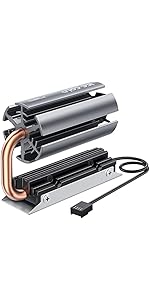
![ineo M.2 2280 PCIe 5 SSD Rocket Heatsink Built-in Cooling Fan [M3]](https://m.media-amazon.com/images/I/61nUPy6ztjL._AC_SL3840_.jpg)




Desertcart purchases this item on your behalf and handles shipping, customs, and support to Kenya.
🚀 Keep your SSD chill and your workflow blazing fast!
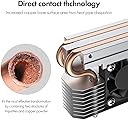
The ineo M.2 2280 PCIe 5 SSD Rocket Heatsink with built-in 30mm RPM fan features 4 pure copper heatpipes and smart fan speed control to drastically reduce SSD temperatures to 40-45°C under heavy load. Designed specifically for desktop M.2 NVMe 2280 SSDs, it includes all necessary mounting accessories for quick installation. This ultra-quiet cooler prevents thermal throttling, ensuring peak PCIe 5 SSD performance and extended hardware lifespan without compromising space or noise.


| ASIN | B08FX7JZ7H |
| Best Sellers Rank | #824 in Heatsinks |
| Brand | ineo |
| Brand Name | ineo |
| Cooler Heatsink Compatibility | M.2 NVMe 2280 SSDs |
| Cooler Heatsink Material | Copper |
| Customer Reviews | 4.5 out of 5 stars 331 Reviews |
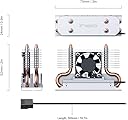
| Item Dimensions L x W x H | 2.95"L x 2.05"W x 0.94"H |
| Item Weight | 2.93 ounces |
| Manufacturer | ineo |
| Model | M3 |
| Mounting Type | Chassis Mount |
| Number of Items | 1 |
| Part Number | M3 |
| Product Dimensions | 2.95"L x 2.05"W x 0.94"H |
| UPC | 797716581809 |
| Unit Count | 1 Count |
D**E
Works extremely well
Completely eleminates thermal throttling and drops max temps to 40-45°C during max speed writes of the entire drive at 3GBps and I got the same results when encrypting the drives. They're 2TB Sabrent TLC drives and they ran at the previously stated temperature max during the encryption and other long lasting high speed transfers with the base temperature inside the case being in between 32 and 33°C. For anyone who is interested, Ineo's other model works almost as well. If you don't encrypt drives or do lots of large file transfers or 5-10°C on a Sabrent TLC 2TB doesn't bother you, their other model does also work quite well and you can close the performance gap by applying some Noctua thermal paste to the chamber where the heat pipe rotates when the halves are unscrewed, completely at your own risk, of course. The actual heatsink on that on is slightly bigger, but it has the advantage of being movable into a position where it doesn't interfere. This one performs a bit better due to the solid aluminum that has fan driven air flow over the fins on it and because it's two heat pipes being spread out, draws in more heat faster than the one larger heat pipe of the othet Ineo model m.2 drive heatsink. Neither of them take up as much space as they look like they do in the pictures, but they are large enough to effectively dissipate the heat they deal with. I would recommend getting better thermal pads as the ones they ship with are fine, but if you're going this far with your cooling, you are definitely going to want to get higher performance thermal pads. Make sure you know whether you have a one or a two sided drive, both will fit in both models, but you will need to know what kinds and amounts of thermal pads you will need if you are getting better ones. Also note that the bottom may require part of a thermal pad to level it if it is two sided of has a different chip on the bottom, which shouldn't happen but I've still seen it (my guess is that manufacturers and designers have to get creative to work around shortages). None of this is a problem for people who are going to use the included thermal pads as they provide plenty and the... bottom tray is actually adjustable, so make sure you are applying pressure when tightening the screws. Also, especially if you adjust the angle of the other model, make sure that you remember that heatsinks are more exposed bare metal inside your computer, so disconnect the power, discharge the capacitors however your motherboard and power supply manufacturers tell you to, usually by physically unplugging the power cord and then switching the switch on the power supply to on and hitting the start up button, waiting 5-10 seconds and then start up button, and repeat until several times after you see nothing try to activate. I also had to have the contact side of the drive sticking out a couple of millimeters so that the assembly would screw in properly. I am genuinely confused by this as it seems to indicate that the drive somehow became shorter. If Ineo could solve that little physics mystery, I'd think they'd not only get a Nobel Prize, but we would all be able to buy physically and , thus, storage sized devices that were much larger but fit into smaller areas and having a 2.5in SSD or even a full 3.5in HDD sized nvme drive arrive in the mail and then being able to put it into an m.2 slot would help with alot of problems with ssd's in general, but it would also just be really fun
S**R
The Best M2 Cooler! It worths the money
This cooler is really doing it's job perfectly. I used it for my Samsung 970 Pro 1TB M2 SSD. It was getting very hot especially while making plots it was reaching over 60 Celsius degrees. And minimum (when M2 is idle) was over 40 Celsius degrees. I tried the other M2 cooler things and they didn't satisfied me so much. They dropped only 3-5 Celsius degrees. After installing this cooler the maximum temperature (M2 was really under huge load - plotting operation) dropped to 47 Celsius degrees from 61 degrees and minimum temperature (M2 is idle) to 36 Celsius degrees. Also room temperature was 35 Celsius degrees in this time. I believe the temperatures will drop more when these hot summer days over. I attached the Hard Disk Sentinel temperature history screenshots (daily average, maximum and minimum values) you can see the values there. Don't forget the apply the blue thermal pads both side of your M2. They are at the bottom of the box. Installing is very simple. It is very small doesn't take up space over the mainboard and doesn't disturb anything in the case. About the fan noise i really can't hear any fan noise :) I strongly recommend this cooler for your M2. Don't forget temperature is enemy of the computer components it reduces the performance and the lifetime of them. If you want performance and long lifetime for your M2 you should definitely get this item.
R**.
Works great
Looks very cool. It actually works the fan leaves the heat sink feeling cool to the touch. I love the fan. In case you don’t know you can get a 3 pin to a usb converter cable if your using it with a computer or laptop instead of a build.
T**M
Good but fan needs to be replaced
Overall this is not bad. It did exactly what I needed it to do on my server. I have 2x M2's used for caching. When my backups run the M2 gets super hot. Was hitting 120F. With this it dropped below 90F. However, after 1 week the fan started to buzz. Since the fan is not really doing much, for now I unplugged it. I may attempt to find a smaller 'quieter' fan at some point. For now it does the job I wanted it to do. I was not really sold on the fan either way. For those getting this and really need the fan I recommend replacing it immediately with a name brand fan like Noctua if they have this small form factor.
J**M
Don't be scared of this because it doesn't have a ton of reviews. It works!
I've been looking for an m2 heatsink that actually works for awhile now and can confirm that this one works. I tried a few others that did not have a fan but had ALOT more reviews of how great there performance was. For me, I have a RTX2080Ti that cooks my m2 drive when I game. Before this heatsink I used to have to run my fans on an extremely aggressive fan curve to keep my drive cool, but the downside to that is it sounds like an airplane is taking off. While gaming, with my aggressive fan curves, my m2 drive used to run at 57C to 59C. After installing this heatsink with no change to my fan curves my drive now runs at 47C to 49C while gaming. I recently switched back to my original fan curve where my drive used to run in the upper 60s and now with this heatsink I stay at 54C to 55C which in my eyes is completely acceptable for gaming load. I played with different fan speeds of the heatsink and can say that after 4500rpm, I do not see any noticeable difference in temperatures of the drive. I now keep the fan locked at 4500rpm or 7.20V. At that speed I don't even notice the noise it makes. In short, if you are worried about the fact that this heatsink has few reviews compared to others like I was, don't be. I can say for me, it made a huge difference, 100% satisfied with this!
J**0
Best Cooler Out There for M.2 Drives!
I wouldn't say the airflow in my MSI Sekira 500x case is amazing, but it is sufficient to keep things cool. Most of my temps are fairly low around 40c at idle(Even my Ryzen 3900x). I have a 360mm rad in the top, 2x200mm fans in the front and a 140mm in the back. I was using the stock passive heatsinks on the MSI x570 Meg Ace Mobo for my 500Gb and 1Tb Sabrent Rocket 4.0 drives. The 500Gb has been fine with the passive heatsink occasionally topping out around 49c, but it only runs my OS and that's it. The 1TB however, would get really warm during gaming up to 65c. Typically between 36-40c at Idle. With the INEO Rocket Heatsink, My idle temps stay solid at 30c and haven't hit over 47c in heavy gaming. This cooler is AMAZING! I would DEFINITELY recommend! I see a few reviews here saying they used Grizzly Thermal tape. Don't bother wasting your money. The tape that comes with the INEO is just fine, and works great. Also, I can't hear the fan over my other case fans. My fans are usually on full blast and I wear headphones, so all the fan noise doesn't bother me anyhow. I will be replacing the passive heatsink covering my 500Gb Sabrent Rocket 4.0 with the INEO Rocket as well. Thank You INEO for such a great product!
J**N
Exceeds expectations; Be mindful of where you need to install it
I had three things I was skeptical about with this product: 1) Build quality 2) Proper fitment inside of PC* 3) Major cooling improvement (for Samsung 970 EVO Plus 1 TB) It was fine on all counts, and exceeded promises on cooling performance. Build quality: the heat pipes are visible and appear to be actual heat pipes, not fake. I saw no defects in the machining or fitment of the components of the final assembled product. *Proper fitment in PC: Note that I was installing this for my M.2_2 slot, which is below PCIe slot 4. It would not have fit under my sound card had I not moved it up to PCIe slot 2. If I wanted to use this cooler on my M.2_1 slot (where my system boot SSD is installed), it would not fit underneath my GPU in PCIe slot 1. Cooling Performance: My PC case is a Fractal Design Define R6, which is well ventilated and uses 3x 140mm Noctua NF-A14 fans for intake on an aggressive fan curve. Previously my Samsung 970 EVO Plus 1 TB would be at 49C idle/70C at load. After installing this cooler it's now at 30C idle/45C load with the fan rpm at around 20-40% (motherboard would only moderate the fans off of either CPU or motherboard temp; I chose CPU). On a more aggressive fan curve (about 65% rpm) it was 27C idle/36C load. Noise: Fan noise is negligible compared to the 140mm and 120mm case fans installed, though my NAS (with all 8x HDD's spooling and 2x 120mm fans) is still louder than my PC.
D**R
20C difference
TLDR: at first testing, it dropped my 970 EVO 1TB from 86C max to 66C, and from 65C avg to 55C. (78F ambient) 5-stars for performance, worth the cost if you have a hot SSD. I was hesitant to put this steam-punk looking contraption in my minimalist machine, but I'm glad I read the reviews and bought it. When installing I noticed the copper pipes and aluminum block don't completely cover the controller on the 970 EVO (see picture), but it seems to be working well enough for a 20C difference. I set the fan controller to PWM - yes it has 4 wires; perhaps others got an old model - HWinfo reports over 8,437rpm max, 6,459rpm min, so it appears to be working (that seems fast compared to my 120MM fans: 900-2700rpm). I wish my motherboard could read the temp of the SSD to control that fan, but I'm going off "system" temp, so I set it a bit high, I guess. "System" temp ranged from 42-53C during last log; good enough to vary this fan's speed according to total usage. Either way, with the speed under control, I can't really hear this fan over the others in the case. This is replacing the generic black passive aluminum heatsink that's ~10-15 USD on amazon. That did make a difference, about 8-10C max if I recall. Yes, the 970 EVO "temp 2" was hitting ~95C naked. So, this heatsink is far superior as the old logs are with the passive aluminum. *if you caught that the Temp 1 min is lower in the 'before' pic, I think that's bc it was completely cold, vs the 'after' was warm from only having time to cool down when I was installing the heatsink.
C**.
Excelente calidad
Excelente producto supero mis espectativas muy recomendable , le bajó 20 grados al disco SSD nvme super recomendado
J**O
Best Buy
it took me 2 nights to look for this heat sink as it reminds me of my father's single cylinder motor engine. The design looks good the copper tube and fins with fan looks good in my set up. my Samsung 970EVO temperature drop to 9 10 degrees Celsius . easy to install and the package include screw and mount. No need rgb led lighting for this..
M**I
Dell optiplex 7050
Working with Dell optiplex 7050
A**V
21 Degrees Celsius drop.
Great M2 Heatsink cooler! Easy installation, base plate can be placed the way to create the anticipated air flow direction. Accurate fitting! The fan is noisy out of the box, the speed can be tweaked within BIOS and does the trick to reduce the noise to none.
K**R
Good product
Good product…
Trustpilot
5 days ago
4 days ago