Desertcart purchases this item on your behalf and handles shipping, customs, and support to Kenya.
🎛️ Mix like a pro, wherever you go — compact power that commands your sound!
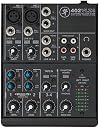
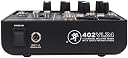
The Mackie 402VLZ4 is a four-channel ultra-compact desktop mixer featuring two premium Onyx mic preamps with phantom power, designed for podcasting, small studios, and broadcast use. Weighing only 2.5 pounds with a rugged metal chassis, it offers versatile input/output options and advanced RF interference rejection, delivering clear, professional-grade audio in a portable form factor.


| ASIN | B00EDRUQXC |
| Audio Input | XLR, 1/4 inch (TS) |
| Best Sellers Rank | #7,626 in Musical Instruments ( See Top 100 in Musical Instruments ) #15 in Unpowered Recording Mixers #57 in DJ Mixers |
| Brand | Mackie |
| Brand Name | Mackie |
| Connectivity Technology | XLR, 1/4 inch (6.35 mm) |
| Customer Reviews | 4.6 out of 5 stars 838 Reviews |
| Frequency | 20 hertz |
| Global Trade Identification Number | 00663961039863, 00755746261436 |
| Item Dimensions D x W x H | 5"D x 12.5"W x 12.5"H |
| Item Highlight | Four-channel desktop mixer for podcasts, small setups, and broadcast, powered by the included external adapter |
| Item Type Name | Mixer - Unpowered |
| Item Weight | 2.5 pounds |
| Manufacturer | Loud Technologies, Inc. |
| Manufacturer Part Number | SRS402VLZ4 |
| Model Number | 2058860-00 |
| Noise Level | 60 db |
| Number of Channels | 4 |
| Number of Items | 1 |
| Output Connector Type | RCA |
| Power Source | Corded Electric |
| Product Dimensions | 5"D x 12.5"W x 12.5"H |
| Software Update Supported to Date | unknown |
| UPC | 755746261436 663961039863 |
| Unit Count | 1 Count |
| Voltage | 48 volts |
| Warranty Description | 1 year non-transferrable. |
P**D
VERY Well Built, and THE Solution for RF Inteference when using PreSonus Eris 5 Studio Monitors
This little Mackie 402VLZ4 is a lifesaver for a small home desktop solution when you want to use one pair of studio/near field monitors, so I want to share my setup. My main goal was to have a QUIET pair of PreSonus Eris E5's on each side of my 30" monitor for multiple uses, but the RF interference was unbearable. The Mackie (and GOOD cables) provided the solution and make the whole system really flexible. Here's what I wanted to accomplish: 1) Audio from my desktop PC for video editing and simply listening to music 2) Audio from my AlienWare 17 R2 laptop which is my main DAW running Studio One 3 Pro 3) Audio from my iPad Pro when fooling with Notion, GarageBand and any other audio source 4) Ability to plugin my Taylor acoustic to play solo or along with any of the above 5) Ability for someone to listen to a finished mix on my studio headphones while I monitor the track through the Eris 5s at a low level so I know what they are hearing at any given point And most of all I needed to eliminate the VERY bad RF interference I was getting from the Eris 5s, because while the sound is TRULY accurate given the price range, the RF shielding is pretty bad, due to the price range. But I got it 99% solved. Here's how: · Connect the Eris 5s to the Mackie with cables such as Mogami 2549 XLR Male to 1/4" TRS Cable with Neutrik Gold Connectors - 6 Feet by ChromaLeaf . Speakers are done. · Connect my desktop editing PC to a Creative Sound Blaster X-Fi HD USB Audio System with Phono Preamp , and from there connect that to the Mackie's Tape In inputs. IMPORTANT: I used cheap RCA cables and a cheap USB cable between the PC, Creative DAC and Mackie, and got horrible RF noise! I then tried, believe it or not, an AmazonBasics USB 2.0 Cable which are very well made, and a pair of Monster RCA cables I already had, and I get NO RF noise from the Eris 5s now. PC is done. · In Channels 3 & 4 I run this Ugreen Gold Plated 3.5mm 1/8" TRS to 6.35mm 1/4" TS Mono Y-Cable Splitter Cord which I can use for iPad (NOT iPhone, more on that in a min) or other device with a 3.5mm headphone jack or line out, or even the headphone jack on the AlienWare DAW in a pinch. For serious mixing with the AW I use a Fiio E17K ALPEN 2 USB DAC Headphone Amplifier , again with a good AmazonBasics USB cable, and then the UGreen Y cable goes into the Fiio. iPad and DAW and other audio devices done. · Channels 1 & 2 are open to accept XLR or line input from my Taylor or mic or preamp or a second device, anything really. With a mixer the headphones being plugged in don't mute the main output, everything has its own level knob, so i can control everything, even those listening to headphone. It's a bit extensive, but this gives me a totally flexible, clear, RF-free environment, all possible by this little Mackie control center of a mixer. I can honestly say I can't think of a thing I don't like about it. It's heavy metal construction and sports a power switch which many mini mixers don't have. And now my Eris 5s sound quiet and amazing, and my range of inputs is totally flexible. One last note regarding RF interference: You still hear that "fax machine" sound faintly when an iPhone is nearby, does it on my wife's PC too, with simple shielded computer speakers. When the iPhone checks for mail for anything else, you hear it. Not horribly but it's there. There is one other Apple product that actually makes noise when you move it about: iTunes for Windows running on my PC! If I scroll a window or something similar, you hear faint RF noice! Other media playing software doesn't so this. WEIRD. Anyway, hope this info helps. If anything, use great cables.
B**0
Solid build quality, Reliable name, Excellent customer service!
I've always had excellent performance and value from Mackie products, and this Mixer is no exception! Worked perfectly and as advertised right out of the box. What amazed me beyond words was when I needed to call Mackie Customer Service (to resolve a weird issue that was due only the the complexity of my studio setup — *not* a problem with the product). I reached Customer Service directly and they answered on the 3rd ring. The Technician was cheerful, knowledgeable and resolved my issue in under 1 minute. I followed his advice and this Mixer is performing wonderfully in my system, with incredibly clear, distortion-free sound. This model offers a great deal of flexibility on how and where to route Inputs, Outputs, 'Sends', and 'Effects'. Even the Channel Mute buttons offer the option to route Muted channels to another Output; so the signal is not wasted. Separate controls for Main, Control Room Send, AUX Send, and Tape (recording outs) come in super handy. Designed in U.S.A. (but built in China), I was skeptical that the quality might not be premium — but Mackie did not sacrifice build quality: the chassis is a sleek, black METAL. The sliders (well, knobs actually) all have a very smooth action and their operation electronically with regards to Gain is perfectly smooth and analog. I can detect no distortion or loss concerning signals that are processed by this Mixer. It's a great unit — especially for the 'budget' cost. Great for home studio, gigs and Podcasts, etc.
R**A
Exactly what I needed
I love this thing! I just got it today, it is sturdy and professional looking and was packaged very well. I have been playing guitar for over 50 years. I still jam now and then, but mostly I play to backing tracks at home. I have an eggnater tweaker with effects processor that i play thru while running backing tracks from my computer thru a stereo amp. Balancing the two volumes is always a pain, and i usually end up too loud once i find the balance. I like to record sometimes, using a tascam recorder with built in microphones. Its not bad, but it picks up room noise and wont register below a certain volume. I bought this mixer hoping to consolidate my devices into some kind of audio system. I have had mixers before and they always have limitations or dont have features i need, so i was skeptical. I set this baby up and plugged my processor into channel 1 and computer into channel 2. I ran the main output thru my 100 watt stereo amp powering a pair of 12" speakers. Turned everything on and both channels came thru loud and clear with no crossover. The volume controls are pretty linear, but it drops off a little on the low end. It was easy to match the two channel volumes. Guitar and backing track sound seamless coming from a single source. I just crank the master volume up and down without losing the mix. The EQ is impressive. I like that there is a knob for bass and a knob for treble (hi and lo). So much easier than trying to adjust your tone with 7 slide pots. Both bass and treble have surprising range and work fine together. They give me an excellent range of tones. The channels have seperate gain controls, which come on smooth and have a lot of punch without making it too distorted. This device otherwise adds nothing to the signal in the form of noise, distortion or carryover that i can tell, all my favorite processor effects sound just the same thru this as they do thru my amp. My room recorder has a line in that i connected to the tape out jacks, but there is no volume for tape out, so i used the headphone out, which does have a volume control and it works perfectly. Now I can record at any volume while playing at any volume, which my family will love. No more blasting just so my recorder will pick it up. All the right features without a bunch of fluff like effects, and it accomodates a mix of stereo and mono inputs and outputs with no special adjustments. I am totally stoked with this thing and highly recommend it to anyone looking for a simple and functional mixer.
B**J
The onyx preamps make a big difference in the Mackie mixer
Mackie has always made a great yet affordable mixer. I worked for a famous Rock band and the keyboard even used a Mackie Mixer, and he could afford to any mixer he wanted .The onyx preamps do you make a difference. Even though this is just a little guy the quality of the sound is very transparent.
F**D
Good little mixer
I purchased this mixer to manage the number of audio signals going into and out of my desktop PC. I looked at Yamaha, Peavey, Behringer, and Mackie products before choosing this unit. I have 20+ years of experience with audio mixers in an installed sound environment. Pros: 1. Solid construction! This thing is built like a tank. No plastic exterior panels here. 2. Clean sound without being cold or sterile, like some Yamaha mixers are. 3. Aux send channel with pre/post setting on an 8-channel mixer. The other mixers I looked at would have required me to go to a 10- or 12-channel mixer to get that functionality. I use an Audio-Technica headset mic with the mixer for online gaming and other purposes; the aux send, set to pre-fader, is connected to the line-in on my PC. It works great for sending the mic signal to the PC; the audio is clear and strong. 4. The instrument switch on channels 1 and 2 eliminates the need for DI boxes when using instruments such as guitars. Cons: 1. Knobs do not have a grippy rubber coating on them; fingers tend to slip when adjusting the knobs. They need a rubbery grip coating, or at least vertical grooves on them, to make them easier to grip. 2. Not all of the knobs have a center detent - an oversight or cost-cutting? With the exception of the gain controls, all of the knobs should have a center detent IMHO. 3. Was not able to find a way to control the headphone volume level independently of the main mix volume level. Other Mackie mixers I've used have been able to do this, so was this an oversight on Mackie's part? Additional comments: 1. The shelving EQ requires careful use; you can overboost very easily. That's not to say it doesn't work, because it does; you just have to be judicious when using it. 2. Typical gaming headset mics apparently won't work with this mixer; I tried two of them, and neither one would put out enough signal. 3. Might be a little complicated for a newbie to hook up correctly. Overall, I am very pleased with it and do not regret buying it. I did feel that the three cons were significant enough for me to knock a star off the final rating - but you may find them to be non-issues.
C**T
Compact, clean, and easy to use
This compact mixer was a lifesaver for me when I needed a quick answer to keep my podcast going. It was super easy to set up, plug and play really. For the cost, I think it's totally worth it.
A**L
Mackie's equipment is top notch and incredibly flexible.
I almost don't remember when I bought my first Mackie Mixer. It's been probably 20 years ago. I was never in the need of a big board ... although I've owned a 16 channel Mackie before ('big board' ... lots of input channels, features, meters, inserts and aux busses). But I've used the 1402 VLZ series in my audio work with great success. I've always been impressed with the incredible flexibility and low noise in these mixers. I still have 3 or 4 of them around, including my first one. My most recent purchase was a 1402VLZ3 ... Nice Board! So, when I went looking for a mixer for a small special application, Mackie was the first place I looked. I wasn't disappointed. Mackie had a couple of smaller mixers either of which would have worked, but I think the 802VLZ4 had just the right combination of features for what the application required. It just arrived today, and I'm already impressed, even before I plug it in. I usually opt for the Power Supply being inside the unit. Hook up the power cord and plug it in. In this application, though, I wanted the board to be as small as possible, and the outboard plug-in supply removes that part of the design from the internals of the mixer, allowing a smaller footprint. "Wall Warts" can also be a problem, but this one was designed to be thin, so as to not rob space on your power strip. The 1402's and many, many other mixers use 'sliders' to control the incoming channel levels. The 802VLZ4 however, just uses "Volume Control Knobs". In the application I'm looking at, a small footprint is a priority, and using what most people would call "Volume Control Knobs" will take up less space than the sliders. (I love Mackie's Sliders, but I just don't have the room for them in this application, and replacing them with "Volume Control Knobs" just makes sense). There's a ton more I could say good about the Mackie 802VLZ4, but you can read a lot of it in their advertising info. But I do like the color coding on their knobs. Very nicely implemented. One small drawback, when I got my other 1402's, they all came with a really good manual. I really appreciated Mackie's audio professionalism that they shared with the owners of their products in their manuals. And of particular usefulness is their "Schematic" or "Block Diagram" (Page 26 in the 802VLZ4 manual). It is a tremendous aid in understanding and using your mixer. I always made a copy of that page on my 1402's and put it in a notebook to take with me wherever I went. I was a bit disappointed to see a "Quick Start Guide" arrive with the new mixer with not much info. However, I had already downloaded their manual in PDF format from their website, and printed it out. I might suggest to Mackie that adding the Block Diagram to the Quick Start Guide would be a real quick help to someone setting up the new mixer, as when you have a flexible product, that flexibility also adds a bit of complexity, and the Block diagram helps figure it out real fast. Also, if a user is to rely on the PDF format for their manual, It would be an great help to format the PDF for 8.5 X 11" paper. (The manual is slightly larger). Overall, I'm at 4.9999 stars with Mackie's equipment. I'm getting up in years, so I'm not seeing too many more new Mackie's in my future, but if that requirement ever comes up (one never knows), that's where I'll be looking first.
M**.
TO THINK I HESITATED...
The perfect solution for a working drummer; I use this mixer for an in-ear monitor feed at gigs as well as a click unit. I bring in the the ear feed from the club in on the first channel and my Tama Rhythm Watch on the 2nd, with the instrument-level button engaged. I get phenomenal levels on both channels. You never know if things might get loud when you'll need that extra headroom, and the Mackie has no shortage of noise-less GAIN, a pleasure to use, especially when you're plugging in-ears right into your gord... Here's a comparison: a week earlier, I'd purchased a Behringer Xenyx 1002 for the same purpose: It's similar in configuration. I noticed immediately that there was NO consistency of gain amount when comparing that unit's first and second channels. They were completely different when testing with the same signal!! I could NEVER get the click quite loud enough no matter how I tried, and without the extra headroom needed to do so, the Behringer was quickly found to be useless. Also, for any sort of louder gain on the Behringer, it had a TON of white noise and distortion, which just simply CAN'T happen when the point of the unit will be in-ear monitor use. That huge amount of noise just competes with what you're trying to accomplish. This line of Mackie mixers are simply the only pro choice when it just has to work consistently perfect. Also I love using a RCA-to-3.5mm cable with the Mackie to practice music off my iPhone. Loud and clear. Don't waste time like I did, get a Mackie.
A**M
Five Stars
Excellent product!
S**U
Excellent Mixer with Robust Build Quality
Excellent mixer with robust build quality. The quality of mic preamps is great. Fantastic value for money. That's why Mackie mixers are well known. The seller is very good and and too quick in shipping and prompt response.
A**ー
ノイズレベルが低い。
このクラスでは最もノイズレベルが低いと思います。作りもガッシリしておりつまみも丁寧に作り込まれています。
V**J
Buenísimo
Buenísima no tengo quejas, audio limpio y claro de alta calidad! Definitivamente recomiendo!!
A**.
Excelente
Me encanto, es de lo mejor
Trustpilot
5 days ago
4 days ago