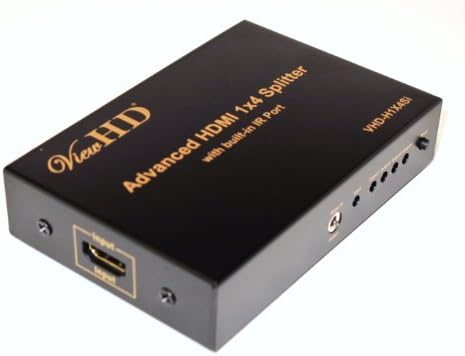

ViewHD HDMI 1x4 Splitter with IR Extender Function | Support 1080P & 3D | VHD-H1X4Si
Product ID: 1755121
🎥Supports 1080P & 3D
📺4 HDMI Outputs
🔌1 HDMI Input
Buy anything from 5,000+ international stores. One checkout price. No surprise fees. Join 2M+ shoppers on Desertcart.
Desertcart purchases this item on your behalf and handles shipping, customs, and support to Kenya.
🔗 Connect & Conquer: Elevate your viewing experience!
The ViewHD HDMI 1x4 Splitter with IR Extender Function is a high-performance device designed to distribute a single HDMI input to four outputs, supporting 1080P and 3D content. With advanced features like an integrated IR control system and durable metal construction, it ensures seamless connectivity and exceptional video quality for both home and professional setups.
B**B
Works very well to elminate a 2nd digital set top box
Using this to eliminate a cable box. Had minor issue where main TV would not have sound when cable remote turned both TV and Cable box on at once. Spoke with Amazon tech support and we determined that there was a handshake issue between the cable box main TV. The second TV was fine.Contacted vendor and they offered two solutions. 1 - Change configuration on cable box to force stereo audio or 2 - Make sure TV is powered on first and then the cable box.I have not tried option 1 yet, but I programmed a spare universal remote to turn on the TV first with a small delay before turning on the cable box and this works well.Picture quality is excellent on both TVs and the cable company will be out $10/month for the second digital box that we were barely using.
S**N
4K does not work
If you don't need 4K, this splitter worked fine in my limited testing. However, I needed it precisely for splitting the 4K signal from Samsung 4K uprez blu-ray player to Seiki 50" UHD TV. Would not pass 4K at all with certified cables that worked fine on direct connection.
A**S
Works as advertised.
I am very pleased with this splitter. I strongly suggest you read the comments section and read the additional directions given by ViewHD. The key is that HDMI has handshaking so you have to remember that and make sure you reset and power up items and the splitter so that a 'new' handshaking takes place between the source and target after inserting the splitter in the pathway.Update 12/21/2014 I remain very pleased with this item. I have 3 TV's driven off this device and 1 available HDMI connection if I decide I need it in the future. I am using it with 1 Amazon Basics 6' HDMI cable and 2 Monoprice 60-Feet Slim Series High Speed HDMI Cable with RedMere Technology purchased here on Amazon. 2 of the TV's are 1080 and one is 720.
A**N
Not fully automatic, has to be reset.
When the second TV gets turned on, most of the time I get a purple screen and I would have to reset (unplug) it so it will get the proper screen. Otherwise once it is reset it works fine. One HDMI cable is 3' and the other is 35'. A year later died completely.
B**B
No signal loss, as advertised
My objective was to distribute a signal satellite receiver signal both locally and to a couple of remote TVs. Locally I want a choice of 3 TVs to send the signal to: main TV, alternate TV (for sports viewing, using a different input source like OTA for the main TV) and exercise room on the other side of the room. For the remote TV, I have a 100 ft Twisted Veins HDMI cable going into a ViewHD 1:2 splitter, which outputs to 2 TVs view 6' and 25' HDMI cables. Short summary is, it works, even with the challenge of that long run.Before buying this, I just ran the 100' cable directly out of the satellite receiver, with component/optical to the main TV, and swapped the HDMI cable out as needed to watch on one of the other local TVs as needed. This was a pain to do since the receiver is in a cabinet.I had tried to run the HDMI from the satellite to my stereo receiver which has two HDMI outputs, but couldn't get the signal to my remote TVs. Presumably this extra hop degraded the signal enough that it wouldn't work over the 100' run.So, I bought this 1:4 splitter and hoped the signal would be strong enough to carry the distance. Happily it did, so it seems the claim that no signal power is lost is true, or at least close enough for my setup.The box does seem to run a bit hot already as a negative review claims, so I'll be keeping an eye on that. Hopefully having the box in the open in my cool basement will be ok, otherwise I'll get a small fan, which may not be a bad idea back there anyway.
J**M
It performs (almost) as advertised.
My previous Splitter could only work with both TV sets powered, otherwise you would get intermittent video on the one set you were watching. This product took care of the problem and now I don't have to turn on every set to get it to work properly. I also got 5.1 audio on the home theater system despite the fact that the secondary TV set connected to it only has stereo audio capability. I read somewhere that the splitter derates audio quality to the least common denominator of all devices connected to it, but this does not seem to be the case here.The only minor annoyance is that sometimes when you turn the second TV on, a 28" wireless capable Vizio (I only have two connected at this time with the other two ports open), there is no audio and poor video. The problem can be corrected every time by just recycling the power on the Directv HD DVR receiver, a 10 second affair. It does not always do it, but when it does, the solution is simple. My main TV set, a Panasonic connected to the #1 port never displays this behavior, go figure...I am perfectly happy with the setup and the only reason for not giving it the 5 stars was the minor glith described above, a small price to pay for the ability to split your HDMI video signal amongst different TVs.
N**M
Definitely works as advertised
This product definitely splits the HDMI output, no compromises.I used it to split the HDMI output from my DirecTV HD PVR receiver to both my TV and Roxio Game Capture HD Pro device. It worked great!On some odd occasions, though, the signal would mess up and it would affect the color of the image outputted by the DirecTV receiver (i.e., everything was a purple hue). It would happen rarely but rarndomly and I resolved the issue by simply unplugging the unit and plugging it back in.For the last 3 months, though, it hasn't happened at all, so no issues.
U**H
Not recommended for continuous powered use...
Needed this splitter installed in a video editing equipment rack to split some signals to various locations when a user powers on the rack. To make things look neat, it was installed in a hidden part of the rack that's out of sight and hard to get to. Only problem was that it doesn't power on automatically and requires a button press every time. To solve this, it was connected to an always-on circuit, powered on and left that way so it'd be ready to do its job whenever someone powers stuff on.Well, it refused to pass any signals from any output after about a month of being powered on 24/7. So if you're looking for something that can always stay on and not have to be bothered with, I wouldn't recommend this. Probably best to spend the extra money on higher end splitters from Gefen or Kramer.
Trustpilot
1 week ago
3 weeks ago