Desertcart purchases this item on your behalf and handles shipping, customs, and support to Kenya.
🎯 Master your media domain with the Yatao W1 — control without limits!
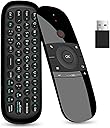
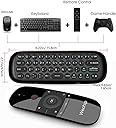
The Yatao W1 Universal TV Remote Air Mouse is a compact, rechargeable 45-button wireless keyboard and air mouse combo featuring stable 2.4GHz RF connectivity with up to 10 meters range. Designed for plug-and-play ease, it supports a wide range of devices including Android TV boxes, PCs, Smart TVs, and projectors, delivering versatile, precise control for professional and entertainment setups alike.


| ASIN | B07WRZNW6X |
| Additional Features | Rechargeable |
| Battery Type | Lithium |
| Best Sellers Rank | #388 in Computer Keyboard & Mouse Combos |
| Brand | Yatao |
| Button Quantity | 45 |
| Color | Black |
| Compatible Devices | Set Top Box |
| Connectivity Technology | USB |
| Controller Type | Radio Frequency |
| Customer Reviews | 3.6 out of 5 stars 1,325 Reviews |
| Item Dimensions L x W x H | 15.8"L x 5.5"W x 1.65"H |
| Manufacturer | WeChip |
| Max Number of Supported Devices | 1 |
| Maximum Number of Supported Devices | 1 |
| Maximum Range | 10 meters |
| Mfr Part Number | Landw-20190822 |
| Model Name | Landw |
| Model Number | Landw-20190822 |
| Number of Batteries | 1 AA batteries required. (included) |
| Number of Items | 1 |
| Special Feature | Rechargeable |
| UPC | 732694212482 |
| Unit Count | 1 Count |
| Warranty Description | 2 week |
❤**️
Excelente
❤️
W**T
No Right Click?! Unacceptable
i had purchased this remote a year or two back and it functioned perfectly until the charging port broke, no big deal, ill just buy another one. So I did but when this one came in, I noticed the button functions were not the same. My old model, identical to this one, had a right click button and oddly enough it was the button with the back symbol on the bottom right of the remote, however upon receiving this one, the mapping was different, they had completely eliminated the right-click, one of the most basic functions needed with a mouse! Now if you ask the seller like several people already have, theyll say its the button with the 3 lines on the bottom left, however THAT IS NOT THE RIGHT CLICK, its a button windows recognizes as the "AppsKey" which does not function like a right-click. Why this company decided to do this ill never know. I ended up having to download a 3rd Party program and write a custom script just to get this to function correctly. Now thats fine for me but for the vast majority of people purchasing this, they will not have the technical knowledge to do this. Once again why they decided to sell an air mouse with no right-click is beyond me. Do yourself a favor and go with another company.
D**E
Almost a great remote........
I purchased the remote based on the ability to program it. I have an android tv and a lg sound bar. Its a 2 remote combo. I was hoping to eliminate having to use a seperate remote for volume because the TV remote does not change the volume of its optical output. I followed the instructions to copy the volume from the lg remote onto the w1. But it seems the W1 remote keeps changing its self back to the tv volume comtrol. Other than that the remote is very nice
B**N
Learn Buttons not correct, but figured it out
My remote learn buttons were different than the manual: Use Menu Button (3-lines) + Back Button at the same time for a few seconds to enter learning mode, then press the button u want to program, I did power and u should be able to press power on the other remote to learn. Other than that I am using it on my Rasberry Pi 3 with Kodi and it seems to function fine. Could use back light but otherwise I like it a lot.
T**F
Works
I bought this remote to work with my mini PC being used as a media player on my bedroom TV. Since I'm running a PC on the TV, I needed a remote mouse to make it easier than having a wireless mouse & keyboard on the TV table. It does work, however it's a bit difficult to use. The range of motion is okay. I could not get the numbers to work though? I wasn't able to log back in to Windows (cuz it uses a pin) & the number pad would not enter #'s. After logging in manually, I opened up Notepad using the remote (there's no "right click" key, so I had to go the long route to open Notepad. I was able to use the keyboard both letters & numbers just fine in Notepad. The FN key turns on the numbers...it works then, but I could not get it to work when attempting to log in. I kept getting the wrong login error and then it locks you out. So still working thru the oddness of using this remote mouse, but it does work for what I need it to do.
A**I
WeChip W1 Universal TV Remote Air Mouse
⭐️⭐️⭐️ **Decent Air Mouse, but Not Perfect** The **WeChip W1 Universal TV Remote Air Mouse** works reasonably well for basic navigation and control. The air mouse function is responsive and makes it easier to move through menus compared to a standard remote, especially on Android TV boxes and smart TVs. However, the build quality feels fairly basic, and the buttons are not as tactile or responsive as higher-end remotes. There can also be a small learning curve to get used to the air mouse sensitivity, and occasional recalibration may be needed. Overall, it’s a **functional and affordable option** if you need a simple air mouse remote, but it doesn’t feel premium and may not satisfy users looking for a more polished experience.
J**W
The concept is great, the execution is awful.
The idea is nice, the execution is garbage. Using this as a mouse is a nightmare. It doesn't move how you'd expect it to, and the closer you get to the edge of the screen the harder it is to control. I gave this a solid week of trying to use it to see if I just had to figure out the quirks, and no, it just doesn't work well. Got pretty tired of waving my hand around in front of me like an untrained wizard with someone else's wand. Other complaints/issues: No backlight on the keyboard so you can't see it if it's dim. The function keys are also labeled in dark blue, which is even harder to see. The back button never functioned. You have to hit the power button before you can use the mouse, which turned my TV off. It's awkward to hold.
A**R
Rad remote!
This thing works great!
K**O
Do not waste your money for busying
Pls do not buy this product
A**.
🌹
🌹
A**M
Great
Very efficient
E**E
Don’t waste your money
I wouldn’t purchase this again. I tried every possible way to have this programmed, the power turns off as soon as I start the process even with full battery charge. The seller is not responsive and doesn’t speak English and keeps telling me to open the tv. I asked him for a replacement with a non defective piece and he keeps dismissing my concern.
B**9
Adequate remote
Does what I need it to do easily... however, it only seems to last 2-3 years before needing to be replaced. Because of the price, this is not a game changer but if a better option comes along....
Trustpilot
4 days ago
1 month ago