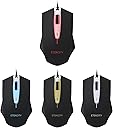
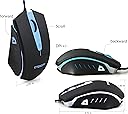
Update (11/13/14): I don't know if it's just me, but after I updated the drivers the mouse would freeze for about 5 seconds every time the driver loaded upon startup. I guess it's to change the preferences of my mouse to the custom settings that I had adjusted the mouse to. Not a huge deal, just a little annoying. Works perfectly fine after that initial lockup though. Follow-up 15 minutes later... I have thought of something that might fix this problem. After you have set up your mouse to your preference, remove the driver program. Flat out uninstall it. So far the settings have been kept by the mouse's onboard memory and hopefully will continue to stay that way throughout restarts and shut downs... Will update more later. Update#2 (11/14/14): So installing the driver, tweaking your preferences, then uninstalling the driver program will save your settings. You will also not have to deal with the mouse freezing as the driver program loads up. The driver program, at least the newest version of it, will, for some reason, reset your BUTTON CONFIGURATIONS back to factory defaults after you restart or turn off your computer. I was about to take off another star for this flaw because on top of having the mouse frozen every time I start my computer, I have to go and change the buttons again. It only happens for button configurations, but even if I liked the way original button layout was, the freezing still would have annoyed me greatly down the road. As of this update, my review is considered complete until any more problem arises. I really hope this helps others with the similar problem. Original Review: So far so good. Took one star off because of the fact that, for some reason, when using in my USB 3.0 slots, the mouse will randomly jump to the top of my primary screen, or off to my secondary monitor screen. This annoyed me very much. I reinstalled the driver and the issue persisted. I finally switched it to my USB 2.0 hub and it totally fixed the problem. Go figure. It works just fine that way, but I didn't really like having to stick my mouse in a hub instead of in the back. I deducted one star for this, first and foremost. There are people who have stated that this mouse doesn't last, so I will definitely be keeping that in mind and will update the moment it gives me any trouble with functionality. I use the computer practically daily, and quite heavily at that. So if this mouse can last me even one year, it will have been money well spent. The Pros: 1) It definitely feels like a more expensive mouse- namely the logitech G9X. 2) It is big, and it is heavy. This might be a con for some people, such as those with small or weak hands. Though even with small hands this mouse will probably still work for you. Those with weak hands, well, work out more? 3) Braided cables. I don't know why, braided cables just makes me feel more at peace. 4) Solid-feeling clicks. You know how mice sometimes make that empty-feeling sound when you click on them? Like you can easily mistaken them for the leftovers of an insect's molted shell? Yeah, not with this mouse. Solid feeling clicks, very nice. 4)I really like the way the scroll wheel glides and clicks. I came from the Logitech G9X and it was quite a tough job to depress the scroll button. The shape and the weight, surprisingly, feels a LOT like the G9X. I ALMOST instantly adjusted to it. The driver was nicely written, in my opinion, and the instructions are pretty straight forward. Key rebinding was also easy (had to switch the left and right side buttons because I was more used to that way - more on this in "Other Thoughts" section) through the driver program. So far, very precise; can't even tell the difference between the G9X and this one in terms of precision. Those who tell you they can are either imagining it or lying out their ***. Seriously, I can do literally everything with this mouse as I could have on the G9X. 5) Cool pulsating lights for those of you 15 year olds that like that ****. Oh who am I kidding I'm 22 and I still love that ****. 6) This mouse is actually ambidextrous, unlike the G9X. Yup. Thoughtful. The Cons: 1)Doesn't seem to do well with USB 3.0. I saw just ONE other reviewer had this issue (he gave one star and returned it). Thankfully, with a bit of work I was able to resolve the mouse jumping issue mentioned in the first paragraph. However, it should really have stated on the package that it doesn't not support USB 3.0. I could be wrong, but whilst my G9X is malfunctional after 2 years of heavy use, it never did the jumping thing like the Scroll T-142 did. If your mouse also jumps, try using it in a USB 2.0 slot - it could save you a lot of grief. Hell, just put it in a USB 2.0 slot to begin with if you have one. It makes no noticeable difference to you which one you use anyway, I guarantee it. 2) Possible con, depending on how you hold the mouse and if you use the side buttons A LOT, you may develop hand cramps. I personally honestly liked the way the G9X had it, both on the same side. I liked this mouse's design overall, but I do like the side button feature of the M555 better. In the end, overall build of the T-142 won out. UPDATE 12/06/14: Actually, this wasn't even an issue for me. Been using this mouse for almost a month now, and no hand cramps despite using both side buttons quite often during raids in WoW. Update 11/21/2014: With use, the side buttons can collect dirt. Due to the buttons being in line with the side of the mouse, with a thin gap between the button and the side of the mouse, dirt can get stuck in there. In other words, it can be kind of ugly and hard to clean if you don't have something very very thin to get the dirt out. Not a huge issue for me since it can absolutely be done. The mouse performs flawlessly so far. Other thoughts: I honestly use the side buttons quite a bit, so some of the cons of this mouse may not even apply to those of you who only use the three main buttons. I just got super used to the way I can use my thumb for both buttons on the G9X, and having to use my ring finger now for the right side button (I'm a righty) feels somewhat awkward and may cause some problems down the road. I really PROBABLY should have spent a little bit more for the Scroll 6E. But that one is a righty-only mouse, so there was also that to consider. Overall, pretty good mouse so far. As I have stated earlier, I will update the moment this mouse malfunctions in any way, and depending on the time frame, deduct stars and advise against purchasing if need be. Don't feel too safe in your sockets, you cute little golden stars.