

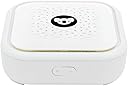


Dome - 1300Mbps Parental Control Router
Product ID: 121205097
Details
- BrandKoalaSafe
- Frequency band classDual-Band
- Wireless communication standard5.8 GHz Radio
- Compatible devicesLaptop Tablet
- Connectivity technologyWi-Fi
- Item weight1 Pounds
Buy Review: Best buy ive ever made for the kids - We have 3 kids surfing the internet, sometimes i could say being abused by the internet. Koala exceeded our expectations. I read the review on bad signal, but the signal works in our 3 floor house in 95% of areas, sometimes better than other routers. -You can protect the kids individually, schedule homework times individually... -When we need help with house chores there is nothing better than closing the internet for the kids until the chores are done! -Schedule means i dont need to be worried about their use when they should be sleeping, in fact their sleep patterns have improved since koala arrived. -easy setup was working in 30 mins, then tuning to each child on what they were able to access with a little patience over a few days it was working perfectly... -go buy and protect your kids! Review: Easy to setup - Works well and my kids laptops are routed through this. Only issue I have is that you can't seem to change the 5GHz Band through the app. It seems to let you but nothing changes. I haven't tried for a few months, so there may have been a patch. Apart from that it's simple enough to use and kids don't notice any speed drops.
| ASIN | B07DK4XFLX |
| Are Batteries Included | No |
| Brand | KoalaSafe |
| Customer Reviews | 2.9 2.9 out of 5 stars (21) |
| Date First Available | 27 July 2018 |
| Guaranteed software updates until | unknown |
| Item Weight | 454 g |
| Manufacturer | KoalaSafe |
| Operating System | RouterOS |
| Package Dimensions | 15 x 14.8 x 9.6 cm; 453.59 g |
| Voltage | 12 Volts |
| Wireless Type | 5.8 GHz Radio Frequency |
A**Y
Best buy ive ever made for the kids
We have 3 kids surfing the internet, sometimes i could say being abused by the internet. Koala exceeded our expectations. I read the review on bad signal, but the signal works in our 3 floor house in 95% of areas, sometimes better than other routers. -You can protect the kids individually, schedule homework times individually... -When we need help with house chores there is nothing better than closing the internet for the kids until the chores are done! -Schedule means i dont need to be worried about their use when they should be sleeping, in fact their sleep patterns have improved since koala arrived. -easy setup was working in 30 mins, then tuning to each child on what they were able to access with a little patience over a few days it was working perfectly... -go buy and protect your kids!
M**.
Easy to setup
Works well and my kids laptops are routed through this. Only issue I have is that you can't seem to change the 5GHz Band through the app. It seems to let you but nothing changes. I haven't tried for a few months, so there may have been a patch. Apart from that it's simple enough to use and kids don't notice any speed drops.
H**D
Constantly drops internet, have to reset it multiple times per day. The ethernet cord provided did not work, had to use my own. Great theory, poorly executed. Customer service was inefficient and unable to rectify the problem. Ended up unplugging it and throwing it away.
A**M
I have been using the original Koalasafe for about a year and it has worked relatively well but there were a few occasional problems. We had lots of devices connected to the Koalasafe and my suspicion was that it just didn't have the digital horsepower to handle it all. It would occasionally freeze up or re-boot. Other than the occasional hardware issues with the original (older version) unit - the software and the way it helped guide my children away from stuff they were not supposed to be doing has worked great! I set up several profiles. One for the Xbox, one for tablets, one for school laptops, and one for phones. I gave each profile different restrictions based on who was using them. The kids' school laptops were unrestricted from 4 to 7pm weekdays for homework (done in the living room). The Xbox was only accessible during weekends and only until 11pm. Phones were locked down pretty strictly. The Roku shut off at 10pm on weekends and 8pm during the week. And, of course, there were logs showing all of their activity. Since my only complaints were really hardware related I saw the new dome and decided to give it a shot and so far- so good! The Dome is much larger, faster, and has upgraded antennas. The range is very good (better antennas). The Dome seems much more responsive than the old unit (faster processor). The software is the same so there is not really any new functionality. There are a few quirks with the Dome. It comes with an instruction booklet for the old unit which does not have the same plugs in the back. The Dome has 3 unlabeled ethernet plugs. The one with the tiny world icon goes to the internet. The other two can plug into the ethernet port on your computer or Xbox or wireless access point or similar. I also noticed that after adding a new device to the network I had to restart the Dome in order to see it on the app's list of devices. If you are a new user the install should be super easy. If you are upgrading - the upgrade process is NOT smooth. You have to contact support and have them un-link the old unit from your account and then you can re-link the new box to your account. The problem is that, after support un-pairs the device, when you click the button in the app to pair the device... it re-pairs back to the old box. So I just made a new account. Logged into the new account in the app but got lots of errors because all of the old profiles were still there and those were not setup on the new Dome. I ended up having to delete the app and re-install. Not a big deal but I see lots of message board posts where people were getting stuck on this. Long story short if you are upgrading from an older Koalasafe: 1)- Delete the app 2)- Create a new account (they are free so why not) 3)- Download the app & log in to your new account 4)- Pair to the new Dome 5)- Be happy!
R**B
Arrived on time. Item as advertised. Works very well, as per advertisement.
S**R
Bought this in dec. worked fine easy set up. Now the WiFi does not broadcast but intermittently and barely see the WiFi network as available for devices. The kids say it drops every two or three minutes and takes time to come back up. Missed amazon return by 6 weeks. Have only had 2.5 months. Not sure of product warranty but for 149 should be usable more than 3 months
A**U
The wifi did no work . Despite the numerous comments the Dome still comes with an outdated instruction manual (incorrect photo references) and i could not find one on the internet . i returned it.
Trustpilot
1 month ago
2 months ago