Desertcart purchases this item on your behalf and handles shipping, customs, and support to Kenya.
๐ผ Relive the classics with modern clarity โ VHS & DVD, perfectly combined!
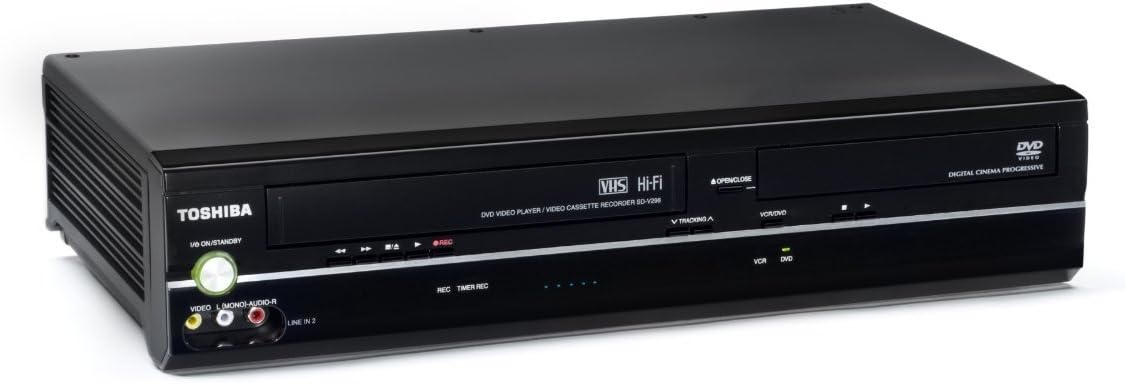
The Toshiba SD-V296 DVD Player/VCR Combo is a versatile entertainment hub that supports DVD, CD, VCD, and VHS formats. Featuring 480p progressive scan video, 14-bit/108MHz video D/A conversion, and 24-bit/192kHz audio D/A conversion, it delivers enhanced picture and immersive Dolby Digital/DTS 5.1 surround sound. Its one-touch VHS recording function simplifies capturing cable or satellite content, making it ideal for professionals preserving legacy media without sacrificing modern quality or convenience.
| ASIN | B001DZFYPW |
| Analog Video Format | NTSC |
| Audio Output Mode | Surround |
| Best Sellers Rank | #117,937 in Electronics ( See Top 100 in Electronics ) #94 in DVD Players |
| Brand | TOSHIBA |
| Built-In Media | 90-Day Labor / 1-Year Parts Warranty, A/V Cable (Rca), Remote Control, Toshiba Sd-V296 Dvd/Vcr Combo Player |
| Color | Black |
| Compatible Devices | Television, Cable or Satellite Box |
| Connectivity Technology | RCA |
| Connector Type | RCA |
| Controller Type | Remote Control |
| Customer Reviews | 4.1 out of 5 stars 1,742 Reviews |
| File Format | MP4 |
| Global Trade Identification Number | 00022265001844 |
| Item Dimensions L x W x H | 9.17"L x 17.13"W x 3.7"H |
| Item Weight | 5.9 Pounds |
| Manufacturer | Toshiba |
| Media Type | CD, DVD, VCD, VHS |
| Mfr Part Number | SDV296 |
| Model Name | SD-V296 |
| Model Number | SDV296 |
| Other Special Features of the Product | Recording |
| Resolution | 1280ร720 |
| Special Feature | Recording |
| Supported Audio Format | Dolby Digital, DTS |
| Surround Sound Channel Configuration | 5.1 |
| UPC | 022265001844 069060193442 803982825353 777782035215 |
| Unit Count | 1.0 Count |
| Video Encoding | RM |
| Video Output Resolution | 720p |
| Warranty Description | 1 year manufacturer's warranty |
| Write Speed | fino a 16x |
M**R
Great Basic DVD/VCR Combo
I've been giving this unit a shakedown before I wrote this review. My 5 stars are for what this unit is capable of, what it is not as advertised, and the cost. Toshiba is one of very few manufactures out there still making DVD/VCR Combo's and I'm glad for this. The manufacture date on the back of my unit was August 2012 so it was assembled quite recently as I write this. I have a large number of VHS titles that were never released on DVD or Blu-Ray so this type of product is still important to me. Hook-up is very straight forward. I'm not sure how typical my hook up scenerio is compared to others, but I had this unit hooked up to a quality 7.1 Home Theatre System that includes one powerhouse Pioneer Elite AV Receiver. I connected the three component Video out cables directly to my HDTV (for DVD), the Digital Audio Coaxial cable connected to my AV Receiver (for DVD), composite RCA cables audio/video out to my AV Receiver (for VHS), and connnected my COX cable box to the audio and video composite in jacks on the back of this unit for VHS recording. DVD video quality is excellent with 480p progressive scan. This unit is capable for bitstreaming both Dolby Digital 5.1 and DTS 5.1, another reason I give high marks. I watched an Enya music video compilation DVD with DTS and it was absolutely stunning, both video and the DTS 5.1 surround sound. As for VHS, the picture quality is certainly not going to be DVD quality but is watchable. For those who have an AV Receiver capable of Video analog upscaling, the improvement works. VHS HI FI audio is an almost forgotten technology in this digital age but the quality is still outstanding with analog Dolby Pro Logic II surround sound. I'll sometimes swear it sounds better than it's Dolby Digital counterpart from some video sources. Recording to VHS tape is something I didn't intend to use this unit for, but the quality is about as can be expected. Since I've gotten used to watching true HD blu ray and SD DVD, VHS viewing is not half bad as long as the recording speed is kept to SP mode and not the slow EP. VHS playback simply will not look as good on an HDTV as it does on a analog TV. If you have the equipment for video processing (upscale to 720P, etc) that really improves the picture. Any recording in the EP mode will look like crap on any HD set. Negatives, I would say the remote could be layed out a little better but is still very functional. The VCR while playing tapes does have an audible noise up close, but if this unit is in a cabinet or reasonably far away I don't think it would be that noticable. I haven't experienced any breakdowns like other reviewers have reported on. As such, for what Toshiba offers with this product and the low price point to own, this unit is worth 5 stars to me. Others have dinged this machine for their own missunderstanding of what this unit will or will not do, like "no tuner" or ignorance of hookups (the manual is very clear about cable hook up "how to"). These are unfair.
T**Z
Great Product at a Reasonable Price
I'm in the process of converting my old VHS tapes to DVD. I needed a VCR to hook into my computer in order to transfer the videos on my laptop's DVD burner using my purchased software (http://www.amazon.com/Honestech-VHS-DVD-5-0-Deluxe/dp/B0040FT30O/ref=sr_1_1?ie=UTF8&qid=1356272603&sr=8-1&keywords=honestech+vhs+to+dvd+5.0+deluxe). This DVD VCR Combo worked perfectly. It had no trouble playing my old Andy Williams Christmas videos and home movies. This unit is also Hi-Fi which isn't mentioned in the product descrfiption. I haven't used the DVD because I was just interested in using the VCR, which again, worked flawlessly. As stated, it doesn't have a built in tuner, but can be connected to a cable box with no problems using the supplied RCA cables. Furthermore, the Honestech VHS to DVD 5.0 Deluxe software makes converting your home movies or old VHS tapes to DVD a breeze. It comes with the necessary cables to connect the VCR (or camcorder) to your computer and the software is easy to use. I hope this helps you in making a decision. :-)
1**0
A different review, my 2 cents
My review is a lot different from most of the people here. I saw the reviews others wrote, which were very negative, and one or two that felt it was a good solid basic machine. I have used toshiba in my profession and it is generally a solid, quality brand. Not schnazzy and spiffy, but solid. A few quirks, but it gets the job done. What I have done/intend to do with this machine: 1--Replace my old vcr which my son destroyed 2--Play old VHS tapes that have been given to us by friends/family, mainly children's videos 3--Play DVD's (for the children and for us--playing them on my laptop it's too quiet). On these three points, honestly, I couldn't have asked for a better deal. the price was under $50 when I purchased it last week, and it's brand spanking new, not a refurb, and everything works good. The sound quality for the VHS side is not extra quiet for my tv. In fact, I had to turn it down some. DVD worked great too. What I have NOT tried to do/don't intend to do: 1--record old vhs's to DVD 2--Hook this puppy into a state of the art audio/visual home theater 3--set the timer for recording programs automatically. In these more advanced digital age things, probably this is not the best tool. All I wanted was something that could play both vhs and dvd's mainly to entertain our kids and sometimes for me and my wife. Our TV is not enthroned in honor in our house, it is just a tool. Our life doesn't focus around TV programming, so all we really needed was something to play VHS and DVD when we need or want. Now it's possible if you have a nice nice system, you've already spent hundreds of $$$ on HD stuff, then maybe you need something that is more compatible. Check carefully on brands and make sure they have the exact connections you need, or you can end up spending a lot of money. Also, if you have a TV that only goes through Co-ax, you'll need a special box to convert the RCA to Co-ax, and the manual says you might find reduced quality if you do. So if you just need a basic solid piece of equipment to play your vids, I think you can't beat this one. The price has raised since I bought it, but it's still the most affordable one as of today, and I'm glad I got one for well under $100.
C**N
Works perfect!
Works perfect.
P**S
Progressive Scan Video Out Does Not Work with Analog TV's
We bought this to replace an old Panasonic VCR which we mainly use to watch TV shows we record. Nothing in the description or reviews we read indicated that this product would not work with an analog TV. Most of the reviews were about it being tunerless, which was no problem because it would be hooked up through a cable box. We hooked it up per the instructions and immediately found that we could not set the clock, because no blank screen appeared on our TV. We then, hooked it up to the TV with the idea that we would be satisfied with just watching tapes recorded on another VCR. Same problem. Finally, we just tried playing a tape. Nothing appeared on our TV. We called Toshiba and they immediately declared it defective, so we returned it. By the way, Toshiba's tech service is non-existent for these VCR/DVD combos. If you can't solve your problem online and resort to calling them, they refer you to their return center, acclaim.toshiba.com to submit a return claim because they don't have any live tech support for these devices. We skipped that and returned our purchase directly to Amazon which was painless. Bottom line--any VCR, DVD player or combo that touts progressive scan will not playback to analog TV if progressive scan is on. You need to be able to turn it off. I did not see how to do this in the Toshiba manual, but I did in the manual for its Magnavox competition. I could not help but notice that the manuals for these two competing units were nearly identical, including the figures and typeface. So, I am going to make some suggestions which may or may not work based on my Magnavox experience. 1. Look though your Toshiba manual for how to turn off progressive scanning. If you find nothing, see if there is a small light labelled P-Scan on the front of the unit. If the light is on, then progressive scan is active and must be deactivated. Try holding down the play button on the DVD side of the unit for a few seconds. This will hopefully deactivate progressive scanning and the light will go out. 2. Next step is resetting your TV's video mode. For this, I strongly recommend going to Google and typing the competition"s name and model in the search box to bring up the Magnavox manual. That would. be: magnavox dv225mg9. 3. Click on the Magnavox manual and download it. On the bottom of p. 6, you will find a table of various TV models and the possible ways of switching the video input. If you don't still have your TV's original manual, this is your best bet. See what works. 4. Once you have successfully switched your TV's video input, you should be good. Test it by trying to play a VHS tape. 5. For my GE set, the key was switching to channel 91 which could be done with the TV's original remote or using the channel up buttons on the front of the set. Your cable box will work fine whether your TV is set to channel 4 or the appropriate video input, in my case channel 91, There is no TV/VCR button on the remote. So, judging from my Magnavox experience, I offer the following guidance: 1. Assuming you have successfully played back a VHS tape, press the Setup button. This should bring up the familiar blue screen. Follow the manual instructions. Set the date and time if you plan on using the timer record function. 2. To play a tape, just press Play and you will see your tape assuming your TV's input has been reset to video, be that channel 91 or something else. 3. Finally, something funky about both these VCR's, you must do two additional things that you may not be accustomed to doing to successfully timer record a TV program: a. During the programming process, you will be prompted for the input source. Choose L1, and be SURE that the RCA leads from your cable box or other external tuner are connected to the VCR's input jacks. b. You MUST press the Timer Start or Timer Rec button on the remote when you have finished entering your program info. This will bring up a confirming display and also restrict your use of the player to DVD viewing only. If you fail to do this confirming step, the VCR will not record your program. For anyone accustomed to an older device without DVD function, this seems bizarre and it took me a few tries before I understood why my programmed shows had not recorded. Good luck, Pam
D**M
VHS Hi-Fi Analog Stereo is Superior to Digital. This Excellent Product has Both.
I bought this Toshiba SD-V296 in July 2014 via Amazon for 85.00, before it was discontinued. Recently, I have wanted to buy another one, realizing I love the sound of VHS analog compared to digital, preferring VHS tapes to DVD disks. Via Amazon, the price for this product has gone up around 35 dollars in the last week, from around $135 to $170. This pushed me in the direction of another online business today...and I made my purchase. This discontinued item is selling out fast. Analog VHS Hi-Fi Stereo Audio is superior to digital, in my opinion, even as the digital audio and video is top of the line for this technological wonder that remains a bargain, even at this price. When the new high end VCR's are all gone, not to mention all of the other new VCR's...and we're about there, people will wish they had snatched up one of these excellent VCR DVD Combos. I listened to and watched the Beatles' film "Help" this a.m. via this Toshiba, with headphones and the VCR portion of this quality machine. A truly excellent experience...the quality, depth, clarity, and realism. A "musical" unit worth buying, even at twice this price. But thankfully, it's not that expensive. Yet. VHS tape is as close to Reel To Reel Quality analog as you can get. Cassettes come next. Then vinyl. As far as digital goes, CD's are best...and then digital "files"...some of which are higher quality than others. Anyway, mark my words, analog will be back, tape will be back, and buying this unit is an investment well worth making. For a truly quality and life like listening experience. And for the future when its value will be much more fully understood and appreciated. PLAYABLE DISC TYPES DVD-Video/DVD-R/DVD RW/CD/CD-R/CD-RW/VCD DVD VIDEO Video D/A Converter 108MHz/14-Bit Component Video Output ColorStream Pro ยฎ Progressive Scan z JPEG Viewer z Digital Picture Zoom z Fast Scan z Slow Motion z Multi-Camera Angle Select z Multi-Language Select z Multi-Subtitle Select z DVD AUDIO Audio D/A Converter 192kHz/24-Bit Dolby ยฎ Digital/DTS ยฎ Compatible z 3D Surround Sound z DVD CONVENIENCE Parental Lock z VCR VIDEO Video Heads 4 Record Speeds SP/SLP (EP) SQPB z VCR AUDIO Hi-Fi VHS Stereo z VCR CONVENIENCE Commercial Skip z OSD Language English/French/Spanish Remote Control DVD/VCR Remote Hi-speed Rewind z TERMINALS ColorStream Pro ยฎ Component z Video Outputs 1 rear - DVD only S-Video Out 1 rear - DVD only RCA-Video Out 1 rear - both RCA-Video In 1 front & 1 rear L-R Audio Out 1 rear L-R Audio Inputs 1 front & 1 rear Coaxial Digital Audio Output 1 (DVD only)
W**1
Good, but questionable reliability.
I bought one of the oringinal Toshiba DVD's (paid about $300) back in the early 90's, a great machine. It was still working when I replaced it about 10 years ago, only because the old Toshiba couldn't play DVD-R's. I bought this machine about 3-4 years ago for my mother-in-law who spent a good part of the 80's and early 90's taping classic movies off the TV. (She has more movies on tape than the MGM vault!:-)About two moinths ago she called me to complain that a disk was stuck in the machine. When I checked it out, she was right. The machime refused to eject a DVD and there was no way I could figure out, short of dismantling the machine, how to get it out. Given my experience with the original Toshiba I was surprised this machine didn't last very long. With the prices so low, the only option was replacement, so I replaced her machine with the same model because of price and the fact that she was familiar with this model and didn't have to go through a new learning curve. This machine is identical to her old one, didn't even have to replace the remote. So the main caveat here is that this machine may not last very long (3-4 years?). To reiterate what others have said, this is not a machine you hook up to a high end system and expect movie theatre quality. If you need something simple to play back VHS tapes, this machine will do the job at very little cost, but may not do it for very long.
S**N
Just Like My Old, OLD One
I just recently had to throw out my Panasonic combo recorder/player. It was over 20 years old. I recorded on it EVERY day & night up until 2 years ago when I got satellite TV with a DVR. Recently I was trying to watch an old Masterpiece Theatre series on DVD's and the DVD player in the Panasonic just had a problem communicating with the TV after about an hour. This went on for 3 weeks or so. It played badly, kept losing the picture and I would stop it for about an hour, then try again...it would play again but not long. Finally I admitted, it was time to replace it. Seems like an element was overheating or something that would finally just quit the unit from functioning totally. I have some great VHS tapes so the combo unit is a must. Recording isn't that important anymore but being able to watch ALL of my media is vital. Finding a good unit sure is hard!! Panasonic doesn't have an inexpensive model anymore or at least one similar to my old one. Toshiba's price is outstanding and this unit includes a clock /counter....a lovely feature I've come to rely on. I just set up the unit this AM....I didn't set the clock immediately (a mistake) and when I went back in, after making sure the DVD's played and the VHS tapes would play, it was rather confusing. I pressed the 'setup' button on the remote and the clock area did NOT come on as the book said it would. I tried EVERYTHING. Maybe they assume we KNOW what media mode to have it set in but I sure didn't, nor did I see this explained in the book. FINALLY I hit the VHS button and then 'setup' and voila, I got the proper screen where you set the clock...whew!!!! PLEASE take note of that tiny but crucial info....push the VHS button before setup and it brings on the full setup screen to set day & time. You don't set up the unit for daylight savings....Hmmmm This doesn't have the GPS stuff so I am assuming I will have to adjust it manually for DST when we change the time every 6 months but that's ok, my Panasonuc did THAT fine but wouldn't keep the right time, it was always losing time for some unknown reason...Who cares? It worked fine as this one sure seems to.... One feature I didn't have with my last combo unit that is on this lovely Toshiba..it has a button on the remote to open & close either the VHS drawer or the DVD drawer...How cool is that???? The price is perfect and I am soooooo glad I bought it......it's also lighter weight than my 20 year old unit, as the times do change old equipment clunky inner workings to compact.....nice
J**O
Toshiba VHS-DVD
Desgraciadamente tuve que regresar el equipo debido a que no fue compatible con mi pantalla de TV una sony 4 k de 50 pulgadas de ultima generaciรณn
E**D
Excellent customer service
Unit worked fine. Had an issue with the remote. Contacted seller Canadian prime and they immediately sent me a replacement.
S**T
Used and very impressed!
It was a bit touchy buying used electronics but service, product and quality were excellent! Watching both DVD and VHS daily, great picture so far! Very impressed!
C**Y
Great product!!
I really like this DVD VCR Combo Player. Plays perfectly, but is very loud when rewinding a VHS tape. Loud and makes a clunk noise when finished rewinding. I like that I can play DVD movies through my speakers. Unfortunately I can't figure out how to get the VHS moves to play through my speakers so we just use the TV sound for those. Highly recommend this product.
F**E
Super
super
Trustpilot
2 weeks ago
2 months ago